Print at Dec 19, 2025, 3:26:19 AM
Posted by Puybaret at Sep 11, 2012, 12:07:12 PM
Textures Library Editor released
Hi,

Here's the Textures Library Editor, a tool that will help Sweet Home 3D users create and manage SH3T files.
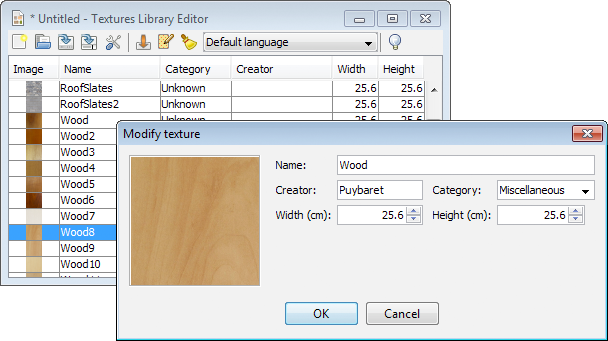


The program is available as a 1 MB JAR executable file (see the end of this post for updated links) and requires you installed Java on your machine (or reuse the Java version embedded with Sweet Home 3D installer when available).
The easiest way to launch it is to double-click on the file. If this method fails, choose open or launch with Java in its contextual menu, or open a Terminal window and run the command:

java -jar TexturesLibraryEditor-2.1.jar

Supported systems are Windows, Mac OS X 10.4 to 14, Linux and probably any system that supports Java 1.5.
If you look for an icon for it, take the following one based on a texture of mine:


Very similar to the Furniture Library Editor, this tool will let you import more than a texture image at a time either with a classic file dialog displayed by the Import textures tool, or by dropping the files in the window of the tool if your system supports this feature.
Once they are imported, you may modify each texture, or by group after selecting them. As the screen capture shows, the modification dialog displays the attributes of a texture (for those interested it's even possible to edit the ID attribute after a small modification in the program).

This tool is also a translation tool that will help translators to localize more easily SH3T files: the name and the category entered in the modification dialog depends on the language chosen in the tool bar, and when you select a new language in this drop down list, all the categories belonging to 4 default categories are automatically translated into the selected language, if the language belongs to the ones supported by Sweet Home 3D at this time.

Caution, there's no undo/redo feature. As always create backups to ensure you won't loose your work. This editor should be stable, but I release it as a beta version to fix easily bugs that may appear. Note also that during its development, I discovered a bug in Sweet Home 3D 3.6 and previous versions, that will save all the images of a SH3T library in a SH3D file as soon as you use only one of them. sad
So, upgrade to a newer version, or if you can't, choose to create small SH3T files rather than a big one if you don't want your SH3D files to grow too fast.

For interested programmers, source code is committed in the TexturesLibraryEditor SVN module separated from SweetHome3D one.
Project contains a README.TXT file with compilation directions.

I hope this tool will be useful and that you'll like it (and even more, once the bug fix in Seeet Home 3D will be released). biggrin

Updated links to Textures Library Editor JAR executable:
Textures Library Editor 2.1 was released on 08/21/2024
Textures Library Editor 2.0 was released on 09/22/2023
Textures Library Editor 1.9 was released on 03/03/2023
Textures Library Editor 1.8 was released on 07/27/2021
Textures Library Editor 1.7 was released on 03/02/2021
Textures Library Editor 1.6 was released on 01/22/2019
Textures Library Editor 1.5 was released on 10/05/2015
Textures Library Editor 1.4 was released on 06/12/2014
Textures Library Editor 1.3 was released on 10/30/2013
Textures Library Editor 1.2 was released on 06/03/2013
Textures Library Editor 1.1 was released on 03/21/2013
Textures Library Editor 1.0 was released on 10/25/2012
----------------------------------------
Emmanuel Puybaret, Sweet Home 3D creator

Posted by speed777777 at Oct 26, 2012, 10:17:04 PM
Re: Textures Library Editor released
hi emmanuel used new textures library ed now that 3.7 is out, please tell me how to delete a new texture once placed in textures library, as no option to modify or delete is available to use, once imported. using jar ex version. cheers shaun

Posted by Puybaret at Oct 26, 2012, 10:40:39 PM
Re: Textures Library Editor released
You can't delete a texture image coming from a SH3T file from Sweet Home 3D. Simply edit the SH3T file with the Textures Library Editor and delete it from there, then reimport the SH3T file in Sweet Home 3D (don't need to restart it).
----------------------------------------
Emmanuel Puybaret, Sweet Home 3D creator

Posted by stcruz at Apr 29, 2014, 3:31:48 PM
Re: Textures Library Editor released
Good days, working with the publisher(editor) of textures I meet the following problem:
On having imported a texture with transparency "texture.png" when the file to guard as texture sh3t the textures with transparency they do not guard. Some solution?
Thank you very much.

Posted by Brakat at Aug 12, 2014, 9:56:22 AM
Re: Textures Library Editor released
Sore im Arbic man i don't understand it's my first work on Sweethome i just need add more Textures to program thank u :)

Posted by Puybaret at Aug 12, 2014, 10:17:33 AM
Re: Textures Library Editor released
Brakat, you're not at the good place to get more textures.
Go there to download more textures, and if it's not enough, visit web sites cited in textures import page.
----------------------------------------
Emmanuel Puybaret, Sweet Home 3D creator

Posted by Brakat at Aug 12, 2014, 10:30:46 AM
Re: Textures Library Editor released
Thank u and have a good time بارك الله لك فى صحتك

Posted by MarcoH at Sep 3, 2015, 4:48:23 PM
Re: Textures Library Editor released
Bonjour,

Merci pour votre excellent logiciel. wink

Serait-il possible, dans une future version de l’éditeur de textures (ou dans une future version de Sweet home 3D lui-même), de prévoir une rotation plus précise des textures.

En effet, il n'est proposé généralement que 0° ou 45° ou 90°.

J'ai modélisé ma (très) vielle maison, aucune pièce n'est carrée et/ou parallèle et/ou perpendiculaire à la grilles et j'ai donc un rendu de l'orientation du parquet non réaliste.

Posted by SnakeGB at Oct 25, 2017, 12:19:25 AM
Re: Textures Library Editor released
Hi not sure if this is still being developed or not but i notice a bug,

if i import textures say
001.jpg
010.jpg
020.jpg
021.jpg
022.jpg

i get under name
00
01
02
02
02

so if i import 100 textures i would have to rename all of them

Posted by Campi at Nov 22, 2017, 7:31:47 PM
Re: Textures Library Editor released
Hi all,
First post here.
I seem to be missing a step or something. I've downloaded both the texture and the furniture library editors and I got a compressed file when opened, I get a folder with a bunch of meta files and a zipped jnlp.jar file

I'm running OS X 10.11.6 and the java site verified I am running Java 9.0.1

Thanks

Posted by Puybaret at Nov 23, 2017, 12:22:17 AM
Re: Textures Library Editor released
MarcoH, rotating textures can be performed only in Sweet Home 3D, not in the Textures Library Editor. From version 5.5, you can set any angle.

SnakeGB, I'll see if I can improve the naming system in a future version of the Furniture Library Editor.

Campi, the Jar executable files shouldn't be unzipped, run them with Jar Launcher. Note that I don't think that the Furniture Library Editor can run with Java 9 under macOS at the moment, and you should rather run it under Java 8.
----------------------------------------
Emmanuel Puybaret, Sweet Home 3D creator

Posted by Campi at Nov 23, 2017, 3:14:37 PM
Re: Textures Library Editor released
Thanks Puybaret
I've done some research since I posted and indeed el captain with java 9 has caused some problems with jars. For some reason 10.11 does not have the launcher from what i understand.
My next hurdle will be to to uninstall 9 (as it seams you can't install older versions over newer) since I'm not that proficient with the terminal haha

Thank you for the link since apple no longer supports legacy java

Thanks again

Posted by Campi at Nov 23, 2017, 4:11:35 PM
Re: Textures Library Editor released
OK that did the trick java 8 installed. The jars still show as zip files but at least I can open with terminal.

Thank you Puybaret!!

Posted by Campi at Nov 24, 2017, 5:05:09 PM
Re: Textures Library Editor released
Hi Again
I know I am missing something but just can't seem to get it to work.
I know this is a java/os problem but perhaps you might have some insight.
I got the texture and the furniture editors to open using the terminal but when I try to open a library I get nothing in the texture editor and the furniture editor crashes when opening a furniture lib.
I have tried all the versions of the editors and same thing happens.
I know this works because the furniture editor worked fine with 10.8

Again, any insight would be appreciated

Posted by Puybaret at Nov 24, 2017, 5:51:06 PM
Re: Textures Library Editor released
What Java version is displayed in the About dialog (click on the light bulb at the end of the toolbar)?
----------------------------------------
Emmanuel Puybaret, Sweet Home 3D creator

Posted by Campi at Nov 25, 2017, 4:13:44 PM
Re: Textures Library Editor released
1.5 for the Texture Lib Java version 9.0.1
I have also tried 1.3 and 1.4 both indicate Java 9.0.1

Posted by FPatrick at Mar 31, 2020, 3:53:48 PM
Re: Textures Library Editor released
Bonjour,
SH3D est toujours aussi plaisant à utiliser, Merci !
Je viens de mettre à jour Textures Library Editor avec la version 1.6. Mon système d'exploitation est Xubuntu, java version 11.0.6 est installé.
Je lance le soft sans problème, j'accède au menu « Ouvrir une bibliothèque de textures », je sélection une bibliothèque créée il y a deux ou trois ans (Ma_Bibliotheque_textures.sh3t)... et rien ne se passe.
Une idée ?
Merci par avance !

Posted by otadmin at Sep 5, 2020, 1:59:53 PM
Re: Textures Library Editor released
Has there been a solution to the problem? I am on Jave 11.0.8, LinuxMint 20 and the same happens here - empty texture editor.

Posted by otadmin at Sep 21, 2020, 6:37:08 AM
Re: Textures Library Editor released
Solved my problem by installing Texture Editor 1.6 from the Sweethome website. Version 1.6.2 in the repositories of LM20 not working.

Posted by Soulbrother at Jul 27, 2022, 1:40:12 PM
Re: Textures Library Editor released
A wish:
could you integrate the category in the Preferences, so that we can setup a category (new or existing).
OR
is there any other way, to avoid manual choosing and entering for each texture in one lib.?

Posted by Puybaret at Jul 27, 2022, 3:05:59 PM
Re: Textures Library Editor released
Once you added a new category, it will be available for the other textures, and if you select more than a texture in the list, you can change their category all together.
----------------------------------------
Emmanuel Puybaret, Sweet Home 3D creator