Print at Dec 16, 2025, 12:44:01 PM
Posted by Puybaret at Nov 26, 2012, 9:10:07 PM
Sweet Home 3D 4.0
Hi,

The first public beta version of Sweet Home 3D 4.0 can be tested.

At this moment, this new version brings the new following features:
- new Materials option in the furniture modification dialog to be able to edit the various materials of the selected furniture,
- new Walls top color option in the 3D view modification dialog to change the color of walls top in the 3D view,
- new 3D view > Create photos at points of view menu item to create photos at a subset of the stored points of view,
- new Aerial view centered on selection preference to center the 3D aerial view on selected items in the 2D plan,
- 3 new wall patterns.

Of course, it fixes the Linux issue when furniture list contains some groups and other minor issues.

Hope you'll like it. smile

[Note: On 2013/01/09, I jumped to version 4.0 and removed reference to version 3.8, mainly because I replaced the shift shortcut used to toggle magnetism by the alt key under Windows, cmd key under Mac OS X and Linux / Meta key under Linux]
[Note from developer: Sweet Home 3D 4.0 was released on March 21, 2013 and the portable version 4.0 was released on April 8, 2013]
----------------------------------------
Emmanuel Puybaret, Sweet Home 3D creator

Posted by hansmex at Nov 27, 2012, 6:15:37 AM
Re: Sweet Home 3D 3.8
Emmanuel,

1 - Materials in Modify furniture works perfectly, and is an extremely useful addition. The bookcase with books now gives close to 10 colours to individually change.
2 - Wall top colour in 3D View works correctly. However I would have preferred that this would have been added to the Modify walls dialogue.
3 - Create photos at points of view in 3D view gives a list with available pov's. When I select Create i get an error message, saying Couldn't compute photos. Maybe I'm doing something wrong? When I selected this option from the 3D preview window, nothing happened the first time. When I tried again after using the menu bar, the menu popped up, but gave the same error message. It's as if the function had to be "initialized" through the menu bar.
4 - Aerial view centered on selection in Preferences works perfectly and is a very valuable addition.
5 - Wall pattern in plan in Preferences gives new hatching, which is useful. However I would have preferred that this would have been added to the Modify walls dialogue. The main reason is that, then, you can distinguish between existing walls and new walls. Many people use SH3D in contacts with their builder, and this would be very useful in such situations. Ideally this would be combined with (2), extended to each individual side of every wall, and "hidden" in an Advanced tab in the Modify walls menu.
6 - The Linux issue with unmoving groups has been solved.

Thanks once again for all the work!

Hans
----------------------------------------
Hans

new website - under constuction
hansdirkse.info

Posted by Puybaret at Nov 27, 2012, 9:34:33 AM
Re: Sweet Home 3D 3.8
Thanks for your feeback smile

About Wall top color and pattern: I wanted to add the ability to modify the pattern of each wall too, but didn't know how to present it in Wall modification dialog. Now that the top color in 3D view could be used too, maybe I could add both options in the dialog, with a new section named Top containing a Plan pattern combo box and 3D view color option. I just fear it won't fit in Wall modification dialog at the end (and even if it fits, the dialog is going to be very big).

About Create photos at points of view, maybe you tested this feature a way I didn't think about. Could you send me a sh3d file that fails, please?
----------------------------------------
Emmanuel Puybaret, Sweet Home 3D creator

Posted by Puybaret at Nov 27, 2012, 6:50:28 PM
Re: Sweet Home 3D 3.8
About Create photos at points of view, you're supposed to select the folder where images will be stored. But I feel like the folder selection mode in Swing doesn't work very well. sad
----------------------------------------
Emmanuel Puybaret, Sweet Home 3D creator

Posted by Puybaret at Dec 18, 2012, 5:39:44 PM
Re: Sweet Home 3D 4.0
I just updated the Beta version (Java Web Start link) to fix a few small bugs and add support for Java 7 under Mac OS X, thanks to Java 3D 1.6 / JOGL 2.0 libraries.
Under Mac OS X, a DMG installer bundled with Java 7 is also available here (74 MB) for test purpose. This installer should work under Mac OS X 10.4 to 10.8:
- under Mac OS X 10.4 to 10.6 (PowerPC or Intel), it runs with the Java 5 or 6 version installed with the system,
- under Mac OS X 10.7 and 10.8, it runs with the Java 7 version bundled with the application.
This new version fixes also the bugs found in the previous DMG test, except antialiasing in the 3D view that requires additional changes in Java 3D 1.6 to be available. Mac OS X users, even if I tested this installer on different computers, your feedback is welcomed.
----------------------------------------
Emmanuel Puybaret, Sweet Home 3D creator

Posted by m@ at Dec 18, 2012, 11:27:31 PM
Re: Sweet Home 3D 3.8
Just tested the OS X Version on a 10.6.8 system. Works fine.

The MATERIALS option is very useful! shhh
Wall top color works too.
Did not test the other new features 'til now.

Posted by Sajmmon at Dec 19, 2012, 8:30:20 PM
Re: Sweet Home 3D 3.8
Hi,
thank you for great new features :-)

I also get exception box when trying to save multiple photos. I run Win. When debugging I found in line 644 of PhotosPanel:
java.io.FileNotFoundException: C:\Users\X220\Desktop\4 - 12\19\12 8:45:36 PM.png

probably slashes are the reason

Cheers

Posted by Puybaret at Jan 9, 2013, 4:02:26 PM
Re: Sweet Home 3D 4.0
Here's a new beta of the next version of Sweet Home 3D:

First, I jumped to version 4.0 because the next version will have two major changes:
- I reprogrammed the shift key as a shortcut used to keep alignment of moved objects along the horizontal axis, vertical axis and 45° / -45° axes, a classic behavior seen in many drawing applications. The shortcut key used to toggle magnetism will be now the alt key under Windows, the cmd key under Mac OS X and the Linux / Meta key under Linux (please Linux users, confirm it works for you since I didn't find any information about the behavior of that key).
- When a color is globally applied on a piece of furniture that displays some textures, these textures will be replaced by that color too, as shown in the following image:


This behavior is more consistent and isn't a big issue since it's now possible to change each material of a piece.

This new beta proposes also a better dialog box to choose the directory where the photos generated by the Create photos at points of view dialog will be stored, and fixes a bug under Mac OS X that forbad to resize windows when their 3D view was detached when saved.
----------------------------------------
Emmanuel Puybaret, Sweet Home 3D creator

Posted by hansmex at Jan 9, 2013, 4:31:57 PM
Re: Sweet Home 3D 4.0
Emmanuel,

It's impossible to test this under Ubuntu 12.04.
After clicking the link, some files are downloaded, the SH3D starting window appears, and then... nothing.

The old link on the desktop for v3.8b now gives an error message.

Hans
----------------------------------------
Hans

new website - under constuction
hansdirkse.info

Posted by Puybaret at Jan 9, 2013, 5:33:02 PM
Re: Sweet Home 3D 4.0
Damned, I've just tested it successfully under Ubuntu 11.10 both with Java 1.6 and 1.7. Those Ubuntu boxes are really touchy! sad

The old link on the desktop for v3.8b now gives an error message.
I removed 3.8 files so it's normal.
----------------------------------------
Emmanuel Puybaret, Sweet Home 3D creator

Posted by DenisS at Jan 9, 2013, 7:18:14 PM
Re: Sweet Home 3D 4.0
Meta key tested under Ubuntu 12.10, Unity.

Seems to work OK.

Meta is obtained by pressing the left Windows Key and the left Alt key simultaneously.

Posted by Puybaret at Jan 9, 2013, 7:55:38 PM
Re: Sweet Home 3D 4.0
Thanks for your feedback.

Meta is obtained by pressing the left Windows Key and the left Alt key simultaneously.
Do you mean that pressing Windows Key alone won't work to toggle magnetism?
----------------------------------------
Emmanuel Puybaret, Sweet Home 3D creator

Posted by DenisS at Jan 10, 2013, 8:45:35 AM
Re: Sweet Home 3D 4.0
Well, it works no more this morning... sad Another OpenJDK issue ?
I played with keyboard settings yesterday to find the Meta key, but finally reverted to defaults...

Seems like this needs some more investigations...

With Ubuntu's default settings, the Windows key is used in two different ways :
- short press displays the launcher ;
- long press displays a help screen for keyboard shortcuts.

Posted by hansmex at Jan 10, 2013, 11:39:22 AM
Re: Sweet Home 3D 4.0
The Windows key on my keyboard doesn't do anything at all.
Neither did it anything on my previous keyboard(s).

That said, it's easy to assign any desired action to the Windows key.

Hans
----------------------------------------
Hans

new website - under constuction
hansdirkse.info

Posted by DenisS at Jan 10, 2013, 12:02:30 PM
Re: Sweet Home 3D 4.0
With default settings, and if I read correctly the keyboard map, Meta should be Shift-Alt.
But this doesn't toggle magnetism.

If I change the keyboard settings, so that Meta is on Left Windows Key (I have only one on my Logitech keyboard), it works but after one second holding the key, this help window pops up...
As a workaround, I can press Shift-Windows or Alt-Windows to avoid the popup.

Debian Wheezy, with Oracle Java, shows the same behaviour. Default Meta (Shift-Alt) doesn't work, I have to change keyboard settings to move Meta on the left Windows key. At least, Gnome shell doesn't show this popup help when you hold the Windows key.

@Hans : do you use Unity and/or Compiz on your Ubuntu ?

Posted by Puybaret at Jan 10, 2013, 12:20:24 PM
Re: Sweet Home 3D 4.0
Since Alt key is already used under Linux to move the current window, I guess I'll have to find an other shortcut. sad
I would prefer a single key, but if it's not possible then I'll choose Alt + Shift.
----------------------------------------
Emmanuel Puybaret, Sweet Home 3D creator

Posted by hansmex at Jan 10, 2013, 12:27:41 PM
Re: Sweet Home 3D 4.0
I'm using Ubuntu 12.04 with the Gnome Classic user interface.

H
----------------------------------------
Hans

new website - under constuction
hansdirkse.info

Posted by DenisS at Jan 10, 2013, 12:48:52 PM
Re: Sweet Home 3D 4.0
@Hans : OK, that's why your Windows key does nothing. These keys are defined by Unity.

Alt alone has a similar behaviour, opening the head up display (search bar) or the application's menu (short or long press).

Alt-Shift should be OK.

Posted by m@ at Jan 10, 2013, 1:47:43 PM
Re: Sweet Home 3D 4.0
Has the DMG for OSX also been updated to 4.0?

I'm testing the 3.8 DMG here and just got an error message by using the new feature "create photos at point of view": I selected 2 points and choosed the path to save. The rendering process started, but when i got back after a few minutes, a message informed me that there was a problem. No photos saved.

Posted by Puybaret at Jan 10, 2013, 6:59:14 PM
Re: Sweet Home 3D 4.0
Has the DMG for OSX also been updated to 4.0?
Not yet, but the Java Web Start version should work correctly. If nothing happens when you click on the previous link, double click on the SweetHome3D.4.0.beta.jnlp downloaded file.
----------------------------------------
Emmanuel Puybaret, Sweet Home 3D creator

Posted by Puybaret at Jan 14, 2013, 8:36:56 PM
Re: Sweet Home 3D 4.0
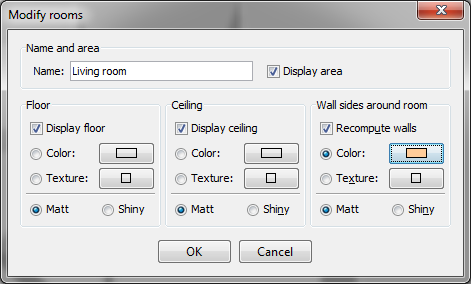
Tonight, the Beta 8 brings a new section in the room modification dialog, that lets the user change the color of the sides of walls surrounding the modified room(s). This includes also a Recompute walls option that will split walls that are shared with other rooms. I tested it against various configurations and hope it will work correctly for you too.


I also added Furniture > Import texture and Furniture > Export to CSV format menu items to help users access these features that weren't so visible.

As DenisS suggested, it seems that we won't have that much choice for magnetism shortcut under Linux, so it will be probably Alt + shift as proposed in a coming Beta.
----------------------------------------
Emmanuel Puybaret, Sweet Home 3D creator

Posted by Sajmmon at Jan 15, 2013, 6:25:47 PM
Re: Sweet Home 3D 4.0
CSV export is very useful!
I am not fun of wall painting so far :-(.

two pictures:


Posted by Puybaret at Jan 15, 2013, 6:52:28 PM
Re: Sweet Home 3D 4.0
CSV export is very useful!
It was already available in the clipboard after selecting furniture and choosing Edit / Copy menu item. But even if it's mentioned in the help, many users weren't aware of it and clipboard is still buggy under Linux.

I am not fun of wall painting so far :-(.
The painted walls are the ones that touch the modified room, and only walls that intersect each others are recomputed at their intersection. In the more complicated cases you show, you should split walls with Plan > Split wall menu item. Not sure I'll go further than that now. Hope you can understand...
----------------------------------------
Emmanuel Puybaret, Sweet Home 3D creator

Posted by Sajmmon at Jan 15, 2013, 9:34:22 PM
Re: Sweet Home 3D 4.0
It was already available

yes I knew ... I thought that there is a small difference, when copying to clipboard one has to select all rows, now I just need to select one and all are exported. On the other hand I could copy to clipboard just selected pieces.

Posted by hansmex at Jan 16, 2013, 9:47:13 AM
Re: Sweet Home 3D 4.0
Emmanuel,

Is there any chance that there is a solution so that v4.0 will run under Ubuntu 12.04?
I currently have to use v3.6.

Hans
----------------------------------------
Hans

new website - under constuction
hansdirkse.info

Posted by Puybaret at Jan 16, 2013, 5:41:54 PM
Re: Sweet Home 3D 4.0
Here's the Beta 9 of Sweet Home 3D version 4.0. It brings the 3 following changes:
- under Linux, I programmed Alt + Shift shortcut to toggle magnetism. Please Linux users, check this; I can't check myself because I test Sweet Home 3D under Linux with Parallels Desktop and I feel keys like Alt or Shift don't send events correctly when pressed. Shift should activate alignment when moving objects, Alt + Shift should toggle magnetism and Ctrl should activate duplication, and it should be possible to combine these behaviors.
- Inspired from an old Hans' request, I added a new option to let user choose whether only the selected items in plan or all home items (including a ground item at elevation 0) should be exported to OBJ. This option is proposed after the file dialog displayed by 3D view > Export to OBJ format menu item. This feature should avoid to install the Copy as new furniture plug-in in the cases where Hans tutorials required it.
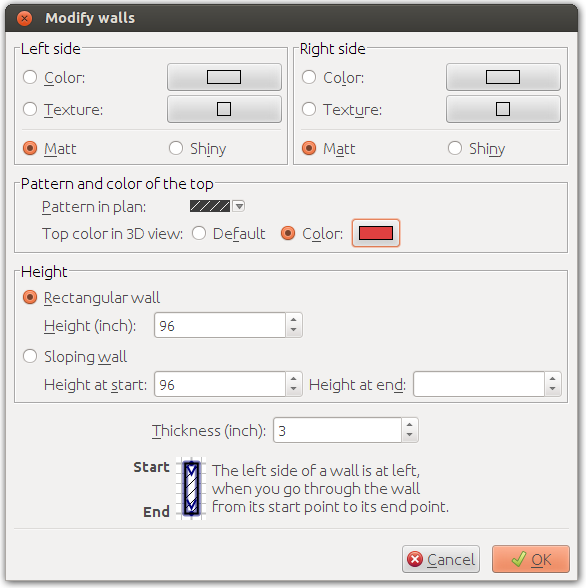
- As requested in a previous message, I added Pattern in plan and Top color in the 3D view options in the wall modification pane to be able to individually change the pattern used to draw a wall in the plan and the color used to paint a wall in the 3D view. Therefore, I removed the Wall top colour in the 3D view modification pane.


Hans, as the previous capture shows (partially), I have no problem to run Sweet Home 3D 4.0 under Ubuntu 12.04. I tried with both default JRE and Oracle JRE 1.6.0_37. Hope you'll find a solution in your case.
----------------------------------------
Emmanuel Puybaret, Sweet Home 3D creator

Posted by Sajmmon at Jan 16, 2013, 10:34:39 PM
Re: Sweet Home 3D 4.0
Just tested:


Posted by DenisS at Jan 17, 2013, 9:29:22 AM
Re: Sweet Home 3D 4.0
I made a quick test with 4.0 beta 9, and everything seems OK (well, at least the features that work under OpenJDK wink).

Alt-Shift, Shift and Control work as intended on my PC (Ubuntu 10.12 64 bits).

Posted by hansmex at Jan 17, 2013, 11:45:09 AM
Re: Sweet Home 3D 4.0
Emmanuel,

Problem solved.

Previous versions of SH3D were compatible with IceTea Java, so they ran without problem on my standard Ubuntu 12.04.
I uninstalled IceTea and installed Sun Java 7.xx and now the beta 4 runs without problem.

Hans
----------------------------------------
Hans

new website - under constuction
hansdirkse.info

Posted by Puybaret at Jan 17, 2013, 12:13:37 PM
Re: Sweet Home 3D 4.0
Great!
I'm looking forward to reading your feedback about the recent new features. smile
----------------------------------------
Emmanuel Puybaret, Sweet Home 3D creator

Posted by robal at Jan 21, 2013, 6:14:22 PM
Re: Sweet Home 3D 4.0
Excellent work !

Couple of observations:

- can't get "create photos at points of view" to work. When I click "Create" button, a folder picker windows always comes up, and hitting "Select" just gets back to "create photos at points of view" window.

- the new "materials" function is greyed out on grouped objects, even if they are similar, and it's possible to change materials for them using multiple selection.


Using: 4.0 beta 9 on Windows 7 x64 PC

Cheers,

Posted by Puybaret at Jan 21, 2013, 6:31:21 PM
Re: Sweet Home 3D 4.0
can't get "create photos at points of view" to work. When I click "Create" button, a folder picker windows always comes up, and hitting "Select" just gets back to "create photos at points of view" window.
Are you really sure the images are not created in the folder you chose? Maybe the creation went so fast that you didn't see the progress message appear. If it's the case, I should probably display a message telling the process is finished.

the new "materials" function is greyed out on grouped objects, even if they are similar, and it's possible to change materials for them using multiple selection.
I didn't allow this kind of changes because I felt that in many cases, it would be too complicate for the end user to understand which material he's modifying. Note also that materials could have the same name from a model to an other but with different color or texture.
----------------------------------------
Emmanuel Puybaret, Sweet Home 3D creator

Posted by robal at Jan 22, 2013, 12:51:29 AM
Re: Sweet Home 3D 4.0
Thanks for a speedy reply !

can't get "create photos at points of view" to work"

I've got an update on the problem.
I've chosen "create new folder" option, and the render process started OK in a sub directory. (Permissions problem ?).
It also started without problems on another PC.
I'll try to investigate further to see when and why exactly the render does not start.

"the new "materials" function is greyed out"

You're right. It's not a trivial problem.
However, I think you use some kind of logic to allow accessing "materials" menu based on similarity of multi-selected objects.
If I select many similar objects, I'm allowed to edit "materials" for all of them, and it works as expected.
However, if I group these objects, I can't.
Couldn't the same same check be run against a group to determine (and allow) using "materials" menu ?


Cheers,

Posted by Puybaret at Jan 22, 2013, 7:44:15 AM
Re: Sweet Home 3D 4.0
Permissions problem ?
It's possible. For your information, the next beta will provide an improved folder dialog where the user will be able to select only folders with write permission.
----------------------------------------
Emmanuel Puybaret, Sweet Home 3D creator

Posted by robal at Jan 22, 2013, 1:43:14 PM
Re: Sweet Home 3D 4.0
More feedback:

The 3D view turns all grey after:
- switching to SW3D window (after it was in background or minimised)
- resizing SW3D window
- hovering over menus

The 3D view return to normal when you drag the camera and force it to refresh.

Happens on both my machines (Win 7 x64, AMD Radeon 4870 & 5570)

Cheers

Posted by robal at Jan 22, 2013, 3:46:59 PM
Re: Sweet Home 3D 4.0
And some more feedback :

- can't get "create photos at points of view" to work

It seems it happens when you just click "Select" in folder picker, without changing the last used directory. You can use the same directory as long as you click some other dir and click your dir back.
This bug is definitely about mouse clicks, not permissions.


- "create photos at points of view" outdoor light settings

Currently, the settings for date/time for outdoor light are not available in "create photos at points of view" dialog.
Even if you change date/time in "create photo" dialog, the "create photos at points of view" will use settings stored at the time points of view were created.

I think it would be better and more intuitive if date/time for outdoor light settings were added to "create photos at points of view" dialog, instead of silently storing this information on points of view

Posted by Puybaret at Jan 22, 2013, 6:05:07 PM
Re: Sweet Home 3D 4.0
I just made the Beta 10 available to fix the problems reported by robal in folder dialog. I also added a message displayed once the photos creation is finished.

Currently, the settings for date/time for outdoor light are not available in "create photos at points of view" dialog.
Even if you change date/time in "create photo" dialog, the "create photos at points of view" will use settings stored at the time points of view were created.
The date/time is stored of each point of view to let the user choose different date/time. Changing this date/time won't influence the Create photos at points of view dialog.

I think it would be better and more intuitive if date/time for outdoor light settings were added to "create photos at points of view" dialog, instead of silently storing this information on points of view
I don't agree because each point of view can have a different date/time. Having an other date/time setting in the dialog + a check box to override the setting at each point of view could be nice, but I feel many users wouldn't understand it.

The 3D view turns all grey after:
- switching to SW3D window (after it was in background or minimised)
- resizing SW3D window
- hovering over menus
It's an old issue that appeared with Java 7. It's the main reason why I still bundle the installer version with Java 6.
----------------------------------------
Emmanuel Puybaret, Sweet Home 3D creator

Posted by Groumphy at Jan 22, 2013, 6:44:38 PM
Re: Sweet Home 3D 4.0
Hello,

Some days later, and some bugs fixed... I've the pleasure to say: under Linux Ubuntu 12, all works perfect !
Thanks for this important evolution.

Only 2 remarks (one for the n00b such as me and one for everybody for the security):

  • delete the installed version before installing the new version (and the shortcut), (for sample I've 2 shortcuts on my desktop... SH3D v3.8 beta and SH3D v4.0 beta...),
  • update the local version of Java, now it's 1.7_10, best is using 1.7_11 (this is not critical because we use the an local version and not an installed version, but interressant for the global security of the appz) ;


Sorry for my very poor contribution at this topics, but... No time for the moment crying
----------------------------------------
Groumphy
-----------------------------
FR - NL - EN
-----------------------------

Posted by m@ at Jan 22, 2013, 7:18:39 PM
Re: Sweet Home 3D 4.0
Looking forward to get a DMG Installer of the latest Beta.
Java seems to be pretty unsafe in the net, so I disabled the Browser plugin...

Posted by Puybaret at Jan 22, 2013, 8:52:48 PM
Re: Sweet Home 3D 4.0
Here's the DMG installer for version 4.0 Beta 10.
Note that this version works differently from previous one, since under Mac OS X 10.7 / 10.8, it tries to run with Java 6 if it's installed in the system. Otherwise it runs with the JRE 1.7.0_11 bundled with the DMG and it doesn't try to download Java 6 anymore (an issue I didn't expect in previous version, but I fixed it). It works correctly under Mac OS X 10.6 but there's a launch problem under Mac OS X 10.5 and I hope to find a solution for the final version.
----------------------------------------
Emmanuel Puybaret, Sweet Home 3D creator

Posted by m@ at Jan 23, 2013, 10:47:08 PM
Re: Sweet Home 3D 4.0
Thanks a lot for the DMG, Emmanuel!

- "create photos at points of view" works just fine now.
- toggling magnetism with cmd key works also fine.

- shift key behavior is pretty much like in photoshop or word, although the "grid" in SH3D seems to be much smaller than in PS or word. Could you define a larger grid?

Posted by Puybaret at Jan 24, 2013, 8:00:50 AM
Re: Sweet Home 3D 4.0
Thanks for your tests. Shift shortcut acts only on the angle of the move direction. There's no grid magnetism in Sweet Home 3D.
----------------------------------------
Emmanuel Puybaret, Sweet Home 3D creator

Posted by Puybaret at Jan 29, 2013, 5:56:18 PM
Re: Sweet Home 3D 4.0
The beta 11 brings the new Check updates at program launch option in the preferences pane along with a Check update button to get information about program and SH3F/SH3T/SH3L/SH3P files updates.


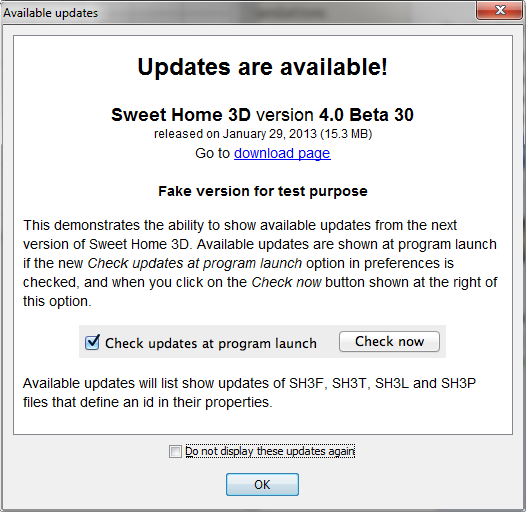
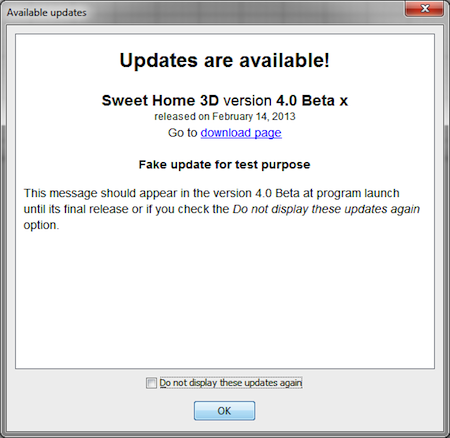
To let you try it with the current Beta, I published some information about a fake version 4.0 Beta 30 that will show the following dialog at program launch.


The updates dialog displays also a Do not display these updates again option shown only at program launch, that avoids you to get the shown updates again at next launch. If you select the check box, the updates dialog will appear again only when newer updates are available.

Of course, in the real world, this new option will have some effect only when version 4.1 will be released, but also for the next beta versions.
----------------------------------------
Emmanuel Puybaret, Sweet Home 3D creator

Posted by HakanS at Feb 1, 2013, 8:49:15 AM
Error messages when I drag and drop furniture.
Sometimes I am unable to drag and drop furniture.
1 times of 2, when I start the program, I can't drag and drop furniture. I start the program from the console with the command
javaws SweetHome3D.4.0.beta.jnlp
.
I click on a furniture, but when I drag it I get error messages in the consol.

System:
SH3D Version 4.0 Beta 11
on
Kubuntu 12.10 (Ubuntu with KDE)
Java version 1.6.0_24

The error text begins:
Exception in thread "AWT-EventQueue-1" java.lang.ExceptionInInitializerError
at com.eteks.sweethome3d.swing.FurnitureCatalogTransferHandler.createTransferable(Unknown Source)
at javax.swing.TransferHandler$DragHandler.dragGestureRecognized(TransferHandler.java:1552)
at java.awt.dnd.DragGestureRecognizer.fireDragGestureRecognized(DragGestureRecognizer.java:356)
at javax.swing.TransferHandler$SwingDragGestureRecognizer.gestured(TransferHandler.java:1615)
at javax.swing.TransferHandler.exportAsDrag(TransferHandler.java:690)
at com.eteks.sweethome3d.swing.VisualTransferHandler.exportAsDrag(Unknown Source)
at com.eteks.sweethome3d.swing.FurnitureCatalogTree$1.mouseDragged(Unknown Source)
at java.awt.AWTEventMulticaster.mouseDragged(AWTEventMulticaster.java:320)
at java.awt.AWTEventMulticaster.mouseDragged(AWTEventMulticaster.java:319)
....

Tell me if you want the whole error text.

Posted by hansmex at Feb 1, 2013, 12:05:59 PM
Re: Error messages when I drag and drop furniture.
Hakan,

Recently I also had a problem with the newest version of SH3D. It turns out the problem was with the Java version (IceTea) I had installed on my computer.

This is how I solved it under Ubunru 12.04 with the Gnome Classic interface:
1 - uninstall IceTea Java through the software centre.
2 - using the terminal, install Java 7 using some help pages from the internet (like this one )
3 - now download and install SH3D
4 - you can now start SH3D as follows: Application --> Java Web Start --> SH3D

Works like a charm for me.

Hans
----------------------------------------
Hans

new website - under constuction
hansdirkse.info

Posted by Puybaret at Feb 1, 2013, 1:11:41 PM
Re: Sweet Home 3D 4.0
Here's the Beta 12 with the following features:
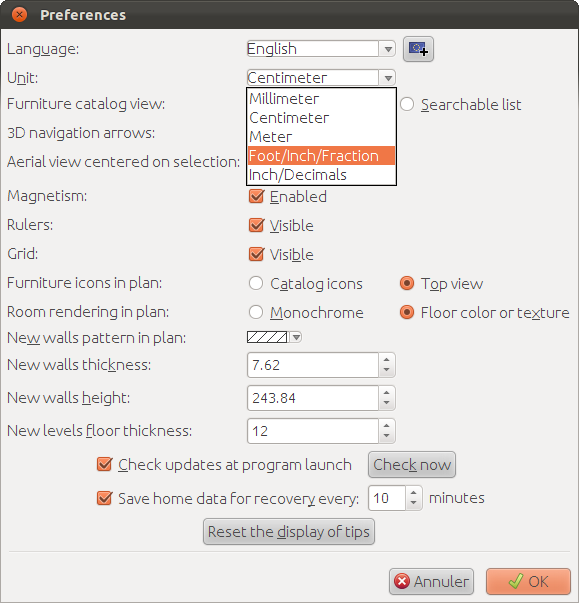
- Existing Inch unit was renamed as Foot/Inch/Fraction, then modified to always display the closest eighth inch fraction for lengths shown in the furniture table and in the plan, and to remove decimals for areas expressed in square foot.
- The Inch/Decimals unit was added to preferences Unit choice, and displays decimals of an inch for lengths shown in the furniture table and in the plan, and for areas expressed in square foot.
- The shortcut of the 3D view > Display in separate window / Display in main window menu item was set to ctrl + alt + Y (cmd + alt Y under Mac OS X) and program shortcuts were enabled in the separated 3D view.
- Line thickness was reduced in prints and PDF files (this feature was already programmed in previous Beta but I forgot to mention it).

As the following screen capture shows, Unit radio boxes were replaced by a combo box proposing the 5 available units.


If there are some users of the Imperial system (i.e. foot/inch) reading this message, I'll be pleased to know their opinion about the unit change. It was a request of some users and I tried to program a logical solution that could be easy to understand. But as a Metric system guy, I could have missed something...
----------------------------------------
Emmanuel Puybaret, Sweet Home 3D creator

Posted by m@ at Feb 2, 2013, 10:27:08 AM
Re: Sweet Home 3D 4.0

- Line thickness was reduced in prints and PDF files (this feature was already programmed in previous Beta but I forgot to mention it).


Thanks for that! shhh
I'll test it when the next DMG gets public (no stress smile )


Am I getting it right: the automatic update detection will include beta releases as well?

Posted by Puybaret at Feb 3, 2013, 10:41:56 AM
Re: Sweet Home 3D 4.0
Am I getting it right: the automatic update detection will include beta releases as well?
Yes, but it depends on the deployment solution you use. In many cases, Java Web Start updates automatically the jar files required for the program when they are more recent. In that case, you won't see the updates information since the program will be already updated to latest version once launched!
----------------------------------------
Emmanuel Puybaret, Sweet Home 3D creator

Posted by hansmex at Feb 3, 2013, 1:40:43 PM
Re: Sweet Home 3D 4.0
Emmanuel,

It looks as if something is broken between versions beta 11 and beta 12.

With beta 10, SH3D created two new entries under Applications :
1 - Java Webstart --> eTeks Sweet Home 3D --> Sweet Home 3D 4.0 Beta
2 - Other --> Sweet Home 3D 4.0 Beta
Both worked correctly, and beta 10 automatically updated to beta 11.

Now with beta 12 nothing works anymore. Even if I download the starting applet of 2.8 Kb nothing works.

Any suggestions??

Hans
----------------------------------------
Hans

new website - under constuction
hansdirkse.info

Posted by Puybaret at Feb 3, 2013, 8:11:09 PM
Re: Sweet Home 3D 4.0
Sorry Hans, I can't help you under Ubuntu 12.04, because I can't make work Sweet Home 3D under that system since I updated it with all the latest patches. Might be a driver issue... again. sad
But on other systems, it works for me.
----------------------------------------
Emmanuel Puybaret, Sweet Home 3D creator

Posted by hansmex at Feb 3, 2013, 8:49:33 PM
Re: Sweet Home 3D 4.0
Emmanuel,

Good news, it all works just fine. I had to do an update, maybe that's why it temporarily blocked SH3D.

However, I noticed another problem in version 3.7, as well as in the 4.0 betas. When I draw a room with sloping walls, the roof stays horizontal and won't follow the walls. I enclose an example, hoping that you can reproduce this bug.

Hans

http://www.mediafire.com/?ezy2rkqwvr4wxh8
----------------------------------------
Hans

new website - under constuction
hansdirkse.info

Posted by Puybaret at Feb 3, 2013, 9:41:53 PM
Re: Sweet Home 3D 4.0
Great that it works again smile

As indicated in the help page about room modification (see 4th bullet), a ceiling follows sloping walls only at the last level. Remove level 4 in your file, and you'll see the ceiling you expect.
But as you know, sloping ceilings are not correctly computed as soon as the room shape becomes a little complex, so I would recommend to use other objects for the roof in that case, and hide the ceiling.
----------------------------------------
Emmanuel Puybaret, Sweet Home 3D creator

Posted by Puybaret at Feb 5, 2013, 7:02:53 PM
Re: Sweet Home 3D 4.0
Tonight, the Beta 13 brings the following improvements:
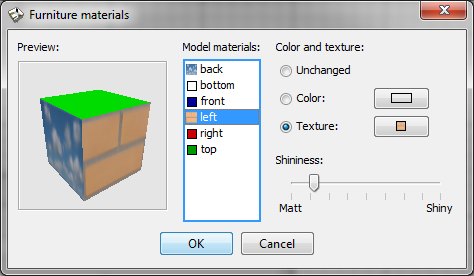
- I added a preview of the currently modified 3D model in the new materials editing pane, so you can faster guess the result of a material change:


- As the previous capture shows too, I added texture coordinates to the Box and Cylinder models of the default catalog, and I set a different material for each of their face, so you can edit the color or texture of each face individually. Note that the behavior of these shapes doesn't change from previous version when you change their color or texture globally (i.e. not with materials pane).
- I fixed a bug that could save files impossible to reopen.

Version 4.0 final is getting very close. smile
----------------------------------------
Emmanuel Puybaret, Sweet Home 3D creator

Posted by hansmex at Feb 7, 2013, 2:26:41 PM
Re: Sweet Home 3D 4.0
Emmanuel,

Having played a bit with the new feature in beta 13, I can say that I am VERY happy with it. This is a very useful trick.

Of course there is room for improvement. I noticed that when you wrap a texture around a cylinder, it's used only once vertically and horizontally, regardless of the size of the cylinder, and regardless of the size (in cms) of the texture. Ideally the program takes into account the size of the cylinder, then calculates how many times the texture should be used horizontally and vertically.

More good news:
Transparency (I used a gif) works fine, so you can now make hollow pipes.
Definition of separate surfaces is kept after exporting and importing a model.

I would be delighted if there was a larger set of basic shapes that has their sides defined, such as triangle, cone, arch, etc.

Thanks!!

Hans
----------------------------------------
Hans

new website - under constuction
hansdirkse.info

Posted by Puybaret at Feb 8, 2013, 9:21:37 AM
Re: Sweet Home 3D 4.0
Hans, thanks for you tests. smile

Actually, my main motivation to add this preview was to show to users the result of their change without explaining that it depends on whether texture coordinates are set or not on the 3D model. I fear it's to complicate to explain the notion of texture coordinates in that kind of program, and even for people who would be ready to learn it from long explanations, it would be difficult to indicate with a text what a texture change could give without showing it. Some 3D models have some texture coordinates, some don't, and I don't want unaware people to care too much about it when they import a 3D model.
Still, the rule isn't so complicate: if a face of the 3D model has some texture coordinates set and the material of that face is a texture, then the size of texture is ignored and the texture is wrapped on the face using these texture coordinates. For faces without texture coordinates, a texture material change will use the same behavior as in the global texture change of the furniture modification dialog, i.e. it might give unpleasant results on faces placed on the side of the object.

In the case of the new cylinder in Sweet Home 3D catalog, the texture coordinates added to the cylinder side make the texture image being shown entirely around the cylinder. If I had to take into account the size of the texture, it would require to introduce some kind of new exception (a little like I did for mirrors) and I don't want to introduce exceptions when there is a workaround or a rule to understand with a little patience.
----------------------------------------
Emmanuel Puybaret, Sweet Home 3D creator

Posted by mrszekely at Feb 9, 2013, 1:37:54 PM
Re: Sweet Home 3D 4.0
Now, I tested the new "create photos at points of view".
It works perfectly, this function was my dream, because i spent a lot of time to wait for the end of the render process (because i made full HD or 2*HD images),move the camera,wait again.So now i'm really exciting when the new version come out!
Excellent work,great job!Thank you!
----------------------------------------
Intel Core i7-2630QM 2.00GHz-8GB RAM-nVidia Geforce GT555M with CUDA-Windows 7 64bit

Posted by mrszekely at Feb 10, 2013, 10:55:11 AM
Re: Sweet Home 3D 4.0
One more thing...when i made a lot of points of view is there any option for delete the old ones?Is that possible?
----------------------------------------
Intel Core i7-2630QM 2.00GHz-8GB RAM-nVidia Geforce GT555M with CUDA-Windows 7 64bit

Posted by Puybaret at Feb 10, 2013, 12:18:41 PM
Re: Sweet Home 3D 4.0
Thanks Márton for your feedback. It's not possible to delete points of view at this time.
I could easily add a menu item to remove all of them, but removing them individually would be more complicate. I'll see if I can do something in the next version though.
----------------------------------------
Emmanuel Puybaret, Sweet Home 3D creator

Posted by robal at Feb 10, 2013, 11:14:11 PM
Re: Sweet Home 3D 4.0
One more thing...when i made a lot of points of view is there any option for delete the old ones?Is that possible?

An option to do that would be nice indeed.
As a workaround, you can set any POV's name to the same name as one of the other POV's. It will overwrite the old one.

Posted by mrszekely at Feb 11, 2013, 9:32:58 AM
Re: Sweet Home 3D 4.0
Thanks for your feedback guys!
----------------------------------------
Intel Core i7-2630QM 2.00GHz-8GB RAM-nVidia Geforce GT555M with CUDA-Windows 7 64bit

Posted by mrszekely at Feb 11, 2013, 1:19:26 PM
Re: Sweet Home 3D 4.0
Could be the render status picture bigger(in create POV)?
Same as on the normal render?
Might be better.Thnak you.

Sorry for my quick posts, it's beacuse i'm working on a project.
----------------------------------------
Intel Core i7-2630QM 2.00GHz-8GB RAM-nVidia Geforce GT555M with CUDA-Windows 7 64bit

Posted by mrszekely at Feb 12, 2013, 8:19:57 AM
Re: Sweet Home 3D 4.0
Hi guys again!

I've found a new intresting thing...

Last night i left my computer to render 6 full HD image.I've started the create photos from POV, but the CPU's cores didn't reach the 100% of usage.They jump between 20% to 60%.

In the morning i saw the render process not finished.

But if I start the last stable version (3.7) from jar file (i made the memory tuning from the FAQ) it's using the cores at 100% and the render process is faster.

Any idea?

Thank you!
----------------------------------------
Intel Core i7-2630QM 2.00GHz-8GB RAM-nVidia Geforce GT555M with CUDA-Windows 7 64bit

Posted by Puybaret at Feb 12, 2013, 5:00:23 PM
Re: Sweet Home 3D 4.0
Here's the Beta 14 with the following new features and bug fixes:
- The color chooser was greatly Improved with different color palettes, a pipette tool and a list showing the recently chosen colors (saved in user preferences):


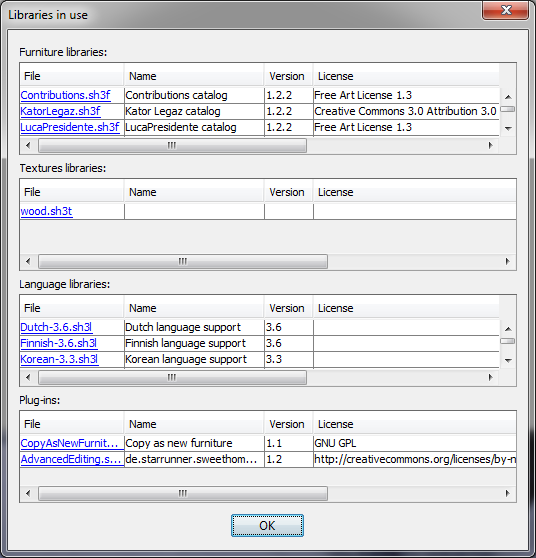
- A new Libraries button was added to About dialog box to display all the libraries and plug-ins used by Sweet Home 3D in a new dialog box:


- The 3D view > Delete points of view menu item was added to select and delete some of the points of view stored in home.

- Handling clicks on web links shown in the help and about dialog box is fixed thanks to the call to xdg-open command under Linux.


Please, check that the pipette works correctly on your side, because making it work required a few hacks. It's not perfect but globally it works correctly under Java 6 and 7, Windows / Mac OS X / Linux in my case.

These should be the last new features for version 4.0, and it's now time for translation! smile
There should be a few adjustments and bug fixes before the final release, but no change that would require new words to be displayed (and translated) in the user interface.
----------------------------------------
Emmanuel Puybaret, Sweet Home 3D creator

Posted by Puybaret at Feb 14, 2013, 1:20:49 PM
Re: Sweet Home 3D 4.0
I need some help from users running Sweet Home 3D beta version from behind a proxy server. I wanted to test it myself but installing a temporary proxy for test purpose on the machine you use daily seems not so simple. sad
If you know you use a proxy for http protocol, please check that the following message is displayed when you run Sweet Home 3D Beta from its Java Web Start link and from a Jar executable file (simply double click on the Jar file once downloaded).


Thanks for your feedback.
----------------------------------------
Emmanuel Puybaret, Sweet Home 3D creator

Posted by Sajmmon at Feb 14, 2013, 9:32:50 PM
Re: Sweet Home 3D 4.0
Is this new updates feature meant only for JWS users, or also windows installers?

Posted by hal9000 at Feb 14, 2013, 10:03:46 PM
Re: Sweet Home 3D 4.0
These should be the last new features for version 4.0, and it's now time for translation! smile
There should be a few adjustments and bug fixes before the final release, but no change that would require new words to be displayed (and translated) in the user interface.


Great! Although may be you already have someone for the Spanish translation, you can count me in to make it in case you need it.
----------------------------------------
If a long walk every day were healthy, mailmen would be immortal. tongue

Posted by Puybaret at Feb 15, 2013, 9:34:50 AM
Re: Sweet Home 3D 4.0
Is this new updates feature meant only for JWS users, or also windows installers?
Actually it's more for the other kind of distribution, because in many cases, the Java Web Start will update the program automatically! wink
As I thought the updates feature could interest people who program plug-ins and derived versions of Sweet Home 3D, I programmed it in such a way it could be adapted to these versions too. It requires an XML file that uses the DTD described in HomeController.UpdatesHandler class. The place where this XML file is stores comes from the com.eteks.sweethome3d.updatesUrl System property, or from the HomeController.updatesUrl property written in com/eteks/sweethome3d/viewcontroller/package.properties resource file (equal by default to http://www.sweethome3d.com/SweetHome3DUpdates.xml).
Each update XML element describes the update of an identified resource, either the program itself or a SH3F, SH3T, SH3L or SH3P file. The id of the program is retrieved with the HomeApplication#getId method (overridden in SweetHome3D class to return the value of the com.eteks.sweethome3d.applicationId System property or SweetHome3D.applicationId resource property) and the id of the libraries comes from the new id property they can now define in the properties file they include. For Sweet Home 3D, the default id is SweetHome3D#ExecutableJar (since an Executable Jar file should be able to run alone with no additional arguments), the id for installers is SweetHome3D#Installer (see for exemple the Windows exe Launch4j file), the id for the portable version is SweetHome3D#Portable (see here) and for Java Web Start, it's SweetHome3D#JavaWebStart. The different ids will generate customized user agent during HTTP requests for the XML update file, and will help me to gather statistics on program use. Of course, this will concern only online users who kept the Check updates at program launch option selected but still it should be interesting to get this information. For people who fear some spyware feature, don't worry : the user agent gives the same kind of information as would browsers: the id of the program, its version, the OS name and architecture, and the user's language and country. Nothing more, nothing less.

Hope this will help. smile

Don't hesitate to suggest any improvement before the final release, in case I could have forgotten something.
----------------------------------------
Emmanuel Puybaret, Sweet Home 3D creator

Posted by Puybaret at Feb 15, 2013, 9:37:15 AM
Re: Sweet Home 3D 4.0
Although may be you already have someone for the Spanish translation, you can count me in to make it in case you need it.
Thanks for your proposal, I'll write you if Pablo Mayordomo doesn't have enough time.
----------------------------------------
Emmanuel Puybaret, Sweet Home 3D creator

Posted by Sajmmon at Feb 17, 2013, 12:36:21 AM
Re: Sweet Home 3D 4.0
I have the same experience with JWS - it "usually" downloads updated version, but sometimes does not. As long as we only update the application with new functionalities it is fine, but if we wish to update prices, a reliable mechanism is needed.

I just tested this new feature with updating both application and libraries and everything works fine.

Great improvement :-)

I need to browse deeper in sources to see how updatesMinimumDate is created in user preferences, when debugging SH3D from Eclipse it was later than 2013-02-01 and was filtering my update elements in line 2426 of HomeController

Posted by Puybaret at Feb 17, 2013, 1:24:47 PM
Re: Sweet Home 3D 4.0
Thanks for your feedback and your tests.

updatesMinimumDate is updated from line 2286 of HomeController class to the next 23:59:59 GMT time of the day. I programmed it that way to ignore the updates of the day at next launch, if the user doesn't want to check updates. Finally, it's not such a good idea since I authorized to set a time in the XML updates file and the user could then miss some updates that arrived later during that day. I'm going to change that... wink
----------------------------------------
Emmanuel Puybaret, Sweet Home 3D creator

Posted by Puybaret at Feb 17, 2013, 1:58:48 PM
Re: Sweet Home 3D 4.0
It's fixed. updatesMinimumDate is now set to the latest date among available updates. Programmed that way, users can't miss any update even if they change their clock meanwhile (except if they don't have access to updates XML file of course).
Thanks for pointing out this issue.
----------------------------------------
Emmanuel Puybaret, Sweet Home 3D creator

Posted by Gaytan at Feb 17, 2013, 4:43:34 PM
smile   Re: Sweet Home 3D 4.0
Emmanuel,

Thanks again for all the work you're putting in this very program!
I still love it!!! Working with it's Linux version (Linux Mint based on Ubuntu) as well!

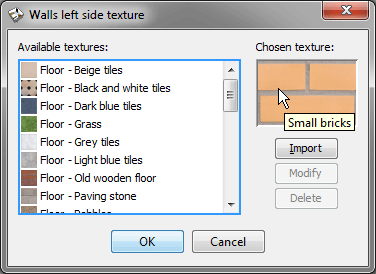
One thing I still miss very much though, is: once you open up the properties of eg a wall, floor, etc, you DO see little thumbnails of the texture(s) used for that wall, floor, etc, but what I miss is the name of that very texture! Should not be too difficult to add that I think, no?

This because I'm working on a very big project lately and don't recall all the (names of) texture(s) I used for different walls, floors etc...

Would be very nice if you could add that option! Especially as I'm working with different versions of your software at the same time; like that it's easier to check if the texture was added to the library or not; with just a thumbnail it's mostly a shot in the dark to get hold of the same file/texture again.

Let me know if you understand what I mean ok?

Thanks!

Kind regards,
Ed
Pays-Bas

Posted by Puybaret at Feb 17, 2013, 5:36:24 PM
Re: Sweet Home 3D 4.0
What about a tool tip displayed when the cursor is over the preview of the chosen texture?


This is the simplest solution for me.
----------------------------------------
Emmanuel Puybaret, Sweet Home 3D creator

Posted by Gaytan at Feb 17, 2013, 5:52:15 PM
Re: Sweet Home 3D 4.0
Yes, that would represent the very same thing! Would be nice!
Would that work in all the coming versions again? Windows, Linux, Java webstart etc etc?

That missing option has given me soo many headaches until now!

Kind regards,

Ed

Posted by Gaytan at Feb 17, 2013, 5:55:18 PM
Re: Sweet Home 3D 4.0
What I do miss with this 'small flag' is the category the item belongs to! I've many textures in Floor, Wall, etc.. Small bricks could be used either in floors as well as in walls... Could you make it: 'Walls: small bricks'? or 'Walls, small bricks'?

Like that it's clear in which (sub)category in the list one has to search for 'Small bricks'...

Posted by Gaytan at Feb 17, 2013, 5:59:37 PM
Re: Sweet Home 3D 4.0
Or...when you click 'Modify' that you get to see the full path like: 'Wall - small bricks'.
Until now when you click Modify you don't get the selection bar on the 'last selection' either: like 'Wall - small bricks' with the selection bar on that very line.... so to speak...

Posted by Gaytan at Feb 17, 2013, 6:07:52 PM
Re: Sweet Home 3D 4.0
In the extention of this very same subject: I today installed the latest Linux version (beta 4) of your program and opened a property screen of a wall.

That wall has gotten texture in an earlier version of your program; as that texture has not yet been added to the textures list in this beta, is it possible that all used material like this texture example, is automatically added in the list?

That would be awesome really!

Now I first have to add all textures etc again to the new version before I can use them again in my project! In my big project this means a lot of work before I am where I were before!

I'm curious to see if that would be possible!

Posted by Gaytan at Feb 17, 2013, 6:26:47 PM
Re: Sweet Home 3D 4.0
Emmanuel,

Something else; in this beta 4.0, 14; when I look at the right / top part of the screen with all the elements to work on; the whole workfield is 'grey-ish' like it's selected or something.

Before, in other (non-beta) versions that 'working field' uses to be normal white.. Now it's about the same color as the rooms that have gotten floors, so to speak... Also 'outside the house' in the garden, so to speak....

My Linux version: Linux Mint 14 Nadia, with graphics NVIDIA Corporation C79 [GeForce 9400M G] (rev b1) (Gallium 0.4 driver)

Rgrds,

Ed

Posted by Gaytan at Feb 17, 2013, 6:29:26 PM
Re: Sweet Home 3D 4.0
On top of that I cannot select any objects! I can 'select and move' them but not select and manipulate with 'turning option' etc in yellow; they don't appear at all.. For no object that is.
I'll quickly make a new test project to see if the behaviour is the same... If it is different you'll hear asap.

Ed

Posted by Gaytan at Feb 17, 2013, 6:36:57 PM
Re: Sweet Home 3D 4.0
Emmanuel,

Ok, made new house / project. Cannot drag anything from the furniture list on the left, to my (also completely grey) working field on the right.

Only thing working is 'right mousebutton' 'Add to home'; then when it's in the working field, I can drag it to it's place alright...

selecting: I see it now works differently? It does select but does not show anything on the corners; only when I hover with my mouse over the corners... Then it seems to work alright...

So: 1) completely grey working field, 2) cannot drag from list (left) to working field (right).

Rgrds,

Ed

Posted by Gaytan at Feb 17, 2013, 6:40:35 PM
Re: Sweet Home 3D 4.0
Emmanual,

One more thing I notice: when I close my temporary project I click 'Close', hoping to close my project but keep the program open!
Noops; the program closes all together! Like in 'Exit'....

To open up my other project, have to startup the program from the start / beginning.... Clicking close should leave the program itself open, I think...

Rgrds,

Ed

Posted by Puybaret at Feb 17, 2013, 9:25:59 PM
Re: Sweet Home 3D 4.0
Yes, that would represent the very same thing! Would be nice!
Would that work in all the coming versions again? Windows, Linux, Java webstart etc etc
Yes on all versions. It's already programmed and will be available in the next beta.

What I do miss with this 'small flag' is the category the item belongs to! I've many textures in Floor, Wall, etc.. Small bricks could be used either in floors as well as in walls... Could you make it: 'Walls: small bricks'? or 'Walls, small bricks'?
The category of a texture isn't stored at the moment, so it could be changed but I fear that introducing some link that may not exist anymore in the current catalog is a good idea.

That wall has gotten texture in an earlier version of your program; as that texture has not yet been added to the textures list in this beta, is it possible that all used material like this texture example, is automatically added in the list?
I understand it could be handy. Maybe in a future version...

Before, in other (non-beta) versions that 'working field' uses to be normal white.. Now it's about the same color as the rooms that have gotten floors, so to speak... Also 'outside the house' in the garden, so to speak....
Please post here or send to me a screen capture.

The other issues look like Java issues. Could you try to install Java 6 and run the beta with javaws coming with Java 6?
----------------------------------------
Emmanuel Puybaret, Sweet Home 3D creator

Posted by m@ at Feb 17, 2013, 11:50:56 PM
Re: Sweet Home 3D 4.0
Hi Emmanuel

I am currently testing V.4.0., Beta 10 under OS X and found out that graphics with the extension *.jpg are no longer supported to import. I can only import the graphics if I rename the graphic to *.jpeg. It's no big thing to me, since renaming is very easy, but I am quite sure that the import of *.jpg graphics was supported in earlier versions. Or am I wrong?

Furthermore, I noticed that there is no possibility to set the X and Y points below zero when importing a background image. Setting the points below zero would come in handy when positioning the background image AFTER having built something. Of course, i can move the whole building to fit the background image, but if you have a building over 4 floors it's quite a lot of stuff to move, compared to move only one background image. (or can I group the floors somehow?)

It's still a great piece of software and I enjoy using it very much!

Besides, a DMG newer than Beta 10 would be nice for testing purposes, but no hurry, take your time smile

Posted by Puybaret at Feb 18, 2013, 1:37:48 PM
Re: Sweet Home 3D 4.0
Thnaks m@ for your tests smile

Here's the Beta 16 (Java Web Start version / Mac OS X DMG) with the following changes:
- I set preview tool tip equal to texture name in texture choice dialog as proposed yesterday,
- Negative values for the coordinates of the origin of the background image are accepted,
- Background image origin is now correctly included in plan bounds,
- jpg extension is again accepted as a JPEG extension.

I also removed support for Java 7 in Java Web Start version run under Mac OS X, because I fear some remaining bugs (like the lack of support for accentuated letters in file paths) will generate too much support requests, whereas Sweet Home 3D installer bundle can still work with Apple's Java 6 until further notice. Nevertheless, Java 7 will be accepted on the Online version for the final release, because running Java 6 applets might require some configuration tricks under Mac OS X 10.7 and 10.8 and strangely, the bug on accentuated letters in local files doesn't happen in applets.
----------------------------------------
Emmanuel Puybaret, Sweet Home 3D creator

Posted by m@ at Feb 18, 2013, 9:50:10 PM
Re: Sweet Home 3D 4.0
Thanks for the quick fixes and for the new DMG! (Surprisingly, it already says "Beta 16", not "Beta 15")
I just tested the background image issues, the jpg issues and the new color picker:
Everything works fine now (still under OS X 10.6)

Posted by Puybaret at Feb 21, 2013, 6:52:49 PM
Re: Sweet Home 3D 4.0
Tonight the Beta 17 brings updated help in English and French, as well as localizations in Czech and Polish (thanks Ondrej and Szymon for your fast translations smile).
It fixes also some bugs in Furniture materials dialog box, and brings small improvements like the support of double clicks in the color chooser and a better 3D navigation in 3D previews displayed in the Furniture import wizard.
----------------------------------------
Emmanuel Puybaret, Sweet Home 3D creator

Posted by Gaytan at Feb 22, 2013, 9:18:41 AM
Re: Sweet Home 3D 4.0
Emmanuel,

1) Installing a new beta over the previous; is that ok? Or does it need uninstalling first? (just to be on the safe side)

2) I did not come back to you over difference(s) in color(s) working areas as difference(s) are too small.... Also in Linux as well as in OSX the versions do work correctly, only 'selection' of item(s) in the working area differ(s) from Linux to OSX...

I don't know if you mean to keep your versions completely in sync question way of working...

What I mean is: in Linux when you select an item it becomes blue and does NOT show the 'corner functions'; in OSX when selecting an item is becomes yellow and DOES show the 'corner functions'...

Kind regards,

Ed

Posted by Gaytan at Feb 22, 2013, 9:21:33 AM
Re: Sweet Home 3D 4.0
Emmanuel,

Still about the 'javaws' you talk about...

You asked me:

quote
The other issues look like Java issues. Could you try to install Java 6 and run the beta with javaws coming with Java 6?
unquote

I do not completely follow; is that within Windows you want me to do that? Or in Linux? In Linux I would not really know how to go about in order to change java versions....
;-)

Kind regards,

Ed

Posted by hansmex at Feb 22, 2013, 9:51:25 AM
Re: Sweet Home 3D 4.0
Ed,

In case you are using Ubuntu, (un-)installing Java isn't very difficult.

1 - Go to the Software Center and uninstall IceTea Java.
2 - Go to the Sun website and download Java. (I am using 7.)
3 - Go to this page and follow the instructions for installing Sun Java.

Switching from IceTea to Sun Java solved some problems, and SH3D now runs without any problems.

Hans
----------------------------------------
Hans

new website - under constuction
hansdirkse.info

Posted by Puybaret at Feb 22, 2013, 10:30:56 AM
Re: Sweet Home 3D 4.0
Gaytan, you shouldn't worry too much about uninstalling / installing Java. The final release should come soon and it will be delivered with its own JRE.

in Linux when you select an item it becomes blue and does NOT show the 'corner functions'; in OSX when selecting an item is becomes yellow and DOES show the 'corner functions'...
Selection colors depends on the one you set in your system, and not on my personal choice or taste. wink
The corner "indicators" (as I called them in the help) are visible when you select one object. Maybe you selected more than one object during your tests under Linux. Could you check again, because I don't have any issue on my side?
----------------------------------------
Emmanuel Puybaret, Sweet Home 3D creator

Posted by Gaytan at Feb 24, 2013, 1:10:00 PM
smile   Re: Hans; java version for Sweet Home 3D 4.0
Hi Hans,

Thanks for your advice; I'm always struggling with the right java version for linux, in my case the Ubuntu-based Linux Mint 14 Nadia.

I tend to use for java install (got there while clicking via your link) The java on 'your link seems only for RedHat, OpenSuse etc; the link I use is 'specially for deb-based distro's':

http://www.duinsoft.nl/packages.php?t=en

I then add the repository:
deb http://www.duinsoft.nl/pkg debs all

I add the key via terminal:
sudo apt-key adv --keyserver keys.gnupg.net --recv-keys 5CB26B26

and then run both commands:
sudo apt-get update
sudo apt-get install update-sun-jre

When I try to UNinstall 'IcedTea' via Software Manager (or Synaptic) I get all kinds of different options / entries making me confused about which to uninstall and / or which not to touch...
So I left that part alone...

I'll test the latest Linux Mint / Ubuntu version of SH3D now!

Kind regards,

Ed

Posted by m@ at Feb 26, 2013, 6:50:26 PM
Re: Sweet Home 3D 4.0
Hi Emmanuel

Sometimes, but not always, SH3D crashes after adjusting the window size by moving the separator between 2D view and 3D view.
I think there is a thread about that problem somewhere else in this forum, but I couldn't find it right now. I encountered this problem in V.3.7. and I still encounter it in V. 4.0 Beta, that's why I post it here. Last time, I got the "spinning wheel of death" and had to completely reboot the system. Could it be a memory problem? That would explain why the crash is not always reproducible.

Posted by Puybaret at Feb 26, 2013, 8:17:10 PM
Re: Sweet Home 3D 4.0
I fear it's more complicated than that. sad
But in all case, I'm pretty sure you don't need to reboot, simply press cmd + alt + esc keys, select Sweet Home 3D in the applications list and click on Force Quit. See also this document for other ways.
----------------------------------------
Emmanuel Puybaret, Sweet Home 3D creator

Posted by m@ at Feb 26, 2013, 9:22:41 PM
Re: Sweet Home 3D 4.0
Thanks for the hint, Emmanuel.
Of course I tried several Force Quit options as described in your post before shutting down the system. In earlier cases, this was also useful, but not the last time... thinking

Posted by Jerry2012 at Feb 28, 2013, 11:08:02 AM
Re: Sweet Home 3D 4.0
Hi Puybaret,
I think there might be an issue with obj-export in 4.0.b18.

What I did: an object in sweethome has a texture and I modify that with the dialogue box "Modify: texture" and change the texture to a color.
After exporting to obj, in the other program where I imported the obj, the texture is still shown.

Expected beahviour: instead of the texture, in the exported OBJ, the object should have the color-value which I entered in the "modify"-dialogue.

Thanks,

Jerry

Posted by Puybaret at Feb 28, 2013, 12:26:03 PM
Re: Sweet Home 3D 4.0
Hi Jerry2012,
I couldn't reproduce your issue on different objects. Could you give me some additional details? Maybe it doesn't work on a particular 3D model.
Thanks
----------------------------------------
Emmanuel Puybaret, Sweet Home 3D creator

Posted by Puybaret at Mar 2, 2013, 10:35:51 AM
Re: Sweet Home 3D 4.0
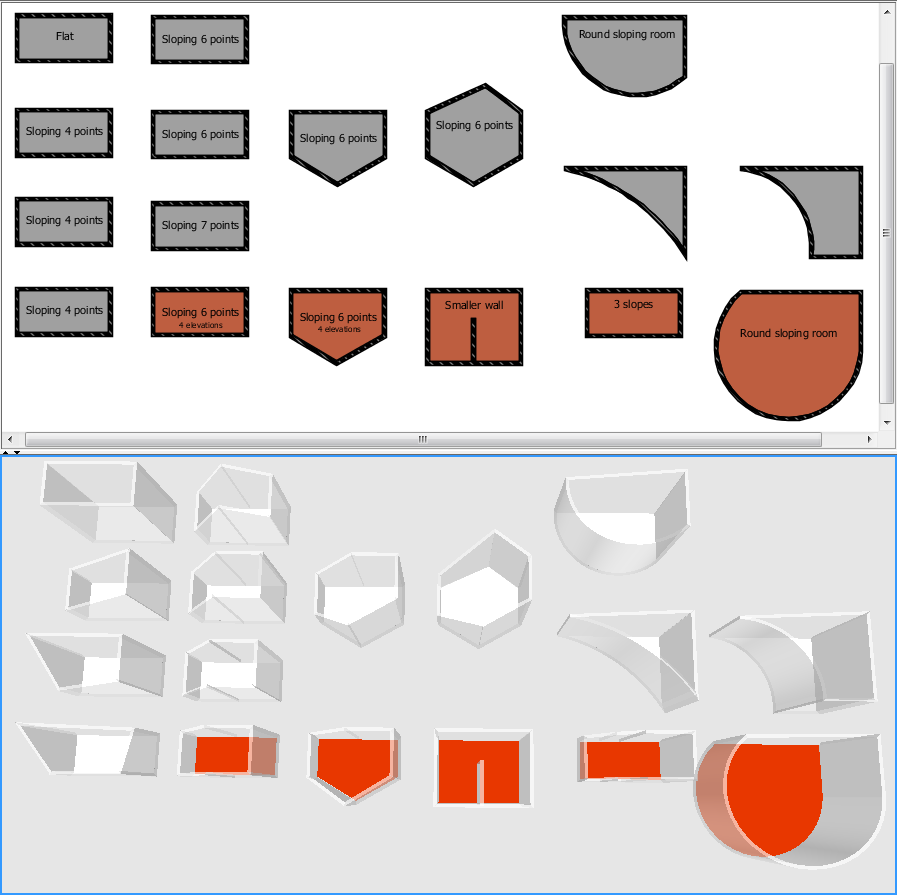
This weekend, the Beta 19 brings more translation updates, and some improvements for sloping ceilings support.
At first, I was almost about to remove this feature in version 4.0, because it brings too often some misunderstandings from new users when they include a small wall in a room or don't understand how it works, and also because it didn't support multiple slopes for a room.
But finally, I kept it because nevertheless, it's still able to compute complex ceiling surfaces as long as their points are more or less coplanar (i.e. belong to the same plane). As soon as the points are not coplanar, there shouldn't be more than 2 slopes and their shape shouldn't be too complicated.
I even fixed a bug that could happen when some room points were aligned, and added support for ceilings at the border of a round sloping wall.

The attached example shows in red the cases that still fail. There's very little chance that it works one day for these, and you'll have to find workarounds (for more than 2 slopes, you just have to create more rooms).


----------------------------------------
Attachment SlopingCeillingsTest.sh3d (5970 bytes) (Download count: 199914) (Tests of various sloping ceilings)

----------------------------------------
Emmanuel Puybaret, Sweet Home 3D creator

Posted by DenisS at Mar 2, 2013, 4:56:18 PM
Re: Sweet Home 3D 4.0
Well, just an idea, but what about an option to exclude a wall from ceiling calculation ? Maybe a checkbox in the wall's properties dialog ?

Posted by hansmex at Mar 2, 2013, 6:41:59 PM
Re: Sweet Home 3D 4.0
And another idea: don't recalculate the ceiling after every change, but make a Recalculate button, just as for the walls around a room.
That way you can fool the program a bit: draw the walls in such a way that the ceiling looks good, then change the walls, but not the ceiling.

Hans
----------------------------------------
Hans

new website - under constuction
hansdirkse.info

Posted by Sajmmon at Mar 2, 2013, 7:24:17 PM
Re: Sweet Home 3D 4.0
I would enable this nice mechanism when there exists only one way of spanning a ceiling (e.g. 2nd from left in top row, or second from top in first column).

However, in some complex situations one can do it in more distinct ways. I would disable the mechanism if different strategies of triangulation result in different ceilings.

The mechanism doesn't work fine for low walls.


the intended ceiling is flat.

And sometimes ceiling covers only part of a floor.


Posted by RobertBurke22 at Mar 3, 2013, 2:31:27 AM
Re: Sweet Home 3D 4.0
Hi,
Sorry if this is unrelated, but as seeing this is a post about the beta, here goes.
I've installed the Beta 4 and have recently updated to 4 Beta 20 from an earlier version. It opened up fine the first few times, but now it gives me the following message:

Application Error
Unable to launch the application.
Name: Sweet Home 3D 4.0 Beta
Publisher: eTeks
From: http://www.sweethome3d.com

Then, there's two buttons: Ok and Details.

If I click details:

Error: Failed to validate signing of launch file. The signed version does not match the downloaded version.

Then there's a tab "Launch File" with a bunch of code and a tab "Exception" with a bunch of info.

I don't know how to fix this. I've tried reinstalling, rebooting, ending the process manually, etc.

If you need either of the texts under those tabs, let me know.

Posted by Puybaret at Mar 3, 2013, 7:56:25 AM
Re: Sweet Home 3D 4.0
Robert, you should click again on the Java Web Start link shown on this page. Depending on your system, Java Web Start applications used to upgrade more easily, but Oracle recently introduced some changes for security sake, that may oblige the user to download the JNLP file each time its content changed. As the JNLP file of the final version is more stable, this issue shouldn't happen at the final release of the version 4.0.
----------------------------------------
Emmanuel Puybaret, Sweet Home 3D creator

Posted by Puybaret at Mar 3, 2013, 8:28:17 AM
Re: Sweet Home 3D 4.0
Denis, Hans, Szymon, thanks for your feedback. From you answers, this ceiling computation feature doesn't feel perfect, and I agree. wink
what about an option to exclude a wall from ceiling calculation ? Maybe a checkbox in the wall's properties dialog ?
Nice idea but still too complicate for basic user to understand, as well as the wall's properties dialog is already quite filled with a lot of information. One of my idea was to add a Flat check box in the Ceiling section of the room modification dialog. A more simple option placed among other user interface options relative to ceiling. If the users wonder what it changes, they can test it and undo/redo it, or look in the help. The biggest problem with ceilings is that they are visible only from below, and I'm not sure that playing with that 3D feature was a good idea for people unaware of it.

don't recalculate the ceiling after every change, but make a Recalculate button, just as for the walls around a room.
Sorry but I feel it wouldn't be consistent with the way Sweet Home 3D works for other features: the user sees the effect of its initial drawing or its change at once, and recomputing walls around a room is just a shortcut of something the user could do with existing features. Following your idea, what would happen if the user would move a point of a room? It would keep always the same elevation until he clicks on that button? And if the elevation of some room points is incorrect at the initial creation of a room, recalculating them won't resolve any issue.

I would enable this nice mechanism when there exists only one way of spanning a ceiling (e.g. 2nd from left in top row, or second from top in first column).
Sorry but I'm not sure to understand what you mean. sad
However, in some complex situations one can do it in more distinct ways. I would disable the mechanism if different strategies of triangulation result in different ceilings.
The triangulation is computed by Java 3D itself. So if I want to test different strategies, I would have to study its algorithm and reprogram it some way, without guaranty that there could be more than one possible strategy at the end!
The mechanism doesn't work fine for low walls.
The Flat option I proposed could help to resolve this issue. But in the case you reported, you should actually create a room for the floor, and a second room for the ceiling with only 4 points at the room corners.
----------------------------------------
Emmanuel Puybaret, Sweet Home 3D creator

Posted by hansmex at Mar 3, 2013, 9:15:31 AM
Re: Sweet Home 3D 4.0
Emmanuel,

I fully understand that it's not simple to find a "one size fits all" solution to compute roofs and ceilings. So maybe a two-pronged strategy, which distinguishes between roofs and ceilings, would work better?
- Ceilings generally are flat.
- Roofs are in a majority of cases non-flat, and/or extend beyond the walls of the building.
I have used other 3D programs, and in general they also make this distinction. Even for non-technical users, it wouldn't be too complicated to understand there is a difference between those two parts of a building.

Hans

PS : When using b19, I draw a rectangular room with a partially sloping ceiling (what you call sloping 6 points) it generates one sloping roof, without the bend in it. Is it Ubuntu, or did I forget the magic spell? :-)
http://www.mediafire.com/file/wa62c9n9yt5l8py/SlopingCeilingTest#2.sh3d

----------------------------------------
Hans

new website - under constuction
hansdirkse.info

Posted by Groumphy at Mar 3, 2013, 4:27:37 PM
Re: Sweet Home 3D 4.0
Hello,

I've a question, is it possible that the last webviewer is not compatible with the lastest BETA ?

I download the lastest stable version of the webviewer and follow the instruction in the ReadMe.txt, but this give a bad result: cannot open the projet.

Is it normal (difference with the version I think) ?

For the other point, all work perfect with my Ubuntu.

Xavier
----------------------------------------
Groumphy
-----------------------------
FR - NL - EN
-----------------------------

Posted by Puybaret at Mar 3, 2013, 5:13:48 PM
Re: Sweet Home 3D 4.0
Hans, actually, I wanted to remove the sloping ceiling feature when I introduced levels in version 3.4. But a user warned me that he documented that feature in a book, so we agreed I'll keep it only for last level.
Your SlopingCeilingTest#2.sh3d example doesn't work because the room doesn't have six points. Ceiling elevation is computed at room points only.
----------------------------------------
Emmanuel Puybaret, Sweet Home 3D creator

Posted by hansmex at Mar 3, 2013, 5:38:07 PM
Re: Sweet Home 3D 4.0
Emmanuel,

Sorry for misunderstanding your improvements. I was living under the impression that one-step-ceilings were introduced for the scenarios you showed.

Would it be possible to slightly improve the "magnetism" for room points, so that it's easier to find the exact spot where room points should connect to wall points? It's easy to find the exact spot for corner points, but not so easy to find the exact spot along a split-up straight wall.

Hans

PS: Making a 6-point room in my example gives a perfect ceiling.
----------------------------------------
Hans

new website - under constuction
hansdirkse.info

Posted by Sajmmon at Mar 3, 2013, 6:50:39 PM
Re: Sweet Home 3D 4.0
After your feedback, I would not disable the mechanism :-) Even thougn it might not be perfect in some situations.

Have a look at an interesting example: Two rooms (almost the same), one is rotated. The same diagonals in tringulation, but different ceilings :-)


It is just a toy example, I would enable the mechanism even with this kind of inconsistencies.

Posted by Puybaret at Mar 3, 2013, 8:59:15 PM
Re: Sweet Home 3D 4.0
is it possible that the last webviewer is not compatible with the lastest BETA ?
I would say no, but since you had a problem that I could reproduce, it must be true. I'll check in the coming days where it could come from.
----------------------------------------
Emmanuel Puybaret, Sweet Home 3D creator

Posted by Puybaret at Mar 3, 2013, 9:39:45 PM
Re: Sweet Home 3D 4.0
Ok, I fixed the bug. If you want a beta of the viewer, just tell me, I'll send it to you.
Thanks for reporting this issue. smile
----------------------------------------
Emmanuel Puybaret, Sweet Home 3D creator

Posted by Groumphy at Mar 4, 2013, 6:43:00 AM
Re: Sweet Home 3D 4.0
Waw... Coming days are coming hours.
Yeah I'll agree for test the beta viewer ! I think you've my e-mail adress (groumphy on the domain GMail).
Or best is upload the beta version on SourceForge.
----------------------------------------
Groumphy
-----------------------------
FR - NL - EN
-----------------------------

Posted by robal at Mar 4, 2013, 12:10:11 PM
Re: Sweet Home 3D 4.0
Spotted a small bug (also in 3.7 if I remember correctly).

- when editing a wall color/texture, setting are not applied after clicking "OK" in "modify walls" dialog

repro:
1) set any side of the wall to any texture and close "modify walls" dialog
2) open "modify walls" dialog again, and change wall side to "color" (but without clicking the color picker button)
3) hit "OK"
4) the wall side is still textured

Cheers,

Posted by Puybaret at Mar 4, 2013, 6:14:53 PM
Re: Sweet Home 3D 4.0
Waw... Coming days are coming hours.
It was just a small problem of some missing files in SweetHome3DViewer.jar file.
Yeah I'll agree for test the beta viewer !
I've uploaded a beta version of the viewer here, to let you test.
----------------------------------------
Emmanuel Puybaret, Sweet Home 3D creator

Posted by Groumphy at Mar 10, 2013, 9:38:34 AM
Re: Sweet Home 3D 4.0
Hello,

I've (endly) make the first test with the webviewer.
This work (for the load, the first view etc...) but I think there is a small problem with 2 thinks:

1. (most important I think) somes furnitures are in one block (no details) and colored in red ;

2. (minor) the height is not good, the code

width:"100%", height:"95%"};
is not understand by the browser...

I have one more idea for improvement: to have the level structure (tabs in SH3D) to have a first hand and not a global view.

You can view the actual problem on this link: myhome.zoyo.be.

I will check for the height and with in the Javascript and try to find a solution...

Success,

Xavier

(PS: for the test, I'm working on Ubuntu 12.04LTS, Mozilla Firefox 19.0.2, and Oracle Java 1.7.0.17 with the Firefox plugin 1.7.0.17)
----------------------------------------
Groumphy
-----------------------------
FR - NL - EN
-----------------------------

Posted by Puybaret at Mar 10, 2013, 1:44:28 PM
Re: Sweet Home 3D 4.0
Thanks for your tests. smile

somes furnitures are in one block (no details) and colored in red
Red blocks generally means a problem with the 3D model file. I downloaded your sh3d file and it appears that the "22" file matching some red objects is incorrect in the sh3d file. I guess you should upload again your file on the server.

the height is not good, the code

width:"100%", height:"95%"};
is not understand by the browser...
Maybe it's because you included the applet script in a div tag.

I have one more idea for improvement: to have the level structure (tabs in SH3D) to have a first hand and not a global view.
Adding the levels tabs at the top of the 3D view shouldn't be too difficult. Please fill a feature request to ensure I don't forget it.
----------------------------------------
Emmanuel Puybaret, Sweet Home 3D creator

Posted by Groumphy at Mar 10, 2013, 4:49:45 PM
smile   Re: Sweet Home 3D 4.0
Hello,

Fantastic, the first "problem" is solved.
But the second for the height isn't...
The Javascript is now out of the DIV.

I think this is because JS send info about the applet this is not à block of HTML. But today I don't have time for look about this. I will try tomorow...

For the tab in the webview I'll introduce next time ;)

Enjoy,

Xavier
----------------------------------------
Groumphy
-----------------------------
FR - NL - EN
-----------------------------

Posted by Groumphy at Mar 10, 2013, 6:31:00 PM
Re: Sweet Home 3D 4.0
Hello,

I've found a solution !
Define a width and height in pixel (for sample). Because if we define it in %, the heigth cannot be know by the browser... ;)

This is a W3C standard... and apply by Firefox.

Have a nice day,

Xavier
----------------------------------------
Groumphy
-----------------------------
FR - NL - EN
-----------------------------

Posted by Groumphy at Mar 12, 2013, 6:44:17 PM
Re: Sweet Home 3D 4.0
Please fill a feature request to ensure I don't forget it.


Done tongue

Have a nice day.
----------------------------------------
Groumphy
-----------------------------
FR - NL - EN
-----------------------------

Posted by Puybaret at Mar 19, 2013, 8:35:08 PM
Re: Sweet Home 3D 4.0
Tonight, here's the last Beta (I hope) of Sweet Home 3D 4.0.
It brings the 16 translations available in the core version, and improvements in the aerial view mode, where the elevation of the rotation center is now at the half height of the items displayed in the 3D view when nothing is selected (underground items excepted), or at the half height of the selected item. Please, help to test it with as many weird cases as possible to ensure it behaves correctly.

Many thanks to all the contributors who translated the new words of this version. smile
----------------------------------------
Emmanuel Puybaret, Sweet Home 3D creator

Posted by Puybaret at Mar 20, 2013, 8:33:25 AM
Re: Sweet Home 3D 4.0
Sorry, I discovered that the Beta 25 couldn't work when the new Aerial view centered on selection option was disabled. So, here's the Beta 26 and as a bonus a DMG file for Beta tests under Mac OS X.
----------------------------------------
Emmanuel Puybaret, Sweet Home 3D creator

Posted by hansmex at Mar 20, 2013, 2:31:27 PM
Re: Sweet Home 3D 4.0
Emmanuel,

I like the new height-sensitive aerial view. Unfortunately, the view zooms in on details, but doesn't zoom out for a larger view. This means that after inspecting a detail, you have to use the scroll button to zoom out manually. Hopefully this can be fixed.

Hans
----------------------------------------
Hans

new website - under constuction
hansdirkse.info

Posted by Puybaret at Mar 20, 2013, 3:01:52 PM
Re: Sweet Home 3D 4.0
Thanks for your feedback.
I'm not sure to understand the behavior you want to improve. sad
At this moment, when the Aerial view centered on selection option is enabled, the distance to the rotation center, pitch angle and yaw angle are not changed when you change the selection, unless the distance is so small that you could enter in the bounding box of the selection. In the later case, the distance is increased to ensure you remain out of this box.
----------------------------------------
Emmanuel Puybaret, Sweet Home 3D creator

Posted by m@ at Mar 21, 2013, 8:25:00 AM
Re: Sweet Home 3D 4.0
Modifying the color of different materials in an object does not always work properly (in Beta 16). For example, I modifyed the colors of this model found here:
http://archive3d.net/?a=download&id=75c319b8
The model consists of 3 Materials and if I change the color of the lower part of the object, the result seems to be randomly after closing the "modify" dialog: sometimes the lower part gets the new color (as desired), sometimes the upper part (?), sometimes it changes to the color of the third material (?!?) or even one part of the model disappears (funny!). There are also other objects with that problems. How come that the behavior is just so randomly?

Posted by hansmex at Mar 21, 2013, 9:58:40 AM
Re: Sweet Home 3D 4.0
The problem you describe is a known one. It has to do with the orientation of the "skin" that surrounds the model, and SH3D cannot decide what is inside, and what is outside. This can give a different result every time the model is recalculated.

It is especially known to happen with DAE models from the Sketchup Warehouse.

Hans
----------------------------------------
Hans

new website - under constuction
hansdirkse.info

Posted by m@ at Mar 21, 2013, 10:21:35 AM
Re: Sweet Home 3D 4.0
Thanks for the answer, Hans. So, try and error is the only workaround? Thats ok for me, as long as I know there is no better way to do the trick.

Posted by Puybaret at Mar 21, 2013, 10:52:48 AM
Re: Sweet Home 3D 4.0
m@, thanks for reporting this issue. I could reproduce it this way: import a zip file containing a 3DS file, save your SH3D file, close your home. Each time you reopen it, the order of materials may change and so, the index of the material color you set may concern a different material.
But there's an easy workaround: import the 3DS file and not the ZIP file it contains. This implies a different process in Sweet Home 3D because the 3D model will be internally saved as an OBJ file which doesn't produce this kind of "material reordering" (it's probably the reason why this bug was detected lately).

Argh, I was about to release the version 4.0 and if I fix this bug, I will have to rebuild all the installers! sad
Nevertheless, I'll see if it's easy to fix.
----------------------------------------
Emmanuel Puybaret, Sweet Home 3D creator

Posted by m@ at Mar 21, 2013, 11:50:46 AM
Re: Sweet Home 3D 4.0
Oh sorry about that biggrin

You are really doing a great job with SH3D and i would be more than happy if the big software company at my workplace would provide the same great support than you do!

Posted by Puybaret at Mar 21, 2013, 12:36:54 PM
Re: Sweet Home 3D 4.0
I fixed the bug and it will be available in the final release of the version 4.0, in the coming hours.

Oh sorry about that biggrin
Don't be sorry!
You saved time to other users who won't encounter this issue, and time for people at support who won't have to answer to questions about this problem. wink
----------------------------------------
Emmanuel Puybaret, Sweet Home 3D creator

Posted by Puybaret at Mar 21, 2013, 10:26:54 PM
Re: Sweet Home 3D 4.0
Sweet Home 3D 4.0 was released tonight
Have fun and thanks to all for your tests! smile
----------------------------------------
Emmanuel Puybaret, Sweet Home 3D creator

Posted by Yuri_fromBY at Mar 23, 2013, 11:02:48 AM
Re: Sweet Home 3D 4.0
Thank you a lot !

Posted by m@ at Mar 29, 2013, 3:49:44 PM
Re: Sweet Home 3D 4.0
It seems that the fields to enter width and depth of furniture where mixed up; with changes the depth and vice versa (happens in the import dialog as well as in the modify dialog, so at least the behavior is constant). I tested with several objects from several sources, the behavior is always the same. It's not a big problem, but maybe you still want to fix it in the next release. smile

Posted by Puybaret at Mar 29, 2013, 8:27:14 PM
Re: Sweet Home 3D 4.0
m@, I didn't succeed to reproduce your issue. sad
Maybe there's an other condition...
----------------------------------------
Emmanuel Puybaret, Sweet Home 3D creator

Posted by m@ at Mar 30, 2013, 9:28:47 PM
Re: Sweet Home 3D 4.0
Hi Emmanuel

I checked again and found out that the confusion between width and depth only happens with some models, with some other not. Therefore, the problem seems to origin in the models and not in your software. Sorry for bothering you about that!

Posted by BLAlley at May 5, 2013, 6:06:01 AM
Re: Sweet Home 3D 4.0
Updated to 4.0, now I can't render advanced photos. How to I go back to the less buggy version?

Posted by Puybaret at May 6, 2013, 4:46:36 PM
Re: Sweet Home 3D 4.0
As explained in the Download page, all released versions can be found at http://sourceforge.net/projects/sweethome3d/files/SweetHome3D/

By the way, it would be nice to explain why you can't render photos. Jumping to previous versions won't help to fix bugs if you found one.
----------------------------------------
Emmanuel Puybaret, Sweet Home 3D creator

Posted by Yuri_fromBY at May 7, 2013, 5:41:53 PM
Re: Sweet Home 3D 4.0
I have a problem - on Ubuntu 13.04 start FILE-Preferences crashes.

Posted by hansmex at May 7, 2013, 5:54:31 PM
Re: Sweet Home 3D 4.0
Some suggestions:

1 - Read the FAQ
2 - Throw out IceTea Java and replace with Sun Java. This has helped many people using 12.04; good guess it may work in 13.04.

Hans
----------------------------------------
Hans

new website - under constuction
hansdirkse.info