Print at Dec 23, 2025, 2:19:02 AM
Posted by trankilou at May 29, 2013, 11:20:42 AM
HQ rendering issue
Hi,

First I want to say I really love your programm, it is almost perfect.
I am planning to build my house from my own plan and I want to know how the rooms will be unlighted.

This drive to our problem :

I think the top HQ rendering is not realistic regarding the condition and the architeture of course.

For instance lets take the living room. I join the plan and a hq picture.


The condition are 21 June, 2:00pm


I think the living rooms seems too dark and we can see blue spotlight (set to 20% brightness) => I think there is a problem

What do you think I should do to have something more realistic ?

Julien

Posted by hansmex at May 29, 2013, 12:56:45 PM
Re: HQ rendering issue
Julien,

The best way to get realistic lighting is to insert one (or more) really large lights in your design. Let's say 100x100x100 cms at 25% with 75 cms elevation. This lights up the room without causing unwanted shadows. Also, make sure that ceiling lights are turned off.

Hans
----------------------------------------
Hans

new website - under constuction
hansdirkse.info

Posted by trankilou at May 29, 2013, 4:31:56 PM
Re: HQ rendering issue
Hello,

Thanks for the workaround!
I assume it is not possible to have realistic reflexion of the sunflare inside the room ? It is too complicated (I have no idea it is a true question) ?

J-

Posted by Puybaret at May 29, 2013, 9:17:43 PM
Re: HQ rendering issue
Since the version 4, you can set some properties of the rendering engine with the SweetHome3D.l4j.ini file (or the Linux launch script) to get some reflection effect as shown as in this thread. I plan to write an article about it but you can already try it yourself with the following lines:

-Dcom.eteks.sweethome3d.j3d.PhotoRenderer.lowQuality.globalIllumination=path
-Dcom.eteks.sweethome3d.j3d.PhotoRenderer.lowQuality.diffusedBounces=3
-Dcom.eteks.sweethome3d.j3d.PhotoRenderer.lowQuality.causticsPhotons=1000000

-Dcom.eteks.sweethome3d.j3d.PhotoRenderer.highQuality.globalIllumination=path
-Dcom.eteks.sweethome3d.j3d.PhotoRenderer.highQuality.diffusedBounces=3
-Dcom.eteks.sweethome3d.j3d.PhotoRenderer.highQuality.causticsPhotons=1000000

See this file for little more explanations about these properties, and expect a much longer rendering process.
----------------------------------------
Emmanuel Puybaret, Sweet Home 3D creator

Posted by hansmex at May 30, 2013, 12:06:20 AM
Re: HQ rendering issue
Emmanuel,

I made a copy of the 880 byte start script, then added those six lines at the end of the text, starting on a new line.
I then ran the script and SH3D started normally.

However, when I try to make a test render in Q3 or Q4, the render times seem to be the same as always, as is the quality.

Did I do something wrong?
Maybe you could publish a working start script, so that we can experiment with these improved quality settings?

Hans
----------------------------------------
Hans

new website - under constuction
hansdirkse.info

Posted by trankilou at May 30, 2013, 2:05:48 AM
Re: HQ rendering issue
hi,

I will try this and I will give a try to lumion 3D rendering also (as they are proposing a free version).

I ll give you the comparison :)

Ju-

Posted by Puybaret at May 30, 2013, 8:16:10 AM
Re: HQ rendering issue
Hans, I talked about the Linux script because I guessed you would like to try it too. wink
But you're right, I didn't give enough details. Consider the each line starting by -D as a parameter you should add between exec "$PROGRAM_DIR"/jre1.6.0_43/bin/java and -Xmx... in SweetHome3D launch script, and separate each parameter by spaces (not line returns).
Hope you can handle it. smile
----------------------------------------
Emmanuel Puybaret, Sweet Home 3D creator

Posted by hansmex at May 30, 2013, 8:38:37 AM
Re: HQ rendering issue
Emmanuel,

I updated my file as you instrcuted. After a short wait I get perfectly black pictures...
Please, see the attached file. Did I do something wrong?

Hans

Linux hi-res start script
----------------------------------------
Hans

new website - under constuction
hansdirkse.info

Posted by Puybaret at May 30, 2013, 12:11:40 PM
Re: HQ rendering issue
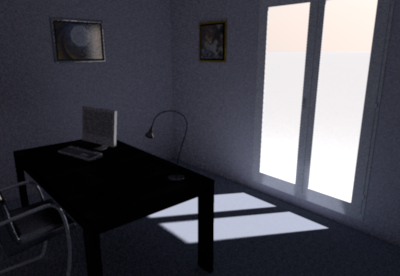
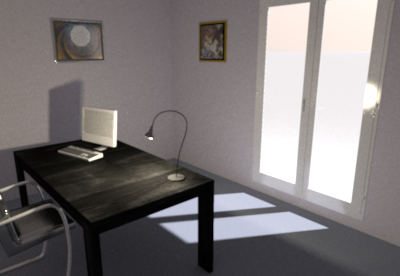
I tested the two following parameters on a small file:
-Dcom.eteks.sweethome3d.j3d.PhotoRenderer.highQuality.globalIllumination=path
-Dcom.eteks.sweethome3d.j3d.PhotoRenderer.highQuality.diffusedBounces=3

and got the following results:


compared to a rendering with default parameters:


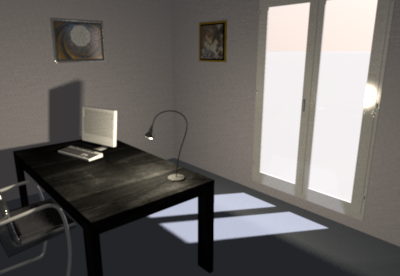
If you turn on the light on the desk, I got the following results:


compared to a rendering with default parameters:


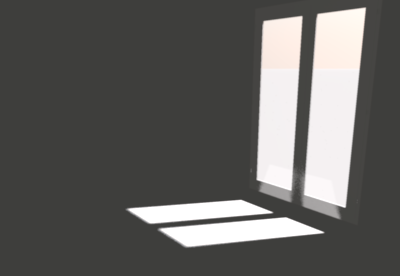
As you can see, if it doesn't give miracle results, the reflection of the outside light on the blue ground has some visible effect, but still an interior light gives correct results much faster.

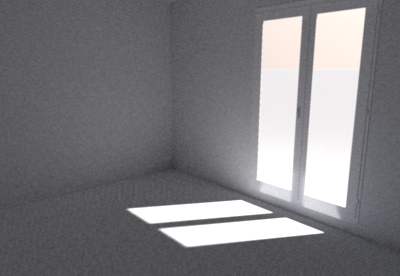
For your information, here are also two images of the same empty room with default color on the walls and the floor:


again compared to a rendering with default parameters:


Did I do something wrong?
I don't know how complex can be the rendered scene. If you're ready to spend some time on this very time consuming task, I'll be pleased to read your report. smile
----------------------------------------
Attachment SimpleRoom.sh3d (493856 bytes) (Download count: 200437)

----------------------------------------
Emmanuel Puybaret, Sweet Home 3D creator

Posted by trankilou at May 31, 2013, 9:22:08 AM
Re: HQ rendering issue
Hi,

As I told you , I tried to export my work in Lumion.
It works great. I just export the house with the minimum of objects in obj format and the import was perfect.

The rendering is just awesome, it is better than the sh3D photo plugin set to maximum but..in realtime !
I will post a link to the video I made
The only cons: this soft dosen't exist on OSX (need bootcamp, burk)

J-

Posted by hansmex at May 31, 2013, 10:16:51 AM
Re: HQ rendering issue
Ju,

And you forgot to mention it costs between €300 and €3000 euros to buy...

H
----------------------------------------
Hans

new website - under constuction
hansdirkse.info

Posted by trankilou at May 31, 2013, 5:44:51 PM
Re: HQ rendering issue
Yes and ... No
actually they have a free version , not limited in time but with watermarks

for your own project it is not a big deal

J-

Posted by trankilou at Jun 1, 2013, 10:50:25 PM
Re: HQ rendering issue
as promised : http://youtu.be/CxcQtZAuPTU

Posted by Puybaret at Jun 2, 2013, 12:57:13 PM
Re: HQ rendering issue
This looks very nice smile
But the woman in bikini must be freezing under the snow! laughing

For users' information, how long did it take you to get this? Do Sweet Home 3D + Lumion form a perfect couple, or is it your background that helped you to achieve this so quickly?
----------------------------------------
Emmanuel Puybaret, Sweet Home 3D creator

Posted by trankilou at Jun 2, 2013, 2:27:10 PM
Re: HQ rendering issue
This looks very nice smile
But the woman in bikini must be freezing under the snow! laughing

For users' information, how long did it take you to get this? Do Sweet Home 3D + Lumion form a perfect couple, or is it your background that helped you to achieve this so quickly?


Thx :)

It seems it the kind of house most people likes :D

How time did it take ? Hard to say

First I start drawing on paper. I changed many times because of ground constraints : small, sloppy, water level in the ground and urban city constraints ( height, length from road and so on). Each times I have to make it validate by a true architect and a structure/concrete engineer.

Once I got this, it was faster. As I am a geek I learn how using software quiet fast but with sh3D it is not a bug deal as it is very easy to use. So it took me maybe around 2 hours: 1 hours to learn the software and 1 hour to make plans.

Once I got the house object, I export it easily in obj format and import to lumion as fast as you import an object in sh3D. Lumion is also very easy to use but as my ground is very difficult to model it took me maybe 4 hours: 1 hours to understand (nice tutorial on youtube and on their own website) how it works and 3 hours to make the outside (and I add so texture inside as the fire, the waterfall and the vegetation).
I also spent 1 hour to play with the sunbeam (height, intensity, orientation) : the rendering in real time is just amazing. As it uses GPU and CPU (I heard my fans for the first time lol), the software can model sunbeam reflectivity on all textures, inside and outside: just awesome ( it was the aim if you remember)

In conclusion, to answer your initial question: My background help me a little : as telecom architect I have a degree in computer science but once you have the plan on paper you have done the main job as these 2 softwares are very easy to use :)

Posted by mamu157 at Aug 9, 2013, 12:26:09 PM
Re: HQ rendering issue
Hello Emmanuel,

first thank you very much for that great software. Could you please explain how to set the rendering parameters in OSX? I played already with the info.plist file but without success. Tried to put it before:

<key>VMOptions</key>
<string>-Xmx1024m</string>

like


<key>VMOptions</key>
<string>-Dcom.eteks.sweethome3d.j3d.PhotoRenderer.highQuality.globalIllumination=path -Xmx1024m</string>

which should reflect the linux way, but it didn't work.

Thank you very much in advance for the help.

-Markus

Posted by mamu157 at Aug 9, 2013, 11:51:23 PM
Re: HQ rendering issue
Hello,

after a little more research and according to this Apple Developer Page the info.plist should look like this:


<key>VMOptions</key>
<array>
<string>-Dcom.eteks.sweethome3d.j3d.PhotoRenderer.highQuality.globalIllumination=path</string>
<string>-Dcom.eteks.sweethome3d.j3d.PhotoRenderer.highQuality.diffusedBounces=3</string>
<string>-Dcom.eteks.sweethome3d.j3d.PhotoRenderer.highQuality.causticsPhotons=1000000</string>
<string>-Xmx1024m</string>
</array>

But as Hans I still get black pictures. What am I missing here?

Thank you very much for your help.

-Markus

Posted by mamu157 at Aug 17, 2013, 3:37:01 AM
Re: HQ rendering issue
Hello,

I found the issue. I had used textures for the ground (grass texture) and the sky (cloudy texture) in the 3D-viewoption menu.

Switching back to colors and the rendering was fine, with the textures I always got black pictures. Not sure if this is a known bug?

Markus