Print at Dec 22, 2025, 5:55:40 PM
Posted by shellbug at May 31, 2013, 8:13:56 AM
3D view wall color problems
Some of my walls are not showing the correct color in 3D view. I have the north wall showing a nice pale yellow.The pale yellow color looks gray on the other walls even though the code number is exactly the same as the north wall. Even the little color icon in the modify box shows the right color. What is wrong with the 3D view?

Posted by marqox at Jun 15, 2013, 11:14:07 PM
Re: 3D view wall color problems
I am facing the same situation. Even if I set color of the walls to pure yellow (RGB - 255, 255, 0), I get a green color in 3D view. I do understanding shadings are involved with walls, but this kind of a difference looks very strange.
After further testing, seems that anything vertical (like walls) will get a green color, and horizontal objects (like floor) will get the exact yellow color.
Please help is there a way to change this behaviour. Thanks.

Posted by marqox at Jun 15, 2013, 11:22:52 PM
Re: 3D view wall color problems
I was a bit wrong with the previous post. Not all horizontal objects are correct.
I just set a carpet to yellow (the carpet has a table sitting on it). Just by changing the 3D view head angle I get different shapes of green and yellow areas being drawn on the carpet. Every change of head angle, even a small one, gives a different green-yellow look of the carpet. This looks like a bug in 3D to me.

Posted by Puybaret at Jun 17, 2013, 7:50:25 PM
Re: 3D view wall color problems
Like in real life, the color of each face of an object depends on its orientation towards light and towards the viewer. Under strong light, some colors can get overexposed and green could be seen as yellow for example. Choose a darker color if you don't want that effect, or reduce the light brightness in the 3D view modification dialog.
----------------------------------------
Emmanuel Puybaret, Sweet Home 3D creator

Posted by fortytwo at Jun 18, 2013, 5:24:14 PM
Re: 3D view wall color problems
I'm having a similar issue but it's that the way the color shows on the wall change drastically based on the angle. It's not really a change in the shade, though, it's whether or not it shows up at all. Changing the amount of light doesn't seem to make much difference.

I've included a link to some screenshots which might better show what I mean. Should I expect the visibility of the color to change this much?

http://imgur.com/a/kH2LL

Posted by marqox at Jun 25, 2013, 8:13:54 AM
Re: 3D view wall color problems
Like in real life, the color of each face of an object depends on its orientation towards light and towards the viewer. Under strong light, some colors can get overexposed and green could be seen as yellow for example. Choose a darker color if you don't want that effect, or reduce the light brightness in the 3D view modification dialog.

Thanks, Puybaret.
I have not managed to reproduce the issues of view angle again, like Fortytwo attached here, but attaching some screenshots to explain my color situation.
http://postimg.org/image/ebdfu24lv/
http://postimg.org/image/w7ivafi05/
http://postimg.org/image/wmgnvadgd/

The wall and floor are of same color - yellow (RGB 255, 255, 0), but in 3D they look completely different, regardless of light brightness setting. In rendered image, green is replacing yellow even with full brightness setting (last image).

I understand I can switch to a darker color, but my wife would like to explore possibilities with "varieties" of yellow color for our new flat, and it has been very difficult to get some impressions of that from the 3D view or render.

Posted by hal9000 at Jun 25, 2013, 8:36:27 AM
Re: 3D view wall color problems
Hmm... well, I see it yellow.

I took the images and looked at their pixels colours. In the third image the most illuminated areas on both wall and floor are 255,255,0 while the less illuminated areas of the wall are 177,172,0 (it's an approximate value, since it varies a bit from a pixel to next) which is a dark yellow.

And in the first image the full wall is 143,143,0 which is clearly dark yellow.
----------------------------------------
If a long walk every day were healthy, mailmen would be immortal. tongue

Posted by hansmex at Jun 25, 2013, 10:12:31 AM
Re: 3D view wall color problems
Marko,

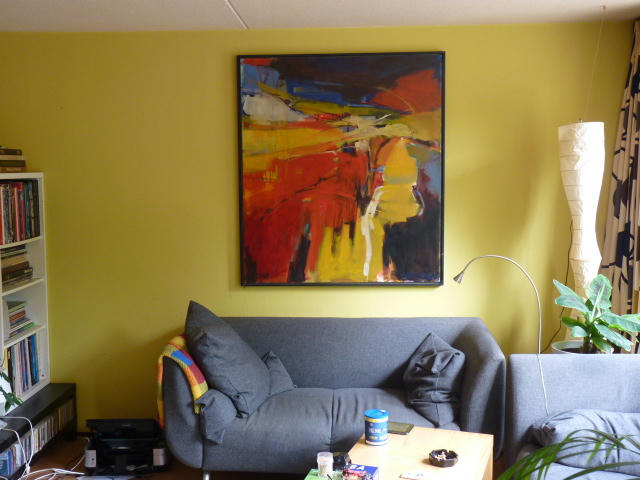
Below you can see a picture of part of my living room.
As you may notice the yellow wall has many different colours, even though the wall is painted in just ONE colour.
So, if SH3D shows many different colours, it correctly mimics what you see in real life.

H


----------------------------------------
Hans

new website - under constuction
hansdirkse.info

Posted by marqox at Jun 26, 2013, 7:25:18 AM
Re: 3D view wall color problems
Thanks guys for your reply.
I do understand there are shadings in real life with possibly quite a big difference in one area depending on lights.
Bottom line is, these colors look so much too green to us. Maybe it is our monitors or eyes, or we're just crazy I don't know smile

@hal9000, on what you wrote - the last image was with full brightness set. This does bring us closer to what we want to see, but makes white under any light impossible to see (in example, you can notice a lamp and white on the right side of the image and what it does to white areas). We are exploring walls (and kitchen elements) with white + yellow combination, and it has been a struggle to get this look anything (what we would consider) realistic.
Again, thanks for support, really trying to understand is it us, or there is something what we can do.

Posted by hal9000 at Jun 26, 2013, 8:32:57 AM
Re: 3D view wall color problems
Well, as I said, the colour is still yellow, as you can see from the RGB values taken from the pictures.

If still you want to get a lighter colour on the wall, you may try to change the brightness configuration of the wall, or cheat a bit and put the wall directly on a yellow slightly lighter than the one on the floor, so the final result comes closer to what you're expecting to see.
----------------------------------------
If a long walk every day were healthy, mailmen would be immortal. tongue
Posted by marqox at Jun 26, 2013, 9:16:17 AM
Re: 3D view wall color problems
Thanks Hal. Now I see my screenshot were a little oversimplifying, I made it just for better explanation. We don't want yellow floor (for sure, then we could be crazy, with yellow floors and yellow walls smile )

Here is the real-thing what we are trying to arrange - white kitchen, connected with living room, and trying to make some glass and walls of same yellowish color to "connect the space" better:
http://postimg.org/image/fjz2embvr/
http://postimg.org/image/i824k2tfn/

Above images are with about 70% general light brightness set. I can't get away from that green look on this.

Posted by hal9000 at Jun 26, 2013, 12:13:43 PM
Re: 3D view wall color problems
Seriously, I see it yellow and dark yellow. Are you sure your monitor is correctly calibrated?

In your images I find more "annoying" the bright yellow parts than the dark ones. I think you should try to use a less saturated yellow, making it lighter by adding a bit of blue.
----------------------------------------
If a long walk every day were healthy, mailmen would be immortal. tongue

Posted by hal9000 at Jun 26, 2013, 12:47:29 PM
Re: 3D view wall color problems
Another thing that you could do is put some "white light sources" (they are just light, not a visible object), making it rather big (for example one on each compartment of the shelf, making each the same size than the compartment to reduce the circular illuminated spot) and give them very little percent of illumination, so it just reduces the shadow to an acceptable level.

Not sure if it will work, but you can try.
----------------------------------------
If a long walk every day were healthy, mailmen would be immortal. tongue

Posted by marqox at Jun 26, 2013, 2:13:55 PM
Re: 3D view wall color problems
Thanks Hal for bearing with me on this one. Will try with your suggestions.
Just to be clear on yellow/green comparison, here, I've added an RGB 255,255,0 square to the images with Paint.NET. This square is yellow and walls are greenish (according to my wife, and that is the most important judgement smile)
http://postimg.org/image/wt43w3sov/
http://postimg.org/image/xervsgzw5/

Regarding monitors, now you mentioned it, just tried it on 3 different monitors, actually there is some difference on how "well" they show this 255,255,0 yellow (and depending on Color Intensity Preset Mode). But walls from Sweet Home are "greenish" everywhere.

Posted by hal9000 at Jun 26, 2013, 2:35:09 PM
Re: 3D view wall color problems
Just to be clear on yellow/green comparison, here, I've added an RGB 255,255,0 square to the images with Paint.NET. This square is yellow and walls are greenish (according to my wife, and that is the most important judgement smile)


Well that's because you're adding a pure 255,255,0 square while the yellow rendered by SH3D is shadowed, but if you use a program which let you take the colour from a pixel and see the values you'll find that it's using the same (or almost the same) values for RG and 0 for B, but of course these RG value is lower so it looks darker, but still yellow.

To me it look right, but if you (or your wife, tongue) don't like that way is your preference of course.

Anyway, forgot about the "one light on each compartment" solution, as I tried myself and it doesn't look right. But then I tried something which may work (not sure because I tried with a simple scene and it may look wrong with a complex one). The thing is as simple as take the "flashlight" object put it at mid elevation just in front of the virtual visitor (close enough so it cannot be seen) pointing forward to where the visitor is looking at, and with the light at 100% (you may adjust it lower if it's too bright).
----------------------------------------
If a long walk every day were healthy, mailmen would be immortal. tongue

Posted by fortytwo at Jun 28, 2013, 10:46:53 PM
Re: 3D view wall color problems
Hey Hal,
Any thoughts on the images I posted? I seem to be having a different issue than marqox. My color difference are much more drastic than just the shadows.

Thanks!

Posted by hansmex at Jun 29, 2013, 3:21:07 AM
Re: 3D view wall color problems
Judging by the stripes in the first picture, my guess would be that you have two walls overlapping each other. Delete the wall to check that there isn't another wall on the same spot.

Hans
----------------------------------------
Hans

new website - under constuction
hansdirkse.info

Posted by fortytwo at Jun 29, 2013, 5:50:15 PM
Re: 3D view wall color problems
Judging by the stripes in the first picture, my guess would be that you have two walls overlapping each other. Delete the wall to check that there isn't another wall on the same spot.

Hans


Ah ha! This was exactly the problem. Thanks Hans!

Posted by diwali at Sep 1, 2013, 1:50:07 PM
Re: 3D view wall color problems
Hello Hansmex
These two walls are obviously not overlapping.
They are supposed to be both yellow.
It seems that walls drawn vertically in the plan can't get the right colors.
This is a real problem.
Thanks for your help


Posted by hansmex at Sep 1, 2013, 3:12:41 PM
Re: 3D view wall color problems
The difference in colour comes from the shading that the renderer applies. It's an imitation of what naturally occurs.
If you rotate your design using the compass, you will see that the yellow wall becomes greenish and the greenish wall will become yellow.

Hans
----------------------------------------
Hans

new website - under constuction
hansdirkse.info

Posted by diwali at Sep 2, 2013, 8:05:15 AM
Re: 3D view wall color problems
Thanks for your reply,Hans,but rotating the compass has no effect on the colour of these walls... :-)