Version 1.1 is available.
It is compatible with the levels at same elevation.
I hope you will find it useful.

----------------------------------------
EnkoNyito
|
Sweet Home 3D Forum » List all forums » » Forum: Developers » » » Thread: Rename furniture |
|
| Print at Oct 1, 2026, 5:23:23 AM | |
| Posted by enkonyito at May 28, 2015, 5:58:14 PM |
|
Rename furniture Hi all! This plugin add the name of rooms to furniture or furniture groups. It works correctly with the Sweet Home 3D executable jar or Java Web Star. I have a problem with the Sweet Home 3D Windows installer on my computer or another. when I install my plugin, the splash screen remains frozen for several minutes. If i remove it, the Windows installer version working again with existing plugins. I enclose my unfinalized plugin (Java source included) to know if this bug is reproducible and how fixed it. Thanks for your help ---------------------------------------- EnkoNyito |
| Posted by Puybaret at May 28, 2015, 7:29:49 PM |
|
Re: Rename furniture Thanks for your plug-in. If it doesn't work with the installer, I suspect a Java version incompatibility. You probably compiled your classes for Java 7 or 8, whereas you should target Java 6 or 5 (the installer version comes with a JRE 6). ---------------------------------------- Emmanuel Puybaret, Sweet Home 3D creator |
| Posted by enkonyito at Jun 1, 2015, 4:56:04 PM |
|
Re: Rename furniture It was indeed a Java incompatibility. The problem was solved by configuring Eclipse with the installer JRE. I will put soon the plugin on SourceForge. ---------------------------------------- EnkoNyito |
| Posted by enkonyito at Jun 5, 2015, 8:49:20 PM |
|
Re: Rename furniture The discussion of Wishlist forum continues here. Thank you for the plug-in. It works as expected on my computer. Two small suggestions: 1 - The two characters you chose to surround the room name take up "a lot" of space. Maybe you could add only a "-" (hyphen) after the name? 2 - The plug-in adds "Rename" to the toolbar. Other plug-ins add "PLUGIN" and then add the plug-in under that "chapter". Maybe your plug-in could check if "PLUGIN" is already present, than add the plug-in to that category. If not, create that category. This would keep things a bit more standardized. Thanks again, Hans 1 - I use unusual characters to add the rooms name. What do you think of it '|' ? 2 - Some plug-in uses "Tools" in the toolbar as in the example of Developer's Guide. What-is the standard? I find a "Plug-in" menu would be much more meaningful. As Sweet Home 3D 5.0 will integrate levels at the same elevation, i would try to take into account this feature in the next version of the plugin. ---------------------------------------- EnkoNyito |
| Posted by Puybaret at Jun 6, 2015, 7:10:08 PM |
|
Re: Rename furniture Using a menu written in all uppercase letters doesn't sound nice. Some other plug-ins add a menu item in Tools menu and I would recommend to continue on this path. You could also put it in any existing menu, like Furniture menu, but at this moment, that will work nicely only in the English version and the localization you'll choose to support, and it will add a Furniture menu in other languages. ---------------------------------------- Emmanuel Puybaret, Sweet Home 3D creator |
| Posted by hansmex at Jun 6, 2015, 7:25:30 PM |
|
Re: Rename furniture I suggested PLUGIN because I have three plugins under that tab, and only one under TOOLS. ---------------------------------------- Hans new website - under constuction hansdirkse.info |
| Posted by enkonyito at Jun 9, 2015, 8:03:18 PM |
|
Re: Rename furniture Version 1.1 is available. It is compatible with the levels at same elevation. I hope you will find it useful. ---------------------------------------- EnkoNyito |
| Posted by enkonyito at Jul 4, 2015, 4:42:06 AM |
|
Re: Rename furniture The version 1.2 allows to rename the furniture included in a group. ---------------------------------------- EnkoNyito |
| Posted by enkonyito at Jun 13, 2016, 11:39:30 PM |
|
Re: Rename furniture Version 1.3 Displays the rooms name in bold. ---------------------------------------- EnkoNyito |
| Posted by enkonyito at Sep 22, 2018, 12:26:10 AM |
|
Re: Rename furniture Version 1.4 Improved treatment. ---------------------------------------- EnkoNyito |
| Posted by hansmex at Sep 22, 2018, 8:11:56 AM |
|
Re: Rename furniture Thanks, Enko, works perfectly! ---------------------------------------- Hans new website - under constuction hansdirkse.info |
| Posted by bdfd at Sep 22, 2018, 12:14:24 PM |
|
Re: Rename furniture Version 1.4 Excellent into a house but just a remark : Improved treatment. Why does the tool include objects outside buildings ? Garden, trees, sidewalks,... It's not necessary.  . ---------------------------------------- Evil progresses when good people do nothing! --- SH3D 7.1 and nothing else - W11 64b in 4K |
| Posted by bdfd at Sep 22, 2018, 12:23:10 PM |
|
Re: Rename furniture Update : it was only on exterior Walls (gutters, windows, doors,...). . ---------------------------------------- Evil progresses when good people do nothing! --- SH3D 7.1 and nothing else - W11 64b in 4K |
| Posted by enkonyito at Sep 23, 2018, 5:05:46 PM |
|
Re: Rename furniture @bdfd Why does the tool include objects outside buildings ? Garden, trees, sidewalks,... Update : it was only on exterior Walls (gutters, windows, doors,...). The plug-in adds to the name of a piece of furniture only the name of a room in which the center of the furniture is located and one of its corners with a margin of 1cm. This therefore depends on the position of the furniture in relation to a room, regardless of its type of environment (indoor or outdoor). ---------------------------------------- EnkoNyito |
| Posted by bdfd at Sep 25, 2018, 7:08:24 AM |
 Re: Rename furniture
@bdfd Ok for these explanations. Why does the tool include objects outside buildings ? Garden, trees, sidewalks,... Update : it was only on exterior Walls (gutters, windows, doors,...). The plug-in adds to the name of a piece of furniture only the name of a room in which the center of the furniture is located and one of its corners with a margin of 1cm. This therefore depends on the position of the furniture in relation to a room, regardless of its type of environment (indoor or outdoor).  But I didn't understand for these... 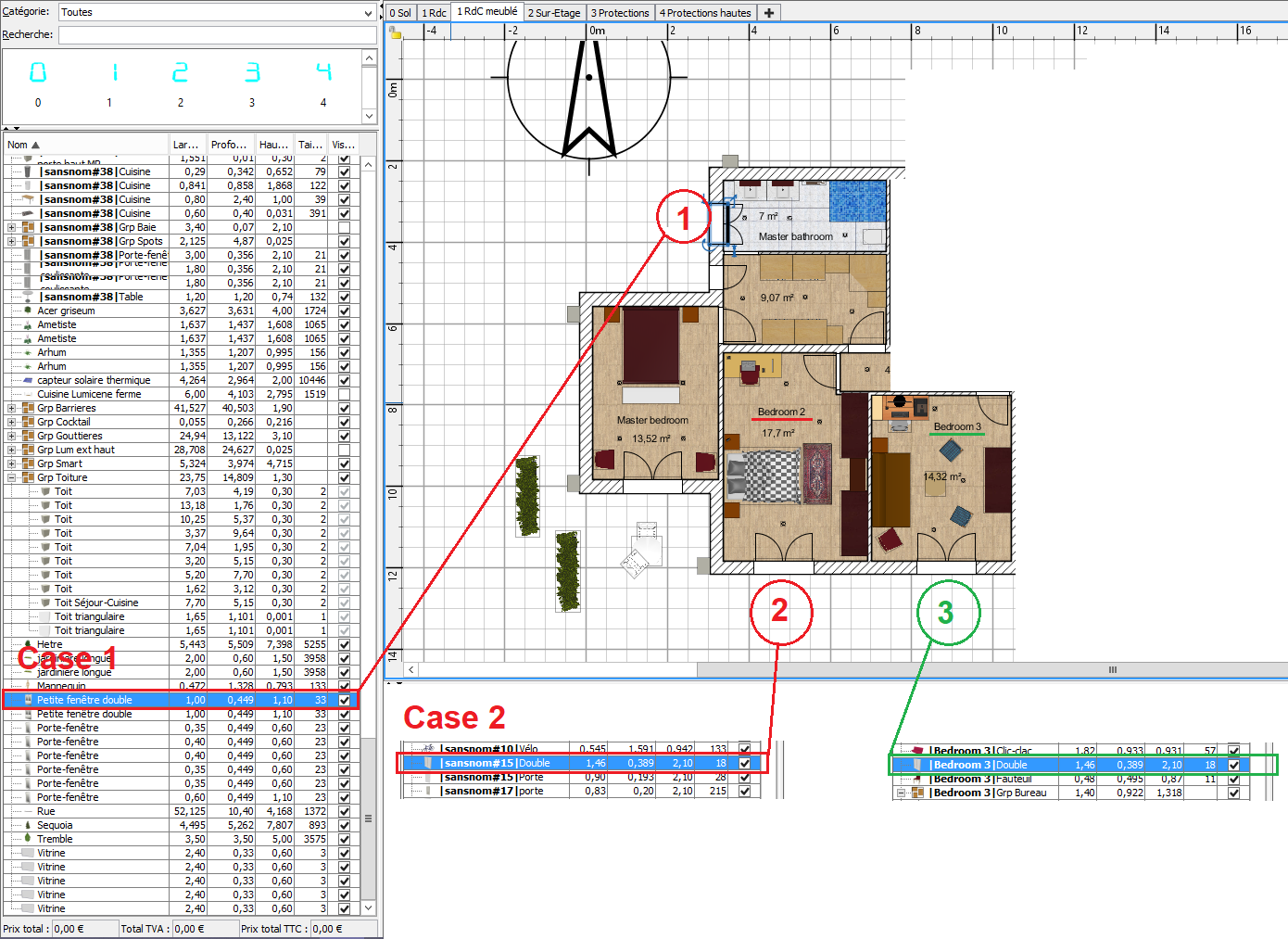 I used plugin v1.4 Case 1 The room has a name : 'Master bathroom' But the window has no name and NO named group ??? => all furniture below in the list are in same case… Case 2 The room has a name : 'Bedroom 2' But the window has no name and without named group ??? Case 3 The next room, nearest of previous anomaly has a name : 'Bedroom 3' It equipped of the same window. The window has a name like the room ! Can you explain us which is different ? Regards, bdfd. ---------------------------------------- Evil progresses when good people do nothing! --- SH3D 7.1 and nothing else - W11 64b in 4K |
| Posted by enkonyito at Sep 26, 2018, 2:02:10 AM |
|
Re: Rename furniture Illustration with the Studio demo file. before  after  As you can see, the 4 doors or windows in bold do not have their centers inside a room so they have not been renamed. ---------------------------------------- EnkoNyito |
| Posted by enkonyito at Sep 28, 2018, 5:17:31 PM |
|
Re: Rename furniture As shown in the user's guide , a selected piece of furniture has a rectangular outline (1 center and 4 corners). Which translates into coding: getXSo just change the outline of the room to take into account the renaming of the piece of furniture (in bold).  ---------------------------------------- EnkoNyito |
| Posted by bdfd at Sep 28, 2018, 5:28:49 PM |
|
Re: Rename furniture ...So just change the outline of the room to take into account the renaming of the piece of furniture (in bold). Yes, good tip !. ---------------------------------------- Evil progresses when good people do nothing! --- SH3D 7.1 and nothing else - W11 64b in 4K |

|
Current timezone is GMT Oct 1, 2026, 5:23:23 AM |