Print at Dec 19, 2025, 6:18:39 AM
Posted by enkonyito at Aug 27, 2015, 4:06:18 AM
Other rendering quality levels
To customize the photo rendering properties, I modify them in a text editor then I save the SweetHome3D.l4j.ini file in the installation folder and at last I relaunch the program.
As it is a bit tedious over time, is it possible to take into account these other rendering quality levels by compiling the source files or adding advanced settings in the photo panel using a plug-in?

I think it might interest some users.
----------------------------------------
EnkoNyito

Posted by Puybaret at Aug 27, 2015, 3:22:24 PM
Re: Other rendering quality levels
If you want, you can change the values in the source code, and run the program with Eclipse. All the photo rendering properties are used in PhotoRenderer class (search calls to getRenderingParameterValue method).
You could also create a plug-in that would set the rendering properties with calls to System.setProperty method.
----------------------------------------
Emmanuel Puybaret, Sweet Home 3D creator

Posted by enkonyito at Aug 27, 2015, 11:19:35 PM
Re: Other rendering quality levels
Thanks for your answer!

The option of the source code with Eclipse is useful mostly for testing and helps make other changes to the program.
I would keep the slider 4 position for predefined qualities:
  - Q1 : overview of 3D view with shading
  - Q2 (low) : globalIllumination = default, diffusedBounces = 1
  - Q3 (medium) : diffusedBounces = 0
  - Q4 (high) : globalIllumination = path, diffusedBounces >= 1

I will deal with the option of plug-in in depth for usual use.
----------------------------------------
EnkoNyito

Posted by hansmex at Aug 28, 2015, 7:19:20 AM
Re: Other rendering quality levels
Good idea! I've asked for a similar change.
----------------------------------------
Hans

new website - under constuction
hansdirkse.info

Posted by enkonyito at Aug 30, 2015, 2:55:53 AM
Re: Other rendering quality levels
I based on these configurations and some tests for predefined qualities.

The addition of the medium level was possible by modifying the files associated with the simple photo panel, photos panel at points of view and video panel.
The program works fine with eclipse or a runnable jar.

Quality 0 : 3D view


Quality 1 : default global illumination


Quality 2 : contrasting global illumination


Quality 3 : indirect global illumination


Is there a manipulation to do if the jar file not running on another computer?
----------------------------------------
EnkoNyito

Posted by Puybaret at Aug 30, 2015, 11:01:06 AM
Re: Other rendering quality levels
The default jarExecutable Ant target generates a Jar executable file able to run under Windows, Mac OS X and Linux, with 32 or 64 bit architecture.
----------------------------------------
Emmanuel Puybaret, Sweet Home 3D creator

Posted by enkonyito at Sep 1, 2015, 5:24:26 AM
Re: Other rendering quality levels
Emmanuel, my mistake was to do export runnable jar in Eclipse. By using the build.xml of the source and Ant, the created jar works on another system.

Those interested can test these other rendering quality levels with SH3D-5.0_advanced.jar .
With constrasting GI, use an interior light if not the image will be very dark.
With indirect GI, use a sky without texture otherwise the image will be completely black.

Quality 3_without ceiling light


Quality 3_with ceiling light

----------------------------------------
EnkoNyito

Posted by hansmex at Sep 1, 2015, 7:13:15 AM
Re: Other rendering quality levels
Thanks you for your file.
I downloaded it and did a few quick tests.

Q1 - completely distorted image
Q2 - usable image
Q3 - usable image
Q4 - overexposed image

Can you explain what the differences are between the settings and how we can get the best results?

Hans
----------------------------------------
Hans

new website - under constuction
hansdirkse.info

Posted by enkonyito at Sep 1, 2015, 7:40:18 PM
Re: Other rendering quality levels
Hans, I have not done tests on Mac OS X and Linux. I don't know if there can be a difference with Windows.

new Q0 = old Q1 : 3D View
new Q1 = old Q2 : default rendering
new Q2 : rendering without diffused bounces
new Q3 : rendering with diffused bounces

For more details, you can consult PhotoRenderer.properties file I edited in the source code.

Thanks for your feedback.
If you get the same result, can you put images to illustrate it?
----------------------------------------
EnkoNyito

Posted by enkonyito at Sep 16, 2015, 1:11:53 AM
Re: Other rendering quality levels
Hi all,

You can also test with SH3D-5.0_advanced a ceiling light less powerful and better centered for complex polygonal rooms.


The AdvancedSettings_PhotoRendering plug-in will allow you to modify the photo renderer properties. (parameters definition)

SH3D standard


SH3D advanced


Good use!
----------------------------------------
EnkoNyito

Posted by hansmex at Sep 16, 2015, 5:09:17 AM
Re: Other rendering quality levels
This is exciting!! Or it will be when it works.

After downloading the plugin and installing it, SH3D doesn't start anymore. After deleting the plugin, everything is back to normal.

System: Kubuntu 14.04 64-bits (fresh, standard installation).

I hope you can fix this...
----------------------------------------
Hans

new website - under constuction
hansdirkse.info

Posted by enkonyito at Sep 17, 2015, 5:16:44 AM
Re: Other rendering quality levels
Can you check the java version used by the program?

My SH3D-5.0 uses Java 1.8.

This is perhaps the same problem as last time . sad
----------------------------------------
EnkoNyito

Posted by hansmex at Sep 17, 2015, 8:43:36 AM
Re: Other rendering quality levels
Because Java 8 causes problems under Ubuntu, I always use Java 6.
That is also the version that comes (for the same reason) with the installer version of SH3D.

H
----------------------------------------
Hans

new website - under constuction
hansdirkse.info

Posted by enkonyito at Sep 17, 2015, 11:47:58 PM
Re: Other rendering quality levels
By testing with SH3D-4.6, the problem occurred.

Version 1.1 of the plug-in is compatible with Java 6.
----------------------------------------
EnkoNyito

Posted by Puybaret at Sep 18, 2015, 8:46:05 AM
Re: Other rendering quality levels
Thanks, it works this time smile
Not with Java Web Start version, but you can't do anything against that because it's due to security reasons in that environment.
----------------------------------------
Emmanuel Puybaret, Sweet Home 3D creator

Posted by Vkbear0 at Sep 19, 2015, 8:13:42 AM
Re: Other rendering quality levels
Thank you for this reply! This helps me a lot!
----------------------------------------
-The Hobbyist

Posted by okh at Oct 2, 2015, 10:05:20 AM
Re: Other rendering quality levels
Interesting plug-in and like the concept. While most of the menu items are understandable, some are not obvious (causticsPhotons???).

Photo (and video) rendering is always a trade-off between time and quality, and I wonder how the different values influence on performance. Trying and failing takes a bit too long. Maybe a little introduction/description/guide could be useful? Or just a little more explanatory text in the menu?

ok

Posted by enkonyito at Oct 4, 2015, 9:20:51 PM
Re: Other rendering quality levels
The plug-in in its current state is made for users who used a SweetHome3D.l4j.ini file, a Linux launch script or Jar command lines to change the photo renderer properties.

In this thread , Emmanuel Puybaret gives some explanation about those properties.
And you can find information on caustics here .


Here are the definitions of the quality parameters given in the PhotoRenderer.properties file:
* Minimum and maximum antialiasing used to compute image

* Global illumination algorithm: "default" or "path"
- "default" uses ambient occlusion during day hours in virtual visit mode
- "path" takes much longer to compute but gives more realistic view at day hours

* Maximum bounces done by light rays when global illumination "path" is used
- Increasing this value greatly slows down rendering process

* Caustics photons count, with 0 producing no caustics
- If different from 0, should be higher than 1000000 to obtain some visible effect

* Shader used to render shiny materials: "default", "glossy" or "silk"
- "default" uses silk shader at high quality level and in virtual view mode, glossy otherwise

* Focus distance in cm when depth of field is used

* Lens radius when depth of field is used
- A bigger value produces a narrower depth of field
----------------------------------------
EnkoNyito

Posted by okh at Oct 5, 2015, 9:23:32 AM
Re: Other rendering quality levels
Thanks, now I am confused at a higher level. smile Looking forward to trying. ok

Posted by enkonyito at Nov 14, 2015, 3:20:01 AM
Re: Other rendering quality levels
Version 1.2 of the plug-in incorporates some additional information.


----------------------------------------
EnkoNyito

Posted by enkonyito at Jan 13, 2016, 2:20:40 AM
Re: Other rendering quality levels
Version 1.3 of the plug-in incorporates 2 new rendering properties (filter and samplerAlgorithm) from SH3D-5.2 .


----------------------------------------
Attachment configureSunflowRenderingEngine.pdf (227128 bytes) (Download count: 3240) (Configure the SunFlow rendering engine with Sweet Home 3D version 4.0 and higher.)

----------------------------------------
EnkoNyito
Posted by mazoola at Jan 13, 2016, 8:47:21 AM
Re: Other rendering quality levels
FYI, for anyone looking for detailed information on the SunFlow rendering engine, a PDF copy of the old SunFlow Wiki can be found here.

Posted by okh at Jan 26, 2016, 8:15:48 AM
Re: Other rendering quality levels
A couple of interesting examples of use in thread 6462. ok

Posted by anhmax at Jan 26, 2016, 5:25:58 PM
Re: Other rendering quality levels
Thank Enkonyito a lot,
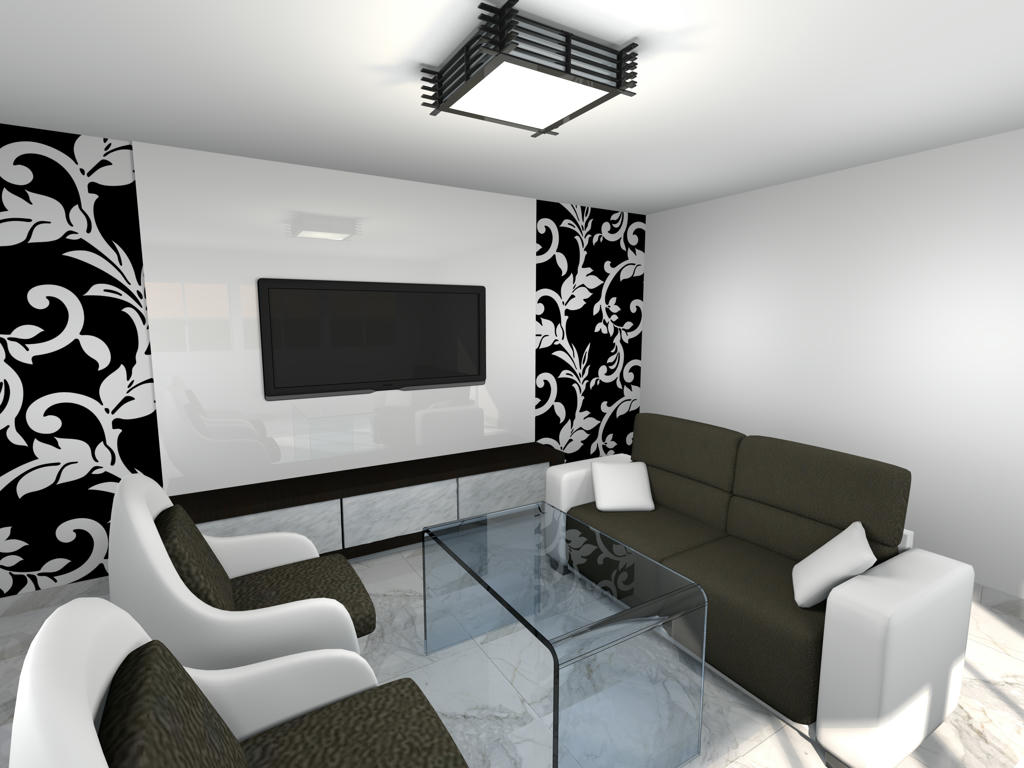
this plug-in helped me solve my question: "how to put shininess on furniture without reflecting the lights". Now I can set "shiny" on object such as TV screen without lights on it. We can look at the TV screen and the wall behind to see the effect.
Here is my image:

----------------------------------------
My channel:
https://www.youtube.com/channel/UCM1mqUjGRtD4uCXX5qzgG3w

Posted by enkonyito at Jan 27, 2016, 4:21:48 AM
Re: Other rendering quality levels
Glad to know this plug-in is also useful to others. wink
----------------------------------------
EnkoNyito

Posted by enkonyito at Jul 7, 2016, 6:25:36 PM
Re: Other rendering quality levels
Version 1.3.1
- Settings backup when saving the project

Option also available for the photo plug-in .
----------------------------------------
EnkoNyito

Posted by enkonyito at Jul 13, 2016, 4:44:30 PM
Re: Other rendering quality levels
In case of problems with previous links (unavailability of sourceforge), use the one attached.
----------------------------------------
Attachment AdvancedSettings_PhotoRendering-1.3.1.sh3p (23044 bytes) (Download count: 1047)

----------------------------------------
EnkoNyito

Posted by enkonyito at Nov 5, 2016, 11:41:06 PM
Re: Other rendering quality levels (Advanced settings of photo rendering plug-in)
Here is additional information on the interactions between parameters:

- For globalIllumination = default, no difference in rendering for diffusedBounces > 1
- For antiAliasing.max = 0 and samplerAlgorithm = multipass, anti-aliasing
- For antiAliasing.max >= 1 and samplerAlgorithm = multipass, identical anti-aliasing regardless of the value of antiAliasing.max
- For antiAliasing.max >= 1 and samplerAlgorithm = ipr or fast, no anti-aliasing
- For filter = box, no anti-aliasing regardless of the value of antiAliasing.max
- For samplerAlgorithm = fast, ipr or multipass, same filter effect regardless of the chosen type

To avoid confusion, safeguards will be put.

According to the BucketRenderer.java file, antiAliasing.max is limited to 5.
----------------------------------------
EnkoNyito

Posted by harbinger at Sep 24, 2018, 5:22:48 PM
Re: Other rendering quality levels (Advanced settings of photo rendering plug-in)
Disinterring this thread because i'm not finding the answers to a simple question: what do all the parameters mean both in definition and in application?

Can you provide the ranges for the values in each field and some examples of their effects?

I've done some reading in wikipedia (there are some dead-end links in this and other threads here), and gotten an idea of the theory, but i'm still not grasping how values used by this plugin will affect a rendering.

For example, i know what anti-aliasing is and i learned what photon mapping is and the definition of caustics, but what values do i put in the fields of this plugin? Is the 'caustics' value a Boolean, does it need a range between 0 and 1, are the effects linear or exponential (or something else)?

More examples and correct ranges would be very helpful. I would also like to know these parameters' effects on rendering times.

Posted by enkonyito at Sep 25, 2018, 3:22:30 AM
Re: Other rendering quality levels (Advanced settings of photo rendering plug-in)
@harbinger
Disinterring this thread because i'm not finding the answers to a simple question: what do all the parameters mean both in definition and in application?

This old plug-in, although functional is no longer maintained, allows to modify the parameters of the Sunflow rendering engine directly in Sweet Home 3D from the PhotoRenderer.properties file.
For more information, you will find here the document "Configure the SunFlow rendering engine" detailing the definitions of each parameter.
(String or numeric values are editable from the arrows)
----------------------------------------
EnkoNyito

Posted by svedel77 at Sep 26, 2018, 11:11:32 AM
Re: Other rendering quality levels (Advanced settings of photo rendering plug-in)
I think this is a great idea for a plugin. If you could make the possibilities for rendering movies at 60 FPS I would be very greatful.

Posted by harbinger at Sep 26, 2018, 7:27:02 PM
Re: Other rendering quality levels (Advanced settings of photo rendering plug-in)
Thanks - i was able to view the PhotoRenderer properties file and that answered the questions well enough. I was able to come up with better renders thanks to the explanations.

I will also take a look at the PDF you pointed to...

Posted by Wolf1066 at Apr 8, 2020, 10:57:59 AM
Re: Other rendering quality levels (Advanced settings of photo rendering plug-in)
At the risk of a major "thread necro", I've got to say: what an awesome plugin! Just found it and installed it this evening and had a bit of a play - primarily to get access to the global illumination options - and I'm absolutely rapt!
Many thanks enkonyito.
----------------------------------------
Crazy Kiwi bloke

Debian "buster" 10 64bit
Sweet Home 3D 6.3 64bit
i5 Quad-core 3.1GHz
8GB 1333MHz DDR3 RAM

Posted by enkonyito at Jul 18, 2022, 2:44:11 AM
Re: Advanced settings of photo rendering plug-in
Version 1.4
- compatible with SH3D-7.0 and higher
----------------------------------------
EnkoNyito

Posted by Puybaret at Jul 18, 2022, 8:45:15 AM
Re: Advanced settings of photo rendering plug-in
Thanks for adding YafaRay settings smile
----------------------------------------
Emmanuel Puybaret, Sweet Home 3D creator

Posted by sjb007 at Jul 18, 2022, 8:44:01 PM
Re: Advanced settings of photo rendering plug-in
So just to clarify... I have SH3D 7 (with Yafaray built in) and AdvancedSettingsPhotoRendering 1.4 plugin.

Should we uninstall YafarayRendering plugin completely? Or does it still have some function?

Posted by Puybaret at Jul 18, 2022, 9:11:28 PM
Re: Advanced settings of photo rendering plug-in
I don’t see a good reason to keep YafaRayRendering plug-in installed if you run Sweet Home 3D v7.
It offers less features than YafaRay renderer version in Sweet Home 3D.
----------------------------------------
Emmanuel Puybaret, Sweet Home 3D creator

Posted by enkonyito at Oct 1, 2023, 8:45:37 PM
Re: Advanced settings of photo rendering plug-in
Version 1.4.1

  • removal of properties identical to the default ones

----------------------------------------
EnkoNyito

Posted by CinemaWalls at Sep 4, 2024, 9:31:35 AM
Re: Advanced settings of photo rendering plug-in
I have already used these settings, but that's the problem, that even the value "normalLens.radius = 1" already gives such a blur as if there is a lens with a 1.8 "hole" on the camera - the DOF is very small.
At the value of radius = 3, the grip is generally several centimeters, almost everything is out of focus. About the other values, more than 3 - I don't understand at all - why are they?
I would like to suggest making several radius values up to one, instead of those useless ones. This would greatly improve the capabilities and quality of the renderers.

I'm applying the renderers for an example

https://imgur.com/a/wJ2WAyb

https://imgur.com/a/17UqX0A

Posted by Puybaret at Sep 4, 2024, 10:44:40 AM
Re: Advanced settings of photo rendering plug-in
Try a value smaller than 1 (0.5, 0.2 etc)
----------------------------------------
Emmanuel Puybaret, Sweet Home 3D creator

Posted by CinemaWalls at Sep 4, 2024, 3:49:52 PM
Re: Advanced settings of photo rendering plug-in
Try a value smaller than 1 (0.5, 0.2 etc)


- and that it was possible? shock

Posted by Puybaret at Sep 4, 2024, 4:17:31 PM
Re: Advanced settings of photo rendering plug-in
You should have remembered that on a less, the aperture is actually prefixed with "1 :", like "1:3.5".
----------------------------------------
Emmanuel Puybaret, Sweet Home 3D creator