Print at Dec 19, 2025, 12:39:25 AM View all posts in this thread on one page
Posted by rkv104 at Nov 4, 2015, 6:28:12 PM
Set of Helpful Utility Plugins
hi friends,

I have created a plugin package with 4 plugins that i normally use to expedite my work in sweethome3d. Thought i would share it with sweethome3d community.

4 plugins are

1)enhanced "Duplicate Style" plugin (all credits to original developer) -> Duplicate style (texture, color) from

furniture to furniture
door to door
window to window
room to room
wall to wall

2)"Intelligent select" -> To select items at current selected level by entering values 1 to 8

(All windows should have string "window" in its name for option 5 to work for selecting windows)

for choices 1 to 7 you need to enter number only
for choice 8 you need to enter 8,text1,text2,..,textn

Option 8 helps to select all objects containing entered texts in there name. You need not have to enter entire text like "windows". only part of text like "dow" will also work.
e.g: enter 7,dow,ed to select all windows and beds at current level

3)"Intelligent Hide/Show" -> To hide items at current selected level by entering values 1 to 7. use value 8 to show items hidden using option 1 to 7.

Hide:
for choices 1 to 6 you need to enter number only
(All windows should have string "window" in its name for option 5 to work for hiding windows)

for choice 7 you need to enter 7,text1,text2,..,textn

Option 7 helps to hide all objects containing entered texts in there name. You need not have to enter entire text like "windows". only part of text like "dow" will also work.
e.g: enter 7,dow,ed to hide all windows and beds at current level


Show:
Show all hidden items by entering value 8


4)"Copy Properties" -> Copy Properties (width, depth,height, angle, elevation) of first selected Object to other selected objects at Current Selected Level

It copies properties of first selected object to similar other selected objects.

e.g:
furniture to furniture
door to door
window to window
wall to wall


Plugin installation steps

1)Download the plugin

Here is the link for plugin file kept on mediafire...

www.mediafire.com/download/i50333o2cysnhor/UtilityPlugin.sh3p


2) Copy the plugin in sweethome 3d plugins directory

plug-in may be deployed on the computer by simply copying "UtilityPlugin.sh3p" in the plug-ins folder.

In my computer plugins location was it was in location
C:\Users\Rohit\AppData\Roaming\eTeks\Sweet Home 3D\plugins


3) Start or restart SweetHome3d

after copying file start sweethome3d.

The plugins will be available in "PLUGIN" tab in menu


General comments

Just try if it fits your needs ..otherwise you can always remove it...

the plugin file contains the original source code files also..

in case anybody wants to make any enhancements..he has all the rights to do so...

Also while using intelligent hide plugin make use of option 8 to display all hidden items......Only undo works in intelligent hide and does same job as choice 8...redo function does not work in intelligent hide plugin...

Hope it is of some help to you all..

cheers,

Posted by Puybaret at Nov 4, 2015, 7:34:24 PM
Re: Set of Helpful Utility Plugins
Thanks for this plug-in smile
Maybe you should try to use buttons rather than forcing the user to enter a value...

1) What is the difference between Duplicate Style and Copy / Paste Style?

2) I had the idea to add a Select all furniture / Select all walls / Select all ... for a long time, but never programmed it because I wonder if it could be really useful. Option 8 is an interesting idea.

3) I noticed that redo wasn't working in some cases.
----------------------------------------
Emmanuel Puybaret, Sweet Home 3D creator

Posted by dorin at Feb 13, 2019, 12:39:35 PM
Re: Set of Helpful Utility Plugins
I found it useful and I decide myself to post this plug-in on sourceforge .
Accordingly with principle "If You don't like AS IS then DIY",
I modify the original code to suits my needs. I add/remove few lines.
The principal features was kept as is described in this post by the original creator but:
-I remove the actions which are already implemented (Copy/Paste Style)
-I rename from Intelligent to Special
-I put it under Edit menu
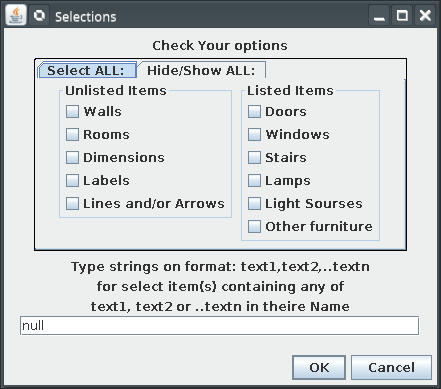
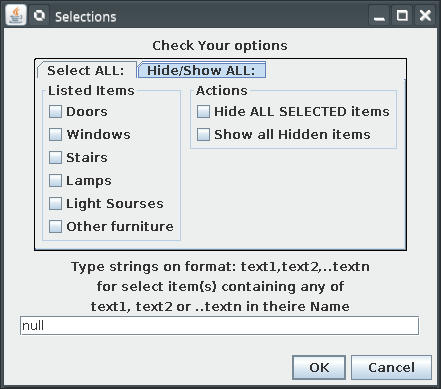
-I modify the interface (radio buttons).
Please don't shut the pianist; I'm not a programmer.
Sweet dreams:
The intention is to learn more and hope to improve it by more specific selections and combination of selections.
Also I want to update it to features provided by the actual version of SH3D (dimensions, poly lines)
----------------------------------------
A computer program does what you tell it to do, not what you want it to do. Murphy's Law
When all else fails, read the instructions. Murphy's Law
If you don't like "AS IS", DIY. Dorin's law

Posted by Ceciliabr at Feb 14, 2019, 7:12:46 AM
Re: Set of Helpful Utility Plugins
Excellent work!


cec

Posted by dorin at Feb 17, 2019, 6:58:39 PM
rose   Re: Set of Helpful Utility Plugins
Thank You cec! You are too kind.
My unique neuron feel very happy!
But I'm not satisfy yet. So I need to fallow the principle I've already enunciated.
In the category "sweet dreams" I wish to:
1. Combine the two plugin in one
2. Possibility to combine different option
3. Keep the option to select by name input
The easiest part of work (visual part) I've don like this:

Now I must make this functional.
Wile the few modification made for previously version took me two month, I don't know how much time I need to learn to do this.
So don't make too much illusions!
Meanwhile maybe You make some comments about this (or maybe is useless to try more in this direction and I avoid a work)
----------------------------------------
A computer program does what you tell it to do, not what you want it to do. Murphy's Law
When all else fails, read the instructions. Murphy's Law
If you don't like "AS IS", DIY. Dorin's law