Print at Feb 4, 2026, 3:23:05 PM
Posted by enkonyito at Nov 17, 2015, 4:50:21 PM
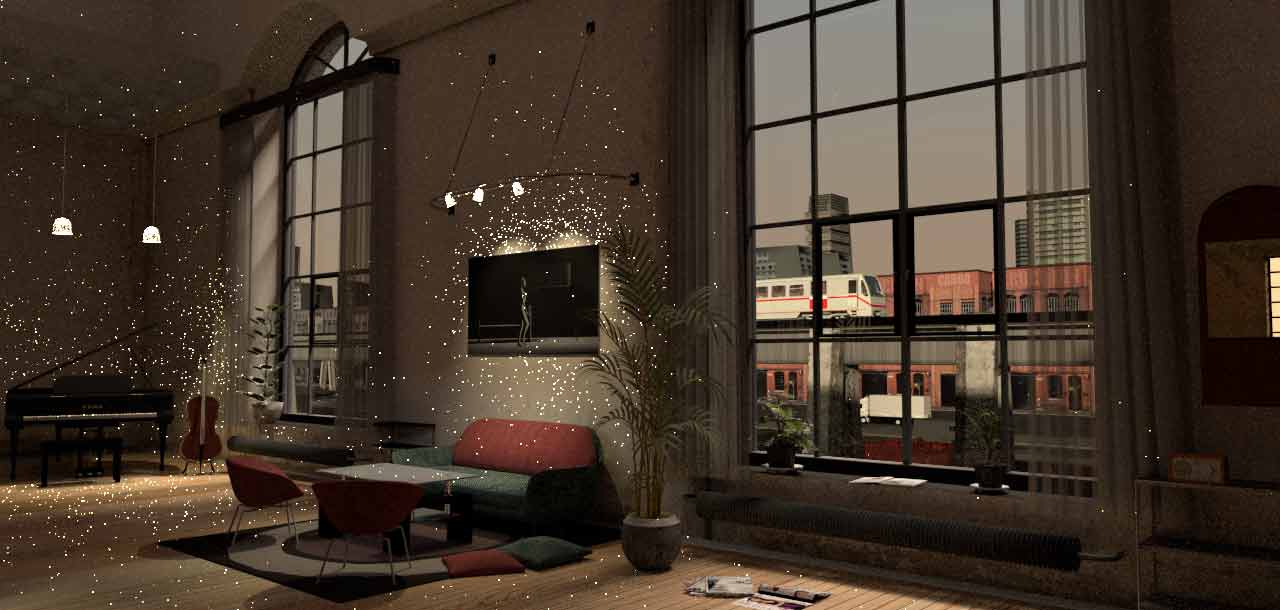
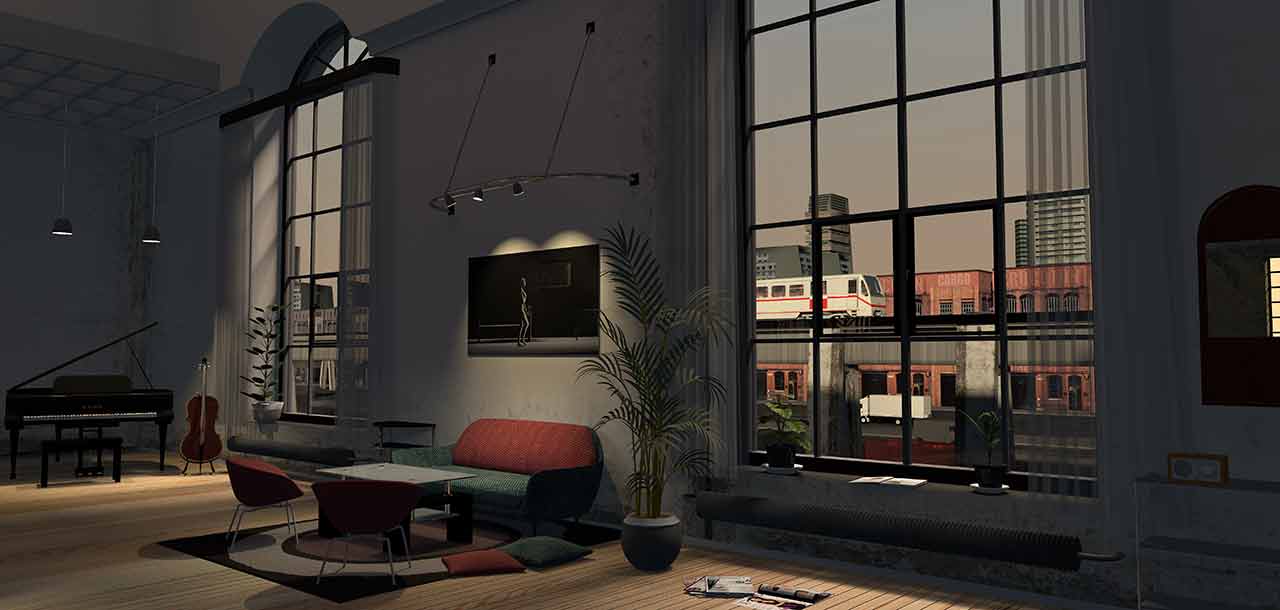
Comparative global illumination
By default, Sweet Home 3D uses global illumination "ambient occlusion".


Indirect light reflected by objects can be simulated by setting global illumination to "path".

The rendering will be longer.
----------------------------------------
EnkoNyito

Posted by HawkDawg at Nov 17, 2015, 7:10:20 PM
Re: Comparative global illumination
Where do you change this setting?
----------------------------------------
Hawk

Posted by enkonyito at Nov 18, 2015, 12:02:10 AM
Re: Comparative global illumination
By using this plug-in .
More info about it here .
----------------------------------------
EnkoNyito

Posted by HawkDawg at Nov 18, 2015, 1:34:18 AM
Re: Comparative global illumination
Thanks. I have that plugin installed. I know what you're talking about now.
Must have been a senior moment that it didn't dawn on me. laughing
----------------------------------------
Hawk

Posted by hansmex at Nov 18, 2015, 3:34:01 AM
Re: Comparative global illumination
Recently, I upgraded my PC, so it's much faster now. Therefore I decided to play around with this photo plug-in. Unfortunately, I can't figure out how it works.

Am I correct in thinking that this plug-in has effect only when making a render in Q4?

Hans
----------------------------------------
Hans

new website - under constuction
hansdirkse.info

Posted by HawkDawg at Nov 18, 2015, 3:40:16 AM
Re: Comparative global illumination
I believe it works in Q3 and Q4.
----------------------------------------
Hawk

Posted by enkonyito at Nov 18, 2015, 7:18:57 PM
Re: Comparative global illumination
Hans, Hawk,

Version 1.2 of the plug-in incorporates some additional information like an illustration quality levels and a small parameters definition.

Hans:
Am I correct in thinking that this plug-in has effect only when making a render in Q4?
Hawk:
I believe it works in Q3 and Q4.
It is used as a SweetHome3D.l4j.ini file, a Linux launch script or Jar command lines to change the photo renderer properties at the two best quality levels (Low/Q3 and High/Q4).

Hans:
Unfortunately, I can't figure out how it works.
I should perhaps make a tutorial like plug-ins and extensions User Guide .

Regarding global illumination "path" , a sky with texture can give a rendering dark, powerful lights can give a dazzling rendering.

Enko
----------------------------------------
EnkoNyito

Posted by HawkDawg at Nov 19, 2015, 6:59:32 AM
Re: Comparative global illumination
Version 1.2 of the plug-in incorporates some additional information like an illustration quality levels and a small parameters definition.

That's the one I have. smile
----------------------------------------
Hawk

Posted by enkonyito at Jan 15, 2016, 3:47:37 AM
Re: Comparative global illumination
A tutorial explaining the use of the plug-in is available here .
----------------------------------------
EnkoNyito

Posted by santbose at Jan 15, 2016, 5:11:32 AM
Re: Comparative global illumination
Hi Enkonyito,

I have downloaded the plugin 1.3 and using the portable version of SH3D 5.1. But am not able to select the filters and Sampler Algorithm. Neither the option Create photo with advanced render properties is working. Can you please help me and guide me how to use the plugin. I am doing a large scale project for my client.

Posted by santbose at Jan 15, 2016, 5:13:25 AM
Re: Comparative global illumination
I am using a Windows 7 OS

Posted by Puybaret at Jan 15, 2016, 8:02:48 AM
Re: Comparative global illumination
The two last properties can be set only in the coming version 5.2 (and not in Java Web Start version).
----------------------------------------
Emmanuel Puybaret, Sweet Home 3D creator

Posted by digitaltrails at Jan 15, 2016, 8:38:27 AM
Re: Comparative global illumination
A tutorial explaining the use of the plug-in is available here .


Thanks for writing up the tutorial.

I'm just starting to play with the plugin. Here is some feedback on the tutorial.

Because experimenting with different renderings is so slow, it would be helpful if the tutorial included some examples of good values from which to start as well as some indication or reasonable ranges to try.

It would also be good to describe some different specific example values with some explanation of the visual changes one might expect as well as some measure of the impact on rendering times (doubles, triples, ..). For example, does each increment of diffused-bounces increases rendering time linearly or exponentially? What is a good practical value for diffused-bounces, one that gives reasonable results for reasonable rendering times?

I'm currently trying 1 diffused bounce, which is taking quite along time for a 256x198 image (perhaps half an hour so far - it's taking so long I lost track). I can see that I will have to experiment with image sizes of less than 256x198 in future (AMD Phenom(tm) II X6 1090T - 6 CPU cores).

Posted by enkonyito at Jan 15, 2016, 9:00:18 PM
Re: Comparative global illumination
I have downloaded the plugin 1.3 and using the portable version of SH3D 5.1. But am not able to select the filters and Sampler Algorithm. Neither the option Create photo with advanced render properties is working. Can you please help me and guide me how to use the plugin.

santbose,
For the portable version of Sweet Home 3D, place the SH3P file in the data/plugins folder.
You can test the 2 new rendering properties with the beta version of the Windows installer pending the official release of SH3D-5.2 .
----------------------------------------
EnkoNyito

Posted by enkonyito at Jan 16, 2016, 2:25:22 AM
Re: Comparative global illumination
Because experimenting with different renderings is so slow, it would be helpful if the tutorial included some examples of good values from which to start as well as some indication or reasonable ranges to try.

digitaltrails,

The tutorial will not only describes the use of plug-in, it can be seen as a quick start guide for this one. This is why I generally indicates the influence of some parameters on the rendering time.
In this thread , it is specified how the complexity of a project (number and power of lights; transparency, relection, refraction or brightness of objects) increases the rendering time. The number of pixels of the image and the maximum value for antialiasing also have an influence.

Regarding the path tracing, here are some examples of tests that I had done. (full size)


antiliasing max = 0, difused bounces = 1, rendering time : 03mn 57,21s


antiliasing max = 1, difused bounces = 1, rendering time : 13mn 31,50s

With additional lights little powerful.

antiliasing max = 0, difused bounces = 1, rendering time : 07mn 25,41s

With additional lights little powerful.

antiliasing max = 1, difused bounces = 1, rendering time : 24mn 32,43s

You can choose difused bounces = 2 to enhance the brightness of a room while keeping the same antialiasing max.

Generally, I use antiliasing max = 0, diffused bounces = 0 and an image of size 2 times wider than I resizes to reduce noise (white dots).
----------------------------------------
EnkoNyito

Posted by digitaltrails at Jan 17, 2016, 8:00:55 AM
Re: Comparative global illumination
enkonyito:

Thanks for the additional examples, much appreciated.

Posted by enkonyito at Aug 28, 2017, 11:51:37 PM
Re: Comparative global illumination
At quality level 3 and 4, 3 rendering types are possible by modifying the properties.

Common settings: default values (quality 4)
Dimensions: 640x480 pixels

Default rendering

GlobalIllumination: default, diffusedBounces: 1

Contrasting rendering

GlobalIllumination: default or path, diffusedBounces: 0

Indirect rendering

GlobalIllumination: path, diffusedBounces: 1
----------------------------------------
EnkoNyito

Posted by enkonyito at Jul 12, 2019, 6:32:15 PM
Re: Comparative global illumination
The following Global Illuminations will be offered with the new version of the photo-video plug-in.


Fake Ambient Term 2 is not available with the standard version of Sweet Home 3D.

Enko
----------------------------------------
Attachment Cornell Box.sh3d (709349 bytes) (Download count: 506)

----------------------------------------
EnkoNyito

Posted by Mike53 at Jul 12, 2019, 10:06:07 PM
Re: Comparative global illumination
I like the path tracing, i do however find the jump from 16 sec to over 4 mins daunting, roughly 17 times longer, mmmmm.
Quality certainly comes at a cost

Posted by maureenowaters at Oct 12, 2019, 3:43:34 PM
Re: Comparative global illumination
Nice comparison.

Posted by enkonyito at Mar 13, 2020, 3:33:20 PM
Re: Comparative global illumination
Lighting methods of the YafaRay rendering engine.


----------------------------------------
EnkoNyito

Posted by bdfd at Mar 14, 2020, 4:49:12 AM
Re: Comparative global illumination
Lighting methods of the YafaRay rendering engine.


Without hesitation, this is the best !

wink
.
----------------------------------------
Evil progresses when good people do nothing!
---
SH3D 7.1 and nothing else - W11 64b in 4K

Posted by UbuntuBirdy at Mar 14, 2020, 10:54:28 AM
Re: Comparative global illumination
Lighting methods of the YafaRay rendering engine.


Without hesitation, this is the best !

wink
.


Jep, I totally agree!
----------------------------------------
Pascal

SH3D 6.6 / Ubuntu 22.04 (Mainline-Kernel) / Radeon RX580 / Ryzen 7 5800x

Posted by Ceciliabr at Mar 17, 2020, 12:27:49 AM
Re: Comparative global illumination
Without hesitation, this is the best !


Well, that may be so when it comes to rendering a test-file, but when it comes to rendering an actual project file, the outcome might not be so obvious:

Path tracing:


Direct lighting:


Test files are just test files, and will never be anything but test files, and test files do not represent anything other than themselves.
And what they represent is certainly miles apart from any project file that the average SH3D-user will ever create.

So, is the path-tracing really better than direct lighting?
Do your own tests, on your own projects, and find out.


Cec

Posted by bdfd at Mar 17, 2020, 5:36:38 AM
Re: Comparative global illumination
OMG, cec is in the thruth,.

Conclusion: each project is a particularity and the used methodology is not written in the stone.

wink
.
----------------------------------------
Evil progresses when good people do nothing!
---
SH3D 7.1 and nothing else - W11 64b in 4K

Posted by bam0o at Apr 12, 2020, 12:06:05 PM
Re: Comparative global illumination
Have the same issues with path... Tried with PVR 1.9 YafaRay renderer.
Here is little preview of the result. Don't want to waste the time to render bigger resolution.


Posted by bam0o at Apr 12, 2020, 10:04:05 PM
Re: Comparative global illumination