Print at Dec 16, 2025, 9:18:17 AM View all posts in this thread on one page
Posted by thomas1991 at Jan 4, 2016, 9:38:25 PM
Textures not loading when importing
Hi,

I'm currently building my new home in sweet home 3d in order to get a grasp of how everything is going to look once finished. I must say i love the way the program works. Building my home seems rather simple.

I just bought a new lamp in Amsterdam at the flea market(where I live) and i found a similar 3d model online. At the following link:
http://3dsky.org/3dmodels/show/prozhiektor_na_trienoghie_1
my lamp is a bit more bulky.

I want to import this 3d model into sweet home 3d. Once downloaded the model comes with a .max file, .obj file and a couple of textures. It is possible to import the .obj file but then it's missing all the textures. Is there someone who can make a .obj file or any other extension to import the lamp including textures into sweet home 3d?

Kind regards,

Thomas1991
The Netherlands

Posted by okh at Jan 5, 2016, 8:10:23 AM
Re: Textures not loading when importing
For the .obj file to work it should have an accompanying .mtl file to sort out where to put textures and colours. Without it all the .obj references will disappear.

But I guess there might be a workaround if your .obj model is not too complicated: Try to edit the .obj file references to SH3D native colours (one of the exact names shown in the colour chart below). The .obj file is clean text, so you could open it in any text editor and substitute current references (lines beginning with usemtl) - for instance like this:

usemtl materialxxx >> usemtl grey
usemtl materialyyy >> usemtl amber

etc

At least that way I think the model should retain different colours (and names) for the different surfaces - and you can later modify them in SH3D.
Failing that, you could always look for other similar models like the 3D Warehouse spotlight on a tripod.

ok
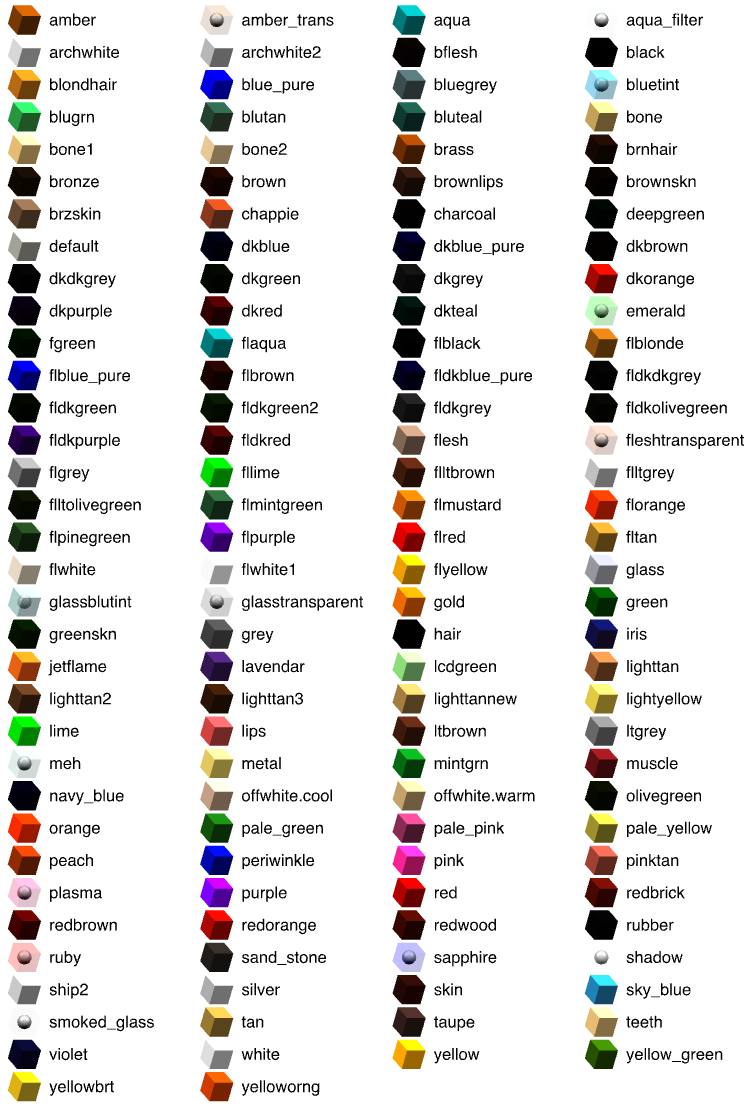


PS .max format, I think, is a binary somehow related to the .3ds format. Doubt it works, but you could also try renaming your .max file to *.3ds.

Posted by okh at Jan 5, 2016, 9:53:35 AM
Re: Textures not loading when importing
I could not help myself and took a quick at the model from 3dsky.
1) The method above will not work on the .obj file included as there are no groups or material references in the .obj file.
2) The model-file is large and texture-files are enormous (files add up to 286 MB - way too much).
3) You could edit the model with Bleder/Art of Illusion or some other software. At least the .obj file should import (even if some errors were reported).

Maybe it is better to forget that model and try to find another model (like above, or this). Or you could combine a tripod and a lamp to create a model that looks like yours.

Sorry about the bum steer. ok

Posted by thomas1991 at Jan 5, 2016, 10:26:09 AM
Re: Textures not loading when importing
Dear Okh,

First of all thanks for your detailed reply. I tried editing the text file but indeed the text file is way to complex for someone who is just learning how to work with SH3D.

In other words, the model is to big (in MB) and to complex for me and for probably for SH3D. I will have to do with another model like the ones you have mentioned.

Thanks for your help. Case closed for me.

Kind regards,

Thomas1991