Should I try this on my XP machine, or am I to outdated?

----------------------------------------
Hawk
|
Sweet Home 3D Forum » List all forums » » Forum: New versions » » » Thread: Sweet Home 3D 5.2 |
|
| Print at Sep 27, 2026, 9:59:56 AM | |
| Posted by Puybaret at Jan 11, 2016, 2:44:25 PM |
|
Sweet Home 3D 5.2 Hi, Here's a first beta version of Sweet Home 3D 5.2. For the moment, this version fixes a few small bugs among which: - the issue reported by Mazoola about the size of some sh3d files that grow too much when the texture of a furniture material is set to its default value - a bug reported by OKH about wrong doors or windows cutouts - a bug that changed the level of walls created from a split. This time, I provide also a Windows installer to ensure that users who have problems under Windows 10 can test the program with the latest Java version 8u66. [Note from developer: Sweet Home 3D 5.2 was released on February 17, 2016] ---------------------------------------- Emmanuel Puybaret, Sweet Home 3D creator |
| Posted by okh at Jan 11, 2016, 4:49:42 PM |
|
Re: Sweet Home 3D 5.2 Congratulations! Looks good. bug reported by OKH about wrong doors or windows cutouts Yes, bug vanished as far as I can tell. Windows installer to ensure that users who have problems under Windows 10 Windows installer version 5.2 Beta 1 Java version 1.8.0_66 / 64 bit / 1.8 GB maxIntel Core i3 @ 1,8 Laptop, Intel HD Graphics 4000 Windows 10 Home 64-bit (10.0, Build 10586) (10586.th2_release.151121-2308) DirectX 11.2 No issues found after a quick test (but had no problems with Win 10 and 5.1 either). Only oddity is that I seem to get US Date/Time format in the Create Photo/Video dialogues (but that may be a Win 10 problem that I just did not notice with 5.1; it is not the only language/locale problem that Win 10 has introduced - the region settings in Win 10 are correct European, btw). ok PS. My problem is to understand the advantages of Win 10 in general. OK, it comes with some bells and whistles that I am unlikely to use (the 3D builder may be nice for 3D printing .obj exports, possibly even edit, but so far I cannot be bothered to figure it out). In fact, my only experience with Win 10 is that the options for changing settings are generally limited. It seems the Laptop is more under Redmond control than mine. Especially constantly sucking processing power and bandwidth dry whenever many of the zillion upgrades/updates/fixes need to be downloaded/applied. It may come as a surprise to MS, but using PC for normal stuff is actually more important to me than all those "exciting new features". But then, that really is not a SH3D issue... |
| Posted by HawkDawg at Jan 12, 2016, 6:32:59 AM |
|
Re: Sweet Home 3D 5.2 Should I try this on my XP machine, or am I to outdated? ---------------------------------------- Hawk |
| Posted by okh at Jan 12, 2016, 7:41:55 AM |
|
Re: Sweet Home 3D 5.2 Also, no longer the reported Win 10 printing problem in bugs 609 and thread 6087. Probably as said, a problem related to the "jeunesse de Windows 10" rather than Java/SH3D. ok |
| Posted by mazoola at Jan 12, 2016, 10:27:08 AM |
|
Re: Sweet Home 3D 5.2 HawkDawg (et al.) -- Seems to run fine on my XP system. I've only attempted to save some small, test plans (still trying to come up with a viable 'frosted glass' texture) and not my 300 Mb albatross, but so far no doubling down on file size.... Maz |
| Posted by HawkDawg at Jan 12, 2016, 2:37:30 PM |
|
Re: Sweet Home 3D 5.2 HawkDawg (et al.) -- Seems to run fine on my XP system. I've only attempted to save some small, test plans (still trying to come up with a viable 'frosted glass' texture) and not my 300 Mb albatross, but so far no doubling down on file size.... Maz Great! Are you running the installer or the web start version? ---------------------------------------- Hawk |
| Posted by Puybaret at Jan 12, 2016, 8:04:23 PM |
|
Re: Sweet Home 3D 5.2 Thanks for your feedback  Unfortunately, from this thread and a private report I received, using Java 8u66 doesn't seem to have fixed some issues under Windows 10. I will submit something else in the coming days... ---------------------------------------- Emmanuel Puybaret, Sweet Home 3D creator |
| Posted by mazoola at Jan 13, 2016, 8:48:09 AM |
|
Re: Sweet Home 3D 5.2 Hawk - I'm running the installer version [on XP]... Maz |
| Posted by HawkDawg at Jan 13, 2016, 9:45:38 AM |
|
Re: Sweet Home 3D 5.2 Hawk - I'm running the installer version [on XP]... Maz Great! That's what I'm currently running. Thanks! ---------------------------------------- Hawk |
| Posted by mazoola at Jan 16, 2016, 12:55:29 PM |
|
Re: Sweet Home 3D 5.2 Emmanuel - Alas, a few minutes ago I saved a home plan using SH3D 5.2 beta 1 -- and it recursively saved itself.  I had just finished adding the latest version of my largest 'furniture' model*; it contains a couple dozen defined materials, of which I remap at least half to a new texture. I know in at least one case I made use of a self-referential texture -- that is, under 'Materials,' I opened a defined texture, selected the existing texture in order to add it to the array of thumbnails, and clicked 'OK'; I then opened another material definition, clicked 'Texture,' and selected the thumbnail I previously added. I have no idea why it chose to save recursively in this instance when in earlier tests with the beta I had intentionally made use of self-referential textures in a model without triggering the erroneous save. After I take a break, I'll return the redefined textures in the recently added model to their defaults and save the project again; with luck, clearing the reference will allow SH3D to store the file correctly. Please let me know if there are any tests or information you need from me. Thanks, maz * It models two decks with railings, an external stairway from one deck to the next, a triangular section of infrastructure that serves as walls and ceiling for an interior stairway and support for the exterior stairway, and carved exterior trim boards along the edges of the decks and stairs. I import it as a 17+ Mb KMZ file I generate from Sketchup; however, a single texture accounts for nearly 8 Mb of the total. 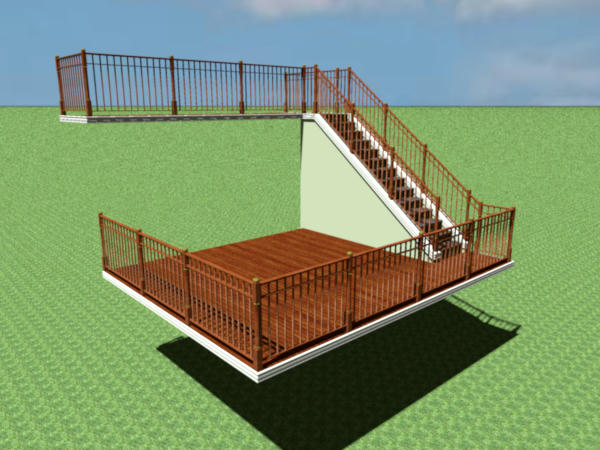 |
| Posted by hansmex at Jan 16, 2016, 1:14:42 PM |
|
Re: Sweet Home 3D 5.2 You may want to check your textures. There's a longstanding advice that textures be no bigger than approx 1000 pixels wide or long. An 8 MB texture seems to be quite a big bigger than that. H ---------------------------------------- Hans new website - under constuction hansdirkse.info |
| Posted by HawkDawg at Jan 17, 2016, 2:01:06 AM |
|
Re: Sweet Home 3D 5.2 I had just finished adding the latest version of my largest 'furniture' model*; it contains a couple dozen defined materials, of which I remap at least half to a new texture. I know in at least one case I made use of a self-referential texture -- that is, under 'Materials,' I opened a defined texture, selected the existing texture in order to add it to the array of thumbnails, and clicked 'OK'; I then opened another material definition, clicked 'Texture,' and selected the thumbnail I previously added. It sounds like; by adding that new texture to an existing array of thumbnails, SH3D decides it's a new sub-compilation of the original, creating a sub-directory of the original instead of just updating the original. ---------------------------------------- Hawk |
| Posted by enkonyito at Feb 1, 2016, 7:21:31 PM |
|
Re: Sweet Home 3D 5.2 Concerning the new photo renderer properties, I made tests with SweetHome3D-5.2.beta1-windows.exe and the SimpleRoom.sh3d file. Can the following renderings match what could be expected with the indicated parameters? Common settings: antiAliasing.min = 1; antiAliasing.max = 2; filter = blackman-harris. The times are given on an indicative basis. BucketRenderer  samplerAlgorithm = bucket; rendering time : 01mn 25.56s SimpleRenderer  samplerAlgorithm = fast; rendering time : 06.49s ProgressiveRenderer  samplerAlgorithm = ipr; rendering time : 11.38s MultipassRenderer  samplerAlgorithm = multipass; rendering time : 01mn 49.45s For information, the final rendering and its duration is similar with the parameters antiAliasing.min=0 and antiAliasing.max=0 for samplerAlgorithm=fast, ipr or multipass. ---------------------------------------- EnkoNyito |
| Posted by hansmex at Feb 2, 2016, 7:11:56 AM |
|
Re: Sweet Home 3D 5.2 My results for this test: Computer: Windows 10, 6 cores SH3D: v5.2 b1 with 3.6 GB allocated Plug-in: Advanced settings for photo rendering v1.3 Default settings: Q4 (including 1/2 AA, blackman-harris) Variable settings: sampler bucket: +/- 7 seconds (= default settings for plug-in) fast : less than 1 sec ipr: less than 1 sec multipass: not available (where did you get that?) Additional tests global illumination: default, diffused bounces: 1 --> +/- 7 seconds (= default settings for plug-in) gi: path, db: 1 --> 2:58 min (worst result of these 3 tests) gi: path, db: 2 --> 6:20 min (best result of these 3 tests) H ---------------------------------------- Hans new website - under constuction hansdirkse.info |
| Posted by enkonyito at Feb 2, 2016, 11:05:19 PM |
|
Re: Sweet Home 3D 5.2 My configuration : CPU 2 cores, SH3D 0.6 GB max. For samplerAlgorithm=fast, do you have the same type of rendering? The multipass parameter is not yet integrated into the plug-in because it is not indicated in the PhotoRenderer.properties file. As the MultipassRenderer.java file is present in the source code, you can test it with a SweetHome3D.l4j.ini file by adding -Dcom.eteks.sweethome3d.j3d.PhotoRenderer.highQuality.samplerAlgorithm=multipass . ---------------------------------------- EnkoNyito |
| Posted by santbose at Feb 3, 2016, 4:59:59 AM |
|
Re: Sweet Home 3D 5.2 How do you allocate in SH3D as you mentioned you have allocated 3.6GB Hansmex. Can you please help me in this. |
| Posted by hansmex at Feb 3, 2016, 5:06:22 AM |
|
Re: Sweet Home 3D 5.2 Please, read the FAQ, especially the section on the XMX trick. ---------------------------------------- Hans new website - under constuction hansdirkse.info |
| Posted by Puybaret at Feb 4, 2016, 9:18:52 PM |
|
Re: Sweet Home 3D 5.2 Here's a second Beta version. As the first Beta version didn't resolve the issues of some Windows 10, I also prepared a Windows installer bundled with Java 8u72 released a few days ago. Hope this time it will work better. I was able to fix the other issue reported by Mazoola. Many thanks for your detailed report, it was very helpful. I didn't realize it was possible to reuse the textures of a piece of furniture through the recent textures list, nice trick!  This version fixes also a bug that prevented to change the proportion of the photos at the two first quality levels. Finally, it brings the two following improvements: - the width of a door or a window displayed in the plan takes now into account the width of its doorOrWindowCutOutShape# property. This can be tested with the files fermette_02.sh3d and windows_etc.sh3d designed by OKH. - I added an Invisible radio button in Furniture materials dialog box to make a material invisible and hide the parts of a model that uses it. Using this option will avoid the "ghost" issue that appeared on photos when you used the invisible texture trick. 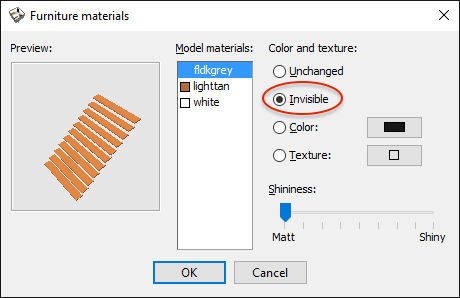 ---------------------------------------- Emmanuel Puybaret, Sweet Home 3D creator |
| Posted by hansmex at Feb 4, 2016, 9:48:47 PM |
|
Re: Sweet Home 3D 5.2 Emmanuel, Just downloaded 5.2 b2 and it works fine under W10. Invisible texture works fine as well. Invisible parts don't cause shadows in Q4. VERY nice feature! Hans ---------------------------------------- Hans new website - under constuction hansdirkse.info |
| Posted by okh at Feb 5, 2016, 1:08:58 PM |
|
Re: Sweet Home 3D 5.2 Quick test: Tried the Win10 installer, beta 1 installed without a glitch, however, now with Version 5.2 Beta 2 Java version 1.8.0_72 / 64 bit / 1.8 GB max I get "The signature of SweetHome3D-5.2.beta2-windows.exe is corrupt or invalid." It is still possible to install b2 if you ignore a barrage of Win attempts to prevent you from installing. Don't know whether this comes from beta2/Java 8u72 or some annoying Windows update (it updates non-stop). (Win 10 Home, Cumulative Update for Windows 10 Version 1511 for x64-based Systems (KB3124262). - apparently up-to-date as of today). width of a door or a window displayed in the plan takes now into account the width of its doorOrWindowCutOutShape# property. Very nicely implemented, and certainly makes it easier to make door and window models.added an Invisible radio button in Furniture materials dialog box to make a material invisible and hide the parts of a model that uses it Love this feature, especially that later exporting the model removes the element marked invisible. Very useful if you want to remove parts of a model. But I suppose that means that it is not possible to set invisible in the .mtl file (as a sort of default - hidden element)? Not that it matters, better to be able to remove. However, with a candlestick (model with candle and lightsource) I could indeed remove the candles by setting to invisible. But the candles reappeared in the 3D view when I added more furniture (still marked invisible, and exporting still "removes" the invisible part completely). This happens both under win81 webstart and win10 installer. Sent you file with misbehaving model. Could it be the lightsource, because it does not happen with other models I tried, or is it because I removed an extremity of the model? Will test more later. ok ok |
| Posted by YGYL at Feb 13, 2016, 5:14:38 AM |
|
Re: Sweet Home 3D 5.2 'Invisible texture 'It is a very good feature. Equivalent to DEL the extra parts. If you add to modify Material Opacity feature and Rotation feature is better. |
| Posted by Puybaret at Feb 15, 2016, 9:33:01 PM |
|
Re: Sweet Home 3D 5.2 Tonight, the Beta 3 fixes the issue on invisible parts reported by okh. The Windows installer should fix the error on the signature okh and others reported. This new version brings also a few improvements: - Resizing furniture with its resize indicator is now proportional when shift is pressed. - The plan viewport (the visible part of the plan when it's displayed with scroll bars) moves only when selected items become completely invisible after a change. This should improve an annoying behavior that moved the visible part of the plan at big zoom factors when you used the arrow keys to move an object. - A group doesn't store its color or texture anymore, and when you modify the color, texture and shininess on a group, the modification will now directly alter the children of the group, as if you had selected them first (this is a very subtle difference that didn't worth it, and was annoying for future XML file format). - I tried to improve the scale of the user interface with the new com.eteks.sweethome3d.resolutionScale system property equal to a factor that will be applied to fonts and icons displayed in the interface. This will allow to enlarge the program interface for computers with a HiDPI screen, but can be tested on any computer. You can try it with the Windows installer by adding the line -Dcom.eteks.sweethome3d.resolutionScale=1.5The font in the help pages isn't resized yet, but I hope I'll find a solution before the final release. Note also the changes in the source code for this feature are not committed in CVS yet, and I wait for your feedback before doing it. Hope there are some beta testers among you who can test it on a HiDPI computer! Many thanks to Dan for his suggestions. YGYL, sorry, I don't think transparency management on materials will appear soon, and rotation won't be for this time. But years after years, I have new ideas about rotating furniture around other axes, and the last idea I found might be not too difficult to understand for everybody. ---------------------------------------- Emmanuel Puybaret, Sweet Home 3D creator |
| Posted by okh at Feb 16, 2016, 8:52:26 AM |
|
Re: Sweet Home 3D 5.2 Interesting new features - shall be looking forward to trying. fixes the issue on invisible parts reported by okh. The Windows installer should fix the error on the signature okh and others reported Yes - both issues are fixed. Thanks.Still, after Win10 upgrade the Windows Smart Screen suddenly blocks me from even attempting to run (even before the normal warnings). Biggest trouble not a warning in itself, but that the option to overruleis hidden in the blue More info text and does not appear as a button. It seems the Smart Screen existed even under Win 8 and before, but the strange thing is that it did not appear on this PC until Win10 upgrade (I may well have disabled it, or it may be that SH3D was on the list before). I suspect this may impact SH3D downloads because users give up or do not think of pressing the More info text. It happens both with IE and Firefox, so not only a browser issue. But e.g. Sketchup is not blocked by the Smart Screen.  http://sourceforge.net/p/sweethome3d/bugs/651/ |
| Posted by Puybaret at Feb 16, 2016, 9:33:03 AM |
|
Re: Sweet Home 3D 5.2 Thanks for your feedback To let you test more easily the com.eteks.sweethome3d.resolutionScale feature, I prepared a x2 scale version of the user interface that you can run with this special Java Web Start link. Under Linux, it also uses an other look and feel because setting size fonts don't have any effect on the default look and feel. The Java Web Start link doesn't seem to work properly under Mac OS X, but it's not important on that system, because Retina HiDPI screens are already automatically managed in Java. ---------------------------------------- Emmanuel Puybaret, Sweet Home 3D creator |
| Posted by okh at Feb 16, 2016, 9:33:53 AM |
|
Re: Sweet Home 3D 5.2 More in stackoverflow on what triggers the Smart Screen - I guess it may just be a new release issue. Off topic, I know, but I cannot help being annoyed by the fact that an option to run is hidden in the More info text. And this is an obstacle to market entry for many brilliant outsider developers, see also FSF blog post. |
| Posted by okh at Feb 16, 2016, 11:39:09 AM |
|
Re: Sweet Home 3D 5.2 ALSO WITH 5.1 installation: Tried installing the normal download too with Win10 / Edge (read somewhere that Edge has an additional implementation of SmartScreen in addition to what now appears to be part of the Win10 OS). Having vented my frustrations in SF bugs 651, I will shut up and go back to work. ok  |
| Posted by mazoola at Feb 17, 2016, 8:22:43 PM |
|
Re: Sweet Home 3D 5.2 You probably know this already, but neither the web start nor the installer versions of 5.2 beta (any) are currently available... |
| Posted by Puybaret at Feb 17, 2016, 9:17:31 PM |
|
Re: Sweet Home 3D 5.2 The version 5.2 was released tonight, and therefore I removed all the beta versions. For your information, I found a way to display the help at a larger scale for the HiDPi version. Hope you'll like the new logo:    Many thanks for your support! ---------------------------------------- Emmanuel Puybaret, Sweet Home 3D creator |
| Posted by mazoola at Feb 17, 2016, 11:11:41 PM |
|
Re: Sweet Home 3D 5.2 The version 5.2 was released tonight, and therefore I removed all the beta versions. Well, that would explain it! Thanks for the fast fixes and enhancements. I've been out of town for a little while, and am looking forward to playing with the new version. (So far I'd only been able to try 5.2 beta 1.) By the way, have you managed to make it through my far-too-long rambling discussion of anti-aliasing in SunFlow? I've been trying to step through the source to see if I could find any possible problems with SunFlow's oversampling and surface normals, but with no luck. I suspect I'll need to compile a copy with maximum debugging code activated before I'll have a chance of finding anything -- a temptation I'm trying to resist until I manage to get some consulting gigs scheduled -- but hoped I might have jogged your memory about something you'd seen earlier. I'm still experimenting with aa.min = 0, aa.max = 4 with good results, but it would be nice to know for certain if these settings are truly an improvement.... Thanks again -- I'm off to play with 5.2 (release)! Maz |
| Posted by okh at Feb 18, 2016, 7:53:44 AM |
|
Re: Sweet Home 3D 5.2 Thanks - and congratulations! BTW: Win installer works like a charm and with no SmartScreen / certificate warnings - tried on both 8.1 and 10. ok |
| Posted by Puybaret at Feb 19, 2016, 7:59:28 PM |
|
Re: Sweet Home 3D 5.2 For your information, all installers and source code were updated on February 19, 2016 to fix a possible conflict during auto saving of homes for recovery (version in About dialog shown as 5.2a). Sorry for an inconvenience this may cause. I must have some bad luck with .2 versions ---------------------------------------- Emmanuel Puybaret, Sweet Home 3D creator |
| Posted by okh at Feb 19, 2016, 8:13:13 PM |
|
Re: Sweet Home 3D 5.2 Been assessing some software products in my time. SH3D does not even come close to any list in terms of lack of stability. So, no reason to loose sleep over this - what is very nice is that you turned around and produced a fix the same day - enjoy your week-end. ok |
| Posted by Puybaret at Feb 20, 2016, 8:31:43 AM |
|
Re: Sweet Home 3D 5.2 Have you managed to make it through my far-too-long rambling discussion of anti-aliasing in SunFlow? I read your interesting comment (it's never too long). As said before, I might adjust default settings of Sunflow in a future version, but I prefer to go very carefully on this subject.---------------------------------------- Emmanuel Puybaret, Sweet Home 3D creator |
| Posted by hansmex at Feb 20, 2016, 9:47:42 AM |
|
Re: Sweet Home 3D 5.2 Emmanuel, Probably several people are willing to experiment with settings. Ideally, we would have: - a timer added to the photo creation window; - more options in the Advanced Settings Photo Rendering plug-in; - a standard file that shows all the (un)wanted features: - - interior light; - - exterior light entering through window(s); - - glass and transparency; - - white spots; - - "double" textures (Mazoola example); - - flipped faces on (Sketchup) models, etc. Finally, a list of tasks of different settings worth exploring. H ---------------------------------------- Hans new website - under constuction hansdirkse.info |
| Posted by mazoola at Feb 22, 2016, 10:02:53 AM |
|
Re: Sweet Home 3D 5.2 Emmanuel - I've found a few oddities about v 5.2a. Quite a few have to do with its handling of surface normals (spoiler alert: it does so differently from v 5.2 beta 1), and it displays some odd persistent-state behavior (e.g., render Image 1 at Q4 default; change a render setting and generate Image 2; reset to defaults and render Image 3: Image 1 and Image 3 are not identical.) However, as this is undoubtedly brain-numbing for virtually everyone, and as I'm still running tests, I'll document what I've found in the next day or so in its own thread. I do want to mention three non-surface normal issues I've found though, in the meantime. Let me know if you'd like tickets opened against these. 1. When using the click-and-drag method of changing Virtual Visitor eye height in the 2D window, the Visitor icon shrinks as it is lowered, making it difficult to manipulate further. As a work-around, the user can double-click on the icon and return the eye height to its usual level in the properties window. (If the mouse button hasn't been released, raising the eye height will cause the icon size to increase until it reaches its default.) 2. The 3D window (in Virtual Visitor mode, at least; I haven't tested it in Aerial View) often fails to update or takes an inordinately long time to update. For instance, if I change from one level to another at a different elevation, the 3D display may change to reflect the Visitor's new elevation. When I return to the original level, though, the display will often continue to display the scene from the previous level. If I do this while monitoring system resources through Task Manager or SysInternals' Process Monitor, I see CPU utilization by the Java process drop to and remain at 0%, even though the 3D display doesn't update. Selecting or resizing the 3D window will not cause the display to update; moving the Visitor's position usually will, albeit often only after a significant delay. 3. Not quite as reproducible, I find after I open the furniture properties window, especially for a complex model, when I go to close it SH3D often takes an unusually long amount of time to do so -- even if no changes have been made. (For instance, select a complex model, open its properties window, and click the 'Materials' button. Without modifying any materials, select 'Cancel.' Often, there is a long delay before the 'Materials' window closes, returning you to the 'Properties' window. Select 'Cancel' from this window, and another long delay occurs before the 'Properties' window closes.) I've also had the system freeze while trying to cancel out of the 'Materials' window, requiring me to kill the Java process. Admittedly, I'm running on an underpowered Core2 Duo running 32-bit XP on 4 Gb RAM, so I'm at least partly to blame... |
| Posted by leeG at Feb 22, 2016, 4:39:07 PM |
|
Re: Sweet Home 3D 5.2 Question on Mac App Store and Version 5.2. I purchased Sweet Home 3D from the Mac App Store on Feb 20. It is Version 5.1.1. Is there going to be an Mac App Store update to 5.2? Thanks |
| Posted by Puybaret at Feb 23, 2016, 9:56:25 AM |
|
Re: Sweet Home 3D 5.2 LeeG, please be patient. It takes always more or less a week to Apple to review new versions. ---------------------------------------- Emmanuel Puybaret, Sweet Home 3D creator |
| Posted by mazoola at Feb 24, 2016, 11:15:14 AM |
|
Re: Sweet Home 3D 5.2 Emmanuel - Um... never mind. After a day spent fighting the three problems I mentioned earlier, for the last two days I've had no trouble at all with SH3D. (Well, the 3D window seems to take a little longer to update than previously -- but, then, my plan is significantly larger.) My best guess is there were conflicts among libraries in use. I'd started out running 5.2 beta 1 before installing 5.2 and, shortly after, 5.2a. At that point I started noticing the delays and hangs. Because of the surface normal issues, rather than leave the PC on overnight to render a complex scene, I powered it off; when I returned to it the following night, everything was OK. I can only assume the reboot cleared out whatever internal struggle had been going on. This raises the question whether the surface normal problems I found (and painstakingly documented  ) actually exist. I'll dive back in later today.... ) actually exist. I'll dive back in later today....Thanks, maz |
| Posted by jz77f at Feb 27, 2016, 7:39:50 AM |
|
Re: Sweet Home 3D 5.2 It's great to see a new version! Sorry to say that, but the old problem with crashing in Ubuntu when one opens the Preferences or runs Create Photo is back. Version 5.0 works well. Note I have java version "1.7.0_95", OpenJDK Runtime Environment (IcedTea 2.6.4) (7u95-2.6.4-0ubuntu0.14.04.1), OpenJDK 64-Bit Server VM (build 24.95-b01, mixed mode). |
| Posted by beber_mal at Feb 27, 2016, 11:29:01 AM |
|
Re: Sweet Home 3D 5.2 hi Jz77f, it's a known issue with some linux distributions. read the FAQ at the question "Sweet Home 3D crashes when I want to edit preferences, print, create a photo or create a video. What can I do?" |
| Posted by mazoola at Mar 5, 2016, 3:18:23 AM |
|
Re: Sweet Home 3D 5.2 Emmanuel - I recently installed versions 4.6, 5.1, and 5.2a simultaneously to compare render quality and handling of Sketchup two-sided faces -- but I'm not here to talk about that. Instead, I swear it seems as if images render faster using a bucket size of 64 than one of 32 -- even though I can't think of any reason that would actually be the case. (I'm sure it is slightly faster, simply from having to do only half as many bucket set-ups and tear-downs, but I can't imagine the difference would be perceivable.) Instead, I have to assume it's simply an illusion -- but it's a welcome illusion. Thanks, maz |
| Posted by Puybaret at Mar 5, 2016, 10:24:48 AM |
|
Re: Sweet Home 3D 5.2 I updated the bucket size to 64 because I read it was a good default value. Actually, I hope it's better than 32, not only for the speed. By the way, about the problems you reported when you updated to version 5.2: When using the click-and-drag method of changing Virtual Visitor eye height in the 2D window, the Visitor icon shrinks as it is lowered There was no change in this behavior (for reasonable height values, the visitor size is supposed to match the size of the human with the eyes at the same elevation as the camera), but I know I should find a better solution. Actually the indicators at the border of the visitor have an higher priority when the mouse pointer is placed on them, making the center zone used to move the visitor too small in some cases.The 3D window (in Virtual Visitor mode, at least; I haven't tested it in Aerial View) often fails to update or takes an inordinately long time to update. Maybe you unchecked the Adjust eyes elevation according to selected level option available in the virtual visitor modification pane when there's more than a level in a home?after I open the furniture properties window, especially for a complex model, when I go to close it SH3D often takes an unusually long amount of time to do so -- even if no changes have been made. Did you notice it was longer than with previous versions? Maybe the home you design becomes quite large, and as you're under a 32 bit system, it won't be possible to use much more RAM for the program.---------------------------------------- Emmanuel Puybaret, Sweet Home 3D creator |
| Posted by mazoola at Mar 5, 2016, 11:27:09 AM |
|
Re: Sweet Home 3D 5.2 Emmanuel -- Please see this post; I fear I didn't make it clear enough what I was referring to. After testing and documenting those three consistently repeatable errors, I rebooted -- and they all went away. I suspect it was a conflict between versions when installing one on top of the other. Many (but not all) of the render oddities disappeared after the reboot, as well. maz |
| Posted by mazoola at Mar 9, 2016, 7:58:47 PM |
|
Re: Sweet Home 3D 5.2 @Emmanuel - While the extreme delays in updating the 3D window or to return from editing an object have not recurred, I have experienced the Incredible Shrinking Virtual Visitor again under 5.2a. Unfortunately, I still haven't identified the sequence of actions required to enter that state (or to leave it, for that matter). The symptom is the same as initially reported: Using the click-and-drag method to lower or raise Visitor eye height causes the Visitor icon to shrink or grow, respectively. maz |

|
Current timezone is GMT Sep 27, 2026, 9:59:56 AM |