Print at Dec 17, 2025, 4:11:56 AM
Posts: 31   Pages: 4   [ Previous Page | 1 2 3 4 | Next Page ]
View all posts in this thread on one page
Posted by okh at Feb 7, 2016, 10:21:46 AM
Re: What am I doing wrong?
Treating cow skin disease: First of all, remove that horrid lipstick. While cow proportions are good, I doubt the designer ever had stick his hand in a cow's mouth.

What seems to work when exporting .dae from Sketchup, is to:
- Select all and explode all groups/components,
- Repeat until there are no groups/components,
- Use Materials (In model) dialogue to select one material at the time,
- Use Entity Info dialogue and apply same material to both surfaces (in the case off the cows, the reverse side is unassigned).
- Repeat for each material (Model Info, Statistics, Purge unused, makes this easier).

Export the model (without checking option Export Two Sided Faces) and import to SH3D. As far as I can tell, from a very quick rendering test, there is no bleed-through or skin disease. However, I have not checked whether the model contains wrongly oriented normals - and I have not experimented with orienting faces in Sketchup. But at least, it seems the model works reasonably well in SH3D.

ok

PS - there are other ways of selecting all surfaces with the same material in Sketchup too - which is more convenient depends on the model.

Posted by DiabolikHinata at Feb 16, 2016, 5:23:24 PM
applause   Re: What am I doing wrong?
Hi to all, this is my first post, i'm new in this forum, and also using sh3d!
First of all.... NICE WORK ceciliabr! applause
I think you're doing nothing wrong! of course i say that from the bottom of my knowledge... :P
just one question, for you or for someone who can help me (i think i can open a new thread by the way) : where did you find those spotllight??? i mean... how do you import an external 3d, object, with the light attributes? confused when i import a new furniture, for example, a lamp downloaded from internet, how can i "say" to the program that there is a light source?

I've tried to solve this problem in other way, for example putting a light source into a cone and making it an almost-spotlight but... is possible that there isn't a way to import directly a lamp with light source? Thank you

Posted by Ceciliabr at Feb 17, 2016, 4:31:45 PM
Re: What am I doing wrong?
Hi,

I make most of my models from scratch.
The downlights are real simple, tree elements: An open cylinder with a ring around the bottom and a closed cylinder to seal the top ( to prevent the light from hitting the ceiling). Export it as an obj-file, and import it using the import furniture option. If you tick the "Staircase"-box, you can elevate them into the ceiling. You have to place a light-source in it afterwards, since obj-files don't support lights. In use the incandescent light and scale it to 2cm. The higher you put the, the more focused the light beam becomes... obviously.

Posted by Ceciliabr at Feb 17, 2016, 4:50:36 PM
Re: What am I doing wrong?
In case U need it:

http://ceciliabr.com/UC/Cylinder open.mtl

http://ceciliabr.com/UC/Cylinder open.obj


Here is a transparent png-file. You will find it very usefull, I'm sure smile

http://ceciliabr.com/UC/Transparent.png

Posted by Ceciliabr at Feb 17, 2016, 4:51:43 PM
Re: What am I doing wrong?
Opp! Broken link
n case U need it:

http://ceciliabr.com/UC/Cylinder_open.mtl

http://ceciliabr.com/UC/Cylinder_open.obj


Here is a transparent png-file. You will find it very usefull, I'm sure smile

http://ceciliabr.com/UC/Transparent.png

Posted by okh at Feb 17, 2016, 4:57:30 PM
Re: What am I doing wrong?
Ceciliabr has got it right. This is of course a much more direct way of doing it than messing around with the .sh3f properties and the result is the same if you stick to normal light colours.

ok

Posted by korence at Feb 19, 2016, 3:28:49 AM
Re: What am I doing wrong?
Thanks for your such nice post, guys.

Posted by hansmex at Feb 19, 2016, 6:21:16 AM
Re: What am I doing wrong?
Maz,

In theory, 1024x over-sampling using (aa = 5) should result in even additional improvement

I decided to try this out. Indeed it works, but you have to be patient.
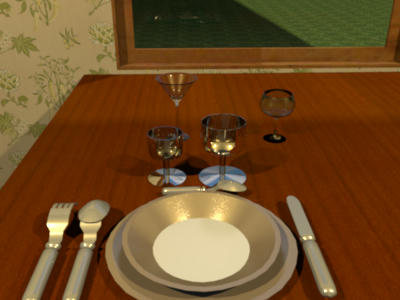
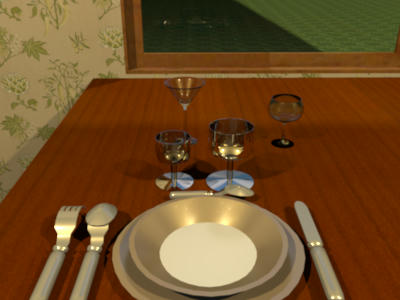
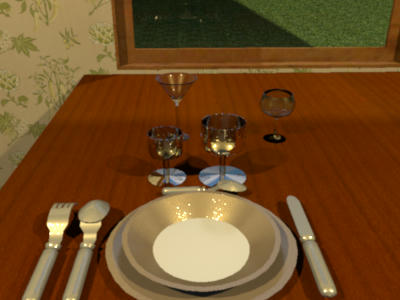
Even this small 400x300 pixels image took several hours to render with settings aa=55. Especially the glasses take VERY long. See below for results.

aa11

aa33

aa55

----------------------------------------
Hans

new website - under constuction
hansdirkse.info

Posted by mazoola at Feb 20, 2016, 12:37:03 AM
Re: What am I doing wrong?
Hans -

Thanks for the tests! I suspect my problem is memory size; I'm still running 32-bit XP on this machine, and the one time I gave it several hours to process, the render routine simply returned the 'start' button active, which SH3D appears to do after some types of failure. (I have a garage door object I brutally hacked into size with Sketchup in the days before I knew how to use Sketchup, the mere presence of which anywhere in a home plan manages to kill any render of any scene in the plan.) As best I can tell -- and I've only looked at the stock SunFlow source, not the bugfixed version Emmanuel includes -- any value greater than 5 is set to 5, so that should be the maximum over-sample available.

I think I've identified where the potential problems with aa = 11 arise, but I'm up against my current understanding of vector math *and* Java syntax, so I need to study some more before I can move on.

Thanks,
maz

Posted by hansmex at Feb 20, 2016, 1:03:49 AM
Re: What am I doing wrong?
Maz,

A few stats...
- Image size was 400*300 pixels
- Render time estimated 3 hours on a six core machine, no other jobs running
- SH3D assigned 4.0 Gb of memory (but declares only 3.6), of which during rendering 2.5 Gb was used

Impressive stats for such a small image.

H
----------------------------------------
Hans

new website - under constuction
hansdirkse.info

Posts: 31   Pages: 4   [ Previous Page | 1 2 3 4 | Next Page ]