|
Sweet Home 3D Forum » List all forums » » Forum: Features use and tips » » » Thread: Photo Render |
|
| Print at Dec 19, 2025, 10:08:39 AM | View all posts in this thread on one page |
| Posted by shahidbgr at Jan 24, 2017, 5:11:04 PM |
|
Photo Render Is there any process to create 360 photo with SH3D? |
| Posted by Puybaret at Jan 24, 2017, 11:52:22 PM |
|
Re: Photo Render What do you want to achieve? Why 360 photos? ---------------------------------------- Emmanuel Puybaret, Sweet Home 3D creator |
| Posted by bdfd at Jan 25, 2017, 10:44:25 AM |
|
Re: Photo Render Or he meant how to create a 360-degree panoramic photo ??? ---------------------------------------- Evil progresses when good people do nothing! --- SH3D 7.1 and nothing else - W11 64b in 4K |
| Posted by FDpaffie at Jan 25, 2017, 6:00:29 PM |
|
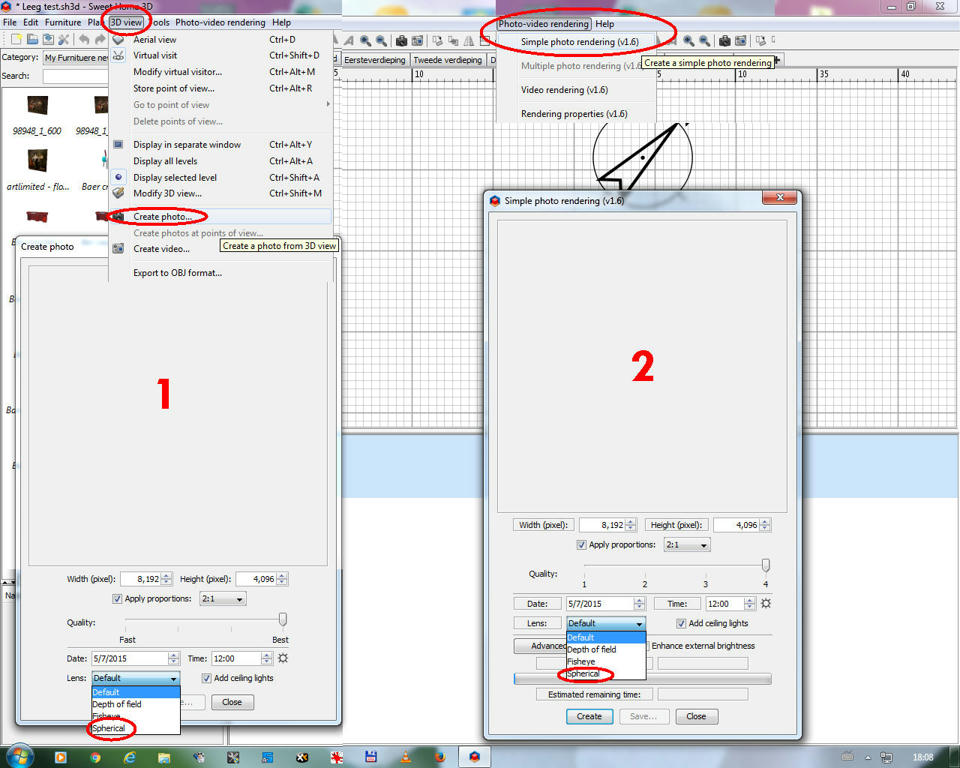
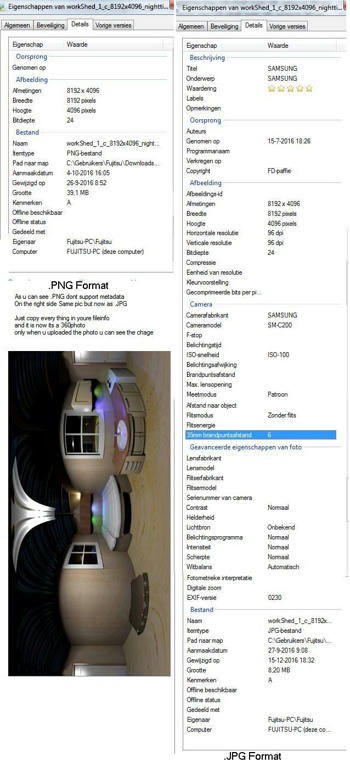
Re: Photo Render lol in pul-down menu (3D view) select (create photo) and set lens to spherical after saving ur photo edit the file info and add the data shown in picture ,your photo is now a 360 photo it works on facebook enter the info data in your photo as shown in right picture ---------------------------------------- To Draw or not to Draw ...... Thats nolonger a question .. We draw |
| Posted by walidbmf22 at Oct 19, 2018, 11:58:42 PM |
|
Re: Photo Render hello i cant find the spherical lens in my create photo menu and also the link you shared about the info data i must enter is invisible please give help |
| Posted by FDpaffie at Oct 20, 2018, 5:58:54 PM |
|
Re: Photo Render here is a picture that explains how you select a photo shot and a spherical lens and here is a picture how to ad metadata in your picture if u need it add the info on the right side of the picture ( .jpg ) ![]() ---------------------------------------- To Draw or not to Draw ...... Thats nolonger a question .. We draw |
|
|
Current timezone is GMT Dec 19, 2025, 10:08:39 AM |