|
Sweet Home 3D Forum » List all forums » » Forum: New versions » » » Thread: Sweet Home 3D 5.5 |
|
| Print at Dec 15, 2025, 7:36:04 PM | |
| Posted by Puybaret at Jul 12, 2017, 5:55:22 PM |
|
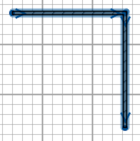
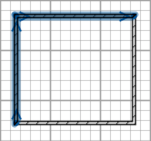
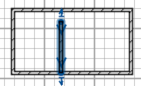
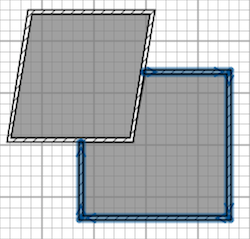
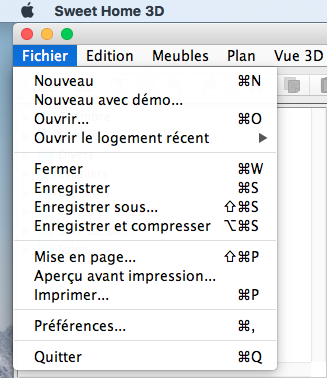
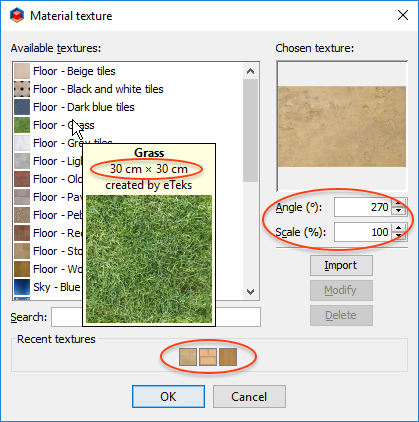
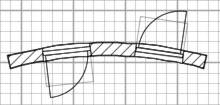
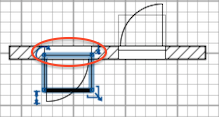
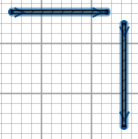
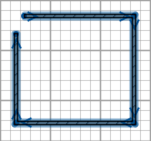
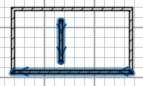
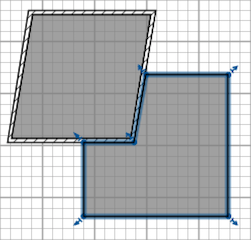
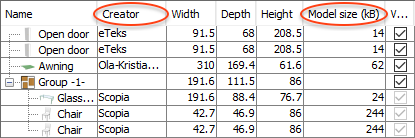
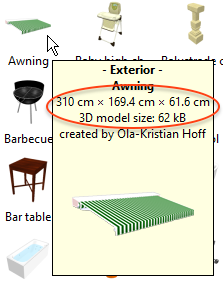
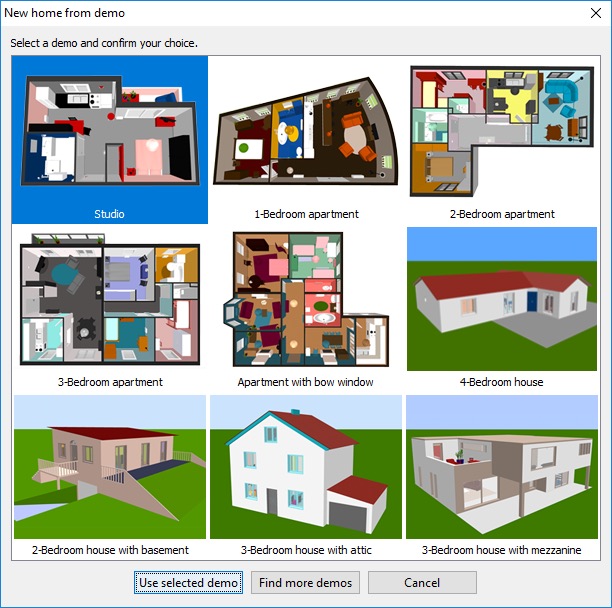
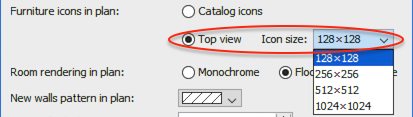
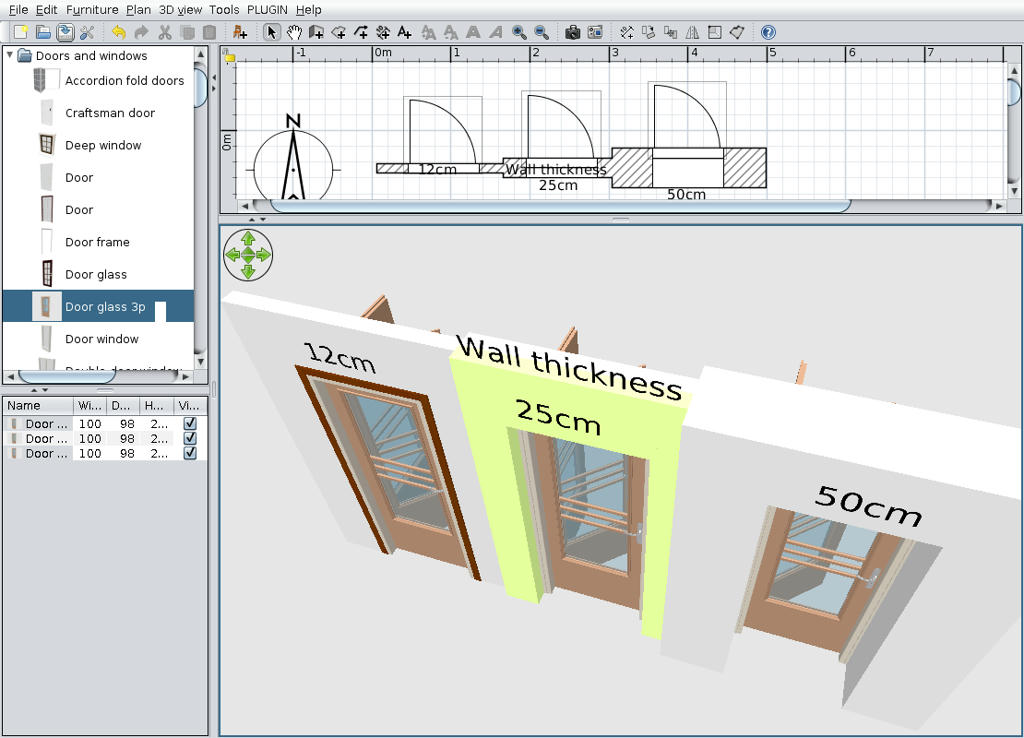
Sweet Home 3D 5.5 Hi, Here's a first beta version of Sweet Home 3D 5.5. At the moment, it offers the following new features : - The 0° / 45° / 90° radio buttons in the texture choice dialog box were replaced by a spinner to choose any texture angle. - A Scale field was added to this dialog box to reduce or enlarge the default size of a texture (now also shown in the information tool tip of a texture). This may be handy when a texture is applied on a shape with texture coordinates you can't change, or if you want to alter the default size of a texture coming from a textures library. - The list of recently used textures is now saved from a session to another. ![]() - Doors and windows now always cut out both sides of straight or round walls when they are parallel or tangent to them, whatever their depth is (but non-rectangular cut out shapes are still not supported in round walls). To avoid changes in your existing designed plans, this will work only for newly added doors and windows, except for service hatches that will continue to dig walls if their depth is smaller than wall thickness (the Service hatch piece has a new doorOrWindowWallCutOutOnBothSides property set to false). When magnetism is active, a door will be automatically placed in the middle of a round wall, but without being resized. ![]() - The width and depth of an open door can now only be proportionally changed to avoid unrealistic results on thick walls. When placed on a straight wall, this kind of door will now be magnetized either on the left or on the right side of the wall without being resized, depending on where you place the mouse pointer (this is the case only for the open door in the default library for the moment, but I'll add the new doorOrWindowWidthDepthDeformable property to other 3D models in the free libraries when version 5.5 will be released). ![]() - I added the new Plan > Join walls that will join the free ends of the two selected walls at their intersection point, thus without changing the direction of the walls. will become: ![]() As many beginners seem to have problems to close a sequence of newly created walls, it's also possible to join walls when there are more than two walls in the selection, and the new menu item will be disabled only in the case selected items contain more than two walls with free ends or if they contain no wall with a free end. will become: ![]() If the walls to join are parallel, it will work only if they are on the same row and in which case the first selected wall end will move to join the free closest free end of the other wall. will become: ![]() If the selection contains only one wall with free ends, its closest end to a wall will be moved to this wall. will become: ![]() - The Wall creation tool is now able to add only the missing walls around a room when you doucle-click in a room. This should make it easier to create the rooms of a whole house one after the other when you know their inner dimensions. will become: ![]() - I added the Creator and Model size items to the Plan > Display column and Plan > Sort by menus, to be able to handle this information in the furniture table. I still wonder what the Model size of a group should display (the sum of the children items sizes wouldn't really make sense in case a group contains more than one item of the same kind, like chairs or boxes), and how such rows should be sorted when the furniture list is sorted by model size. ![]() To let you choose a furniture model from its size, I also added the model size and its default dimensions to the information tool tip of a piece of furniture of the catalog. ![]() - For newcomers and any one looking for ideas, the new New from demo item was added to the File menu. This item shows a dialog box proposing nine different demos designed by Véronique, our great community manager. ![]() To avoid any potential problem with textures (and let you improve them at your taste), the demos use only colors. They also reference only 3D models of the default library to prevent Sweet Home 3D size to grow too much. These demos are available under CC-BY license as well as all the GNU GPL 3D models of the default library which are now available under two licenses. The header of these 3D models was updated accordingly whereas many models were optimized to reduce the size of their file, and 5 new models were added (a flat TV, flowers, an upper cabinet, a front door and a bed with sheets and pillows). - It's now possible to choose the size in pixels of 3D model icons in the plan with a new preferences setting. From the default size 128x128, you can go up to 1024x1024, but be aware that using larger icons will make the program use much more RAM. Finally, the following improvements and bug fixes were also added: - Frustrum front and back distances are now computed differently to avoid a too far front distance at higher levels or a too close back distance when objects are added very far. Of course, I didn't find any miracle solution, so there might still be plans where the new solution won't work perfectly. - I fixed an issue when a texture was displayed upside down. - I fixed the file dialog issue which appeared under Windows 10 Creator update. I hope you'll appreciate these new features and look forward to reading your feedback ![]() [Note from developer: Sweet Home 3D 5.5 was released on September 6, 2017] ---------------------------------------- Emmanuel Puybaret, Sweet Home 3D creator |

| Posted by okh at Jul 12, 2017, 6:46:34 PM |
|
Re: Sweet Home 3D 5.5 Wow, you have been busy. So many issues addressed! Looks like very good solutions, too. Congratulations, and will be looking forward to trying. ok PS Only shame the builders finished this week; I will have to start a new project, my better half will be thrilled. |
| Posted by hansmex at Jul 12, 2017, 7:21:30 PM |
|
Re: Sweet Home 3D 5.5 Wow, I really like the Scale feature for textures. Excellent! Also the Join Walls works better than the Connect Walls from the AdvancedEdit plugin. Compliments and thanks!! Hans ---------------------------------------- Hans new website - under constuction hansdirkse.info |
| Posted by bdfd at Jul 12, 2017, 8:31:01 PM |
|
Re: Sweet Home 3D 5.5 Hi, Good new, I've downloaded the jlnp file in the given link and after ??? ![]() ---------------------------------------- Evil progresses when good people do nothing! --- SH3D 7.1 and nothing else - W11 64b in 4K |
| Posted by Puybaret at Jul 12, 2017, 8:49:29 PM |
|
Re: Sweet Home 3D 5.5 Thanks for your feedback. bdfd, you just have to install Java and double-click on the the JNLP file. ---------------------------------------- Emmanuel Puybaret, Sweet Home 3D creator |
| Posted by okh at Jul 13, 2017, 12:43:28 PM |
|
Re: Sweet Home 3D 5.5 .. appreciate these new features and look forward to reading your feedback Spent half an hour or so working my way through (most of) the new features and models this morning (have yet to test some of the wall-joinings and doorOrWindowWallCutOutOnBothSides / doorOrWindowWidthDepthDeformable). ...First, I really like what you have done. Solutions are clever and work well. Could not find anything that did not work as described. My greatest concern with any software upgrade, is whether (often not very important) features are added at the cost of speed/interface. This it seems, you have avoided. Tested on the tablet (Atom Z3740 @ 1,33 GHz, orig config, Win8.1), i.e. a relatively slow machine. No noticeable performance reduction/problems. Especially appreciate the extra information indicating size / creator: size for convenience and an easy way of avoiding bloating a home (and removing performance reducing objects), creator as it makes sense when CCBY models are used. The find more demo homes is an interesting option, not only for demo/user guidance, but also possibly as a platform for distributing real homes (yes, I see possible legal implications, but it is a nice thought, maybe one I can try on an architect friend). So, yes, features are appreciated and no problems so far (except PS, but that may be a coincidence) ok PS First attempt trying round walls, cutouts, the 3D window at some point stopped updating moving furniture. Not able to reproduce. Has (I think) also happened once or twice with earlier releases, so it may be a one off. Sent you a screendump. |
| Posted by VeroniQ at Jul 13, 2017, 6:24:00 PM |
|
Re: Sweet Home 3D 5.5 I really love the way we can now adjust, precisely and very quickly, the textures. It changes my life! |
| Posted by MasterBoy at Jul 14, 2017, 9:13:16 AM |
|
Re: Sweet Home 3D 5.5 Very happy with latest extensive update. Thank you. |
| Posted by okh at Jul 14, 2017, 10:21:24 AM |
|
Re: Sweet Home 3D 5.5 ..3D model icons in the plan with a new preferences setting. From the default size 128x128... Most interesting feature, which can significantly improve display (and print/export?) of a plan. Did not come across any issue at all when experimenting with the different icons (so in terms of beta-testing, the below is not important). In fact, the feature worked perfectly. Increasing to 1024×1024 (temporarily) could really improve 2D view (e.g. thread 7832).The feature is also interesting for creating models with custom planIcons, so I am trying to get my head around this. Am I right in thinking:
Anyway, great feature. No problems. Happy. And happy 14th of July. ok |
| Posted by Puybaret at Jul 14, 2017, 3:42:24 PM |
|
Re: Sweet Home 3D 5.5 okh, thanks for sharing your thoughts ![]() My greatest concern with any software upgrade, is whether features are added at the cost of speed/interface. Don't worry it's my main concern too. But as I could have forgotten some special cases, I appreciate that you double-check, especially on a slow machine. I was worried about how to retrieve the size of 3D models in existing homes and libraries, but I finally find a fast way to explore the entries in a zip file. Managing doors and windows that cut out both sides of walls is a more heavy operation, but the difference should be very little.About the new icon size in preferences, the top views of 3D models used as icons in the plan are not saved in a sh3d file, except if that top view was precomputed and used in the pieceIcon# property of a piece of furniture. Thus, these icons are generated by Sweet Home 3D when opening a home, and generating larger icons should slow down the program a little. Images set in the planIcon# property of a piece don't have to be square, and will be always resized to the size of the piece in the plan. I don't know how much work would be required to add support for SVG for plan icons or background images. Sweet Home 3D supports only SVG Paths at the moment, but I guess Batik must also be able to convert SVG data to the needs of a Java graphical program like Sweet Home 3D. My main concern would be about performances, because drawing a SVG will run slower than drawing an image most of the time. I'll check how difficult this task is in the coming days. I wouldn't mind to add a shortcut for preferences under Windows and Linux (under Mac OS X, it's cmd + , ). I just don't know which one is commonly used under those systems. Any suggestion? ---------------------------------------- Emmanuel Puybaret, Sweet Home 3D creator |
| Posted by okh at Jul 14, 2017, 9:29:47 PM |
|
Re: Sweet Home 3D 5.5 Still no issues found. And no repeat of the 3D freeze. Happy. Great features. .. features are added at the cost of speed/interface.... Yes, and thanks for that! There are some horror stories from large projects, where the developers had access to hardware much more powerful than the average user, and the result was a disaster. It is never a bad idea to test new releases on the slowest computer in the organisation. ..my main concern too... ..generating larger icons should slow down the program a little... Tried a plan with lots and lots of items at 1024×1024 setting, and yes, RAM and DISK went to max and I was left staring at lots of clocks for a minute or so. But never mind, I am running a slow computer. It is great to have the option and I would only use this for 2D plan presentations anyway. (But maybe there should be a warning in the Preferences? Or somewhere?)Images set in the planIcon# property of a piece don't have to be square, and will be always resized to the size of the piece in the plan. Quite, it is my impression that a planIcon# png with the same proportions as the model, will render more nicely and with less blur (until the proportions are changed, that is). The nice thing with home-made planIcon# pngs is that the model-maker has control over how it renders...doors and windows that cut out both sides of walls is a more heavy operation... Yes, and this surprised me. I really noticed absolutely nothing in terms of performance. So, job well done...shortcut for preferences under Windows and Linux... Inkscape uses Ctrl-Shift-P for programme preferences and Ctrl-Shift-D for document properties. Both dialogues seem to be intended for frequent use and the logic appeals to me, but Ctrl-Shift-P is already used. So I dare not suggest, but + and , moves about depending on the nationality of the keyboard, which means I never learn them.SVG icons would be nice for the set of symbols, and maybe some standard furniture with architectural symbols (bed, cooker, closet - the standard architect mark-up). I volunteer for making a library of simple models, if you come up with a way to do SVG planIcon#s (Well, after the boating season, that is.)ok |
| Posted by bdfd at Jul 15, 2017, 6:12:01 AM |
|
Re: Sweet Home 3D 5.5 bdfd, you just have to install Java and double-click on the the JNLP file. Yes, I did that and nothing, just a black msdos windows which disappears... ![]() java 1.8.0_51 and java3d 1.6.0 installed on my laptop. And ??? ---------------------------------------- Evil progresses when good people do nothing! --- SH3D 7.1 and nothing else - W11 64b in 4K |
| Posted by Puybaret at Jul 15, 2017, 9:24:43 AM |
|
Re: Sweet Home 3D 5.5 bdfd, sorry, it's the first time I'm reported this kind of problem with JNLP files. No idea of the origin, but don't worry, I'm pretty sure this won't happen with the finally released installer. ---------------------------------------- Emmanuel Puybaret, Sweet Home 3D creator |
| Posted by Ceciliabr at Jul 17, 2017, 10:46:45 AM |
|
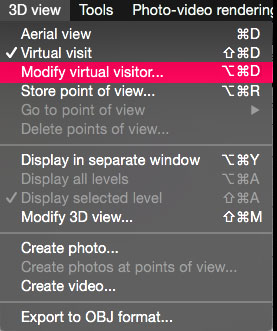
Re: Sweet Home 3D 5.5 @Puybaret This might not be the right place to suggest this, but I'll take my chances: Would you consider adding a shortcut for modifying the Virtual Visitor? F.i. like this: ![]() It would be a great help when the camera symbol is out of view and not selectable for double-clicking. cec |
| Posted by dorin at Jul 20, 2017, 1:44:52 PM |
|
Re: Sweet Home 3D 5.5 @Puybaret 1. Your's work at new features are great and work fine. 2. I suggest few minor customization (no offense please) In file com/eteks/sweethome3d/swing/package.properties at lines: ... 1053: HomePane.MAKE_LEVEL_VIEWABLE.Name=Make level viewable 1054: HomePane.MAKE_LEVEL_VIEWABLE.ShortDescription=Make selected level viewable replace with: v1 1053: HomePane.MAKE_LEVEL_VIEWABLE.Name=Make level visible 1054: HomePane.MAKE_LEVEL_VIEWABLE.ShortDescription=Make selected level visible or bather v2 1053: HomePane.MAKE_LEVEL_VIEWABLE.Name=Show level 1054: HomePane.MAKE_LEVEL_VIEWABLE.ShortDescription=Show selected level ... 1060: HomePane.MAKE_LEVEL_UNVIEWABLE.Name=Make level unviewable 1061: HomePane.MAKE_LEVEL_UNVIEWABLE.ShortDescription=Make selected level unviewable replace with: v1 1060: HomePane.MAKE_LEVEL_UNVIEWABLE.Name=Make level invisible 1061: HomePane.MAKE_LEVEL_UNVIEWABLE.ShortDescription=Make selected level invisiable or bather v2 1060: HomePane.MAKE_LEVEL_UNVIEWABLE.Name=Hide level 1061: HomePane.MAKE_LEVEL_UNVIEWABLE.ShortDescription=Hide selected level ... 1158: HomePane.DISPLAY_ALL_LEVELS.ShortDescription=Display all viewable levels in the 3D view replace with: 1158: HomePane.DISPLAY_ALL_LEVELS.ShortDescription=Display all visible levels in the 3D view ... 1597: LevelPanel.viewableCheckBox.text=Viewable replace with: 1597: LevelPanel.viewableCheckBox.text=Visible I usually use the v2 for my taste. ---------------------------------------- A computer program does what you tell it to do, not what you want it to do. Murphy's Law When all else fails, read the instructions. Murphy's Law If you don't like "AS IS", DIY. Dorin's law |
| Posted by dorin at Jul 20, 2017, 2:26:56 PM |
|
Re: Sweet Home 3D 5.5 I've made a mistake. The line 1061: .... level invisiable must be 1061: ... level invisible Sorry!!! ---------------------------------------- A computer program does what you tell it to do, not what you want it to do. Murphy's Law When all else fails, read the instructions. Murphy's Law If you don't like "AS IS", DIY. Dorin's law |
| Posted by dorin at Jul 21, 2017, 11:16:28 AM |
|
Re: Sweet Home 3D 5.5 About the first improvement door and windows to don't be deformed it work as expected and is great. I've made this furniture but I encounter this issue: The casing are well positioned when the thickness of the wall are the same as the doorOrWindowWallThickness#1=12. I suspect I do something wrong but I don't know what. I modify also other doors and windows from contributors library and some work well but other don't. It appear the doorOrWindowWallDistance#1=1 are computed from the middle of the wall not from the side of wall. Is not necessarily a problem wile I use the arrow keys to correct the position but is a little difficult when are angled walls (different then 90dg). ---------------------------------------- A computer program does what you tell it to do, not what you want it to do. Murphy's Law When all else fails, read the instructions. Murphy's Law If you don't like "AS IS", DIY. Dorin's law |
| Posted by Puybaret at Jul 24, 2017, 7:51:19 PM |
|
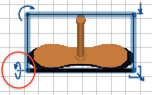
Re: Sweet Home 3D 5.5 Hi, Tonight, the version 5.5 Beta 2 brings the other following features: - Ctrl + M shortcut to display the preferences panel under Windows and Linux (under macOS, the existing cmd + , is unchanged) - Ctrl + Alt + M (cmd + alt + M under macOS) shortcut to modify the virtual visitor (Ceciliabr, cmd alt D is reserved to show/hide the dock under macOS) - To prevent selectioning and showing the virtual visitor in the plan each time a move is made in the 3D view, you can now unselect the new Virtual visitor selected at change option in the preferences panel. But don't get lost! ![]() - Angles can now be entered with decimals for more precision - And after many years, I finally added the ability to rotate furniture (but not doors and windows, staircases and groups) around either their roll (Y) or pitch (X) horizontal axes. Rotation can be changed with the furniture modification dialog. ![]() Once a piece of furniture has its roll or pitch angle set with a value different from 0, it's also possible to adjust this angle in the plan with its bottom left indicator that replaces the one used to modify the height. The height indicator was actually removed because the size indicator can resize only proportionally a piece of furniture that is horizontally rotated, or a group that contains such pieces. ![]() The center of a rotated object in the plan doesn't move after a rotation and its altitude is adapted to ensure that its lowest vertex remains at the elevation set on the object. Angle values increase clockwise the same way as for the rotation angle around the vertical axis in past versions. - I also added the horizontallyRotatable property to prevent some models to rotate around an horizontal axis if needed. I wonder on which 3D models of the free library I should set this property. Any idea? - Finally, I fixed the location and icon in the plan for 3D models with a non paralleledipep shape (like a cone), when a rotation different from 90° was applied on it at importation time. This correction won't be applied on existing objects in an opened sh3d file to prevent breaking compatibility. I sincerely hope you'll like the way I programmed the rotation around horizontal axes, and won't think it overcomplicates Sweet Home 3D. Dorin, sorry, I don't think I'll change viewable / unviewable words in the user interface, because even if it's subtle, a viewable upper level can still be invisible in the 3D view when the 3D view > Display selected level menu item is selected. It's the reason I chose two different words. About your other post, I don't see any issue about the open doors you tested. The front part of a door with a doorOrWindowWidthDepthDeformable property set to true is magnetized to the side of the wall where you drop it. In your example, the values of doorOrWindowWallThickness and doorOrWindowWallDistance properties are subtracted from the depth to know the depth of the front part where the open door is, i.e. 98 - 12 - 1 = 85 cm. In case it wasn't clear enough, the doorOrWindowWidthDepthDeformable property set to false just states that the global width and depth of a 3D model can only change proportionally. Sweet Home 3D doesn't analyze subparts of a 3D model to guess which vertices could move or not. Hope you can live with it... ---------------------------------------- Emmanuel Puybaret, Sweet Home 3D creator |
| Posted by bdfd at Jul 25, 2017, 6:41:05 AM |
|
Re: Sweet Home 3D 5.5 Don't work on my main PC too ! When a exe release ? ![]() ---------------------------------------- Evil progresses when good people do nothing! --- SH3D 7.1 and nothing else - W11 64b in 4K |
| Posted by Puybaret at Jul 25, 2017, 8:25:23 AM |
|
Re: Sweet Home 3D 5.5 The final release won't appear before a few days or weeks, because it requires some translations. But as the version 5.5 is supposed to fix the bug that prevents to show file dialogs in Windows 10 Creator update, here's a Windows installer for version 5.5 Beta 4 [link removed, see this message to test version 5.5 Beta 5] to let you and others check this bug was fixed (you shouldn't need the SweetHome3D.l4j.ini file to set swing.defaultlaf anymore). I updated also the Java Web Start version to version 5.5 Beta 4 after fixing some bugs I discovered on the management of groups which contain objets rotated around an horizontal axis. ---------------------------------------- Emmanuel Puybaret, Sweet Home 3D creator |
| Posted by bdfd at Jul 25, 2017, 10:47:56 AM |
|
Re: Sweet Home 3D 5.5 Great, exe installation is OK ! first tries are good... Pitch and roll on 'modify furniture' window are amazing !!! ![]() ---------------------------------------- Evil progresses when good people do nothing! --- SH3D 7.1 and nothing else - W11 64b in 4K |
| Posted by Puybaret at Jul 26, 2017, 3:29:18 PM |
|
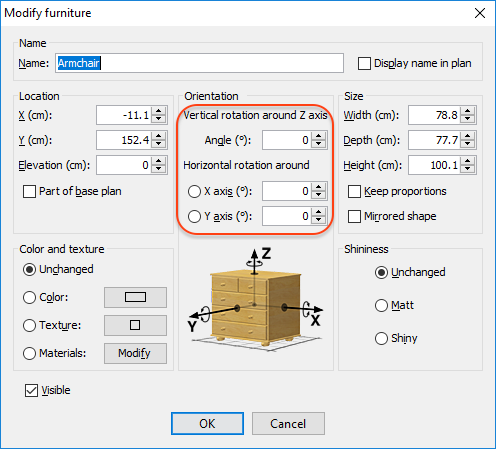
Re: Sweet Home 3D 5.5 The version 5.5 Beta 5 fixes a regression that appeared in the previous version on doors which are supposed to cut the both faces of walls. I also tried to improve the new image shown in the Furniture modification dialog box, showing a chest: ![]() instead of a cube: ![]() I also renamed the new Virtual visitor selected at change preference as Select visitor in plan at 3D move, in the hope it will be easier to understand. ---------------------------------------- Emmanuel Puybaret, Sweet Home 3D creator |
| Posted by harhouse at Jul 28, 2017, 11:13:52 AM |
|
Re: Sweet Home 3D 5.5 Great work, great program. Sadly the new 5.5 beta 4 does not solve the crashing when using the open/save dialog popup in W10. The java webstart 5.5 you provided at the top of this threat does work however. |
| Posted by bdfd at Jul 28, 2017, 2:11:59 PM |
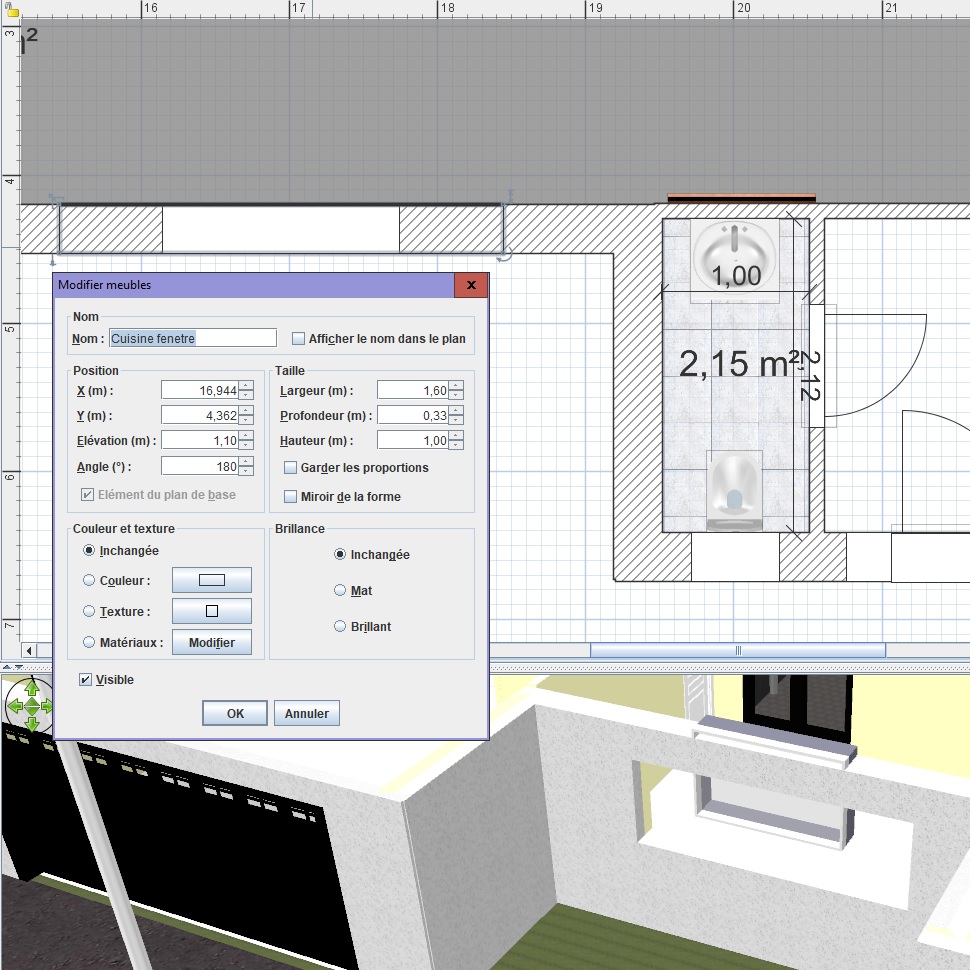
Re: Sweet Home 3D 5.5First anomaly for me ! An existing project made with 5.4 and copy/paste and updated with 5.5 beta4 !!! See the window and the wall (standard height 2.5 m) ??? => All updated objects are wrong ! ![]() ---------------------------------------- Evil progresses when good people do nothing! --- SH3D 7.1 and nothing else - W11 64b in 4K |
| Posted by Puybaret at Jul 28, 2017, 2:56:55 PM |
|
Re: Sweet Home 3D 5.5 Thanks for your feedback. harhouse, can you confirm that you tried the Java Web Start version 5.5 of Sweet Home 3D with Java 1.8.0_141 or higher (see About dialog)? bdfd, can you describe step by step how to reproduce this bug with an example as simple as possible? ---------------------------------------- Emmanuel Puybaret, Sweet Home 3D creator |
| Posted by bdfd at Jul 28, 2017, 5:14:14 PM |
|
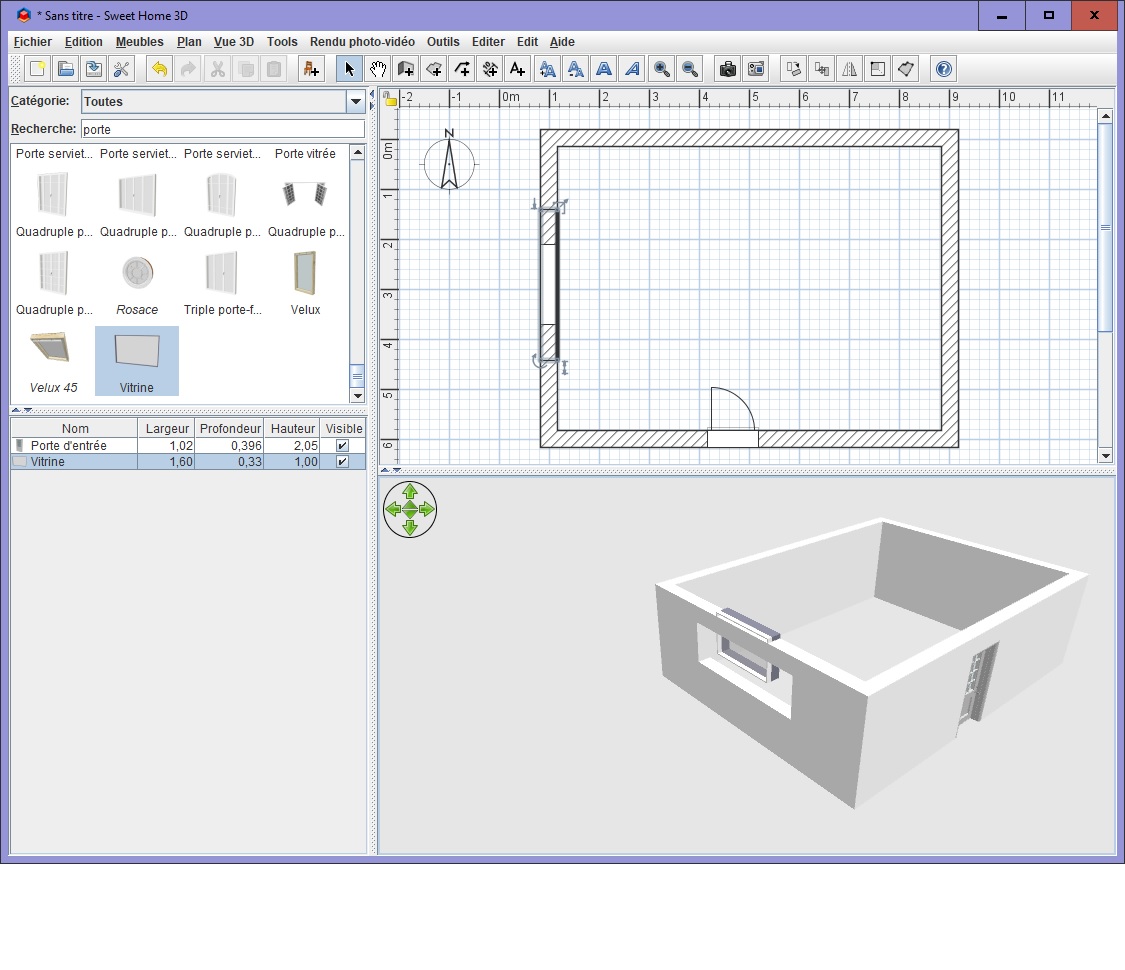
Re: Sweet Home 3D 5.5 bdfd, can you describe step by step how to reproduce this bug with an example as simple as possible? Well,I began with a new project. 4 Walls (h = 2.5 m, width = 0.33 m) One door for entry A standard fixed window (vitrine in french) updated with dimensions : elevation = 1.1 m height = 1 m lenght = 1.6 m Boom, look at the screenshot... The wall keeps the old dimensions and the 'new' window has new location... ![]() ---------------------------------------- Evil progresses when good people do nothing! --- SH3D 7.1 and nothing else - W11 64b in 4K |
| Posted by Puybaret at Jul 28, 2017, 5:43:06 PM |
|
Re: Sweet Home 3D 5.5 As I suspect your issue is due to a regression in the Beta 4, please try the Windows installer version 5.5 Beta 5 [link removed, see this message to test version 5.5 Beta 6]. Did you remove the SweetHome3D.l4j.ini file from your installation directory to check if the bug that prevents to show file dialogs in Windows 10 Creator update is fixed? I have an other idea to fix it, but would like to know how the first attempt worked for you, after harhouse's bad report. ---------------------------------------- Emmanuel Puybaret, Sweet Home 3D creator |
| Posted by bdfd at Jul 28, 2017, 5:54:44 PM |
|
Re: Sweet Home 3D 5.5 Great, it works fine ! ini file has been renamed. ---------------------------------------- Evil progresses when good people do nothing! --- SH3D 7.1 and nothing else - W11 64b in 4K |
| Posted by Puybaret at Jul 28, 2017, 7:54:23 PM |
|
Re: Sweet Home 3D 5.5 Thanks for your test bdfd. Actually, I discovered an other small issue about the position of 3D models with an irregular shape, when they are rotated around horizontal and vertical axes. So please, test rather version 5.5 Beta 6 [link removed, see this message to test version 5.5 Beta 7]. ---------------------------------------- Emmanuel Puybaret, Sweet Home 3D creator |
| Posted by bdfd at Jul 29, 2017, 7:31:10 AM |
|
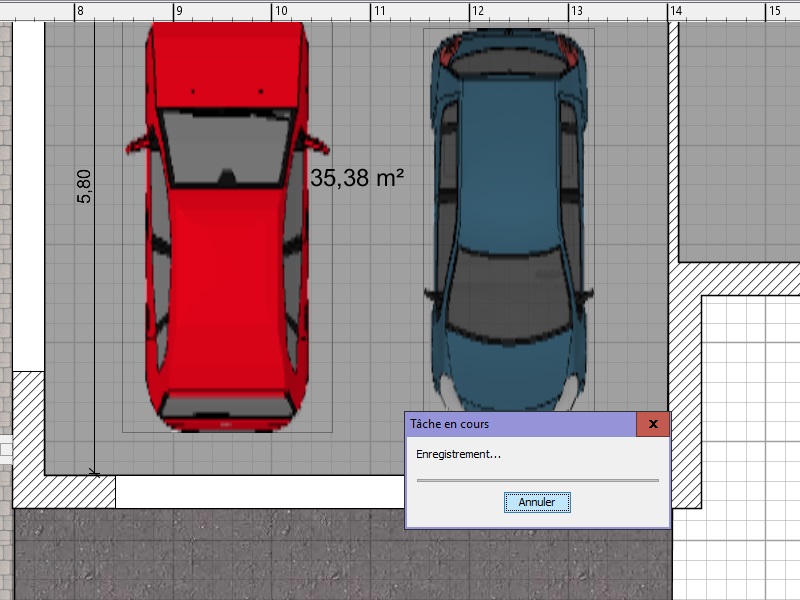
Re: Sweet Home 3D 5.5 Thanks for your test bdfd... De nada Manu.1. I saw a strange thing when I ask 'Save & compress'. The progress bar into the box window didn't move. Is it malfunction ? Not sure that beta6 is the cause... 2. Regressions a.The function 'Save as' breaks down sh3d. b. Save a rendering photo breaks down too... Perhaps by giving a beta6.jar would be OK ? ![]() ---------------------------------------- Evil progresses when good people do nothing! --- SH3D 7.1 and nothing else - W11 64b in 4K |
| Posted by bdfd at Jul 30, 2017, 6:01:28 AM |
|
Re: Sweet Home 3D 5.5 1. The progress bar into the box window didn't move. Do not anything !2. Regressions a.The function 'Save as' breaks down sh3d. b. Save a rendering photo breaks down too... Perhaps by giving a beta6.jar would be OK ? ![]() I resolved ALL the problems in renaming INI file in initiale name ! ![]() ---------------------------------------- Evil progresses when good people do nothing! --- SH3D 7.1 and nothing else - W11 64b in 4K |
| Posted by Puybaret at Jul 30, 2017, 1:23:22 PM |
|
Re: Sweet Home 3D 5.5 bdfd, thanks for your tests. Apparently the file bug in Windows 10 Creator update wasn't fixed in beta 6 yet, but I have other ideas, better than obliging users to add a SweetHome3D.l4j.ini file. Here's the version 5.5 Beta 7 [link removed, see this message to test version 5.5 Beta 10] that might fix that bug. It would be nice if you and/or harhouse could report if showing file dialog boxes works better in this version. This Beta version brings also auto translation of furniture names found in demos, and the first translations of the new features in Italian, Portuguese, Dutch, Czech, and Polish made by the nice Sweet Home 3D contributors. Finally, it fixes again an other small issue about furniture rotated around an horizontal axis (a really tough subject as I feared!!!). ---------------------------------------- Emmanuel Puybaret, Sweet Home 3D creator |
| Posted by bdfd at Jul 30, 2017, 5:28:41 PM |
|
Re: Sweet Home 3D 5.5 bdfd, thanks for your tests. Apparently the file bug in Windows 10 Creator update wasn't fixed in beta 6 yet, but I have other ideas, better than obliging users to add a SweetHome3D.l4j.ini file. Sorry, No change (dialog box & save as) !Here's the version 5.5 Beta 7 (Java Web Start version and Windows installer) that might fix that bug. It would be nice if you and/or harhouse could report if showing file dialog boxes works better in this version. This Beta version brings also auto translation of furniture names found in demos, and the first translations of the new features in Italian, Portuguese, Dutch, Czech, and Polish made by the nice Sweet Home 3D contributors. Finally, it fixes again an other small issue about furniture rotated around an horizontal axis (a really tough subject as I feared!!!). beta7 crashes too (without ini file). ![]() ---------------------------------------- Evil progresses when good people do nothing! --- SH3D 7.1 and nothing else - W11 64b in 4K |
| Posted by Puybaret at Jul 31, 2017, 10:08:52 AM |
|
Re: Sweet Home 3D 5.5 bdfd / harhouse, please try the Windows installer of the version 5.5 Beta 8 without the SweetHome3D.l4j.ini file. I found an issue about how Java 8u51 handles Windows 10 version number and it prevented the correction that I programmed for file dialog boxes to work! Thanks for your patience... ![]() ---------------------------------------- Emmanuel Puybaret, Sweet Home 3D creator |
| Posted by bdfd at Jul 31, 2017, 11:44:41 AM |
|
Re: Sweet Home 3D 5.5 Hi, It's better with beta8... No crash (Save as or Save rendering photo) No change for the dialog box ![]() ---------------------------------------- Evil progresses when good people do nothing! --- SH3D 7.1 and nothing else - W11 64b in 4K |
| Posted by Puybaret at Jul 31, 2017, 11:50:41 AM |
|
Re: Sweet Home 3D 5.5 Thanks for your tests. Great that it works without any SweetHome3D.l4j.ini file this time No change for the dialog box Do you mean the dialog box shown when you select Save & compress? Does it actually save the file?---------------------------------------- Emmanuel Puybaret, Sweet Home 3D creator |
| Posted by bdfd at Jul 31, 2017, 1:16:59 PM |
|
Re: Sweet Home 3D 5.5 Do you mean the dialog box shown when you select Save & compress? Does it actually save the file? No, it's about the progress bar which doen't move in all dialog boxes.![]() ---------------------------------------- Evil progresses when good people do nothing! --- SH3D 7.1 and nothing else - W11 64b in 4K |
| Posted by Puybaret at Aug 1, 2017, 8:25:57 PM |
|
Re: Sweet Home 3D 5.5 Tonight, the version 5.5 Beta 9 brings translations of the new features in German, Swedish, Russian, Traditional and Simplified Chinese, and a few more improvements about horizontal rotations. I also updated some demos to ensure they use the new features of the version 5.5, particularly for sloping roofs and doors on thick walls. Finally, I decided that the child piece with the biggest model size will be used as a sort criterion for rows containing a furniture group. ---------------------------------------- Emmanuel Puybaret, Sweet Home 3D creator |
| Posted by bdfd at Aug 2, 2017, 7:17:22 AM |
|
Re: Sweet Home 3D 5.5 FYI: beta9 doesn't resolve the anomaly about the progress bar which doen't move in all dialog boxes... ![]() ---------------------------------------- Evil progresses when good people do nothing! --- SH3D 7.1 and nothing else - W11 64b in 4K |
| Posted by Puybaret at Aug 2, 2017, 8:43:54 AM |
|
Re: Sweet Home 3D 5.5 This is really a very small aesthetic bug that I can't reproduce on my Windows 10 computer. As long as the lengthy operation still works, I don't think I'll look for how to fix this issue. Probably a small problem in Java. Anyway thanks for reporting it. ---------------------------------------- Emmanuel Puybaret, Sweet Home 3D creator |
| Posted by Puybaret at Aug 4, 2017, 4:06:11 PM |
|
Re: Sweet Home 3D 5.5 The version 5.5 beta 10 (Java Web Start, Windows installer and Linux 64 installer) comes with an update of Hungarian translation and a new look for the Furniture modification dialog box with different labels for the rotation around the horizontal axes. ![]() Hope you'll find it clearer ![]() I propose also a second installer for Windows with the version 5.5 beta 11, to get your feedback about how Sweet Home 3D works with the latest Java Runtime Environment 1.8.0_144, one year later I decided to stuck on JRE 1.8.0_51 to fix the crash problems encountered by some of you (the installer of Sweet Home 3D version 5.5 beta 10 still comes JRE 1.8.0_51). To check if it works better, I hope some of you will have the patience to test whether Sweet Home 3D 5.2 still crashes, then try the new version 5.5 beta 11. Thanks for your tests ![]() If needed, the MD5 of SweetHome3D-5.5.beta10-linux-x64.tgz is da2f87dfd603909f9f3d38973ce6051b ---------------------------------------- Emmanuel Puybaret, Sweet Home 3D creator |
| Posted by hansmex at Aug 4, 2017, 4:42:53 PM |
|
Re: Sweet Home 3D 5.5 The Linux_64_installer links downloads a file called SweetHome3D-5.5.beta11-jre1.8.0_144-windows.exe. Is that correct? H ---------------------------------------- Hans new website - under constuction hansdirkse.info |
| Posted by Puybaret at Aug 4, 2017, 5:28:28 PM |
|
Re: Sweet Home 3D 5.5 Sorry Hans, I fixed the link. Thanks for reporting the issue ![]() ---------------------------------------- Emmanuel Puybaret, Sweet Home 3D creator |
| Posted by bdfd at Aug 4, 2017, 6:38:33 PM |
|
Re: Sweet Home 3D 5.5 ...If needed, the MD5 of SweetHome3D-5.5.beta10-linux-x64.tgz is da2f87dfd603909f9f3d38973ce6051b Not chance !It's now the second link for linux which is bad... ![]() ---------------------------------------- Evil progresses when good people do nothing! --- SH3D 7.1 and nothing else - W11 64b in 4K |
| Posted by Puybaret at Aug 4, 2017, 7:18:26 PM |
|
Re: Sweet Home 3D 5.5 Fixed. Thank you. Bad luck ![]() ---------------------------------------- Emmanuel Puybaret, Sweet Home 3D creator |
| Posted by okh at Aug 7, 2017, 1:56:29 PM |
|
Re: Sweet Home 3D 5.5 Guess 'nothing to report' can also be a report Worked my way through the features and did some random editing, and Java Web Start seems to work beautifully under Win81. Thanks for the new features. ok |
| Posted by bdfd at Aug 8, 2017, 9:48:52 AM |
|
Re: Sweet Home 3D 5.5 Just a remark : Today, I use sh3d 5.5 beta11 in exe mode with success. I won in using jlnp method with a good '.bat' file. but i saw that the launched version was beta12 ! Is it the good ? ![]() ---------------------------------------- Evil progresses when good people do nothing! --- SH3D 7.1 and nothing else - W11 64b in 4K |
| Posted by enkonyito at Aug 11, 2017, 8:14:02 PM |
|
Re: Sweet Home 3D 5.5 Is it possible for the camera to tilt along the Y axis like furniture? ---------------------------------------- EnkoNyito |
| Posted by Puybaret at Aug 11, 2017, 10:00:15 PM |
|
Re: Sweet Home 3D 5.5 Bdfd, I don't post a message at each update, moreover when it's about very small changes, but you're right, the current beta version is 12. Enkonyito, I wonder what your request could be useful for. ---------------------------------------- Emmanuel Puybaret, Sweet Home 3D creator |
| Posted by enkonyito at Aug 15, 2017, 2:37:35 AM |
|
Re: Sweet Home 3D 5.5 Emmanuel, this "roll" option may not be very useful applied to the virtual visitor but in the case of a video rendering this would be an additional basic camera movement. ![]() ---------------------------------------- EnkoNyito |
| Posted by jdab at Aug 24, 2017, 6:25:38 PM |
|
Re: Sweet Home 3D 5.5 May I also suggest : - Smoothen transitions between 2 camera moves - and elliptical camera trajectory Regards |
| Posted by Puybaret at Aug 30, 2017, 9:52:10 PM |
|
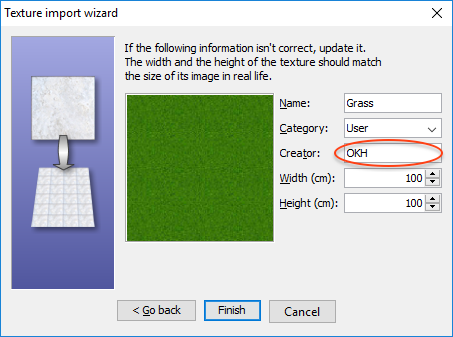
Re: Sweet Home 3D 5.5 The version 5.5 beta 13 (Java Web Start, Windows installer, macOS installer and Linux 64 installer) comes with updated translations and a more complete management of content creators. It's now possible to enter the creator of imported furniture and texture images in the wizards, and the Creator column displays the creator of a 3D model + the creators of textures applied to the object. The Java 3D version and architecture used by the Windows installer can be also modified with the following additional parameters: /os.arch=x86 will force the installation of the 32 bit version of Sweet Home 3D under Windows 64 bit /j3d.version=1.5.2 will force the installation of Java 3D 1.5.2 /j3d.version=1.6 will force the installation of Java 3D 1.6. As Java 3D 1.6 seemed to cause some problems for some users under Windows 7 and older versions, I also modified the behavior of the installer in such a way that Java 3D 1.5.2 will be installed by default under Windows XP, Vista and 7. To use these options, simply execute the installer in a cmd window followed by the options of your choice separated by spaces. I should release Sweet Home 3D 5.5 in the coming days. Just wait for some feedback from users to be sure that the new options and Java 8u144 work correctly for them. ---------------------------------------- Emmanuel Puybaret, Sweet Home 3D creator |
| Posted by okh at Aug 31, 2017, 8:53:43 AM |
|
Re: Sweet Home 3D 5.5 Good, again no issues discovered so far. Congratulations. .. It's now possible to enter the creator of imported furniture and texture images in the wizards... Have a feeling this is a silly question, but exactly where in the import wizards can you add creator? ok PS, BTW, the console log shows, not sure whether the insecure properties mean anything: Java Web Start 11.131.2.11 x86 Using JRE version 1.8.0_131-b11 Java HotSpot(TM) Client VM User home directory = C:\Users\ok ... ---------------------------------------------------- CacheEntry[http://www.sweethome3d.com/SweetHome3D.5.5.beta.jnlp]: updateAvailable=true,lastModified=Sun Jul 30 14:08:09 CEST 2017,length=3555 CacheEntry[http://www.sweethome3d.com/lib/SweetHome3D.5.5.beta.jar]: updateAvailable=true,lastModified=Fri Aug 04 16:52:09 CEST 2017,length=13181730 Insecure property: (com.eteks.sweethome3d.applicationId, SweetHome3D#JavaWebStart) specified in unsigned jnlp file will not be set. Insecure property: (com.eteks.sweethome3d.deploymentInformation, Java Web Start) specified in unsigned jnlp file will not be set. |
| Posted by Puybaret at Aug 31, 2017, 10:14:39 AM |
|
Re: Sweet Home 3D 5.5 As images may talk better than words, here are screenshots of the new creator text fields in wizards: I wouldn't bother about the report about the insecure properties in the Beta version. I know the Beta versions in Java Web Start are configured less securely than in releases. ---------------------------------------- Emmanuel Puybaret, Sweet Home 3D creator |
| Posted by okh at Aug 31, 2017, 10:37:33 AM |
|
Re: Sweet Home 3D 5.5 Thanks, yes, now I see it. I must have started 5.4 or beta 10 by mistake. Felt it was silly. Nice feature! ok |
| Posted by hansmex at Aug 31, 2017, 3:14:13 PM |
|
Re: Sweet Home 3D 5.5 Emmanuel, There seems to be some kind of a regression in beta 13. Using Mint 18 (=Ubuntu) I double-click the java3d-1.5.2. option. I see the window where I choose Run or Run-In-Terminal, but nothing happens. Checking beta 10, all is normal. Hans ---------------------------------------- Hans new website - under constuction hansdirkse.info |
| Posted by Puybaret at Aug 31, 2017, 4:05:20 PM |
|
Re: Sweet Home 3D 5.5 Very strange, Hans. I don't remember programming a change that could cause a launch issue, and it works on my Ubuntu 14 system ![]() ---------------------------------------- Emmanuel Puybaret, Sweet Home 3D creator |
| Posted by hansmex at Aug 31, 2017, 4:10:54 PM |
|
Re: Sweet Home 3D 5.5 I restarted my computer and tried again. Same result unfortunately... ---------------------------------------- Hans new website - under constuction hansdirkse.info |
| Posted by UbuntuBirdy at Aug 31, 2017, 10:35:04 PM |
|
Re: Sweet Home 3D 5.5 No problems on Ubuntu 17.04 @Hans seems to be a Mint problem or a individual one. ---------------------------------------- Pascal SH3D 6.6 / Ubuntu 22.04 (Mainline-Kernel) / Radeon RX580 / Ryzen 7 5800x |
| Posted by Ceciliabr at Sep 1, 2017, 3:07:56 AM |
|
Re: Sweet Home 3D 5.5 @Puybaret + ![]() |
| Posted by bdfd at Sep 1, 2017, 5:30:00 AM |
Re: Sweet Home 3D 5.5![]() ---------------------------------------- Evil progresses when good people do nothing! --- SH3D 7.1 and nothing else - W11 64b in 4K |
| Posted by qythyx at Sep 2, 2017, 1:14:45 PM |
|
Re: Sweet Home 3D 5.5 I just tried to render a video with this version and it didn't work at level 1 & 2, basically nothing happens. When I try level 3 or 4 it works fine. |
| Posted by bdfd at Sep 2, 2017, 2:31:59 PM |
|
Re: Sweet Home 3D 5.5 I just tried to render a video with this version and it didn't work at level 1 & 2, basically nothing happens. When I try level 3 or 4 it works fine. No problem for me in these levels. But you: OS ? RAM ?, CG ?, ... ![]() ---------------------------------------- Evil progresses when good people do nothing! --- SH3D 7.1 and nothing else - W11 64b in 4K |
| Posted by qythyx at Sep 4, 2017, 1:17:16 PM |
|
Re: Sweet Home 3D 5.5 This isn't really related to the new version, but I thought I'd mention it here anyway. I have a MacBook Pro with the LG 5k monitor. When running SH3D on that monitor it is quite slow. It seems that's because of the very high resolution. Interestingly it's slow not just operations that involve the main layout screen, just bringing up normal dialog windows is slow to the point that I can see the dialog components being drawn in the window. If I reduce the size of the window, or adjust the resolution settings, then it does get better, but obviously I'd like to use the full resolution if possible. Again, this isn't new to the new version. On a side note, is there a jar-only build of the new version so I can run it with Java 8 on MacOS? Thanks, |
| Posted by bdfd at Sep 5, 2017, 7:57:00 AM |
|
Re: Sweet Home 3D 5.5 ... It seems that's because of the very high resolution... Hi,What is your "high resolution" ? What is the weight of your used file ? ![]() ---------------------------------------- Evil progresses when good people do nothing! --- SH3D 7.1 and nothing else - W11 64b in 4K |
| Posted by Puybaret at Sep 6, 2017, 5:02:26 PM |
|
Re: Sweet Home 3D 5.5 Sweet Home 3D 5.5 was released today (including a Jar executable version, but without the portable version yet). Thanks to you all for your feedback and help! ![]() ---------------------------------------- Emmanuel Puybaret, Sweet Home 3D creator |
| Posted by okh at Sep 6, 2017, 6:50:56 PM |
|
Re: Sweet Home 3D 5.5 Congratulations on the new release! Lots of interesting improvements as usual. Thanks. ok |
| Posted by bdfd at Sep 6, 2017, 7:32:01 PM |
|
Re: Sweet Home 3D 5.5 At this time, 5.5 works fine ! ![]() ---------------------------------------- Evil progresses when good people do nothing! --- SH3D 7.1 and nothing else - W11 64b in 4K |
| Posted by qythyx at Sep 7, 2017, 11:15:09 AM |
|
Re: Sweet Home 3D 5.5 The builtin display is 2880x1800 and the external monitor is 5120x2880. I usually show the floor plan on the external monitor and the 3D view on the builtin. The file is about 30MB. |
| Posted by Ceciliabr at Sep 7, 2017, 11:59:53 AM |
|
Re: Sweet Home 3D 5.5 There seems to be a problem with creating pictures and videos at the two lowest qualities. I have tried with OSX Sierra 10.12.6, and with Yosemite 10.10.5. cec |
| Posted by Puybaret at Sep 7, 2017, 2:54:54 PM |
|
Re: Sweet Home 3D 5.5 I just tried and didn't notice any issue. Does the problem happen even with very simple homes? ---------------------------------------- Emmanuel Puybaret, Sweet Home 3D creator |
| Posted by YGYL at Sep 7, 2017, 8:00:13 PM |
|
Re: Sweet Home 3D 5.5 Too long to wait, thank you very much!!!!!!!!!!!!!!!!!!!!!!!!!!!!!!!!!!!!!!!!!!!!!!!! |
| Posted by Ceciliabr at Sep 8, 2017, 9:52:18 PM |
|
Re: Sweet Home 3D 5.5 @puybaret. I have tried this on eight different machines now, both desktop and portable, with Yosemite, El Capitan, Sierra and even Lion(OSX 10.7.5) Four of the machines needed to install Java Runtime in order to open SH3D. So there's really no doubt about it: If you download the free version from Sourceforge and install it on any Mac, it will not create any image or video, no matter the size, on Q1 or Q2. Cec |
| Posted by Puybaret at Sep 9, 2017, 10:24:57 AM |
|
Re: Sweet Home 3D 5.5 I tried on another computer running Sierra too, and didn't notice any issue. What error do you get? Did you test a specific sh3d file or just made very simple tests? ---------------------------------------- Emmanuel Puybaret, Sweet Home 3D creator |
| Posted by Puybaret at Sep 9, 2017, 11:34:18 AM |
|
Re: Sweet Home 3D 5.5 For your information, all installers and source code were updated on September 9, 2017 to fix a bug that prevented to render the lights belonging to groups at the two best qualities of the photo creation tool (version in About dialog shown as 5.5a). Sorry for an inconvenience this may cause. Thanks to EnkoNyito for reporting this issue quickly. ---------------------------------------- Emmanuel Puybaret, Sweet Home 3D creator |
| Posted by Ceciliabr at Sep 9, 2017, 6:16:13 PM |
|
Re: Sweet Home 3D 5.5 This is what happens on every Mac we try: http://ceciliabr.com/sh3d/SH3D-create-photo.mov This film covers the whole sequence including downloading the program on a "virgin" Mac Pro 12-core with 96GB memory, running OSX 10.10.5 ( no previous installations of SH3D). As you can see, nothing happens when creating photo on Q1 or Q 2, but it works fine on Q3 and Q4. Cec |
| Posted by Ceciliabr at Sep 9, 2017, 9:24:04 PM |
|
Re: Sweet Home 3D 5.5 Ah, I was happy to find version 5, and this is what happened when I tried it: http://ceciliabr.com/sh3d/SH3D-v5-photo-creation.mov As you can see, it worked like it should. So I'm back on v5, and happy. Can I possibly be doing something wrong? Is there a special version of Java required, maybe the developers version? Please forgive my hopelessly incompetent screen-captures Cec |
| Posted by Puybaret at Sep 11, 2017, 9:13:00 AM |
|
Re: Sweet Home 3D 5.5 Thanks for posting these videos. Really strange issue that I still can't reproduce under macOS 10.10 and 10.12 If needed, all installers are available here so maybe, you're not obliged to go back to such an old version. Could you try to install Java 8 and run Sweet Home 3D 5.5 from its Jar Executable or Java Web Start versions? ---------------------------------------- Emmanuel Puybaret, Sweet Home 3D creator |
| Posted by Ceciliabr at Sep 11, 2017, 9:46:34 AM |
|
Re: Sweet Home 3D 5.5 @Puybaret I tried the online version. It seems it cannot produce images, only print. cec |
| Posted by Ceciliabr at Sep 11, 2017, 10:16:44 AM |
|
Re: Sweet Home 3D 5.5 No icons for creating photo or video. ![]() Cec |
| Posted by Puybaret at Sep 11, 2017, 10:55:35 AM |
|
Re: Sweet Home 3D 5.5 On the Online version, these features are available in the contextual menu of the 3D view once you logged in. ---------------------------------------- Emmanuel Puybaret, Sweet Home 3D creator |
| Posted by Ceciliabr at Sep 11, 2017, 11:12:47 AM |
|
Re: Sweet Home 3D 5.5 Logged in... of course... I thought I was logged in. BUT: It does not create images in Q1 or Q2. We have tried on two different machines. Same problem. On both machines we can create both photos and videos in every quality using v5.4 cec |
| Posted by Puybaret at Sep 11, 2017, 12:37:13 PM |
|
Re: Sweet Home 3D 5.5 Could you try again with the Online version after you activate Java console? If some text appears when you try to create a photo, I would be pleased you copy paste it here to help me understand what's going on. ---------------------------------------- Emmanuel Puybaret, Sweet Home 3D creator |
| Posted by Ceciliabr at Sep 11, 2017, 1:57:49 PM |
|
Re: Sweet Home 3D 5.5 Like this: ![]() ? cec |
| Posted by Puybaret at Sep 11, 2017, 3:05:23 PM |
|
Re: Sweet Home 3D 5.5 Thanks for this helpful information. The error must be provoked by the fact that you use two monitors on your computer. I made the required change in source code to fix this bug. Too bad, I didn't fix it with the update I published on Saturday, moreover because you reported it on Thursday ![]() Shall I release a version 5.5.2 already? ---------------------------------------- Emmanuel Puybaret, Sweet Home 3D creator |
| Posted by Ceciliabr at Sep 11, 2017, 3:25:13 PM |
|
Re: Sweet Home 3D 5.5 Puh! I was starting to think my karma had gone bad. I'm okay finishing my project with version 5.4, so there's no hurry on my behalf. cec |
| Posted by Puybaret at Sep 11, 2017, 3:50:43 PM |
|
Re: Sweet Home 3D 5.5 I'm sure your karma is ok, but mine is in bad shape for this release, even if regressions are unfortunately very difficult to avoid after programming important changes. At least, printing and print preview work for the 3D view, and creating images work if you turn off the second monitor. As the users with two monitors who want to create pictures in quality 1 or 2 might be quite rare, I might wait longer before releasing a new version. I fear that the upcoming macOS High Sierra might require some more important changes if Apple doesn't fix the current issues with Java programs (in the current beta, Sweet Home 3D free DMG version doesn't work and the paying version has some problems with the menu bar). So I would prefer not to release a new version each week! ---------------------------------------- Emmanuel Puybaret, Sweet Home 3D creator |
| Posted by Puybaret at Sep 14, 2017, 2:29:42 PM |
|
Re: Sweet Home 3D 5.5 In case of need, I published a patch for this issue that was reported by another user. See Bug #780. ---------------------------------------- Emmanuel Puybaret, Sweet Home 3D creator |
| Posted by Simon_Franke at Sep 14, 2017, 4:40:01 PM |
|
Re: Sweet Home 3D 5.5 Thank you for the new version, but I still miss the portable version. |
| Posted by Puybaret at Sep 14, 2017, 5:25:18 PM |
|
Re: Sweet Home 3D 5.5 Unless you speak Ukranian, Slovenian, Slovakian and Korean and translate all the new words tonight in those languages, you'll have to wait a little longer. I don't know if translators will agree to continue their contribution to Sweet Home 3D translations for this version, but I feel we shouldn't stress them and wait their contribution a little longer, no? ![]() ---------------------------------------- Emmanuel Puybaret, Sweet Home 3D creator |
| Posted by Simon_Franke at Sep 14, 2017, 5:38:18 PM |
|
Re: Sweet Home 3D 5.5 I don´t know, that there is much new to translate. I tought it was a bugfix release - so the translation whould have been the same. |
| Posted by Simon_Franke at Sep 14, 2017, 5:44:43 PM |
|
Re: Sweet Home 3D 5.5 Why its not possible to edit my own posts, at least for a few minutes ? Thats a security problem, If somebody post wrong things, not for public. What I wanted to ask you, too - why there is a difference between full installer an the portable version relating to the language translation ? The full installer is available in german. |
| Posted by Ceciliabr at Sep 14, 2017, 11:55:28 PM |
|
Re: Sweet Home 3D 5.5 @Puybaret In case of need, I published a patch for this issue that was reported by another user. See Bug #780. Perfect! Thank you! cec |
| Posted by Puybaret at Sep 15, 2017, 12:25:41 AM |
|
Re: Sweet Home 3D 5.5 I tought it was a bugfix release Hum, you should look closer. The version 5.5 is much more than a bugfix release! Why its not possible to edit my own posts, at least for a few minutes ? Thats a security problem. You're right, it's for security reasons but not the ones you had in mind. It's mainly to avoid spammers to publish nice messages then change them once moderated. Forums are nice but they require some moderation work as soon as they are successful.why there is a difference between full installer an the portable version relating to the language translation ? The portable version comes also with all the contributed translations (full or outdated).But be patient, let's hope that more translation updates will arrive soon. ---------------------------------------- Emmanuel Puybaret, Sweet Home 3D creator |
| Posted by Puybaret at Sep 20, 2017, 10:56:53 PM |
|
Re: Sweet Home 3D 5.5 I released tonight the version 5.5.2 which fixes some bugs reported since version 5.5 and includes the portable version. To ensure Sweet Home 3D can run under the upcoming macOS 10.13 High Sierra, I had also to update the Java 3D version used in the installer (DMG) and portable distributions, to Java 3D 1.6.0 (the same one used under Java 8). Unfortunately, this obliges to give up support to Java 5 and PowerPC which are the only option to run Sweet Home 3D for some users under Mac OS X 10.4 and 10.5. Nevertheless, if these few users still want to use the latest version of Sweet Home 3D, they can still run the JAR Exectutable distribution. Anyway, keep in mind that giving up support to Java 5 will happen sooner or later because the compiler of upcoming Java 9 won't be able to generate files compatible with Java 5 anymore (for Java programmers, the smallest value for -target option in javac is 1.6 in Java 9). But there's no need to hurry! Speaking about Java 9, note that I also tried successfully Sweet Home 3D with the last Beta of Java 9 under Windows and Linux, but had trouble under Mac OS X, where it doesn't run yet (except if you use the -Dcom.eteks.sweethome3d.no3D=true Java option to run the program as Sweet Home 2D). One last thing: there's still a bug in macOS High Sierra that prevents to display the menu bar of Sweet Home 3D at the top of the screen on non-English systems. In version 5.5.2, I programmed a workaround that attaches the menu bar at the top of each window (like under Windows), and as soon as Apple will have fixed this bug, the menu bar should go back to screen top. Please, don't beat me, I really did all my best to avoid this bug! You may also use the JAR Executable file or the Java Web Start version which don't show this bug. Hope you'll enjoy this update ![]() ---------------------------------------- Emmanuel Puybaret, Sweet Home 3D creator |
| Posted by hansmex at Oct 26, 2017, 4:45:57 PM |
|
Re: Sweet Home 3D 5.5 COPY-PASTE doesn't work under Mint 18 I made a drawing (walls and floors) and then tried to copy everything from level 1 to level 2. Unfortunately that wasn't possible. - I tried CTRL-A then CTRL-C then CTRL-V without success. - I tried select with mouse, then using the menu Copy and Paste without success. Copy-Paste only works when selecting one or more items (but not ALL) at a time and copy-paste it to the new level. NB: this is about walls and floors only, it's a design so far without furniture. System: Mint 18, based on Ubuntu 16.04, SH3D version 5.5a Hans ---------------------------------------- Hans new website - under constuction hansdirkse.info |
| Posted by Puybaret at Oct 28, 2017, 11:52:23 AM |
|
Re: Sweet Home 3D 5.5 Sorry Hans, I just tried some demos of Sweet Home 3D 5.5a and 5.6 under a fresh image of Mint 18.2 64 bit, and could copy paste the selected items after a Ctrl + A. One thing I noticed is that when the compass is visible, it's also selected with Ctrl + A, but as the compass can't be duplicated, it's not part of the pasted items. Thus, as the copied items and pasted items are different, they are pasted at the same place with no visual feedback (except the compass which becomes unselected if it's displayed in the plan area). This may give the feeling that nothing happened. Wouldn't it be what you actually experienced? ---------------------------------------- Emmanuel Puybaret, Sweet Home 3D creator |
| Posted by bdfd at Oct 28, 2017, 7:28:34 PM |
|
Re: Sweet Home 3D 5.5 ...This may give the feeling that nothing happened. Wouldn't it be what you actually experienced? if that's true, Hans should have seen his items list dubbed in lower-left frame, right ? ![]() ---------------------------------------- Evil progresses when good people do nothing! --- SH3D 7.1 and nothing else - W11 64b in 4K |
|
|
Current timezone is GMT Dec 15, 2025, 7:36:04 PM |