Hello everyone,
Search for my new project (lounge) luminous neon objects from American bars. I couldn't find anything in 3D Warehouse!
Is there a website that has something like this?
Thank you very much!
Merry Christmas & Happy New Year
Engelbert

|
Sweet Home 3D Forum » List all forums » » Forum: 3D models and textures » » » Thread: Search luminous neon objects! |
|
| Print at Sep 24, 2026, 11:09:00 AM | |
| Posted by oldies2000 at Dec 20, 2017, 2:56:02 PM |
|
Search luminous neon objects! Hello everyone, Search for my new project (lounge) luminous neon objects from American bars. I couldn't find anything in 3D Warehouse! Is there a website that has something like this? Thank you very much! Merry Christmas & Happy New Year Engelbert |
| Posted by hansmex at Dec 20, 2017, 4:17:37 PM |
|
Re: Search luminous neon objects! https://www.turbosquid.com/3d-model/neon-light https://3dwarehouse.sketchup.com/search.html?...=entity&q=neon%20sign mit die suche: "free 3d model neon sign" gibt's u.v.a.: https://www.yobi3d.com/fr/q/Mod%C3%A8les-3D/Neon.obj https://www.cgtrader.com/3d-models/neon Achte darauf das du selbst <!!!> das Licht an das Model hinzufuegen sollst! OKH hat eine Anleitung geschrieben wie man das macht. Hans ---------------------------------------- Hans new website - under constuction hansdirkse.info |
| Posted by okh at Dec 20, 2017, 5:02:26 PM |
|
Re: Search luminous neon objects! OKH hat eine Anleitung geschrieben wie man das macht. Well, rather an appendix to the SVG mini guide. But with little detail, it does not describe how to add multiple light-sources one model. However, in the Forum there is good advice in several places - also how you can place lights manually in the SH3D plan. That said, for a neon light, my off the cuff advice to avoid too many complications, would be to use a model with a box and transparent lettering so you can place the lights behind the transparent parts in the box. But much better, look to the rendering-experts, e.g. posts by enkonyito and Ceciliabr, such as the Chinese ghost city. |
| Posted by spocky at Dec 21, 2017, 5:58:12 AM |
|
Re: Search luminous neon objects! Hello, One solution is to do everything yourself with transparent shapes and adding light sources. But it's going to be long ... |
| Posted by okh at Dec 21, 2017, 4:49:58 PM |
|
Re: Search luminous neon objects! But it's going to be long ... Yes, you may have a hard time both finding old bar neon lights and adding lightsources to make it look real. A lot of time and lots of try and fail. I know I would.But it all depends on your ambition level and need for quality renderings. If you are willing to live with lower quality, there is a possible compromise. Make a box with a front texture and inside boxes with different colours. Add a couple of lightsources inside the coloured boxes. Now the front texture is a canvas where you can use raster software (like the Gimp) to write or draw transparent patterns in a .png or .gif file. Put the different textures on the boxes. That way the light will shine through and look like light signs, if not exactly proper neon signs. If the texture is mapped to 100% of the front surface, you can also scale the sign to different ratios (but beware the scaling of the lightsource that tends to end up beyond the box borders). Yes, yes, I know. Nowhere as elegant as other projects, such as the ghost city, but it is quick (and dirty) and takes up very little file space. The rendering, however, can still be pretty sluggish depening on how many lightsources you wish to play with. NOTE that the below examples are quick illustrations not intended to produce high quality results. With some editing the look could improve, if not to the standards some here would require. In case some of the pros want to contribute proper models, I created a ticket in SF 3D models 453. ok Demo file: bar_neon.sh3d 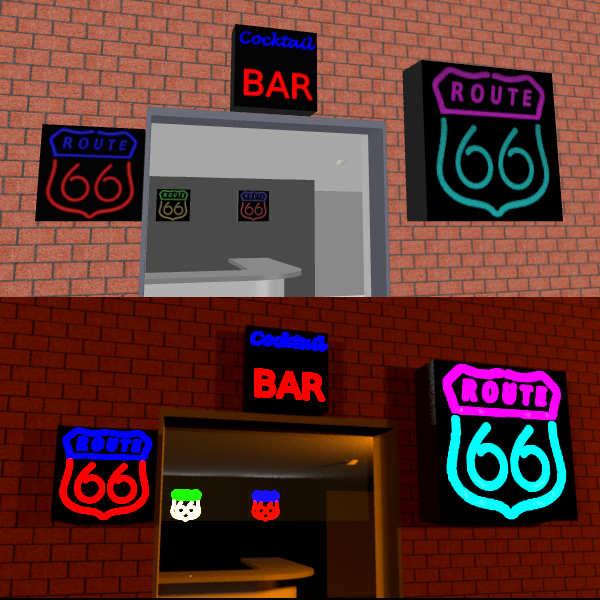 Texture files (low res) - transparency written on a black canvas.   |
| Posted by alaX at Dec 21, 2017, 6:07:22 PM |
|
Re: Search luminous neon objects! GLOW You need your model in .obj format with corresponding .mtl file. If you have .dae or .3ds model import it to SH3D and export as .obj (3D view > Export to OBJ format...). Open .mtl and set "illum 0" for material you want to "glow". Save, reimport model and render with global illumination=path (if you dont have plugin it will be Q4 - best quality i think) 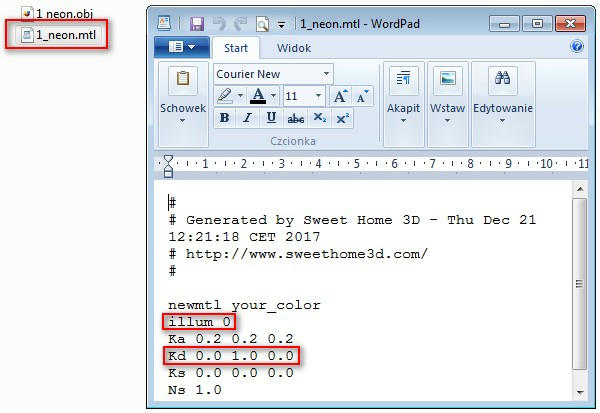 1) Global illumination default - your object is always bright, even if there's no light source in your scene, but it doesn't emit its own light (no glow). Global illumination path - your object glows - gives light to the scene. 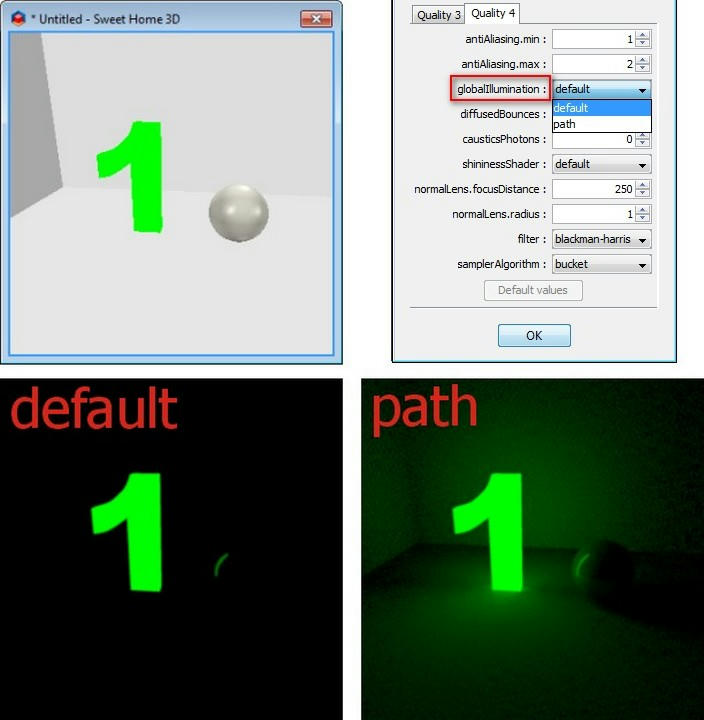 2) The bigger is model (face) the more light it emits (range). Single face emits light from both sides. 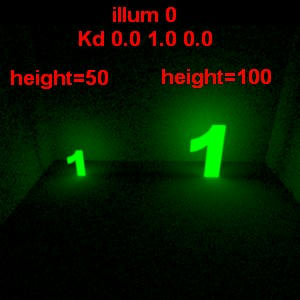 3) You can increase strength of light by multiplying Kd values in .mtl file. Example: White color is Kd 1.0 1.0 1.0 (RGB) - if you want more bright white change it to Kd 2.0 2.0 2.0. Green is Kd 0.0 1.0 0.0 - more glowing green Kd 0.0 5.0 0.0 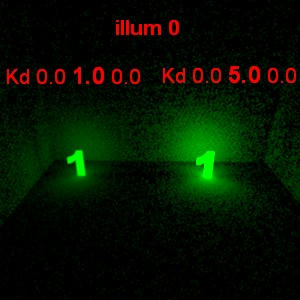 4) Emitted light doesn't pass thru transparent objects. 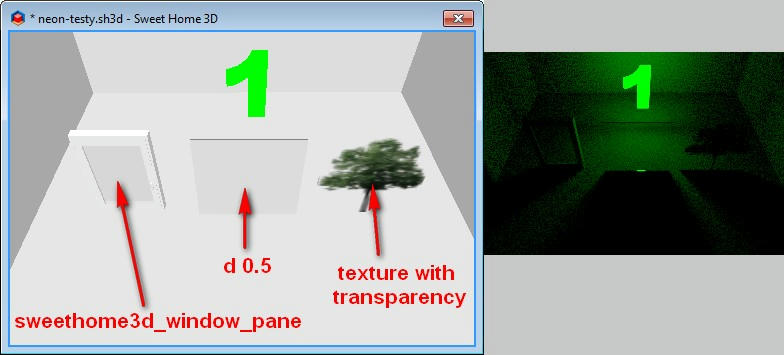 5) Changing color in "Modify furniture" removes glow effect. 6) It increases rendering time (in comparison to normal light sources). |
| Posted by okh at Dec 21, 2017, 7:27:07 PM |
|
Re: Search luminous neon objects! This is interesting. Never quite figured the full meaning of the illum settings, but then, there you go with amateurs at play. Thanks for sharing this. More to play with: and before I elaborate on my lack of understanding I am looking forward to do some testing - if I can get my head around all the variables. You would not, by any chance, have a corresponding .sh3d file to explore? ok |
| Posted by alaX at Dec 21, 2017, 8:38:51 PM |
|
Re: Search luminous neon objects! This is really very simple. More useful example (i hope): Create your own sign using walls, floors and other objects (furniture). (If you want your floor to have thickness create next level with elevation>0) Apply different colors to parts of your sign (for walls - top and both sides). 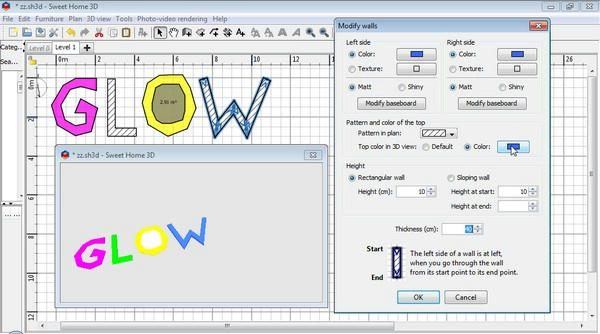 Select all parts* and Export to OBJ. 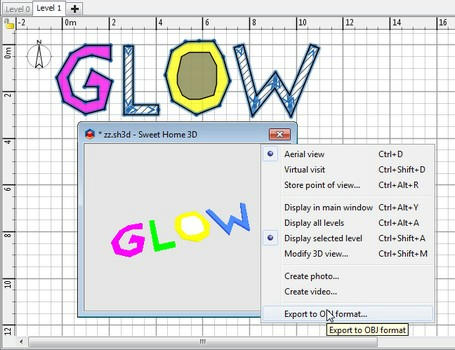 Modify .mtl - illum to "0" (You can remove some parameters - i think you can leave only newmtl, illum and Kd). 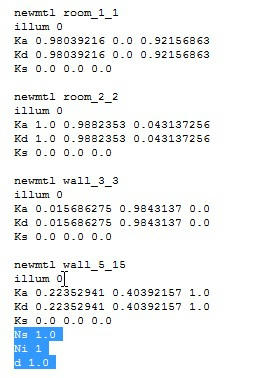 Import .obj - rotate, change size if needed, etc. 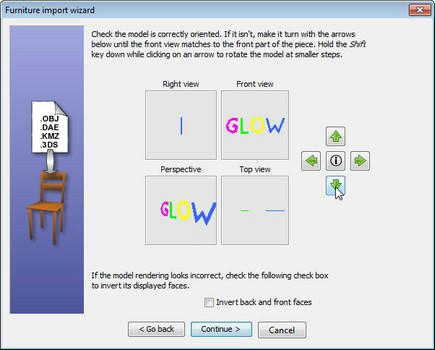 Place in your home and render Q4 (or with plugin - set gI to "path")** 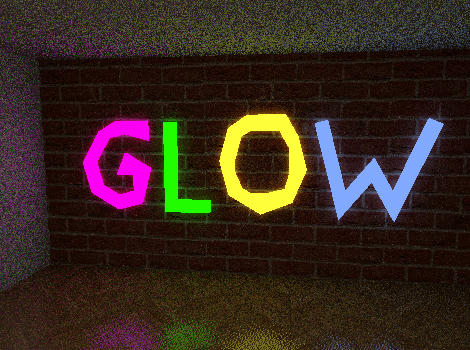 *If you want to cut hole in floor draw smaller floor shape inside(on it) and don't select it for exporting (see "O" in "GLOW") ** No glowing when sky has texture Download glow.sh3d |
| Posted by okh at Dec 21, 2017, 10:15:45 PM |
|
Re: Search luminous neon objects! Thanks - looking forward to explore. This is really very simple... Yes, well, for you, I suppose... Not sure about me. But then, everything is simple when you know how  . Anyway, thanks again, most useful. New possibilities for learning... And Merry Hols. ok . Anyway, thanks again, most useful. New possibilities for learning... And Merry Hols. ok |
| Posted by bdfd at Dec 22, 2017, 6:00:21 AM |
|
Re: Search luminous neon objects! This is really very simple. Amazing. More useful example (i hope): Create your own sign using walls, floors and other objects (furniture). (If you want your floor to have thickness create next level with elevation>0) Apply different colors to parts of your sign (for walls - top and both sides). Select all parts* and Export to OBJ. Modify .mtl - illum to "0" (You can remove some parameters - i think you can leave only newmtl, illum and Kd). Import .obj - rotate, change size if needed, etc. Place in your home and render Q4 (or with plugin - set gI to "path")** *If you want to cut hole in floor draw smaller floor shape inside(on it) and don't select it for exporting (see "O" in "GLOW") ** No glowing when sky has texture Download glow.sh3d  Bravo Alax !  ---------------------------------------- Evil progresses when good people do nothing! --- SH3D 7.1 and nothing else - W11 64b in 4K |
| Posted by spocky at Dec 22, 2017, 6:10:54 AM |
|
Re: Search luminous neon objects! Excellent. |
| Posted by okh at Dec 22, 2017, 11:04:07 AM |
|
Re: Search luminous neon objects! This is really very simple You are right, not difficult once you know how. Thanks so much for good instructions! This opens lots of possibilities. Tested to see whether it was as easy as you said. And yes, making a model and editing the .mtl did not take many minutes - even if the rendering was a pain, as you warned. Thankfully glow without the path at the next best rendering level is still pretty nice - and much faster. Testing your instructions compared with model with built in lightsource - at quality 2,3,4: |
| Posted by bdfd at Dec 22, 2017, 12:04:46 PM |
|
Re: Search luminous neon objects! Actually, yes it's simple. It made me remember the letters I had used on Mars II's project for the end of year celebrations. I found the original file and all the letters of the alphabet are there. 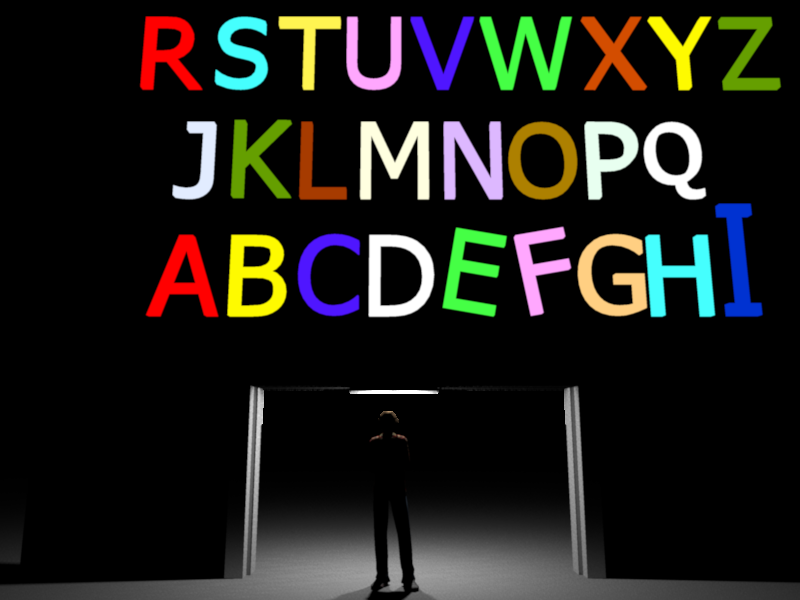 No need to go through walls because the letters are normalized and capitalized. Everything is configurable, the e.g. by the letters E and F leaning or I larger. I think I'll do the same thing with the numbers from 0 to 9. Attention, only the color is allowed, a texture blocks the light... Merry Christmas. ----------------------------------------  Alphabet_upp.sh3d
(163496 bytes)
(Download count: 597)
Alphabet_upp.sh3d
(163496 bytes)
(Download count: 597)
---------------------------------------- Evil progresses when good people do nothing! --- SH3D 7.1 and nothing else - W11 64b in 4K |
| Posted by Ceciliabr at Dec 30, 2017, 5:37:23 PM |
|
Re: Search luminous neon objects! @okh Nowhere as elegant as other projects, such as the ghost city, Being reminded of the Ghost City project I did some nearly two years ago, I recalled doing a lot of research about the glow-effect. There was an old thread ( by Enko perhaps?) that had a link to the Sunflow renderer Bible. I remember I did a lot of this stuff, and created heaps of logos and neon signs - and ended up using only a fraction. Anyway, searching through my backups I found that most of it was in Chinese, and that a lot had never been back up. But I found a few things that was not Chinese, like these neons. They are not very good, but I used some of them anyway...  ... and I remember making combinations in order to get neon objects with different colours. I have made a kind of reconstruction as an example: 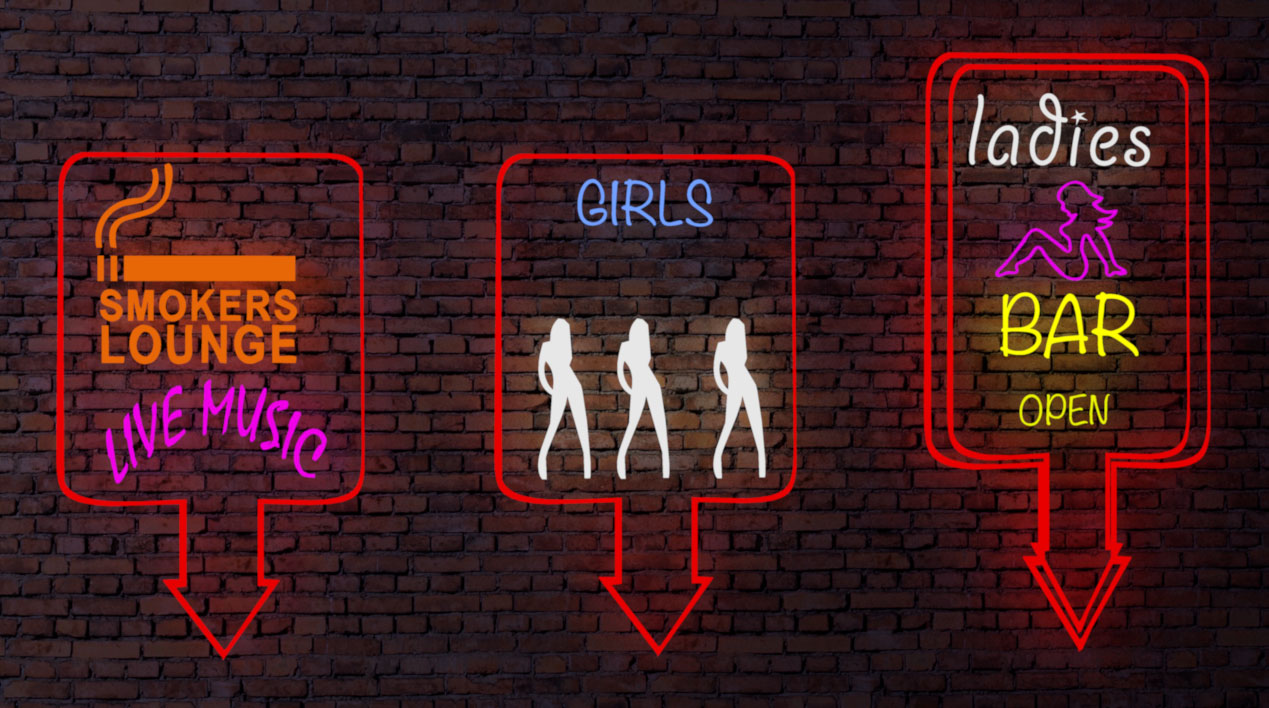 I also found some of my logos - like the ones on top of the skyscrapers in the Ghost City.  The different sizes and qualities are because they are experiments, made over a period of several months. If anyone think they can find any use for them, please, feel free to download. Logos.sh3d Neons.sh3d To change the colour of any of the objects, just edit it in SH3D, and export the object with it's new colour. Change the illum to 0 in the .mtl-file, and re-import to SH3D. The way I made these object was to first make Photoshop-files and do extrusions, and then import them into Verto Studio 3D, both to colourize them and to merge the extruded sides. Then I edited the .mtl, as described elsewhere in this thread. Cec |
| Posted by spocky at Dec 30, 2017, 8:11:36 PM |
|
Re: Search luminous neon objects! ... If anyone think they can find any use for them, please, feel free to download. Logos.sh3d Neons.sh3d ...Cec The two links are the same (logos.sh3d).  |
| Posted by Ceciliabr at Dec 30, 2017, 11:20:48 PM |
|
Re: Search luminous neon objects! Busy day |
| Posted by spocky at Dec 31, 2017, 6:39:55 AM |
|
Re: Search luminous neon objects! Okay cec. Fascinating but, it's just an example of a personal use of frozen objects. Except color, nothing else can be done. If I want to customize a shop, I'll take Alax or bdfd method. with both, we do everything we want ...  |
| Posted by okh at Dec 31, 2017, 3:50:04 PM |
|
Re: Search luminous neon objects! @okh Nowhere as elegant as other projects, such as the ghost city, Being reminded of the Ghost City project I did some nearly two years ago, I recalled doing a lot of research about the glow-effect. And told us nothing... Oh well. At least I got the reference to the Ghost City right. For some of us, who have no patience (read: skill) for perfect renderings, the balance is between result and rendering time. As the full 'path' option seems to grind my low-end processor almost to a halt, I shall have to experiment with some compromise and leave the aesthetics to you. Which certainly is better anyway. Thanks for sharing. Do not really know when I will next need signs for a strip joint, but your neon signs bring back memories of wanderings in dubious neighbourhoods. To an extent where I can feel the smell of cheap tobacco and perfume. ok |
| Posted by alaX at Dec 31, 2017, 4:48:47 PM |
Re: Search luminous neon objects!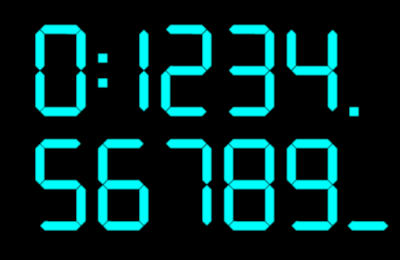 Neon digits.sh3f |
| Posted by alaX at Jan 4, 2018, 6:13:31 PM |
Re: Search luminous neon objects!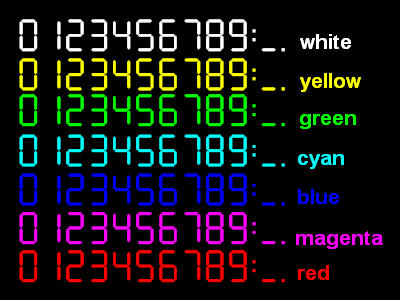 Neon digits white Neon digits yellow Neon digits green Neon digits cyan Neon digits blue Neon digits magenta Neon digits red |
| Posted by alaX at Jan 13, 2018, 6:02:52 PM |
Re: Search luminous neon objects!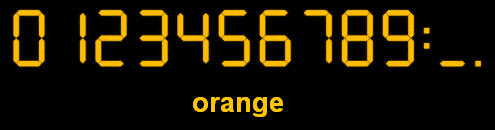 Neon digits orange |
| Posted by rontant at Jul 28, 2018, 3:09:32 AM |
|
Re: Search luminous neon objects! Oh man! I have been searching high and low for weeks to make a glowing material and only now I stumbled upon this thread. I think thhis should be made sticky or at least mentioned in the Tips section. This is very useful. Not only for those who want to make neon signs. Below is the example how I made my spotlight housing rim to glow using tips found on this thread.  See the spotlight on the right? |
| Posted by enkonyito at Mar 10, 2020, 3:00:06 AM |
|
Re: Search luminous neon objects! With the YafaRay rendering engine, you can transform any object into light. Based on the logos and neon signs created by Ceciliabr.   ---------------------------------------- EnkoNyito |
| Posted by Mike53 at Jan 27, 2021, 4:50:42 PM |
|
Re: Search luminous neon objects! Hi, trying, unsuccessfully, to get a stair tread to glow 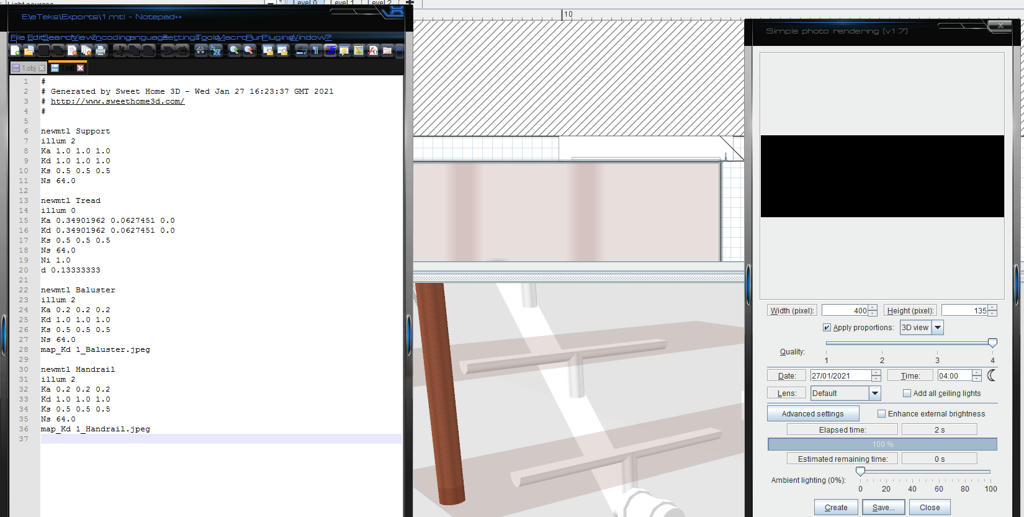 . .Is it only the illum line that has to change, or is there something in the .obj file as well. Tried with Path instead of ambient occlusion, just took longer to get the same result. Any help would be appreciated. Thx Mike |
| Posted by Puybaret at Jan 27, 2021, 6:27:12 PM |
|
Re: Search luminous neon objects! Sorry Mike, it won't work with transparent materials. ---------------------------------------- Emmanuel Puybaret, Sweet Home 3D creator |
| Posted by Mike53 at Jan 27, 2021, 6:37:22 PM |
|
Re: Search luminous neon objects! Ok mate, thx for the prompt reply, even if you are the bearer of bad news, you may keep your head.  |
| Posted by Mike53 at Feb 5, 2021, 8:18:05 AM |
|
Re: Search luminous neon objects! So this is what i came up with to get a similar effect 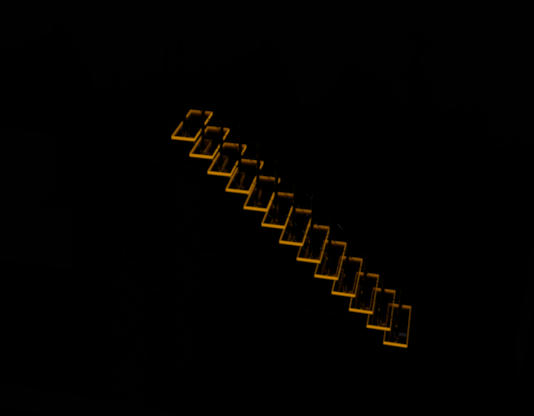 created a rectangle of walls, 2 mm x 30 mm exported it and modified its MTL |
| Posted by DeonEva at Mar 3, 2021, 4:59:02 PM |
|
Re: Search luminous neon objects! Thanks everyone for the tips and helpful links! there are one in a million. All kinds of signs, letters, and so on! Hurrah!! ---------------------------------------- "Let the beauty of what you love be what you do." https://www.worktime.com/employee-monitoring |
| Posted by lemaj77 at Sep 15, 2022, 11:31:23 AM |
|
Re: Search luminous neon objects! First of all thank you for everything you do for us on sweet home 3d. please are there only capital letters? can we also have the alphabet in lowercase letters? can the font be changed? thank you |
| Posted by enkonyito at Feb 12, 2023, 1:58:45 PM |
|
Re: Search luminous neon objects! Libraries of light shapes based on neon lights and fluorescent logos created by Ceciliabr. Available in the Lights category with the "neon" or "logo" keywords and compatible with SweetHome3D-7.0. ---------------------------------------- EnkoNyito |
| Posted by Puybaret at Feb 12, 2023, 4:27:29 PM |
|
Re: Search luminous neon objects! Thanks EnkoNyito. These light shapes work well with a light power reduced to 10% if placed close to a wall. Rendering runs much faster with YafaRay rendering engine too. 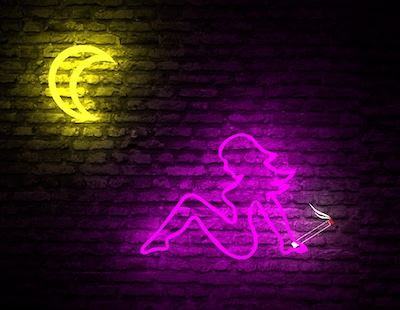 ---------------------------------------- Emmanuel Puybaret, Sweet Home 3D creator |

|
Current timezone is GMT Sep 24, 2026, 11:09:00 AM |