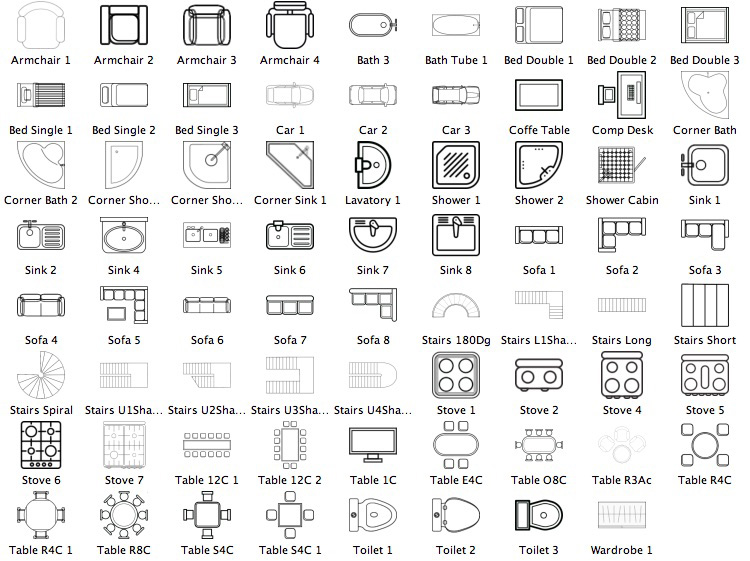
Try furniture 2d symbols made by Dorin or create your own (tips ).
|
Sweet Home 3D Forum » List all forums » » Forum: 3D models and textures » » » Thread: 3D models |
|
| Print at Sep 26, 2026, 4:39:33 PM | View all posts in this thread on one page |
| Posted by Bender4380 at Jan 8, 2018, 9:03:07 PM |
|
3D models Hi. I am working on using this great program to make floor plans for rentals. Does anyone know how to make the lines of a 3d model thicker, or do you recommend a color scheme to help cabinets and such pop? This is an example of what I have done so far: https://manager-prod.s3.amazonaws.com/Documen...5CqWbd2QVghEH75%2BhYIA%3D |
| Posted by Puybaret at Jan 9, 2018, 8:34:39 AM |
|
Re: 3D models What do you mean by lines? Sorry, the document you pointed to isn't accessible. Please check it. ---------------------------------------- Emmanuel Puybaret, Sweet Home 3D creator |
| Posted by alaX at Jan 9, 2018, 9:52:18 AM |
|
Re: 3D models Try furniture 2d symbols made by Dorin or create your own (tips ). |
| Posted by VeroniQ at Jan 9, 2018, 11:03:22 PM |
|
Re: 3D models This recent blog's article also mentions some other symbols libraries (arrows, emergency symbols, etc...) if it is what you are looking for. |

|
Current timezone is GMT Sep 26, 2026, 4:39:33 PM |