Print at Dec 16, 2025, 9:29:46 AM
Posted by Mike53 at May 7, 2018, 11:21:46 AM
In need of assistance
Hi

I have made some new windows, which i hope to use and share. Unfortunately i have no idea at all what to do to make them user friendly, they are at present just an assembly of box's.
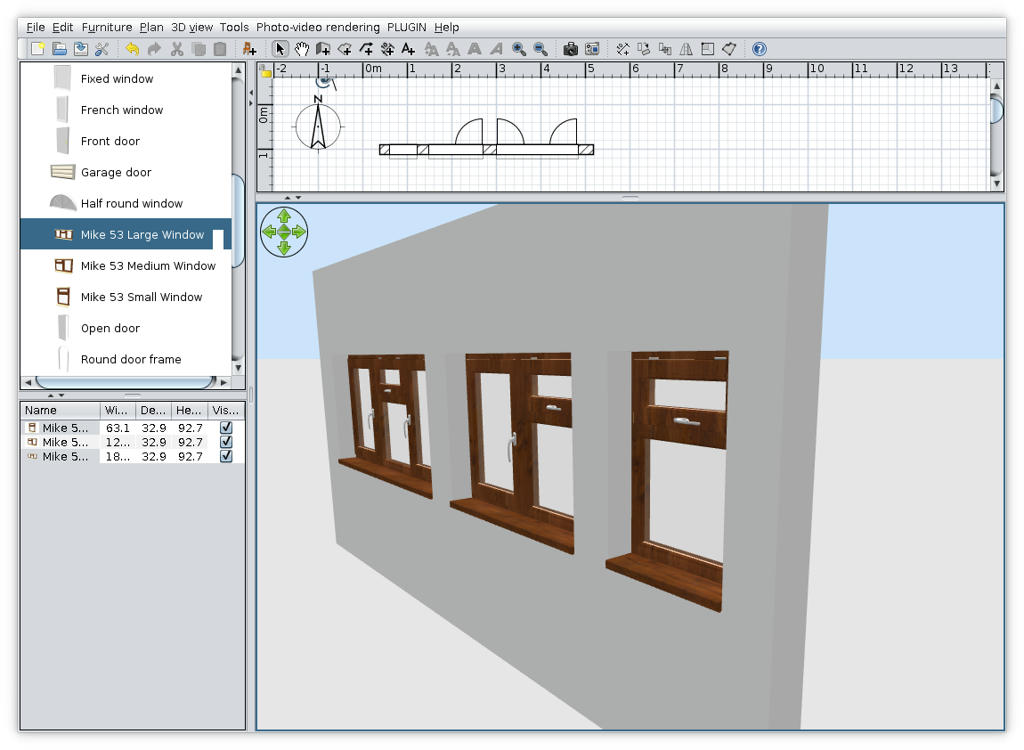
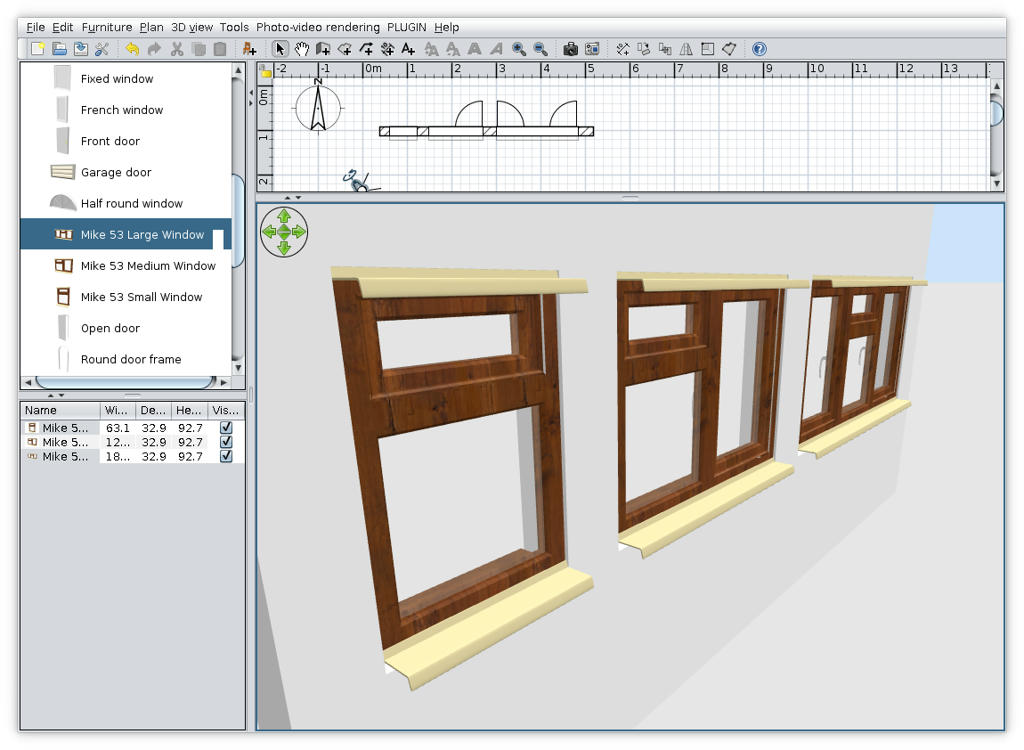
Here are the windows :-
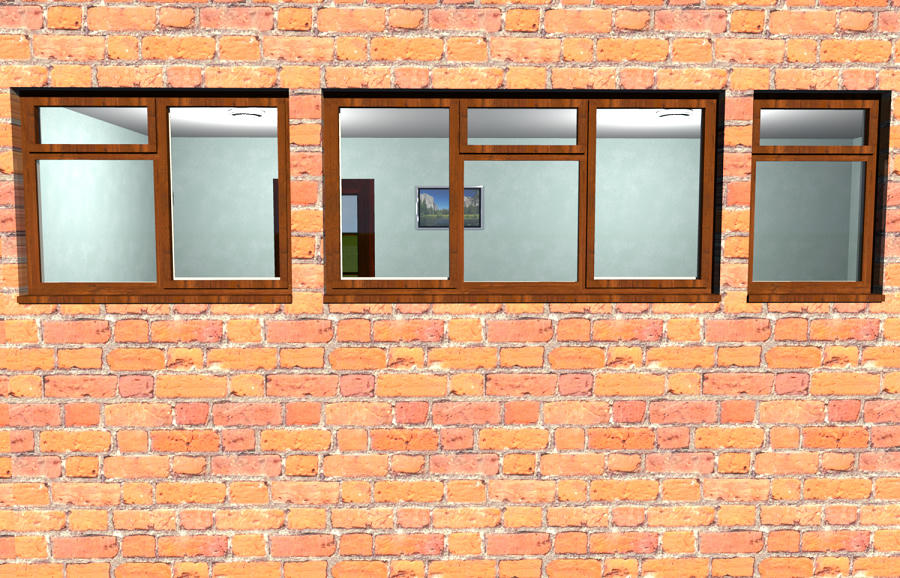
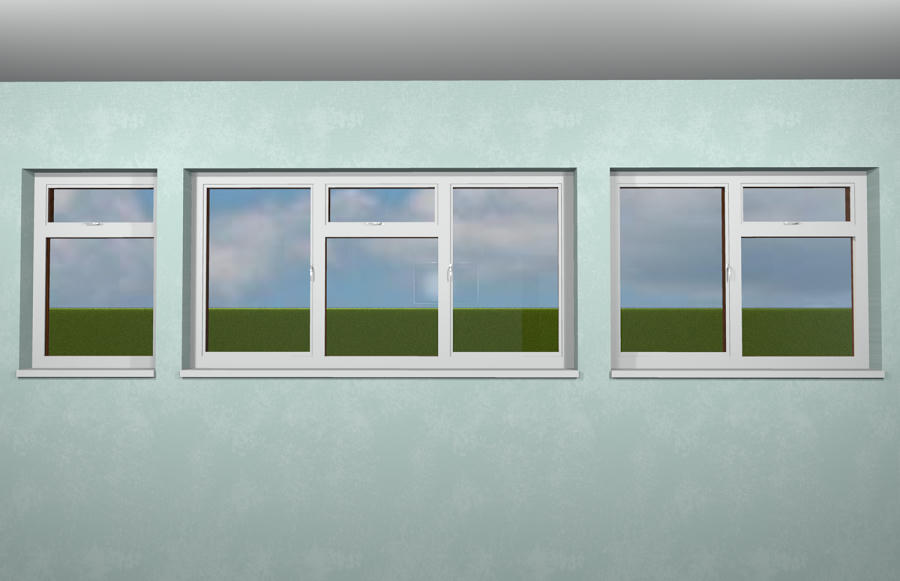


and here is the issue
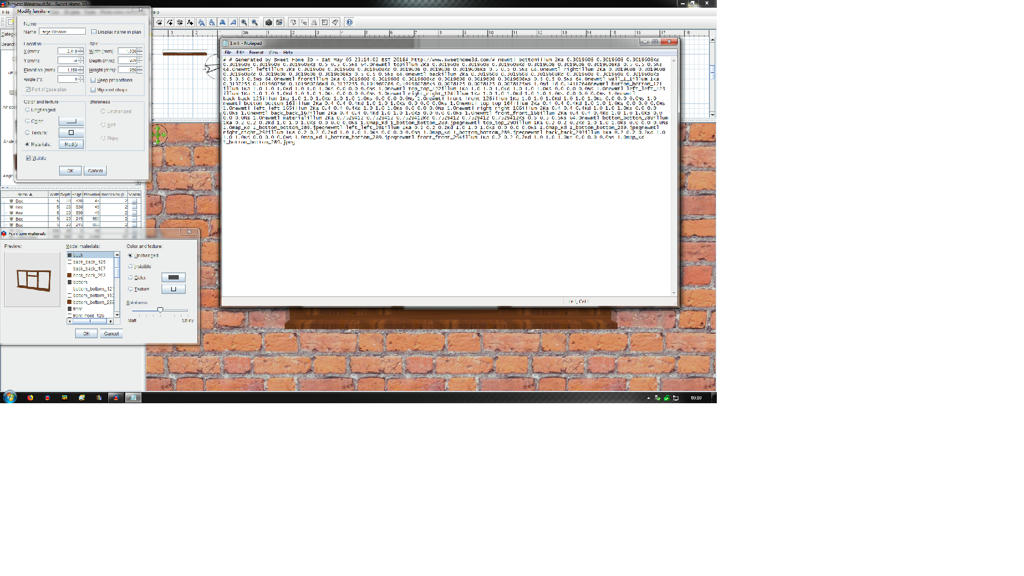

If i (well someone else smile ) could get the modify box to show inner, outer, glass, handles and edge, or explain why i cannot get it to work this way, then i would be eternally grateful.

Mike

Posted by dorin at May 7, 2018, 8:13:37 PM
Re: In need of assistance
The trick is to name the texture or color with the name of object part.
e.g. The 4 boxes from window frame must have the texture name "frame" or whatever and so on.
I do this usually in AOI to modify all in one step but I think is possible too in SH3D but in multiple steps.
So, You have 2 options:
1. Try to do it Your self (I seen Your work in Gallery and I think You can do it) or
2. Put the obj and mtl file somewhere to be downloaded for modification.
----------------------------------------
A computer program does what you tell it to do, not what you want it to do. Murphy's Law
When all else fails, read the instructions. Murphy's Law
If you don't like "AS IS", DIY. Dorin's law

Posted by Mike53 at May 7, 2018, 9:45:40 PM
Re: In need of assistance
Hi Dorin.
Thank you for the quick response, i would like to have a go, i don't believe i will be successful as i am no good with numbers. That said, looking at the mtl, what part defines that objects color/texture, here is an example :-


0
map_Kd Small_Window_bottom_bottom_87.jpeg

newmtl right_right_90
illum 1
Ka 0.2 0.2 0.2
Kd 1.0 1.0 1.0
Ks 0.0 0.0 0.0
Ns 1.0
map_Kd Small_Window_bottom_bottom_87.jpeg

newmtl back_back_91
illum 1
Ka 0.2 0.2 0.2
Kd 1.0 1.0 1.0
Ks 0.0 0.0 0.0
Ns 1.0
map_Kd Small_Window_bottom_bottom_87.jpeg

newmtl front_front_92
illum 1
Ka 0.2 0.2 0.2
Kd 1.0 1.0 1.0
Ks 0.0 0.0 0.0
Ns 1.0
map_Kd Small_Window_bottom_bottom_87.jpeg

newmtl wall_1_1
illum 2
Ka 0.8980392 0.8980392 0.8980392
Kd 0.8980392 0.8980392 0.8980392
Ks 0.5 0.5 0.5
Ns 64.0
Ni 1
d 0.14117646

newmtl bottom_bottom_195
illum 2
Ka 0.3019608 0.3019608 0.3019608
Kd 0.3019608 0.3019608 0.3019608
Ks 0.5 0.5 0.5
Ns 64.0

newmtl top_top_196
illum 2
Ka 0.3019608 0.3019608 0.3019608
Kd 0.3019608 0.3019608 0.3019608
Ks 0.5 0.5 0.5
Ns 64.

mmmmm that looks different than the note pad version.

Looking at the way that now appears, am i right in assuming that each side of each box starts with the word "new" and those that have a jpeg are therefor textured?
I think from what you said i could rename each white part to inner, instead of back back or front front etc and each textured part to outer, or start all over again.

Here is a link the the 3 obj's and mtl's.

Just had a thought , is there a better thingy for viewing the mtl than notepad?

Mike

Posted by dorin at May 8, 2018, 9:37:32 AM
Re: In need of assistance
Is not so simple.
1. MTL file (material textures library) is OK to open/edit with notepad.
- newmtl is a kind of tag; the name came after (right_right_90)
- this name are used several times in OBJ file; You must modify both.
- don't care about numbers; it's some codes for color except dose for glass which describe the transparency (d 0.14117646)
- indeed the JPG is the texture but I suggest to not set it until the final step wile we can modify when we use it; use only colors to be more easy identifiable.
2. If You want to use only SH3D and the texturable box You must build step by step: e.g.For simple window:
-fist make the frame (5 boxes), align them correctly, GROUP them and then export as obj.
-edit the MTL and OBJ file by renaming all the textures "frame".
-re import as furniture and in modify texture You must have only one entry "frame".
3. Repeat these procedure for "window", "glass", "knob", "ledge" and "hinge".
4. At the end import them all, arrange correctly, group and export as obj.
5. Import the furniture and see what You do blushing
Otherwise learn AOI and make it there.
I will tray to make a library with windows You suggest; I'm interested in this.
PS. I suppose the knob must be on the other side to be usable.
----------------------------------------
A computer program does what you tell it to do, not what you want it to do. Murphy's Law
When all else fails, read the instructions. Murphy's Law
If you don't like "AS IS", DIY. Dorin's law

Posted by Mike53 at May 9, 2018, 10:12:28 PM
Re: In need of assistance
Thank you Dorin
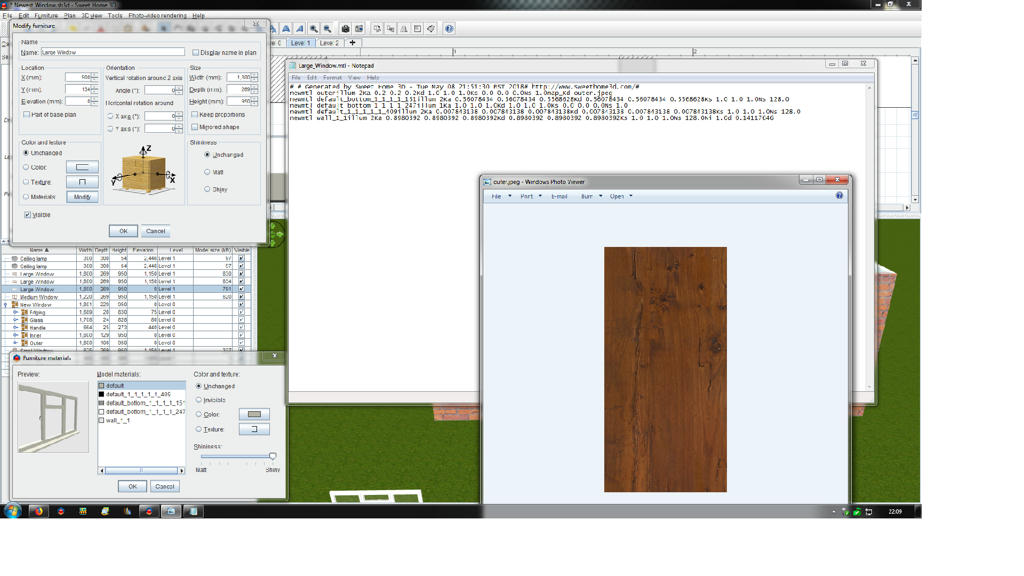
Very very helpful, but, i am missing something. Here is an image of the progress i have made
so when i now open the "modify" box i see the 5 items i want, but they are all called Default, which is probably my fault smile . hopefully you can see the top line on the mtl which reads :-

newmtl outer
illum 2
Ka 0.2 0.2 0.2
Kd 1.0 1.0 1.0
Ks 0.0 0.0 0.0
Ns 1.0
map_Kd outer.jpeg

and the image named "outer".
What have i missed?
Thx
Mike

Posted by Mike53 at May 9, 2018, 10:18:54 PM
Re: In need of assistance
I also noticed that if i change the last line to read glass or window instead of wall it loses its transparency??????/

Posted by dorin at May 10, 2018, 8:32:28 AM
applause   Re: In need of assistance
1. You've made good progresses applause
2. On notepad You've right -it looks bad. Verify the notepad settings because don't interpret correctly the end of line and the spaces.
You can use other text editor (LO writer or MSWord).
3. My advice is to NOT use any texture in that stage, only different colors. The user could set their own preferences after insert it in plan.
4. If You modify the name ONLY in mtl file of course You've loose the transparency; You MUST also modify the name in obj file (in text editor). e.g.:
in Window.mtl
#Produced by Art of Illusion 3.0.3, Tue May 08 14:32:53 EEST 2018
newmtl window
illum 1
Ka 0.2 0.2 0.2
Kd 1.0 1.0 1.0
Ks 0.0 0.0 0.0
Ns 1.0
Ni 1.0
d 0.26666665 #this indicate the transparency

in Window.obj
#Produced by Art of Illusion 3.0.3, Tue May 08 14:32:53 EEST 2018
mtllib Window.mtl
s 0
g Window
usemtl window #this indicate which texture to use for next object
v 0 0 0
v 0 0 10
.....
..... etc

Hope is useful.
----------------------------------------
A computer program does what you tell it to do, not what you want it to do. Murphy's Law
When all else fails, read the instructions. Murphy's Law
If you don't like "AS IS", DIY. Dorin's law

Posted by Mike53 at May 11, 2018, 10:04:13 PM
Re: In need of assistance
Does that mean i need to add it to my liary and the use the furniture editor?

Posted by dorin at May 12, 2018, 5:44:01 AM
Re: In need of assistance
No, that mean You need to modify BOTH files in notepad to use the same name for texture in .mtl and in .obj.
----------------------------------------
A computer program does what you tell it to do, not what you want it to do. Murphy's Law
When all else fails, read the instructions. Murphy's Law
If you don't like "AS IS", DIY. Dorin's law

Posted by Mike53 at May 12, 2018, 10:52:45 AM
Re: In need of assistance
Ok, just looked at the obj in text, i think its gonna remain "default". biggrin

Posted by dorin at May 14, 2018, 5:10:48 PM
Re: In need of assistance
1. With notepad You can't do much things. Install Notepad++.
2. Hope not too late; I've made a little library with closely Your type and dimensions. In zip archive You have also the sources in AOI for future projects.
Extract the archive and install only the sh3f.
It took so long because I must learn AOI first blushing
Some preview:
Inside

Outside

----------------------------------------
A computer program does what you tell it to do, not what you want it to do. Murphy's Law
When all else fails, read the instructions. Murphy's Law
If you don't like "AS IS", DIY. Dorin's law

Posted by Mike53 at May 19, 2018, 9:47:38 AM
Re: In need of assistance
Thank you again for all your help Dorin.
I cannot imagine me trying to learn other software nor can i master these mtl files or give plan view the openings, so i will stay with what i have, i will however try to find a different handle for them the size (weight) grows about 10x by using the ones i have.
Door without handle <300
Door with handle >800
large window without handles <400
With 3 handles > 1800

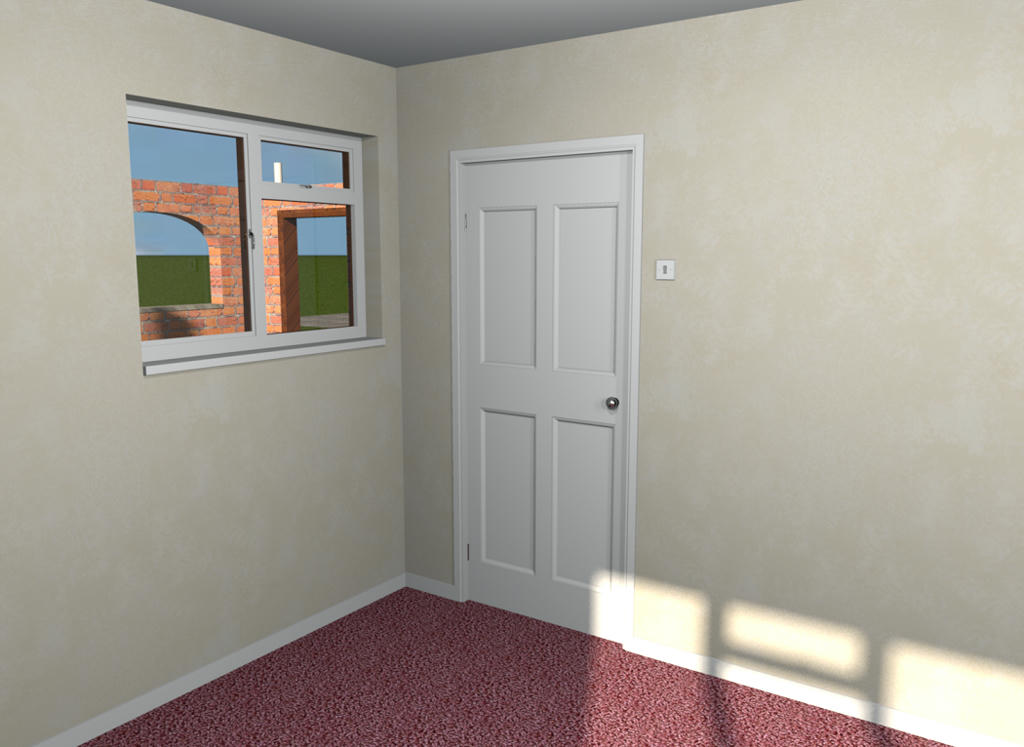
Door and window


Thank you again
Mike

Posted by dorin at May 20, 2018, 3:13:44 PM
rose   Re: In need of assistance
@Mike53
1) I suppose we are a very close age. Maybe I'am a little older,so
"Even the old dog can learn new tricks"
I cannot imagine me trying to learn other software

If I can, You can!
2)
try to find a different handle for them the size (weight) grows about 10x by using the ones i have

You can try but as far as I know You don't find it. That's why I "learn" a little bit AOI and other.
3) You've right about size. But You have to make a compromise between size and quality.
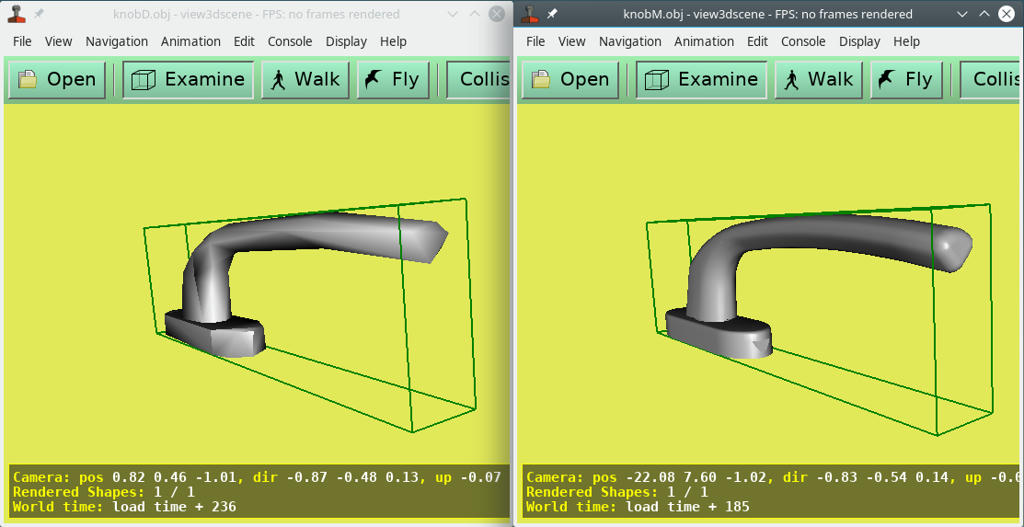
I've extract Your knob as object and this are the extreme:

Left 6.2K and right 233.3k as original.
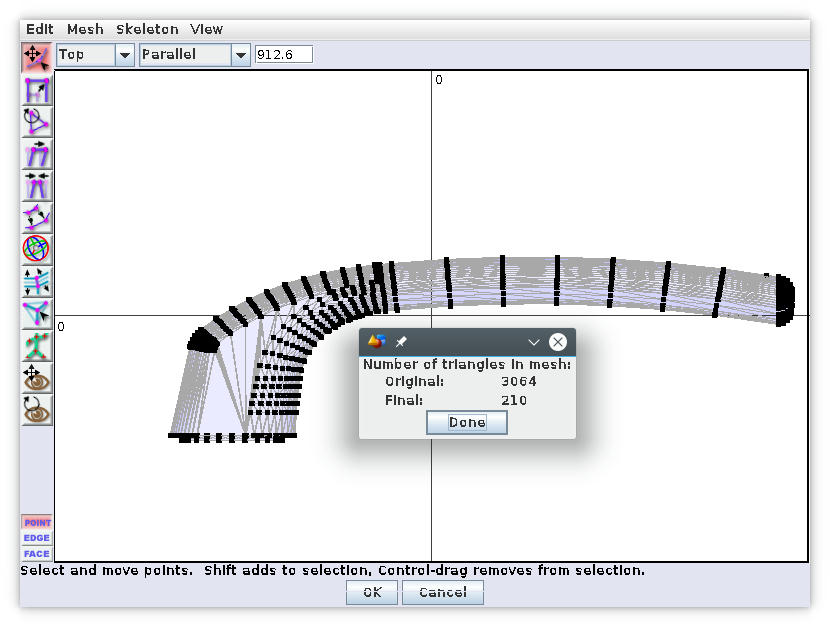
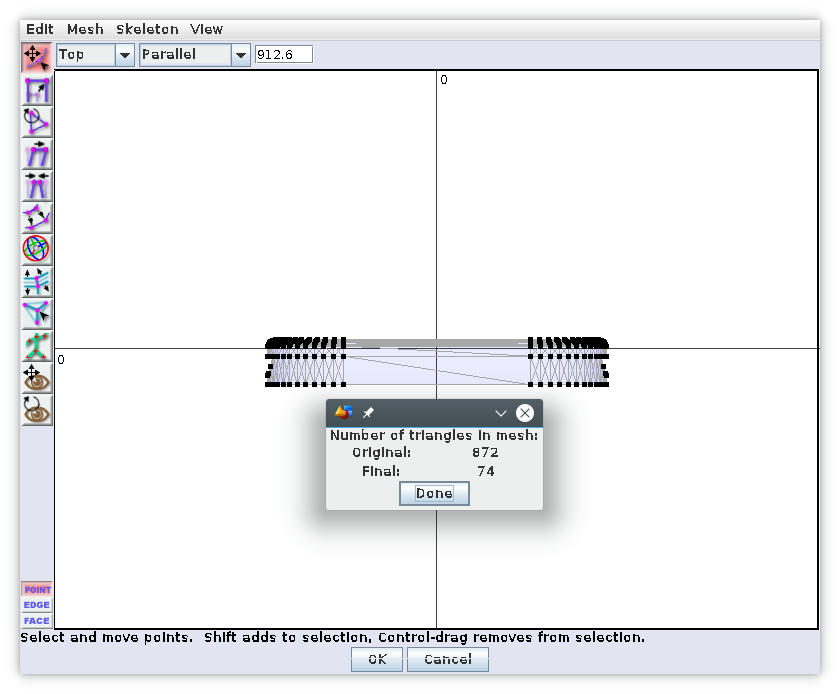
Few information of what is behind:

You can see the numbers of triangles in original and after optimization of tow pieces which compose Your knob.
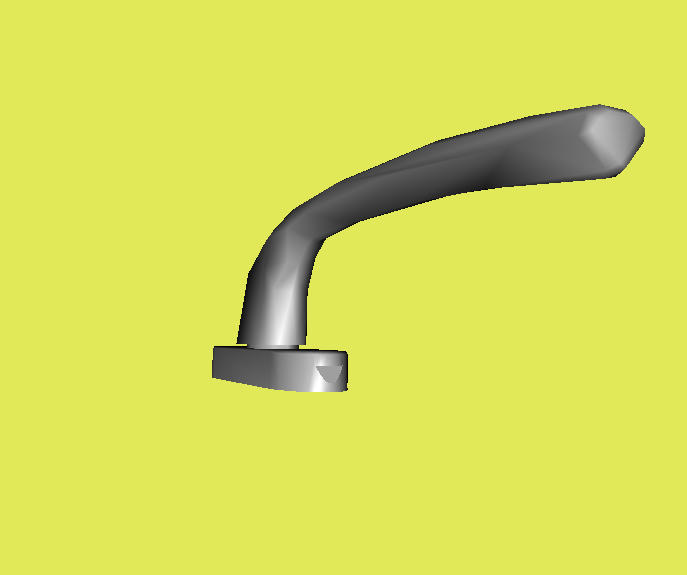
So, for me, I opted for a compromise at 113.9k which look like that:

4) If You use it for a pretty regular home is not a problem the size but for a hotel it is biggrin
5) I've started to simplify my furniture; I don't have a hotel but i have a poor computer so I need also to reduce the size everywhere I can.
If You think I can help You I'm available; just ask.
Dorin, a old man (very old for today generation, (clik-generation or tap-generation)) alien 2
----------------------------------------
A computer program does what you tell it to do, not what you want it to do. Murphy's Law
When all else fails, read the instructions. Murphy's Law
If you don't like "AS IS", DIY. Dorin's law

Posted by Mike53 at May 20, 2018, 4:24:06 PM
Re: In need of assistance
Thank you Dorin
Is that handle going to be shared? wink

Posted by Mike53 at May 20, 2018, 4:30:56 PM
Re: In need of assistance
If anyone is interested i can share the windows (once i change the handle) and door, as you can tell from following this topic, they will show no openings in 2d, and when modifying, all parts are called "default". But they look ok.
Mike

Posted by dorin at May 20, 2018, 5:09:17 PM
Re: In need of assistance
Yes,HERE . In fact is Yours; I only simplify them. Choose which You want.
----------------------------------------
A computer program does what you tell it to do, not what you want it to do. Murphy's Law
When all else fails, read the instructions. Murphy's Law
If you don't like "AS IS", DIY. Dorin's law

Posted by okh at May 24, 2018, 10:42:35 AM
Re: In need of assistance
Mike53 - congratulations on your models! And thanks for sharing the process.

It is indeed true that while a door or window can be realatively small (few surfaces), the hinges, knobs, handles and keyholes often increase the size of the model many times over.
Dorin:
4) If You use it for a pretty regular home is not a problem the size but for a hotel it is
5) I've started to simplify my furniture; I don't have a hotel but i have a poor computer so I need also to reduce the size everywhere I can.

Thanks for your simplification guide. I for one certainly believe in the advantages of small models - for all sort of reasons. However, it is also worth noting that if you use one model many times over in a plan, SH3D will only save one instance of the model. So the file size of a hotel does not have to increase much with many handles.

As for simplification, just for reference, in addition to Dorins simplifications, the models can be stripped down even further by following Puuybarets guide in SF 261. A couple of months ago we needed some retro doorhandles. Thinking same as Dorin, make the models as small as possible - even if these examples may be a bit extreme, they illustrate how far down you can go. I throw them in your examples for comparison.

doorhandle_retro_03.zip - 1508 bytes
doorknob_round_02.zip - 1952 bytes
door_keyhole.zip - 1244 bytes

But as Ceciliabr rightly pointed out in thread 8292 for a nice rendering of a rounded shape, you certainly need more segments in the polygon.