|
Sweet Home 3D Forum » List all forums » » Forum: Wishlist » » » Thread: Holes in the ground |
|
| Print at Dec 19, 2025, 8:39:33 AM | |
| Posted by UbuntuBirdy at Jun 28, 2018, 9:30:06 PM |
|
Holes in the ground My wish for a future version of sh3d is that objects like furniture or groups do not cut these rectangular holes in the ground. If it's a single object, i could live with the hole, but it would be nice if it would act like an object in a wall (door or window). But realy annoying are the holes which the groups cut in the ground. They are often much bigger than they have to be... sample picture At the bathing platform you can see the triangle which is from the group of the underwater lights. And the rectangular hole from the bathing platform which is in a group with the stair and the ladder. Of course, a houseboat is a special case, but the same problem appears when a house has a cellar. ---------------------------------------- Pascal SH3D 6.6 / Ubuntu 22.04 (Mainline-Kernel) / Radeon RX580 / Ryzen 7 5800x |
| Posted by VeroniQ at Jun 28, 2018, 10:52:08 PM |
|
Re: Holes in the ground Beautiful houseboat, by the way! |
| Posted by UbuntuBirdy at Jun 29, 2018, 5:27:49 AM |
|
Re: Holes in the ground @VeroniQ Thanks! As soon as I can pay the money for this dream, I will explore all the canals and rivers in france, and then the rest of the european waterways. ---------------------------------------- Pascal SH3D 6.6 / Ubuntu 22.04 (Mainline-Kernel) / Radeon RX580 / Ryzen 7 5800x |
| Posted by UbuntuBirdy at Jul 6, 2018, 11:17:57 PM |
|
Re: Holes in the ground At the moment I'm imageing how cool it would be if we could shape landscapes in the ground. Create a negative shape of the landscape, let it form the ground, switch it to invisible and tataa... there are mountains, lakes, hills, rivers... ... but only, if the object only cuts exactly the own shape in the ground... ---------------------------------------- Pascal SH3D 6.6 / Ubuntu 22.04 (Mainline-Kernel) / Radeon RX580 / Ryzen 7 5800x |

| Posted by VeroniQ at Jul 7, 2018, 9:56:05 AM |
|
Re: Holes in the ground It is not really landscape, but this tip can help you to make a small lake and an hill in a garden. |
| Posted by UbuntuBirdy at Jul 7, 2018, 12:00:54 PM |
|
Re: Holes in the ground I know this tip, and it's really a cool workaround, but it is not what I'm talking about. I wish that objects only cut their own exact shape in the ground, and not a rectangular hole of their length, width and height like they do at the moment. ---------------------------------------- Pascal SH3D 6.6 / Ubuntu 22.04 (Mainline-Kernel) / Radeon RX580 / Ryzen 7 5800x |
| Posted by okh at Jul 8, 2018, 2:45:56 PM |
|
Re: Holes in the ground ..wish that objects only cut their own exact shape in the ground, and not a rectangular hole... If I understand your point, it is possible to achieve this, but you will have to add a cutout your model, using the FurnitureLibraryEditor and adding SVG. It is, by the way, sometimes faster to go straight for Home.xml and add the cutout there.staircaseCutOutShape='xxxxxxxxxxxxxx'Either way, you need to be able to describe the cutout in an SVG path, and true, it is not for the faint hearted first time user, but then, your design is pretty advanced too... And if you wish for a SVG cutout for a special model, just ask. ok PS. In some thread about the release of a new version, there are comments on why windows have automatic cutouts, while stairs do not. |
| Posted by UbuntuBirdy at Jul 8, 2018, 6:46:35 PM |
|
Re: Holes in the ground Again, not what I'm talking about, sorry. If I have a level at -500mm and I build some round walls in sh3d about 2000mm in height, the ground level (0mm) has a hole exact shaped from the walls. If I create the round walls in CAD instead and put them on the sublevel (-500mm), the ground has a rectangular hole which is as big as the maximum length and width of the CAD walls. And my wish is the CAD walls cut the same hole in the ground as the walls from sh3d do it. ---------------------------------------- Pascal SH3D 6.6 / Ubuntu 22.04 (Mainline-Kernel) / Radeon RX580 / Ryzen 7 5800x |
| Posted by okh at Jul 8, 2018, 8:52:49 PM |
|
Re: Holes in the ground You are right, I do not get it. Still do not, I am afraid. But I am curious, maybe you could post a model? ..create the round walls in CAD instead and put them on the sublevel (-500mm), the ground has a rectangular hole... Trying to recreate. Yes, a circular model with no cutout will create a rectangular hole, while walls (or room) will cut along the shape.I then tried using the same circular object below ground WITH a cutout m 0,0.5 a .5,.5 0,0,0 1,0 a .5,.5 0,0,0 -1,0 z for the model in the FurnitureLibraryEditor (or actually, I just added staircaseCutOutShape='m 0,0.5 a .5,.5 0,0,0 1,0 a .5,.5 0,0,0 -1,0 z' in Home.xml). And there is no longer a square, but a circle (well, two circular arcs to be presise) cutout that fits snugly around the circular model. Any shape can be recreated with SVG, but manually. But - it seems we may not be talking about the same thing. As I said, I am curious, so a model would be great to illustrate. ok PS the Home.xml model then had the following properties for the circular shape: <pieceOfFurniture level='level0' name='wallcircle_tmp_with_cutout' model='1/wallcircle_tmp.obj' icon='0' x='820.5' y='388.17648' width='522.00006' depth='521.23444' height='240.0' modelSize='30583' movable='false' staircaseCutOutShape='m 0,0.5 a .5,.5 0,0,0 1,0 a .5,.5 0,0,0 -1,0 z'/> |
| Posted by UbuntuBirdy at Jul 8, 2018, 11:52:30 PM |
|
Re: Holes in the ground You are right, I do not get it. Still do not, I am afraid. But I am curious, maybe you could post a model? It's not your fault, it seems I'm not able to describe my problem properly... I understand your solution, but in my opinion, this is only a workaround, and sorry, I'm a perfectionist, and workarounds are only temporary solutions and for me not aceptable. That does not mean they are not good, it's my crazy compulsion to have everything perfect... And in my opinion, a software like sh3d can only get better, if a workaround is not a solution forever. Ok, you asked for a model: Luxemotor Hull This is a hull from a old inland cargo vessel. If I have to create a cutout path, I have to do one for every mm in height because the ships has a different draft for different loads. Ergo, your solution is not the right solution. And now I go back to the Groups. How can I apply your solution to groups? As you can see in my first post, they cut holes where nothing is. Believe me, I am very grateful for your help, but in my opinion that is not a solution to my problem. ---------------------------------------- Pascal SH3D 6.6 / Ubuntu 22.04 (Mainline-Kernel) / Radeon RX580 / Ryzen 7 5800x |
| Posted by UbuntuBirdy at Jul 9, 2018, 7:00:46 AM |
|
Re: Holes in the ground In easy words: the ground should act like water or fine sand. Not that kind everything sinks into it, but if you put an object into it, the ground should "flow" around the shape of the object. ---------------------------------------- Pascal SH3D 6.6 / Ubuntu 22.04 (Mainline-Kernel) / Radeon RX580 / Ryzen 7 5800x |
| Posted by okh at Jul 9, 2018, 1:43:04 PM |
|
Re: Holes in the ground Oh, now I see. True, true, you are right. SH3D cannot calculate and adjust the waterline around a hull at various loads (elevations). Calculating exact displacement/waterline/draft/freeboard for many different loads and at different water densities (fresh/salt) is a science in itself. Not to mention if you put the hull in motion through water. And you are right, the waterline perimeter is indeed significantly different between loaded and normal/standard displacement, at least for a cargo vessel. But for a house boat, I think there sort of is an answer to your challenge as different displacements are standardised. And once you know a more or less official displacement you can calculate the 'standard' waterline. Which it seems to me would be the correct cutout to use. And for a house boat with a relatively large hull (inland cargo vessel), it is hard to see that the waterline would vary much within the permitted limits for passenger load + baggage + provisions. My guess, but I may be wrong, is that it would be well within the margin of error allowed for displacement calculations. Your question is interesting for a number of reasons. For me, because I play with displacement and waterlines for different hull shapes from time to time, albeit at an amateur level. One thing is where to put the masking tape for the anti-fouling, but it is also interesting for determining hull speed, propeller dimensions and motorisation. Lots of lovely theory to study. In the realm of naval architecture, that is, and there are probably many suitable tools for this. Some of which might even help you intersect water surface with hull at different loads and speeds. Traditionally calculation of waterline and displacement and other factors was done on experience, rule-of-the-thumb, slide-rule and tables. Amazingly, the guesstimates were usually very good, with some notable exceptions like Wasa. But then, world moves on with some impressive estimations done by clever engineers and computers, such as Oasis_of_the_Seas passing under the Great Belt bridge in shallow waters at high speed (squat effect) with marginal clearance. Not much room for calculation errors... But the real questions you ask are different, assuming I have not misunderstood again. 1) Should SH3D calculate automatic cutout for 'staircase' type models? 2) And furthermore, should SH3D calculate the cutout to the perimeter at the exact level where the model intersects with a floor/ground? 1) Possible auto staircase cutout was mentioned in connection with the release of SH3D 4.2, thread 4444. Even if this could possibly be useful in some contexts, non-rectangular staircases and swimming-pools, the reason I asked was not because the feature would be important to me. The question was more about whether I should bother to add SVG for L-shaped staircases. And as Puybaret mentioned, the actual cutout for a staircase is often different from the outer perimeter of the total staircase. 2) A cutout that also considers perimeter at a certain height, I think is a new suggestion. In your case, I can see it might be useful. But then, that is probably the only case I can think of. And how would this work with a staircase? .. in my opinion, this is only a workaround, and sorry, I'm a perfectionist, and workarounds are only temporary solutions and for me not aceptable. So, this is where I disagree. I do not see manually adding SVG for advanced models as a workaround. Quite the contrary. For models with complicated shapes, it will be better if SH3D does not make assumptions about how to cut / intersect with other surfaces. Letting the model maker (or the user) is - I think - much more professional, or perfectionist if you like.But as you may have understood from the stuff above, I think your house-boat project is really interesting and I hope you will keep posting images and solutions. I hope your dream of travelling the canals of Europe comes true. ok |
| Posted by UbuntuBirdy at Jul 9, 2018, 2:23:12 PM |
|
Re: Holes in the ground At the end we're talking about the same! I do not think, sh3d should calculate the displacement for different loads, this is my job and with a CAD this is an easy job. But I believe sh3d should draw the exact waterline at a defined draft. You're right it could be a solution to edit home.xml, but in my opinion, intuitive-to-use software like sh3d has not much of end-users who are willing to do so. If this is the only possible solution, I can design the complete boat in FreeCAD and I can save the effort of switching from CAD to sh3d. Because the easy intuitive way how I can use sh3d was the reason to switch between CAD and sh3d. BUT, if this adaption is too much work, to complicated or even impossible, I can accept the decision. ---------------------------------------- Pascal SH3D 6.6 / Ubuntu 22.04 (Mainline-Kernel) / Radeon RX580 / Ryzen 7 5800x |
| Posted by UbuntuBirdy at Jul 9, 2018, 10:29:01 PM |
|
Re: Holes in the ground But for a house boat, I think there sort of is an answer to your challenge as different displacements are standardised. Btw, the standard displacements are a little bit different for a houseboat navigating the european waterways... on one way easier... on an other way much more complicated... The only thing that counts is: as less as possible into the water (minimal draft) and, what makes it complicated, as less as possible out of the water (clearance under the low bridges). And this is the only reason why the waterline could change also for a houseboat - there are ballast tanks - full for passing a low bridge (e. g. capestang), and empty if the canal is very shallow (e. g. nivernais) ---------------------------------------- Pascal SH3D 6.6 / Ubuntu 22.04 (Mainline-Kernel) / Radeon RX580 / Ryzen 7 5800x |
| Posted by UbuntuBirdy at Jul 10, 2018, 2:58:53 PM |
|
Re: Holes in the ground .. in my opinion, this is only a workaround, and sorry, I'm a perfectionist, and workarounds are only temporary solutions and for me not acceptable. So, this is where I disagree. I do not see manually adding SVG for advanced models as a workaround. Quite the contrary. For models with complicated shapes, it will be better if SH3D does not make assumptions about how to cut / intersect with other surfaces. Letting the model maker (or the user) is - I think - much more professional, or perfectionist if you like.After a long night of studying my possibilities with sh3d, FreeCAD and Inkscape I could not resist to give your solution a try, and now I have to say yes, you are right, this is a solution. It's absolutely not as much effort as I thought it is, but it's even not the simple solution sh3d should offer for most of the end-users. Group Cutout But as you can see in the picture, the groups still cut big holes. Is there a possibility to define groups do not cut anything? BTW, the staircaseCutOutShape-entry for the hull is exact 66662 rows long... ---------------------------------------- Pascal SH3D 6.6 / Ubuntu 22.04 (Mainline-Kernel) / Radeon RX580 / Ryzen 7 5800x |
| Posted by UbuntuBirdy at Jul 12, 2018, 12:53:27 PM |
|
Re: Holes in the ground Unfortunately, I was happy too early. The groups are a huge problem and I need them because with so many objects I lose track without the groups. But even if I have no groups, still dozens of objects cut out a corner where they should not. And to edit the staircasecutoutshape for all these objects can not be a solution, because every time I change the interior design of the houseboat I would have to adjust the cutouts again. I am now trying to find a solution with a framework. This is basically a 1000x1000 meter square, which has the cutout for the hull in the middle. But unfortunately I have problems here too, this time with the texture. As I can see, a length of the texture is stretched to the length of the object. Can I change that, so that the texture is lined up in all directions next to each other, as if it is on the ground? ---------------------------------------- Pascal SH3D 6.6 / Ubuntu 22.04 (Mainline-Kernel) / Radeon RX580 / Ryzen 7 5800x |
| Posted by UbuntuBirdy at Jul 15, 2018, 2:18:19 PM |
|
Re: Holes in the ground It seems, this frame-thing will also not end in a solution for my problem. I think at the moment there are too many limitations in sh3d for solving my problem. I have to look around for another possibility to render my boats... Thank you for your help and I will certainly try again with sh3d in the future ... ---------------------------------------- Pascal SH3D 6.6 / Ubuntu 22.04 (Mainline-Kernel) / Radeon RX580 / Ryzen 7 5800x |
| Posted by Puybaret at Jul 15, 2018, 4:10:55 PM |
|
Re: Holes in the ground Holes in the ground around objects belonging to underground levels ensure that these objets are still visible even if they are not in underground rooms. Otherwise, what would be the point to add objects that remain invisible? By default, the hole is a bounding box for performance reasons and not the exact surrounding shape of the object that digs the ground (computing this shape can be a time-consuming task), and you can override this hole by defining a staircase cut out shape. If you want to hide these objects, you could add a thin box that covers the hole. If you define some staircase cut out shapes for each underground object, you could also draw a room at ground level even if these objects belong to a group, because the algorithm that computes the holes in rooms takes into account the individual cut out shapes of each object within a group. I'll change the program in the coming version to ensure that the behavior of groups that digs the ground is more consistant with how groups cut out rooms. Thus, the holes in the ground will be computed for each object, whether it's in a group or not. ---------------------------------------- Emmanuel Puybaret, Sweet Home 3D creator |
| Posted by UbuntuBirdy at Jul 15, 2018, 4:43:35 PM |
|
Re: Holes in the ground Holes in the ground around objects belonging to underground levels ensure that these objets are still visible even if they are not in underground rooms. Otherwise, what would be the point to add objects that remain invisible? By default, the hole is a bounding box for performance reasons and not the exact surrounding shape of the object that digs the ground (computing this shape can be a time-consuming task), and you can override this hole by defining a staircase cut out shape. If you want to hide these objects, you could add a thin box that covers the hole. If you define some staircase cut out shapes for each underground object, you could also draw a room at ground level even if these objects belong to a group, because the algorithm that computes the holes in rooms takes into account the individual cut out shapes of each object within a group. This is what I learnd about sh3d in the last few weeks. The solution with the staircase cutout is not practicable for me: my project contains over 550 objects and if I have to edit the cutout for about 10% of them this is a absolutely too-much-time-consuming-job because I perhaps have to redo many cutouts every time I change the design of the Boat. I'll change the program in the coming version to ensure that the behavior of groups that digs the ground is more consistant with how groups cut out rooms. Thus, the holes in the ground will be computed for each object, whether it's in a group or not. This is a really cool announcement, because the most annoying holes are the ones from the groups. And if they no longer cut unnecessary holes my renderings will look much better! ---------------------------------------- Pascal SH3D 6.6 / Ubuntu 22.04 (Mainline-Kernel) / Radeon RX580 / Ryzen 7 5800x |
| Posted by UbuntuBirdy at Jul 20, 2018, 7:58:50 PM |
|
Re: Holes in the ground After a long try and error game, I probably found a solution: because the staircase cutout cuts the floor from the next level too, I have to define a cutout of 0 for the hull. I then create a simple box on the same level as the hull and add the svg path to this box. The box is not as hight as the the next level so it does not cut its floor. For simple hulls I can create the svg path without any help, but for complexe hulls I still run into problems. I can create a svg path out of the CAD file of the hull, but it looks like this: m 1172.9113,107.20674 c -46.6005,46.75386 -104.4355,86.01881 -167.9345,112.21023 -63.42076,26.38049 -132.08077,39.51148 -198.09224,39.40299 H 692.77607 -592.79963 c -69.91766,0.0369 -145.45105,-5.51316 -218.64342,-18.16499 -73.14649,-12.54482 -143.4291,-32.29125 -201.36875,-57.6116 -58.1327,-25.23622 -103.4683,-55.84858 -132.2698,-87.708338 -29.0472,-31.879733 -41.7895,-64.779129 -41.7049,-95.23252904 v -0.20500592 c -0.085,-30.45340004 12.6577,-63.35279604 41.7049,-95.23252904 28.8015,-31.859758 74.1371,-62.472118 132.2698,-87.708338 57.93965,-25.32035 128.22226,-45.06678 201.36875,-57.6116 73.19237,-12.65183 148.72576,-18.20184 218.64342,-18.16499 h 1285.5757 114.10849 c 66.01147,-0.10849 134.67148,13.0225 198.09224,39.40299 63.499,26.19142 121.334,65.45637 167.9345,112.21023 L 1280.118,0 ZHow do I get from the milimeters to the 1 to 1 square for SH3D? ---------------------------------------- Pascal SH3D 6.6 / Ubuntu 22.04 (Mainline-Kernel) / Radeon RX580 / Ryzen 7 5800x |
| Posted by okh at Jul 22, 2018, 1:03:17 PM |
|
Re: Holes in the ground Depends on whether the software will let you change the co-ordinate system (e.g. viewBox="0 0 1 1" preserveAspectRatio="none"). The path alone is not much help without knowing the overall dimensions within which your path is referenced. Even so, recalculating the values with a spreadsheet would not be straightforward with a combination of absolute and relative co-ordinates in the path. Maybe it is simpler and more accurate to enter the SVG values manually. Your hull is a relatively simple shape. You just need to measure the relative length of a few co-ordinates: Bow, start bow curve, start hull straight side, start aft curve (and mirror the same values back again + calculate/estimate the two curves). That is, recalculate your mm to values relative to overall size. My preferred way would be to use a file that opens in a browser and/or edit with e.g. Inkscape (setting preferences SVG output, Path data, Absolute makes it easier to use Inkscape's XML editor to adjust to accurate values later). But without knowing the overall dimensions of the hull and exact curvature of bow/stern, the values are guesstimates. <svg version="1.1" width="1975" height="400" viewBox="0 0 1 1" xmlns="http://www.w3.org/2000/svg" preserveAspectRatio="none"> |
| Posted by UbuntuBirdy at Jul 22, 2018, 1:29:10 PM |
|
Re: Holes in the ground I'm using Inkscape for my sgv jobs, but I'm not really familiar with this software. What I figured out is to scale down the svg path exported from CAD to 1 mm length and 1 mm with. Then the path is as I need it, but the "M" values are somewhere beyond here and the moon... and I can not find the point where they should be... ---------------------------------------- Pascal SH3D 6.6 / Ubuntu 22.04 (Mainline-Kernel) / Radeon RX580 / Ryzen 7 5800x |
| Posted by okh at Jul 22, 2018, 2:09:44 PM |
|
Re: Holes in the ground M would - for SH3D purposes - only indicate the starting point of the cutout. In your path, and mine, it is the bow waterline. But, of course, you can start 'cutting' anywhere. If M is followed by more than one pair of coordinates, L (lineto) is assumed for the next ones (or l if lowercase m is used). So you can skip the L in the second line of my path. But when editing manually, it is easier (for me) to put each path command on a separate line prefixed with the command. Normally, btw, I would also use L instead of H and V. That way the entire path can easily be imported in a spreadsheet with x and y values in their proper place if you need too play with the values. ok |
| Posted by UbuntuBirdy at Jul 22, 2018, 4:20:12 PM |
|
Re: Holes in the ground Ok, seems FreeCad and Inkscape are not realy a good team. I'm usinf FreeCAD-daily release, this is not as stable as it could be, but Inkscape is the stable version, and on my Ubuntu 18.04 this one is absolutely unstable. So, I will send Inkscape to the moon an lear how to edit the svg path manually... This is absolutely not my style of working, because it is uncomfortable and this runs into failures, but the results from the other correctly cut out hulls in SH3D are absolutely awesome, so I will go this way, even if it hurts... BTW the hull is 25m long and 5m wide. ---------------------------------------- Pascal SH3D 6.6 / Ubuntu 22.04 (Mainline-Kernel) / Radeon RX580 / Ryzen 7 5800x |
| Posted by okh at Jul 23, 2018, 10:17:50 AM |
|
Re: Holes in the ground FreeCad and Inkscape are not realy a good team Maybe there is software well suited for custom SVG suited for SH3D cutouts, but I have not found it. In your case, where almost all the co-ordinates are easy to measure (except maybe parts of the C, Bézier curves) my guess is still that it will be both easier and more accurate to work with the SVG path directly. Hence the cheat file for visualisation above. If opened in Inkscape, you can also import a background image to help.25m long and 5m wide Is pretty big... You probably know this, the ICC pleasure craft certificate is not rally standardised, so you may run across problems on a European tour. I do not know various European licences, but here anything above 50ft / 15 metres will requires a much more demanding certificate. Btw, in addition to your boat line-up in thread,8749 - there is another option if you reallly want to design your own boats. Several manufacturers will sell pontoons on a frame, on which you can construct whatever you like, thread,6956 (and a picture of a live example in thread,6916). While the pontoon construction may not be for offshore use, they are surprisingly seaworthy and quite stable because of their catamaran/trimaran design. And, of course, they do not have to look like boxes... ok |
| Posted by bdfd at Jul 23, 2018, 10:39:31 AM |
|
Re: Holes in the ground Or may be this floating house. ![]() ---------------------------------------- Evil progresses when good people do nothing! --- SH3D 7.1 and nothing else - W11 64b in 4K |
| Posted by UbuntuBirdy at Jul 23, 2018, 11:51:49 AM |
|
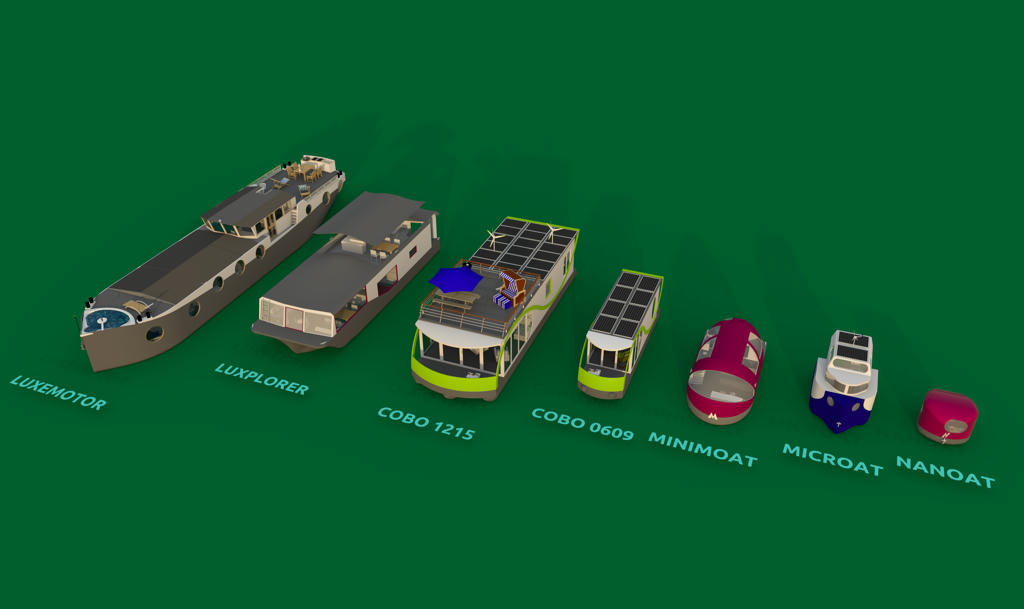
Re: Holes in the ground So, based on your path above, I figured out how to edit it manually. I tried it with Inkescape, but this software does not run properly on my system. Perhaps I should look aroud for an alternative... I wish I could build a boat about 38m long and 5m wide (Freycinet), because this would fit in most of the locks but for boats from 25m upwards you have to have a captain's license (at least 4 years to gain) to control it. So my Luxemotor will be just under 25m. For this size I only need to have a "small" license. The idea about the pontoons is a good one, and it's a cheap one. That's why I already had it myselfe: ![]() The COBO1215 and the COBO0609 are both based on a pontoon platform and the COBO1215 is even usable for coastal waters. But they have oune big problem: they are much higher than the other boats, and that is a problem, if you have to pass low bridges. The COBO0609 is my try to fix this problem, but this boat is really small... At this point I have to say thank you very much for your help with the svg path, you really saved my boat projects and fixed my problem (even if it's not a perfectionist-solution ). Now I only have to wait for SH3D 6.0 to fix the group-problem and from then SH3D is a perfect boat and ship design software!---------------------------------------- Pascal SH3D 6.6 / Ubuntu 22.04 (Mainline-Kernel) / Radeon RX580 / Ryzen 7 5800x |
| Posted by okh at Jul 23, 2018, 5:56:41 PM |
|
Re: Holes in the ground So my Luxemotor will be just under 25m. For this size I only need to have a "small" license. That may be so for European waterways. But if I have understood correctly, the ICC certificate proves only general competence - and you may still be barred by local restrictions. And that may be less than 25 metres. Here the limit would be 15 metres (and you would also need the ICC costal licence).The idea about the pontoons is a good one, and it's a cheap one. There is no such thing as a cheap boat You are right that the pontoon solution will not let you exploit volume below the waterline for habitation, and you will loose headroom. Still, I thought most European waterways had air draft of > 3 metres (?) - and that should be sufficient for a pontoon boat? ok |
| Posted by UbuntuBirdy at Jul 23, 2018, 9:37:41 PM |
|
Re: Holes in the ground The licenses are complicated to choose, you have to be sure what you want (and you have to be sure what you need...). So, there are 3 possibilities: 1. to only navigate the inland waterways (with this license you are not allowed to navigate costal waters or offshore) 2. to only navigate the seas around the world (with this license you are not allowed to navigate inland waterways) 3. to gain both of this licenses to navigate where you want Of corse, there are other possibilities between, but to gain them there are some other problems (one of them is to speak dutch...). The european waterways are about 47'000km long, that is more than enough to navigate on. This is a point for #1. Sweden has one of the most beautiful canals on this world and the archipelagos and the mälaren up there are impressive landscapes. So this is a point for #3. The possibility #2 is no option for me, because all of my boats are primary designed to navigate inland waterways and they are not realy comfortable to navigate on rough seas. You're right, most of the european waterways have an air draft >3m, but I try to design my boats for absolute all of the waterways in europe. And old bridges with an air draft of about 3m are traps! The 3m airdraft is only in the exact center f the bridge. At a width of 5m there often are only 2.8m left. For me the old bridge at Capestang, crossing the canal du midi, is my template (I have a 3D model of this bridge in SH3D) to design the profile of my boats. Often I just tilt the roof edges off but if you want to have a flybridge or a terrace on a pontoon boat, this would end in a boat which is not able to fit under one of these old bridges. And on my pontoon boats COBO1215 and COBO0609 (COBO0609 fits under the old bridges, it's only 2.5m wide) tilting the edges would intolerable rise the price of the boat because of it's construction. ---------------------------------------- Pascal SH3D 6.6 / Ubuntu 22.04 (Mainline-Kernel) / Radeon RX580 / Ryzen 7 5800x |
| Posted by UbuntuBirdy at Jul 23, 2018, 9:43:31 PM |
|
Re: Holes in the ground @bdfd, I'm designing two floating houses right now - and the palm trees in your picture are very inspiring... Pictures coming soon... ---------------------------------------- Pascal SH3D 6.6 / Ubuntu 22.04 (Mainline-Kernel) / Radeon RX580 / Ryzen 7 5800x |
| Posted by bdfd at Jul 24, 2018, 6:42:27 AM |
|
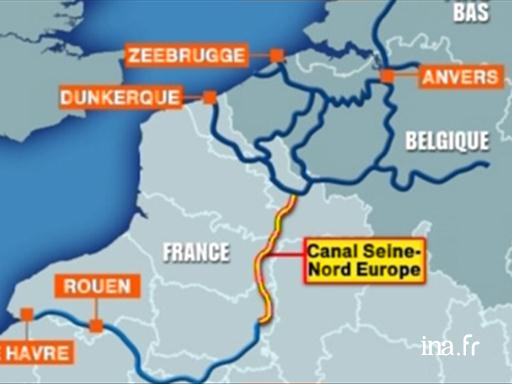
Re: Holes in the ground The licenses are complicated to choose, you have to be sure what you want (and you have to be sure what you need...). So, there are 3 possibilities: Hi,1. to only navigate the inland waterways (with this license you are not allowed to navigate costal waters or offshore) 2. to only navigate the seas around the world (with this license you are not allowed to navigate inland waterways) 3. to gain both of this licenses to navigate where you want Of corse, there are other possibilities between, but to gain them there are some other problems (one of them is to speak dutch...). The european waterways are about 47'000km long, that is more than enough to navigate on. This is a point for #1. Sweden has one of the most beautiful canals on this world and the archipelagos and the mälaren up there are impressive landscapes. So this is a point for #3. The possibility #2 is no option for me, because all of my boats are primary designed to navigate inland waterways and they are not realy comfortable to navigate on rough seas. FYI, in my country and specially in my 'state' : HAUTS de France, we began to build a new waterway between Paris and Brussels. the official website : Here Which another country builds waterways today ? ![]() ---------------------------------------- Evil progresses when good people do nothing! --- SH3D 7.1 and nothing else - W11 64b in 4K |
| Posted by UbuntuBirdy at Jul 24, 2018, 2:29:02 PM |
|
Re: Holes in the ground In Germany since 1990, the previously filled city canal (Potsdam) is restored piece by piece. Otherwise, I am not aware of any current project. ---------------------------------------- Pascal SH3D 6.6 / Ubuntu 22.04 (Mainline-Kernel) / Radeon RX580 / Ryzen 7 5800x |
|
|
Current timezone is GMT Dec 19, 2025, 8:39:33 AM |