|
Sweet Home 3D Forum » List all forums » » Forum: Features use and tips » » » Thread: Angled walls |
|
| Print at Dec 18, 2025, 3:56:21 AM | View all posts in this thread on one page |
| Posted by evil_twin at Aug 29, 2018, 11:35:26 AM |
|
Angled walls Hi, I'm new here and first of all I'd like to say what a brilliant piece of software this is, being an advanced Illustrator and fairly experienced SketchUp user, I was up and running in very little time, very intuitive unlike any other free 2D/3D CAD package out there ... My questions are: - how can I draw a wall perpendicular to an angled wall? - how do I find an angle of an angled wall (generated from a new room drawn based on an imported floor plan) Also is there a way to draw a wall from a pair of coordinates to naother pair of coordinates? Is there something like magnetic guide lines that can be placed to a particular coordinate? Thanks in advance for any help or hint. |
| Posted by Wild_Penguin at Aug 31, 2018, 6:39:35 PM |
|
Re: Angled walls No replies yet, and perhaps someone more involved with Sweet Home 3D will reply. Anyways I tried to do what you need to do (as far as I understand it) and it seems Sweet Home 3D does not offer tools to do what you need to do directly. Angle information is not available in the wall dialog (and would definitely come in handy sometimes). If you drag an endpoint of a wall (or click-and-hold, but do not drag if you do not actually want to move it), you can see the angle of the wall. |
| Posted by evil_twin at Sep 5, 2018, 10:24:50 AM |
|
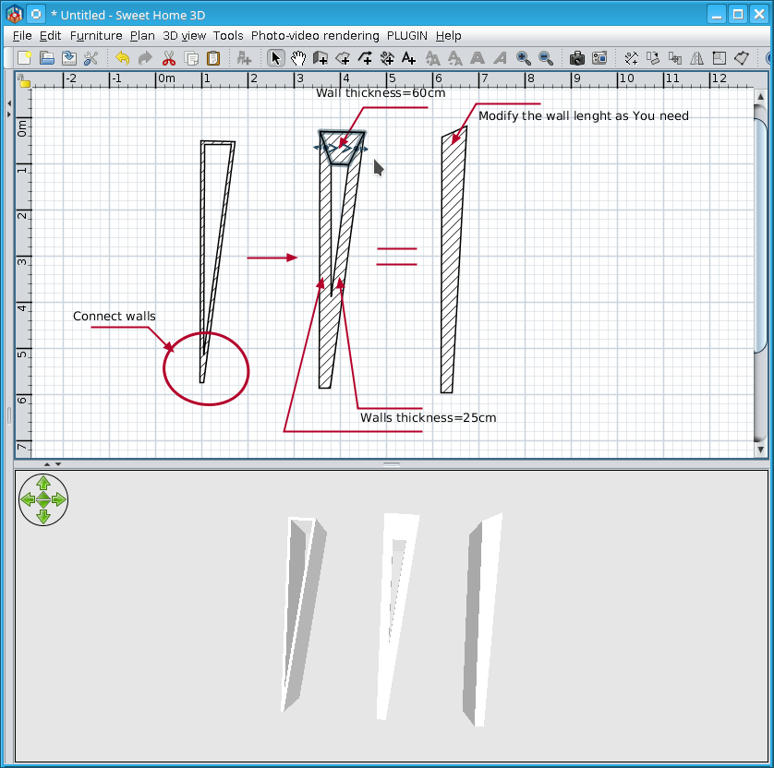
Re: Angled walls Thanks for a reply and trying. I also need walls whose faces aren't parallel, which is not unusual in older houses in my neck of woods, and which doesn't seem possible with Sweet Home 3D either, so I have to resort to SketchUp. It's quite a shame that the software actually cannot be used unless all the walls are perpendicular or parallel ... |
| Posted by Ceciliabr at Sep 5, 2018, 12:01:08 PM |
|
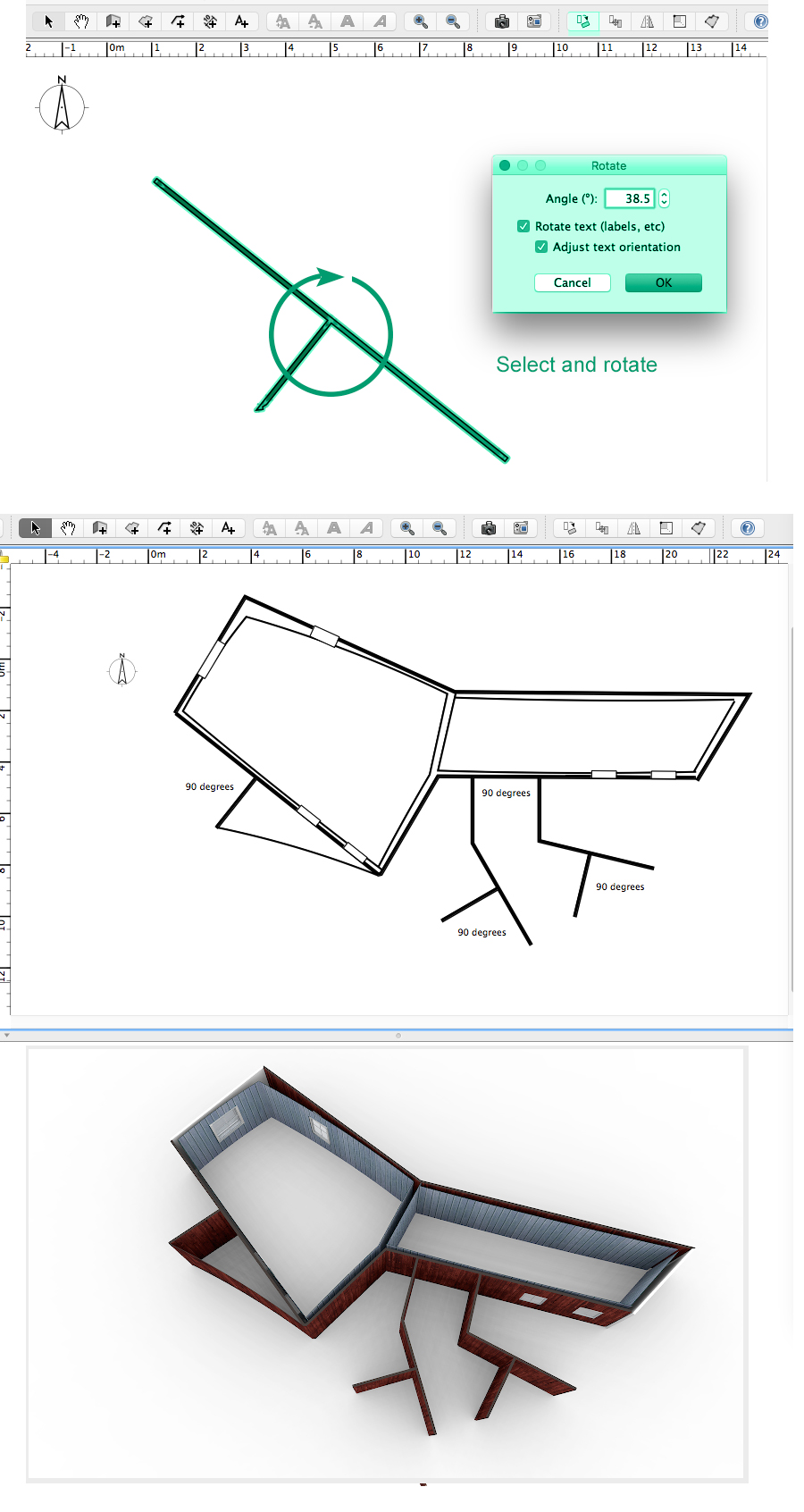
Re: Angled walls how can I draw a wall perpendicular to an angled wall? You draw a zero angled wall and then add a perpendicular wall. Then you select them both an rotate the selection to whatever angle you want. For walls with unparalleled insides and outsides, you draw them separately (of course!). ![]() AutoCad is a good program for precise architectural drawings. Cec |
| Posted by dorin at Sep 5, 2018, 1:36:28 PM |
|
Re: Angled walls 1. "Definitions of shame noun a painful feeling of humiliation or distress caused by the consciousness of wrong or foolish behavior". I think is not correct for a free software. 2. I have some irregular walls on my apartment. I use this trick: ![]() ---------------------------------------- A computer program does what you tell it to do, not what you want it to do. Murphy's Law When all else fails, read the instructions. Murphy's Law If you don't like "AS IS", DIY. Dorin's law |
| Posted by okh at Sep 5, 2018, 5:58:18 PM |
|
Re: Angled walls Or, maybe just normal drawing will do the trick? ..how do I find an angle of an angled wall... Using the editing tool (arrow), click on either end of a selected wall to display actual wall angle...how can I draw a wall perpendicular to an angled wall? Use text entering - start drawing wall from somewhere on a wall, press enter, add accurate numbers (add 90° to angle displayed above)...draw a wall from a pair of coordinates to naother pair of coordinates... Modify wall dialogue lets you set start and end point of a wall, i.e. co-ordinates...fairly experienced SketchUp user... All of the above are generally easier and faster in SH3D than SketchUp. Once you know how. Good luck.ok |
| Posted by evil_twin at Sep 7, 2018, 4:31:27 PM |
|
Re: Angled walls @dorin Sorry for not being a native English speaker, so I guess more appropriate word would have been 'unfortunate'? @Ceciliabr I used to use Autocad some 30 years ago, so yes, I know. I can afford neither the price nor the time spent climbing that learning curve, I have plenty of those with stuff like coding. @everyone Thanks a lot for the tips I still appreciate how easy SH3D is to get up and running compared to pretty everything else, and I know not everything can be made completely intuitive, so it's great there's a place like this forum where one might ask questions and expect useful answers : ) |
| Posted by Xlance at Apr 20, 2025, 1:40:52 AM |
|
Re: Angled walls from sweethome3d to autocad saveas .svg > open in inkscape > saveas.dxf or .dxf v12 https://mydxf.blogspot.com/2008/11/inkscape-r12-dxf.html?m=1 _________ from autocad to sweethome3d load cad2walls.lsp inside autocad > export as cad2walls.input.txt > use cad2walls.jar > saveas cad2walls.output.sh3d https://sourceforge.net/p/sweethome3d/plug-ins/56/ ---------------------------------------- Windows 64bit | Intel i7 | 8GB Ram | SH3D 7.5 + Plugins |
|
|
Current timezone is GMT Dec 18, 2025, 3:56:21 AM |