Print at Dec 20, 2025, 1:01:57 PM View all posts in this thread on one page
Posted by Ceciliabr at Aug 31, 2018, 2:26:32 PM
EasyBox - for quick texturing
Being born both lazy and impatient, I have always wanted a cube that could be textured on all sides at the same time.
So I made this:
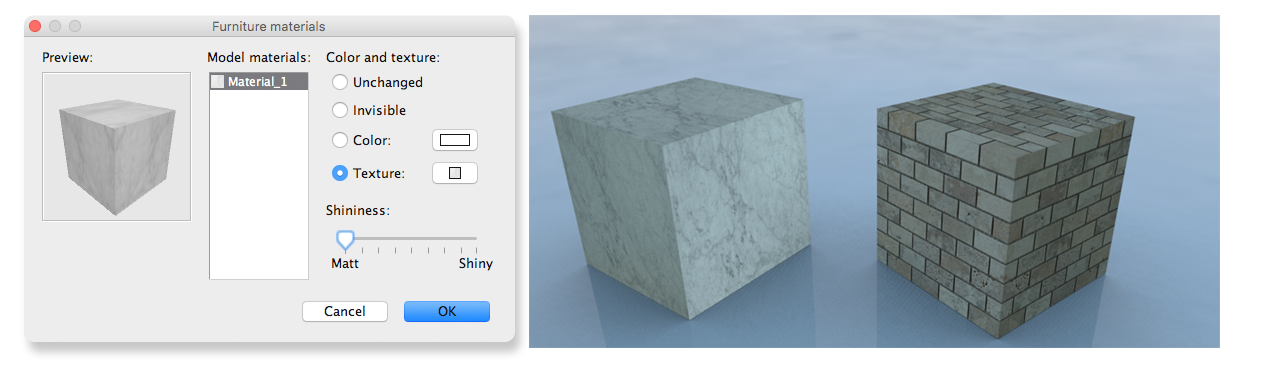


Included for download for anyone who finds it useful.

Easybox.zip
(t's only 1kb untextured, so it should be easy to handle)

Here is the project file with textured examples:
EasyBox.sh3d

Cec

Posted by hansmex at Sep 22, 2018, 9:04:59 AM
Re: EasyBox - for quick texturing
Hello Cecilia,

Just imported your easybox, but unfortunately it has the same problem as the old box. Two sides have a diagonally striped texture... (Using SH3D v5.7)

Hans
----------------------------------------
Hans

new website - under constuction
hansdirkse.info

Posted by okh at Sep 22, 2018, 3:00:47 PM
Re: EasyBox - for quick texturing
Works for me using Modify Furniture > Materials-Modify (third option). Adding a texture in the first dialogue (second option) will ignore the mapping altogether I think - and give stripes.
(t's only 1kb untextured, so it should be easy to handle)
Thanks, my kind of size. And nice brick texture. Too big, of course, but that is easily fixed smile.

Did you, btw, notice that in SH3D 6 it is possible to do multiple select in the Model materials dialogue. Just remembered seeing your model and tried the new feature. Works like a charm, and super useful.

ok

Posted by hansmex at Sep 22, 2018, 4:19:16 PM
Re: EasyBox - for quick texturing
I used the 2nd option. 3rd option works like a charm!!

@Cec - sorry I doubted you !!
----------------------------------------
Hans

new website - under constuction
hansdirkse.info

Posted by Ceciliabr at Oct 27, 2018, 12:27:54 AM
Re: EasyBox - for quick texturing
Did you, btw, notice that in SH3D 6 it is possible to do multiple select in the Model materials dialogue


Yes, and it ( of course) renders my easy-box a totally unnecessary invention.
But I'm absolutely happy with that.

cec