|
Sweet Home 3D Forum » List all forums » » Forum: 3D models and textures » » » Thread: The format of the chosen model isn't supported. Please chose an other model. |
|
| Print at Dec 24, 2025, 9:37:29 AM | |
| Posted by TheTrueMe at Sep 8, 2018, 4:23:30 PM |
|
The format of the chosen model isn't supported. Please chose an other model. Hi, I've been using SH3D for a bit now, I've made a few homes and flats etc using the programme just for fun, and I've been making 3D models using 3D builder on windows pretty much the whole time with no issues at all. I've also used the free designs of course. Each time, I create the model (always a fairly simple design) on 3D builder, "Save As..." an OBJ file, as the other supported file types aren't an option on the programme, and then import to SH3D with no issues. A while ago, SH3D stopped accepting these models unless I put them into a zipped compressed file or whatever it's called first, and I always put the mtl file in there too just to be safe, and it worked for ages. I imported a piece of furniture (a bumpy rug for the bathroom) last night for example, but then I made another immediately after, and after following the exact same process, but with a 3D model of a cabinet, I got the following error on Sweet Home 3D: "The format of the chosen model isn't supported. Please chose an other model." I've tried to resave the 3D model a few times, in case I did something different, I've tried importing it with and without the compressed zip file and even with all colours and textures removed but none of that worked. I've even tried saving it under 3 different names just in case the only issue was that the programme was getting confused with an older model or something along those lines, but so far nothing has worked. I would definitely try saving it as a different file type but as 3D builder doesn't have the option to save as those file types, I'm lacking in options in that area. Can anybody tell me why this particular model may not be supported when all the others have been? I haven't used any unusual colours or textures, named it with any symbols in the name, changed the file format, it's not even the biggest or smallest model I've created (although it's a bit difficult to tell sometimes) so I don't think it can be file size related (can it??? is there a restriction on either end of this?), it's not a particularly complicated model either. I'm just totally out of ideas and I'm hoping it wont take a huge work around to sort this out as I just make these for fun and longwinded processes to work around something that used to work fine aren't fun, but then maybe it'll only be needed once as it will still import my older homemade models. PLEASE HELP :) |
| Posted by Puybaret at Sep 9, 2018, 6:23:51 PM |
|
Re: The format of the chosen model isn't supported. Please chose an other model. Sorry, but it's difficult to help without the OBJ or ZIP file you tried to import. You don't even name the tool you used to design your model! If you don't want to share the file, you can send it to me, I'll have a look. ---------------------------------------- Emmanuel Puybaret, Sweet Home 3D creator |
| Posted by Ceciliabr at Sep 9, 2018, 8:26:31 PM |
|
Re: The format of the chosen model isn't supported. Please chose an other model. When I get this error message importing an .obj-file , it's always due to a syntax error in the .mtl-file. Cec |
| Posted by TheTrueMe at Sep 10, 2018, 12:25:15 AM |
|
Re: The format of the chosen model isn't supported. Please chose an other model. Sorry, but it's difficult to help without the OBJ or ZIP file you tried to import. You don't even name the tool you sued to design your model! What do you mean the tool? All I know is the program I used, which was 3D builder, sorry! and I would share the file, but I don't know where I can upload an .obj file to? When I get this error message importing an .obj-file , it's always due to a syntax error in the .mtl-file. This sounds promising, what do you do to fix this error? :) Thanks for the (ongoing) help, guys :) |
| Posted by Ceciliabr at Sep 10, 2018, 10:18:18 AM |
|
Re: The format of the chosen model isn't supported. Please chose an other model. This sounds promising, what do you do to fix this error? First try to rename the .mtl-file so SH3D don't see it. If you can import the model (it will be all grey) without the .mtl-file, then you have at least located the problem. We don't know yet if I'm right – but assuming I am: My best advice is to open the .mtl-file of a model that you know is working, and then compare it with the non-working. You might spot the error – or you might not. 3D builder is likely to produce the same errors again. Then you have to learn how to wash your mtl-files, or you will be stuck. Lots of luck! Cec |
| Posted by TheTrueMe at Sep 11, 2018, 6:58:08 PM |
|
Re: The format of the chosen model isn't supported. Please chose an other model. First try to rename the .mtl-file so SH3D don't see it. If you can import the model (it will be all grey) without the .mtl-file, then you have at least located the problem. Thanks so much for the info, but unfortunately it looks like this isn't the issue this time as this didn't work :( |
| Posted by okh at Sep 12, 2018, 3:12:48 PM |
|
Re: The format of the chosen model isn't supported. Please chose an other model. 3D builder had some oddities when I tested testing. Maybe obj format too, but cannot remember the details. Could be extra info in the .obj file or something, as often is the case when Microsoft exports to other formats. Import/export via Paint3D might work. Or you could share it via some online service. Gallery 1886 explains mediafire, but any service will do as long as the file can be read by others. It could be interesting to see the reason now 3D builder is preinstalled on so many PCs. ok |
| Posted by TheTrueMe at Sep 21, 2018, 5:25:21 PM |
|
Re: The format of the chosen model isn't supported. Please chose an other model. Interestingly, I just tried to convert my obj file on an online 3D converter and despite uploading to it etc it said there was a possible malformation in the file and it couldn't convert it. Anyway, thanks to okh I have uploaded my files to mediafire, can anybody have a look at them and see if they work for you? or see if you can see any problems? Hopefully the files will be more informative to the issue. http://www.mediafire.com/folder/5l5h9e0px62vf/3D_models Thanks! |
| Posted by hansmex at Sep 22, 2018, 8:18:24 AM |
|
Re: The format of the chosen model isn't supported. Please chose an other model. Hi TTM, Just downloaded 3 files and tried to import them. I get the same error message as you get. Looking at the MTL-file with a text editor, I noticed that the medwood-JPG file isn't mentioned. Is that file not needed, or is it omitted for some reason? H ---------------------------------------- Hans new website - under constuction hansdirkse.info |
| Posted by okh at Sep 22, 2018, 9:45:26 AM |
|
Re: The format of the chosen model isn't supported. Please chose an other model. Same error as hansmex. Blender does not like it either, and gives some sort of report. It looks nice in 3D builder, but there must be something wrong in the export (i.e. blame Redmond). Will look at it and try to figure it out. Even if I have never warmed to 3D builder, the user interface is relatively clean and straight-forward. Coming pre-installed on Win machines, I suppose we may hear more problems like this. ok |
| Posted by hansmex at Sep 22, 2018, 10:23:36 AM |
|
Re: The format of the chosen model isn't supported. Please chose an other model. As a Ubuntu (Linux) user, I'm not very familiar with Windows. A bit of research shows that 3D Builder is geared towards 3D printing. That may explain why the texture is not included in the exported file. And as OK points out, Microsoft is well-known to have their own interpretation of what is "standard", so it shouldn't come as a surprise that their OBJ-files are incompatible with about anything not-Microsoft. H ---------------------------------------- Hans new website - under constuction hansdirkse.info |
| Posted by okh at Sep 22, 2018, 2:30:46 PM |
|
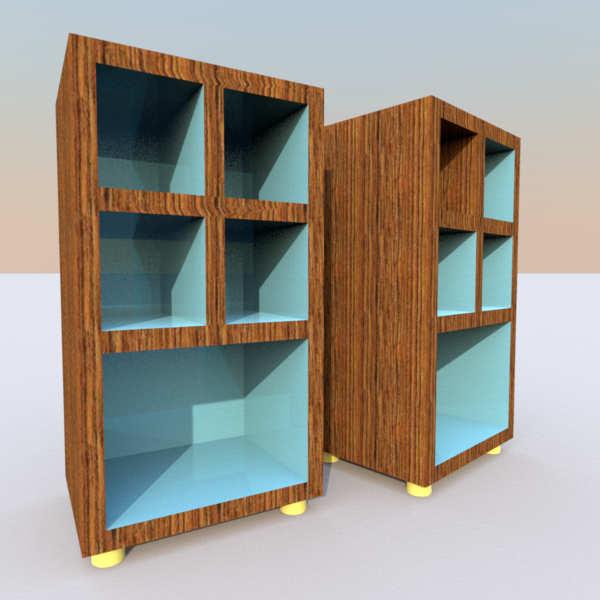
Re: The format of the chosen model isn't supported. Please chose an other model. ..3D Builder is geared towards 3D printing... That may very well be the explanation (even if there is a texture in the .mtl). So I tried a couple of approaches (very quickly, so take this with a pinch of salt). Manually removing all textures and materials from .obj file. And that worked, but of course with no colours / textures. Then I tried 3D builder and exported in the other available formats. Then Blender could read them, but again without colours or textures. Then I did a couple of tests with 3D builder. Just boxes and cylinders with and without textures. The exported .obj/.mtl/.jpg imported as expected in SH3D. Which means I do not understand what has happened with your .obj file. But I took the liberty of messing a bit with the parts of your file I managed to export, simplifying a bit. Round legs in 3D Builder are very detailed, possibly useful for 3D printing, but not needed for SH3D. Even by Cec standards. Then I added texture mapping all elements (say if you want the same wood in one or more of the shelves). But as this was a quick and dirty test, I may have ruined your original proportions. Not too much I hope. SF 3d models 501: - stylish_simplified.zip - stylish_simplified.sh3d ![]() |
| Posted by TheTrueMe at Sep 26, 2018, 6:29:08 PM |
|
Re: The format of the chosen model isn't supported. Please chose an other model. Looking at the MTL-file with a text editor, I noticed that the medwood-JPG file isn't mentioned. Is that file not needed, or is it omitted for some reason? I'm not really sure how it works to be honest, but it's nothing I've done. I just want whatever ends up being imported to SH3D to have more than one editable colour/texture as I like to change them within the homes rather than predict the colour in general. In this case, the main design feature that made this model interesting was the concept of having coloured shelves, which is why it was such a blow that there was a possibility the solution was going to need to be a blank model. Microsoft/Windows or the 3D printing goal might be where the issue is coming from, but whatever the issue is wasn't happening before this model and hasn't happened since (I think I made one thing since and imported it no issue, no more than that yet.) I really do use 3D builder just because it's there on my laptop to be honest XD I don't have the experience on other 3D modellers to know if I'd be able to use them or not, 3D builder more corresponds to lego or model planes, putting different shapes together and painting them, it's not high tech, at least not in my hands. XD Then I did a couple of tests with 3D builder. Just boxes and cylinders with and without textures. The exported .obj/.mtl/.jpg imported as expected in SH3D. Which means I do not understand what has happened with your .obj file. But I took the liberty of messing a bit with the parts of your file I managed to export, simplifying a bit. Round legs in 3D Builder are very detailed, possibly useful for 3D printing, but not needed for SH3D. Even by Cec standards. Then I added texture mapping all elements (say if you want the same wood in one or more of the shelves). But as this was a quick and dirty test, I may have ruined your original proportions. Not too much I hope. I really don't get why it's doing it either, but I'm really grateful for your version of it! The original proportions were never very important to me but even so I can't really see how much they've been changed. I'm just really happy to have something that looks like what I intended in my model at last :D Also the number of faces on the 3D builder cylinders and how complicated they can be to paint unless you're going for a block colour bugs me too XD They really don't need so much detail for a rounded edge. I can only assume it's down to the 3D printing thing also. Thanks again! -------------- With SH3D finally accepting this variant of the model, my problem is now solved until/unless 3D builder does it again. I am still interested in what caused the problem, so I may be able to fix it in future, if anybody has any future input, but we need not spend any more time guessing at answers that we can't figure out until a more solid answer comes along (unless you want to of course :) ). Thanks all for your time :) |
| Posted by Ceciliabr at Oct 2, 2018, 12:59:44 AM |
|
Re: The format of the chosen model isn't supported. Please chose an other model. II know it has been solved, but I can't resist a challenge, so I had to try. Imported your file into Verto Studio 3D using the assimp library option. Exported an .obj file, which was unreadable by SH3D. Changed the wood texture and exported a dae file, and it opened in SH3D right away. It's a huge model – plenty of storage capacity :) Here it is Cec. |
|
|
Current timezone is GMT Dec 24, 2025, 9:37:29 AM |