Print at Dec 20, 2025, 10:25:50 PM View all posts in this thread on one page
Posted by Larz2 at Dec 19, 2018, 3:00:06 PM
Custom made lights?
Hello !
I would like to attach a light source to an object. More specific I will make a spotlight to include in my custom library.


Spotlight model: http://www.exanimo.dk/SH3D/Spotlight.sh3d

Is this possible - and if so, how to make this?

Thanks for your help!
Best regards,
Lars

Posted by okh at Dec 19, 2018, 5:45:12 PM
Re: Custom made lights?
There are forum posts about adding light-souces to models you have made, and a very short description of a single light-source page 10 in the SVG guide. You can add more than one light-source (several entries in the light-source properties separated by space).

God jul.

ok

Posted by Larz2 at Dec 19, 2018, 8:21:55 PM
Re: Custom made lights?
There are forum posts about adding light-souces to models you have made, and a very short description of a single light-source page 10 in the SVG guide. You can add more than one light-source (several entries in the light-source properties separated by space).

God jul.

ok
Thanks O.K., I searched the forum before posting, but could not find the relevant information. Please link to post - thanks!

Thanks for your link to your SVG guide. If I was a programmer, I think I could find out, but I am not, so I need direction and guidance step by step.
First of all, if I need to edit code, I need to know exactly where to find it (path? Using Windows 7).
E.g. where to find "PluginFurnitureCatalog.properties"? And do I need a Java tool to edit?
Sorry for these dumb questions, but there is a huge lack in my knowledge about Java! d oh

Also think some of the links are old and need to be updated, to be useful for a beginner as me.

Your help is greatly appreciated!

God Jul!

Best regards,
Lars

Posted by Larz2 at Dec 19, 2018, 8:33:23 PM
Re: Custom made lights?
Just to avoid misunderstandings, what I want is to bind/attach a light source to an object/furniture, with option to set the light power (%). And to save this selflighting furniture (this spotlight) into a library (I know how to do this).

Posted by VeroniQ at Dec 19, 2018, 9:41:37 PM
Re: Custom made lights?
Thanks O.K., I searched the forum before posting, but could not find the relevant information. Please link to post - thanks!

Larz2, here are two interesting post, among others:
http://www.sweethome3d.com/support/forum/viewthread_thread,8715
http://www.sweethome3d.com/support/forum/viewthread_thread,8003
Hope it can help you.

Posted by Larz2 at Dec 19, 2018, 10:44:37 PM
Re: Custom made lights?

Thanks for the links to posts about "Ceiling downlight" and "How to create a down light embedded in the ceiling", VeroniQ.
Interesting reading, but is not an answer to my problem.

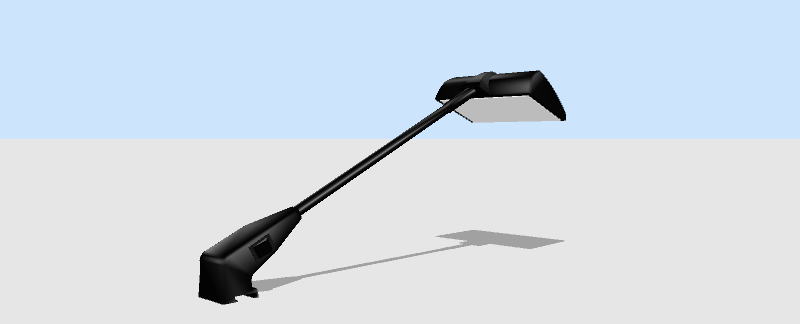
What I want is to have my own spotlight model (see picture) attached/binded/included with a light source, so the light power can be controlled. A new furniture/light exactly as in the category "Lights". But saved in my own library.
It is easy to do this in a scene, grouping the light source to the furniture/model/spotlight, but I want to have this "self lighting furniture" to be in a library so I can drag it into new scenes. I know we can copy and paste objects between open files, but this is still not what I aim at.

This is my spotlight (without a light source):


Your help is greatly appreciated!

Best regards,
Lars

Posted by Puybaret at Dec 20, 2018, 1:01:36 AM
Re: Custom made lights?
Lars, there’s no need to know how to program to add a light source to an object. Even if the procedure isn’t very simple, using default zip tool and text editor of your system is enough. Follow okh’s advice explained also here or choose a light source in the catalog and place it where you want, like you do now.
----------------------------------------
Emmanuel Puybaret, Sweet Home 3D creator

Posted by okh at Dec 20, 2018, 9:52:57 AM
Re: Custom made lights?
Lamp models with built in lights are great for simplifying house planning with SH3D. However, if you look at the masters of light they will rarely satisfy themselves with the built in light source properties, but add multiple light sources manually before rendering. So just a warning - for perfect rendering it is probably easier to add lightsources separately. If need be grouped with the model for easier editing in the plan.

If you still wish to add lightsources to the model, you should be able to find out how by studying the links provided. Still, here is a slightly more elaborate description (no programming or Java required) - and off the top of my head (several steps may be superfluous depending on your computer setup and how you work):

  • (Download and) open the FurnitureLibraryEditor.
  • Import the model file (drag and drop) into FurnitureLibraryEditor.
  • Save the file, so you have a file with sh3f extension.
  • Add .zip behind the .sh3f extension (you may have to set Win not to hide known extensions for this to work).
  • Open the library and copy the file called PluginFurnitureCatalog.properties out of the zipped file.
  • Open PluginFurnitureCatalog.properties with a text editor. Notepad does nicely, or PsPad or Notepad++, as long as the editor will save a clean text format.
  • The file will look something like this
id#1=macrodot#spotlight
name#1=Spotlight
category#1=Unknown
icon#1=/Spotlight.png
model#1=/Spotlight/spotlight.obj
multiPartModel#1=true
width#1=13.8
depth#1=43.4
height#1=20.5
movable#1=true
doorOrWindow#1=false
modelSize#1=112080
creator#1=Macrodot

To this list of properties, you need to add the lightSource properties, so it will look something like this:
name#1=Spotlight
category#1=Unknown
icon#1=/Spotlight.png
model#1=/Spotlight/spotlight.obj
multiPartModel#1=true
width#1=13.8
depth#1=43.4
height#1=20.5
movable#1=true
doorOrWindow#1=false
modelSize#1=112080
creator#1=Macrodot
lightSourceX#1=xx.xx
lightSourceY#1=yy.yy
lightSourceZ#1=zz.zz
lightSourceColor#1=#BB9854
lightSourceDiameter#1=dd

Where xx.xx is the placement of the lightsource along the x-axis, yy.yy along the y-axis, and zz.zz along the z axis (height) - see Puybaret's link. Numbers are relative to the dimensions listed above. lightSourceColor#1= should be set to the colour of the light in HTML notation (#RRGGBB) Red, Green, Blue - #FFFFFF is white, #000000 is black (Hex). lightSourceDiameter#= is, well, the diameter of the light. You can use several light-sources in one model adding more values behind xx.xx etc. separated by space. Note the US numeric format using . instead of ,

  • Save the file PluginFurnitureCatalog.properties (make sure it is a clean text format).
  • Copy the file into your .zip file.
  • Rename the .zip file back to a .sh3f file (by removing the .zip extension).
  • Open the .sh3f file with SweetHome3D.
  • Find the model in your list, use it and experiment.
  • You will probably have to go back and re-edit PluginFurnitureCatalog.properties to get it right.
My guess is that you will have too play around with the lightSource properties a bit. The lamp has a pretty flat reflector and getting the light to be directional could be a bit tricky. Ideally, you would want to play with the model itself, adding a reflector and changing the material of the light. If you use enkonyito's brilliant Photo-video rendering plugin, you will have the option of using more light properties (SphereLight/PointLight/TriangleMeshLight) to improve the effect of different light sources.

There may, by the way, be some licensing issues here. Do not know the origin of the model, but keep copyright in mind.

ok

Posted by Larz2 at Dec 20, 2018, 10:51:23 AM
Re: Custom made lights?
Thank you O.K. for your time to explain this in detail. Your help is greatly appreciated!
I was missing the information about how to find and get into the model code/source (PluginFurnitureCatalog.properties)!
I will try to make this work!

There may, by the way, be some licensing issues here. Do not know the origin of the model, but keep copyright in mind.
ok

In my case there is no problem with license/copyright, as I my self have made this spotlight 3D model!
You all are welcome to freely use it!

Happy Holidays to you all! God Jul & Godt Nytår!

Best regards,
Lars

Posted by okh at Dec 20, 2018, 3:06:47 PM
Re: Custom made lights?
..no problem with license/copyright, as I my self have made this spotlight 3D model!...
In which case, consider removing the 'glass' or make it semi-transparent. And to control the direction of the light, an inside 'reflector' (or 'reflectors' for several light sources) may make life easier.