|
Sweet Home 3D Forum » List all forums » » Forum: Features use and tips » » » Thread: Various issue with walls/textures |
|
| Print at Dec 17, 2025, 1:54:04 AM | |
| Posted by thoron at Jan 26, 2019, 9:56:31 PM |
|
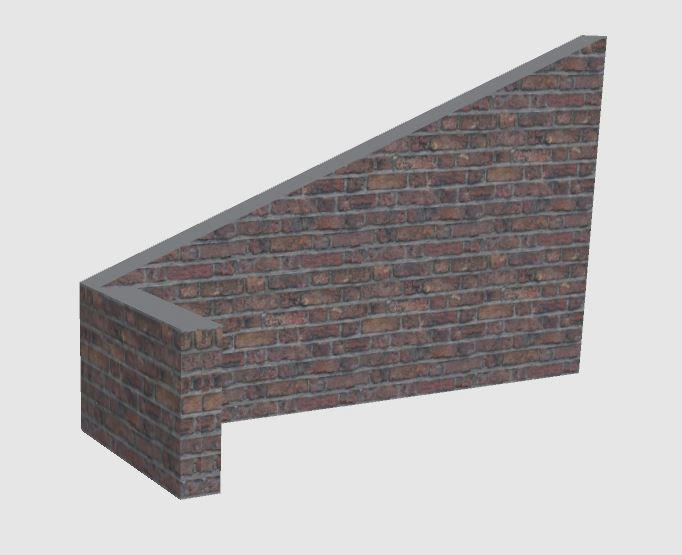
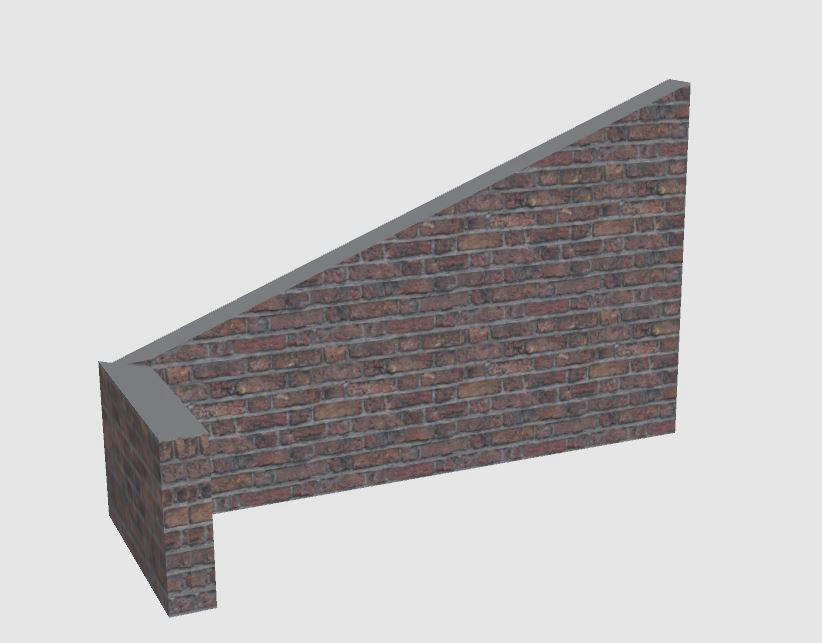
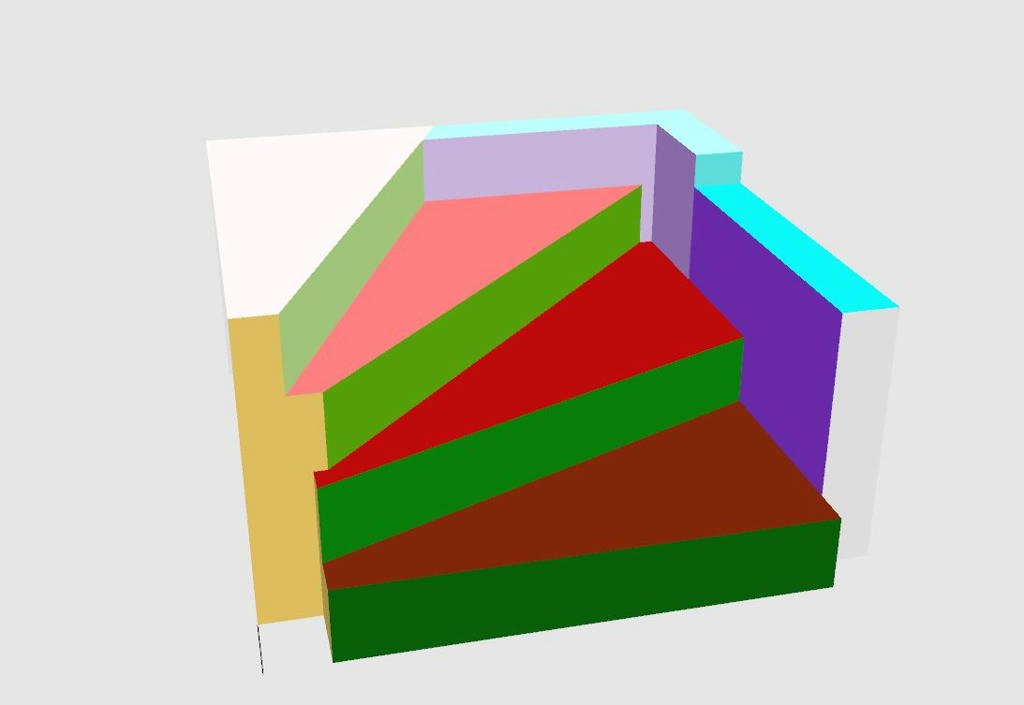
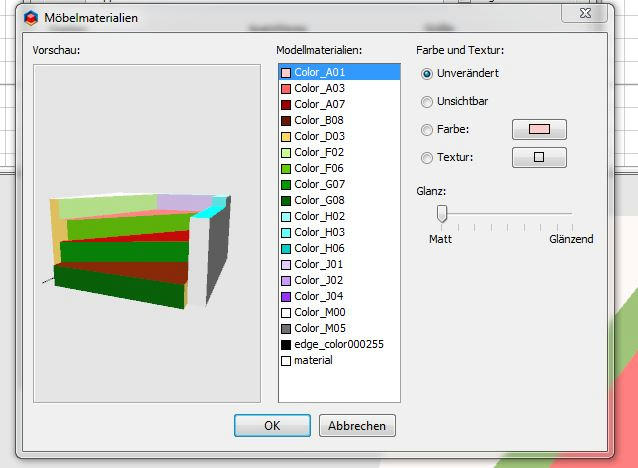
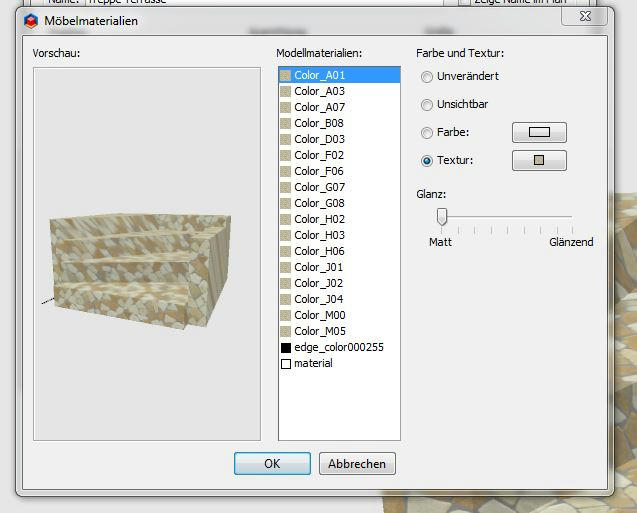
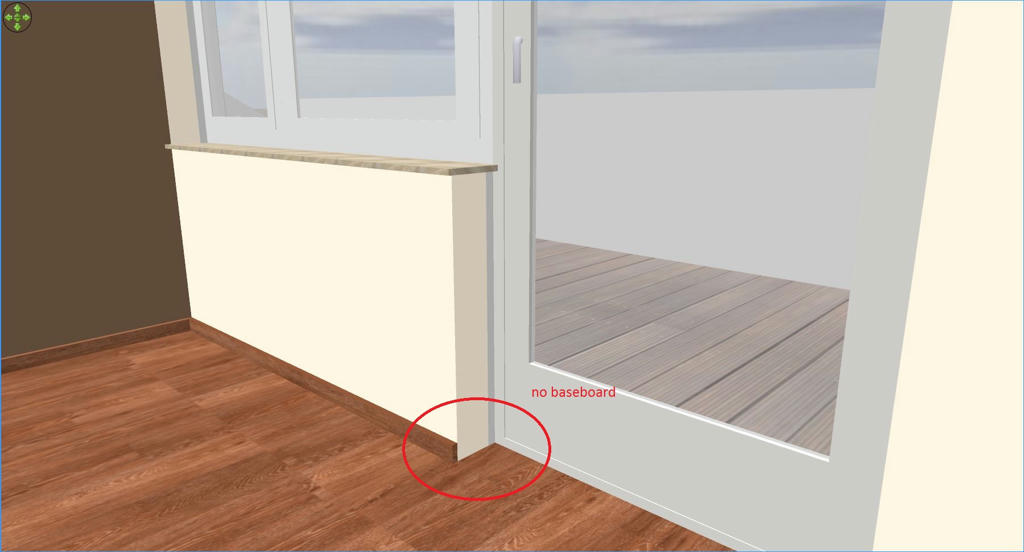
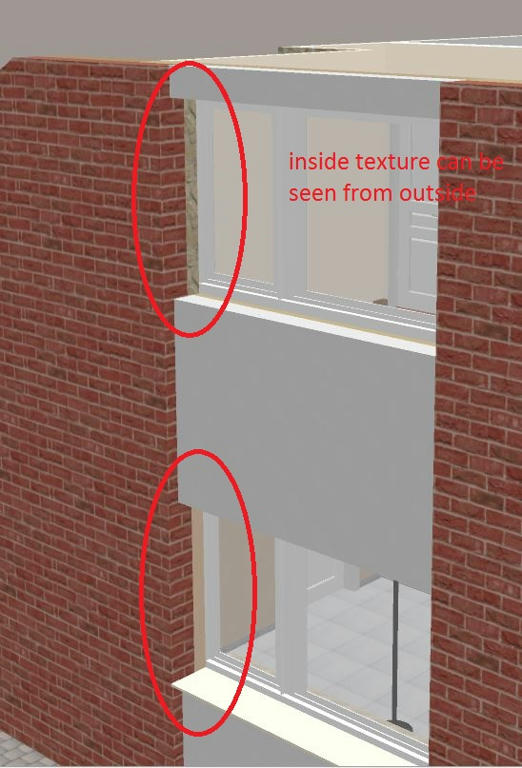
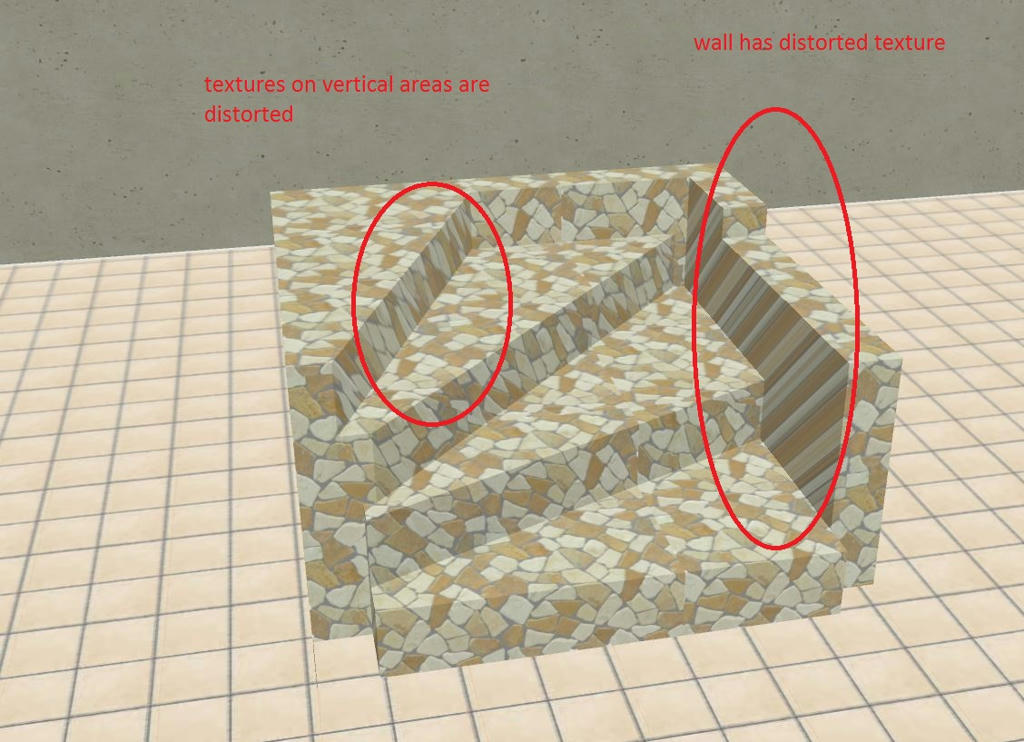
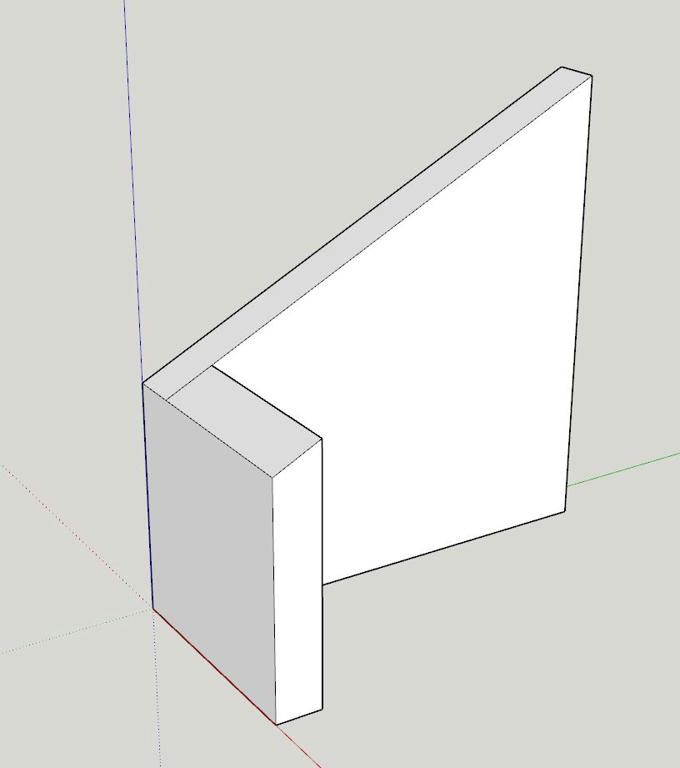
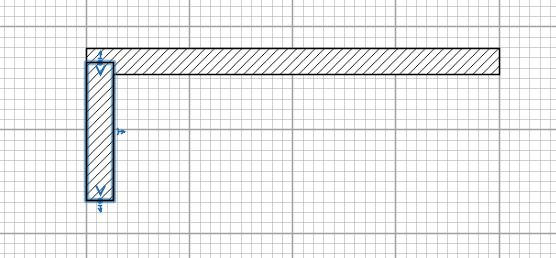
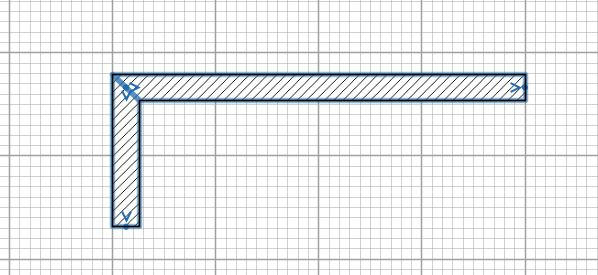
Various issue with walls/textures Hello, after some more weeks working with SW3D and building my home I notified various issues with walls/textures which make me crazy and I am seeking for some help to solve these issues: Issue no 1: In my house I have many walls which ends somewhere in the room so that you can see the head of the wall. Unfortunately this part of the wall does not get baseboards (see picture). Any idea how to get this done? Issue no2: If walls get one texture from one side and another texture from the other side, the top and the side (head) of the walls display both textures half and half. this leads to a problem especially with windows when this window is not sitting exactly in the middle (see picture) ![]() Issue no 3: Objects imported to SW3D do get a very strange texture on some areas (see picture). Especially if the texture has a structure like tiles the texture gets a strong distortion. This does not happen if the same object is textured in Sketch up. Any ideas here how this can be resolved? ![]() Issue no 4: Inclined walls which every house with inclined roof has. This picture shows the desired outcome: This is my first option in SW3D: walls not joined: OK, but the smaller wall has no inclination along its thickness as required. I read somehwere that walls meeting each other should always be joined. This would lead to the following situation: Not really ok, because the walls meet at different heights. Could be corrected, but need trigonometric calculations in order to input the right height. Two questions: 1. Is it possible to create a situation as shown in the first picture? If not is it planned to introduce this capability in a future version? 2. Is it right to say, that in the given situation the walls should not be joined? Hope somebody can help. Many thanks. |
| Posted by thoron at Feb 2, 2019, 10:09:59 PM |
|
Re: Various issue with walls/textures Ok, more tha 40 members looked at this post, but nobody answered. Did I ask something wrong or is it the wrong thread? I can't imagine that none of the experienced users did not had the same issues and may know how to resolve or simply confirm that there is no solution. I took some work to make this post and I would really appreciate some feedback. Thanks. |
| Posted by Puybaret at Feb 3, 2019, 2:09:52 AM |
|
Re: Various issue with walls/textures Thanks for taking the time to report these limitations on Sweet Home 3D, and sorry but don’t expect they will be improved soon. Nevertheless, you can circumvent the first one by creating a small additional wall at 90° at the end of the main wall. The second issue can be avoided by using two thinner walls in the thickness. The texture can be drawn differently if the 3D model contains some texture coordinates and you apply textures on an object with its material modification panel. If interested you can find explanations about texture coordinates on the web. ---------------------------------------- Emmanuel Puybaret, Sweet Home 3D creator |
| Posted by thoron at Feb 3, 2019, 10:55:27 AM |
|
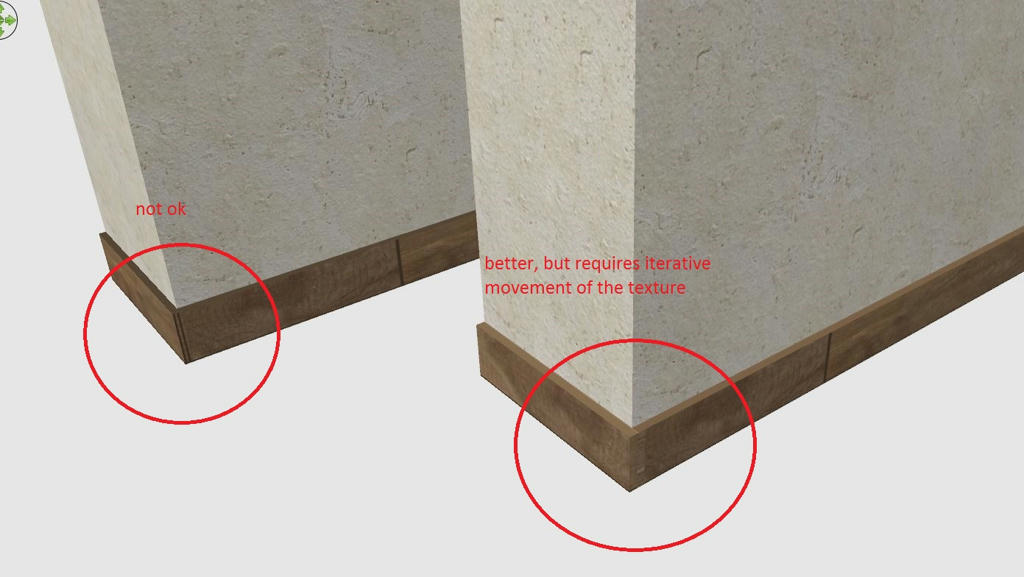
Re: Various issue with walls/textures Thank you, Puybaret for giving some feedback. With regard to issue 1, I tried your proposal of a small wall (see picture). Hope that this was what you mean. Apart from the need to iterate the texture of this small wall in oder to get it in line with the normal baseboard picture, would this not create a problem with the ceiling? As far as I understood the manual/hints any wall smaller than the surrounding main walls would create strange things with the ceiling, which anyhow is another problem I have, because my house has several walls smaller than room height. With regard to issue no. 2 I do not really get what you mean. Can you explain a little more detailed? With regard to issue no. 3 I am as well not sure that I understand what you want to say. I figured already out that assigning a texture when creating the model (in Sketch up) helps sometimes to overcome this issue when retexturing in SW3D with the material modification panel. But other cases e.g. the one I displayed in my first post, do not work, although it got assigned a simple color texture in Sketch up. Regarding issue 4 any ideas or hints? Just for my interest, when you say that these issues will not be improved soon, would the fix so difficult or do you have so many other things with higher priority? Your help is very much appreciated. |
| Posted by Ceciliabr at Feb 3, 2019, 11:29:25 PM |
|
Re: Various issue with walls/textures Fixes: Issue 1: Use boxes to create your own baseboards for illustrative purposes. That way you have full control. Issue 2: Apply a textured box to the end of the wall as an illustrative make-up. Issue 3: Tricky, but it’s really more of a constructional challenge than a texture problem. Create your stairs using boxes in SH3D, and the texture problem is solved. Alternative if you are set on making your models with Sketchup: Get a program like f.i. Blender or Verto Studio 3D that can unfold your model and fix your texture coordinates. Issue 4: ![]() Download this file: Walls sh3d Best of luck, Cecilia |
| Posted by Puybaret at Feb 4, 2019, 12:32:00 PM |
|
Re: Various issue with walls/textures For the first issue, you can shift textures using X / Y offset fields in texture choice panel. For the second issue, I meant that you can use two parallel walls with different thicknesses which touch each other, as in the file attached to this post. Using two different wall patterns could even help you to distinguish insulation from the main wall part. when you say that these issues will not be improved soon, would the fix so difficult or do you have so many other things with higher priority? The fixes aren't always so difficult to program, but as soon as there is an easy way to circumvent an apparently missing feature, I'm very often reluctant to overload the user interface with new fields. The furniture and wall dialog boxes are already quite large!---------------------------------------- ---------------------------------------- Emmanuel Puybaret, Sweet Home 3D creator |
| Posted by thoron at Feb 4, 2019, 2:52:11 PM |
|
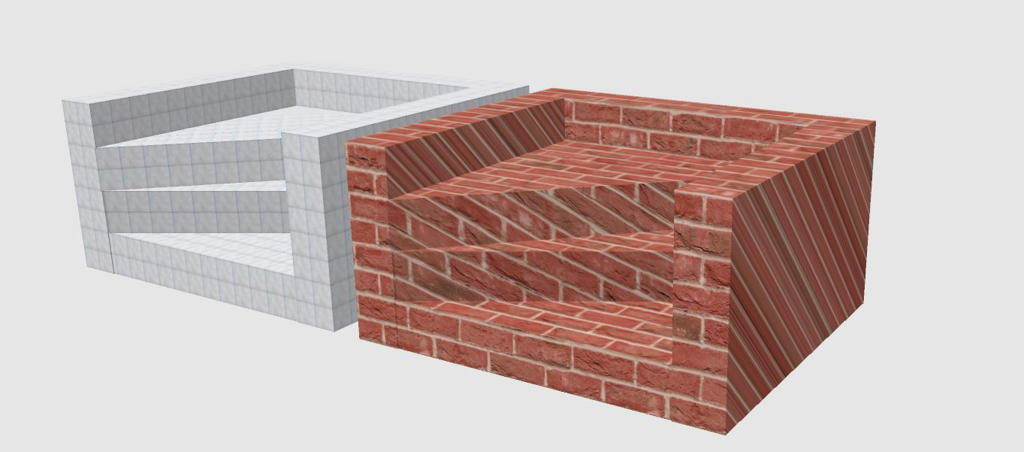
Re: Various issue with walls/textures Many thanks for your helpful hint, Ceciliabr, The boxes to circumvent issue 1 and 2 I already used before my post, but I must admit that I don't like this very much. If it would be only 1 or 2 times, ok, but more than 30 times is too much. I prefer to have objects (furniture and other stuff) separated from construction items as walls, textures, windows etc. I would really appreciate if theses issues could be fixed in one of the next releases. With regard to issue no. 3 I must admit that I am still confused. Ceciliabr, how should a box which has 90° angles help to build the steps of my stairs which do not have a rectangular shape? Furthermore the box from SW3D has texture issues as well, when you rescale it. The texture gets compressed on those areas which are getting smaller. I would appreciate some more help on this. Issue no. 4: Great idea, which I didn't find myself. The only little disadvantage is the visible cutting line which separates the two parts of the wall. So I still looking for some help on issue no. 3. Thank you. |
| Posted by Ceciliabr at Feb 4, 2019, 11:19:03 PM |
|
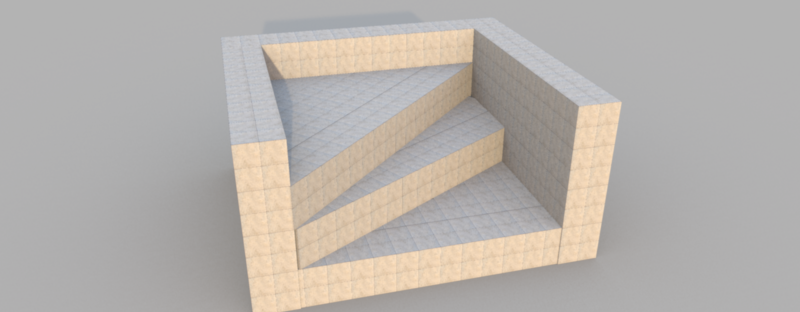
Re: Various issue with walls/textures If it would be only 1 or 2 times, ok, but more than 30 times is too much. Make a group, or better yet: Create a 3D OBJ file, a customized window including your make-up boxes. Then copy/paste.Ceciliabr, how should a box which has 90° angles help to build the steps of my stairs which do not have a rectangular shape? Just like in real life, you build your model with bricks or tiles. Here I have used 20x20 cm boxes to create a simplified construction: ![]() You can of course alter the size of your building blocks, and you can also use textured triangles and cylinders in addition to the boxes. The reason I go for boxes is that I find mimicking real life to be a good starting point when making 3D models If you export your construction to an OBJ-file, you can easily change and customize textures to fit the model after importing it to your project. Making this simple demo took me some ten minutes. A more complex construction will naturally take a bit longer. Cec |
| Posted by thoron at Feb 5, 2019, 4:15:21 PM |
|
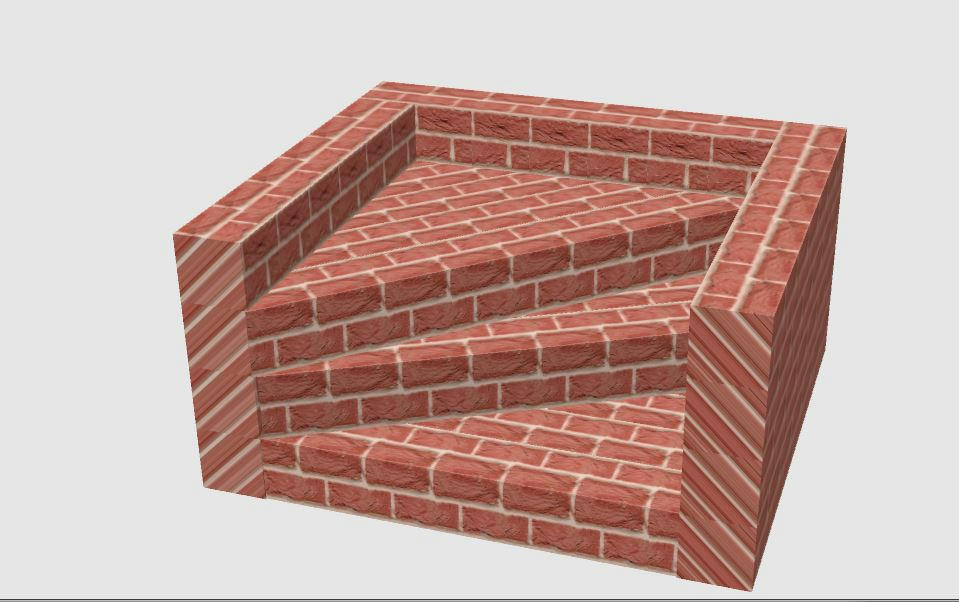
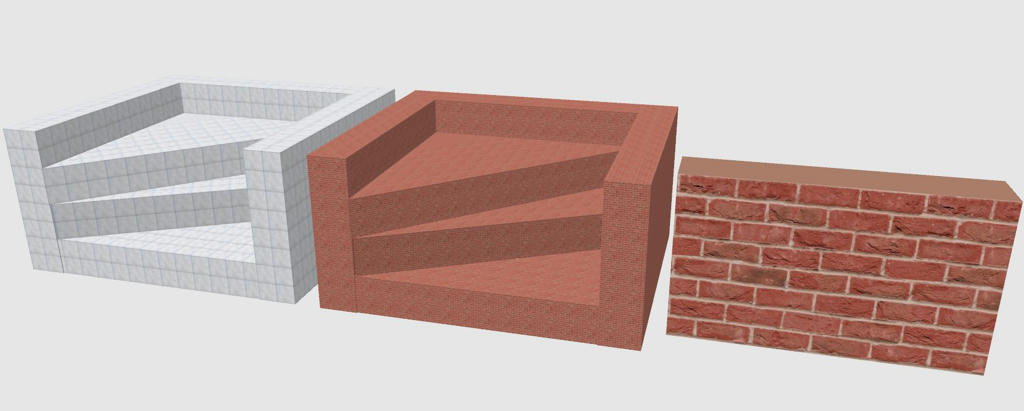
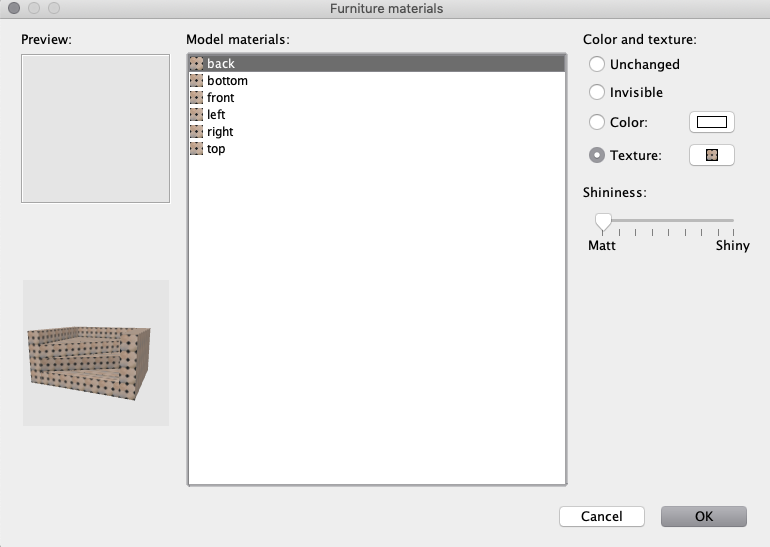
Re: Various issue with walls/textures Hello Ceciliabr, Now I got it, very tricky I played a little bit with your model with regard to customizing textures and additional questions came up. Hope you can answer them: 1. case: Loading your model, marking all boxes and change texture of the selection (not with the material change panel as being inactive) and got this. Again some areas of distortion: 2. Case following your advice exporting you model as obj-file and importing it again. Using texture change (not the material change panel) and got this. Other areas of distortion: 3. case Doing the same as in case 2, but now using the material change panel and assigning each of the 6 areas the same texture. Result is strange again, because the scaling of the texture was changed (to very small). You see as well a simple wall with the same texture and 100% scaling. ![]() I find this very strange and I don't get the logic behind. Maybe you can shed some light on this. Many thanks. |
| Posted by Ceciliabr at Feb 5, 2019, 8:16:14 PM |
|
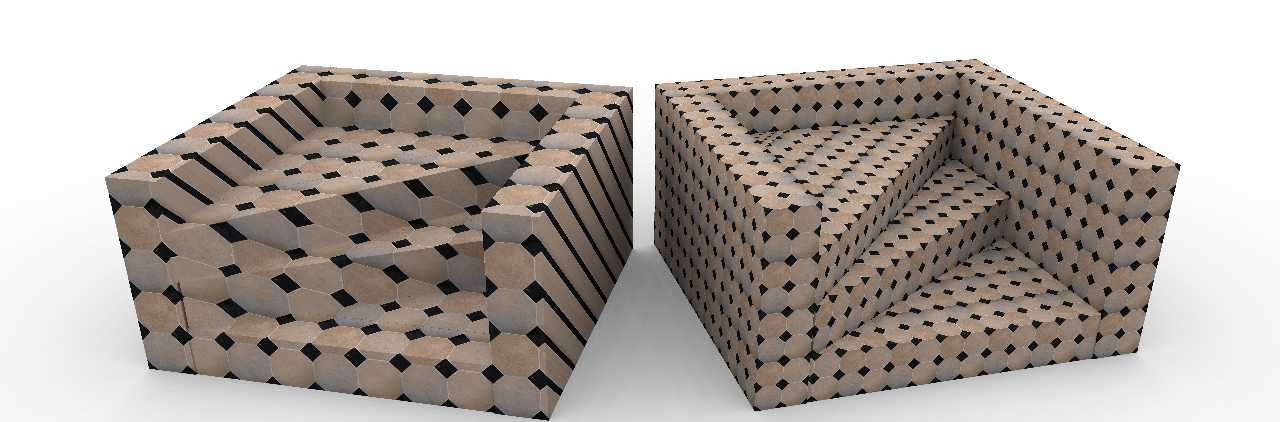
Re: Various issue with walls/textures I find this very strange and I don't get the logic behind. Maybe you can shed some light on this. Yes, I can.The texture coordinates are not recognised when you use the first method ( left), so the texture is applied using the predefined size. The other method will use the texture coordinates when you apply a texture, and give the texture a relative scale as described by the coordinates. Any texture , no matter the size, will be rescaled by the texture coordinates to fit the model. ![]() You have to use this method to get the result on the right: ![]() If you are changing texture you have to scale and maybe alter the x/y coordinates of your texture before you apply it to all six sides. Cec |
| Posted by thoron at Feb 6, 2019, 3:53:18 PM |
|
Re: Various issue with walls/textures Hello Ceciliabr, thank you for this explanation. I think I understood that I can not assign textures to an object with various areas, because they don't have the texture coordinates. The workaround you proposed by building the object of many samll boxes and exporting to obj-file and importing again works if the material change option is used. But I have to live with a scale effect and need rescaling (in the case of the red bricks I need to rescale from 100% to 1000%). I do not understand where this is coming from, as the texture when imported was scaled to certain size in "meters". Maybe you have an answer to this as well. What secondly I don't understand is the following. When I do the object in Sketch up and assigning a color to each of the areas the object should have the texture coordinates. Importing this object as collada file and change (see picture) the texture results still in distorted textures. This is the object imported from Sketch up as Collada-file: That's what I get opening the material editor: then change texture and I am getting this Why??? I really would like to understand. |
| Posted by Ceciliabr at Feb 6, 2019, 6:30:59 PM |
|
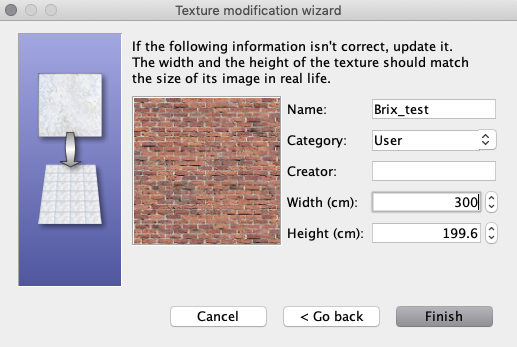
Re: Various issue with walls/textures Why??? I really would like to understand. I will try to explain this with an example: Let say you have a brick wall texture that is 300 x 200 cm. When you apply this texture to a wall, this texture will cover an area of 300 x 200 cm on that wall. If the wall is higher or longer, the texture will be tiled and repeat itself to cover the entire wall. If the wall is lower or narrower, the texture will be truncated. If you just apply this texture to a 100 x 100 cm cube using method 1, the texture will keep its size. But if you apply this texture using using the material change panel to all sides of a 100 x 100 cm cube, 100% of the 300 x 200 cm texture will by default be squeezed to fit inside each 100 x 100 cm surface of the cube. In my experience, Sketchup-models do not always behave as expected when imported into SH3D ( or into any of my other 3D programs, for that matter). But Sketchup is supposed to be a great tool, and there are members of this forum that are experienced Sketchup users and might be able to offer you an explanation. If you should have any interest of it, I have written some words about how I texture models in this thread. Cec |
| Posted by thoron at Feb 7, 2019, 3:56:52 PM |
|
Re: Various issue with walls/textures Thank you very much Ceciliabr, I think, now I got the logic. If I am not wrong, I can es well explain the upscaling factor of 10 which I needed to get the stairs right with the red bricks. You scaled the box down to 0.2m (Factor 1/5) and used a 50% scale in the texture property (Factor 1/2). Makes together Factor 1/10. Right? Nevertheless I consider all these issues as somewhat annoying and as well the walkarounds are not really perfect. My question would be: Is it theortically possible to solve these issues in SW3D by improving the code (future update?)? As I am trying to build my house as near as possible to reality I need anyhow to construct most of the objects (furniture and other stuff) myself as the objects in the SW3D library are not similar enough. For this I am using Sketch up and I can assign the textures as well in Sketch up which would be a good way of circumvent all these issues, especially as Sketch up offers a lot of options to deal with textures. (And I did this already successfully). But if I want to use textures from the SW3D library I did not find a way how to import them in Sketch up. Do you have any idea? If you should have any interest of it, I have written some words about how I texture models in this thread. I looked at this briefly and it is really nice and interesting. Will look more deeply into it in the next time. |
| Posted by hansmex at Feb 7, 2019, 6:11:04 PM |
|
Re: Various issue with walls/textures The most important is that you assign textures to individual surfaces in SketchUp. After importing in SH3D you can easily apply other textures. H ---------------------------------------- Hans new website - under constuction hansdirkse.info |
| Posted by thoron at Feb 7, 2019, 7:28:29 PM |
|
Re: Various issue with walls/textures Hello Hans, unfortunately this is not always true. As you can see in the pictures above in my post at the top of the page, I did exactly this (assign texture in Sketchup to each surface, imported into SW3D, assign a new texture), but some textures are nevertheless distorted. |
| Posted by thoron at Feb 7, 2019, 8:01:08 PM |
|
Re: Various issue with walls/textures By the way, I really would like to understand, why this method does not work always. Maybe I am doing something wrong. |
| Posted by Ceciliabr at Feb 7, 2019, 9:10:13 PM |
|
Re: Various issue with walls/textures IBut if I want to use textures from the SW3D library I did not find a way how to import them in Sketch up. Do you have any idea? If you want to use SH3D textures in Sketchup, I assume you can apply f.i. six different textures to a box and then export the box as OBJ-file. Then the textures will be exported as .jpg or .png files that you should be able to import with Sketchup. Personally I don't use Sketchup unless I'm forced to, so I'm really not the right person to answer questions about it. I have come to appreciate the way SH3D v6 handles textures, once I grasped the logic of it. Cec |
| Posted by thoron at Feb 8, 2019, 4:55:59 AM |
|
Re: Various issue with walls/textures Sketch Up does not support the import of obj-files, not even the Pro-version. There is a plugin available, but it costs $79. Hoped to find an alternative way. |
| Posted by Ceciliabr at Feb 8, 2019, 2:01:36 PM |
|
Re: Various issue with walls/textures You don't import the OBJ-file, you import the texture: Apply textures to a box, create a directory, export the box to the directory you created. In the directory you will find the exported textures as image files along with the obj-file and the mtl-file. Sketchup can import image files as textures. ![]() Cec |
| Posted by thoron at Feb 8, 2019, 3:19:46 PM |
|
Re: Various issue with walls/textures Thank you, that's it. I should have come on this myself as I have already seen these images , when exporting to obj. |
| Posted by soundguru13 at Sep 27, 2024, 8:29:58 PM |
|
Re: Various issue with walls/textures nice work with the sloped top of the wall. IF only there was an option for choosing the TEXTURE of the top of the wall rather than just the COLOR, then it would match the rest of the wall, eh? |
|
|
Current timezone is GMT Dec 17, 2025, 1:54:04 AM |