Print at Dec 20, 2025, 12:06:13 PM
Posted by dorin at Apr 15, 2019, 6:50:01 PM
Rooms Surfaces plug-in
In category YAUP (Yet Another Useless Plugin),
I present You my second attempt in java (and in programming in general).
It was necessary in my learning curve to my initial purpose: to make a useful plugin.
I hope it will be ready before the end of the world.
Until than, this plugin could be find also on Source Forge here .
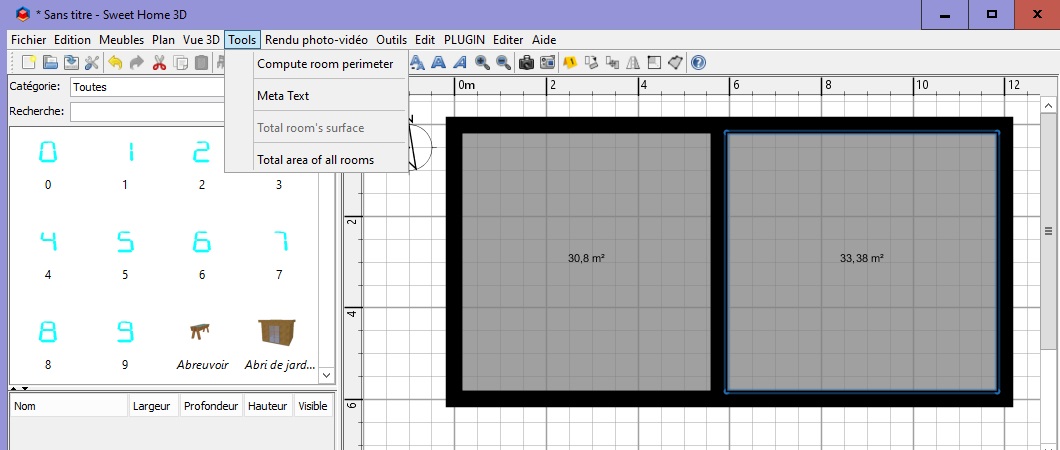
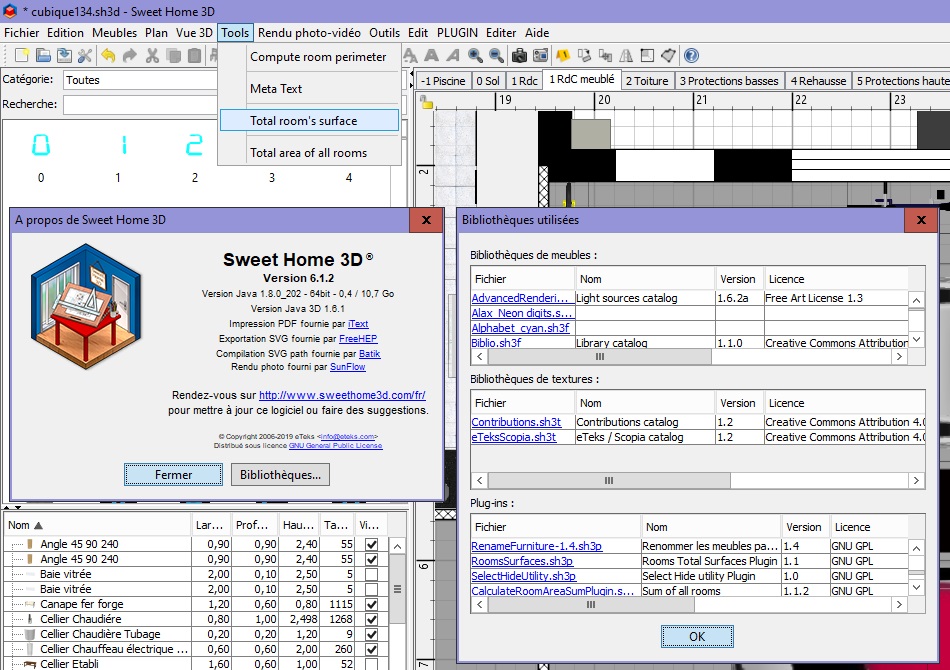
Few image:
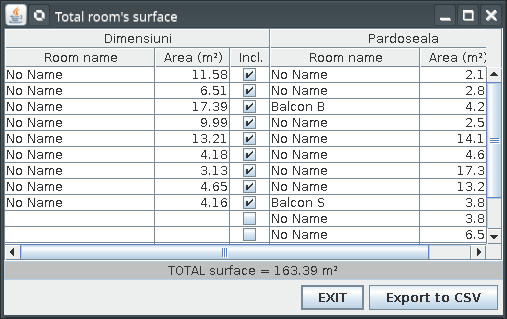
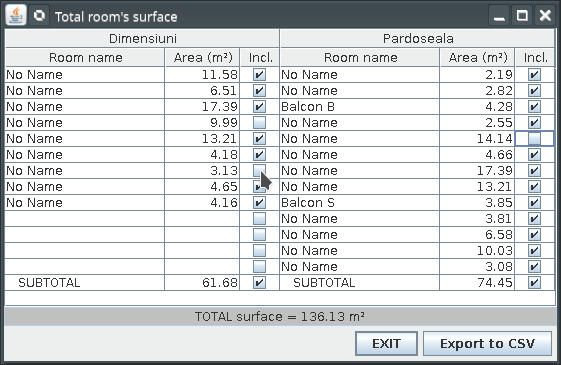
The plug-in could be find here:Rooms Surfaces plugin .
Hope somebody can use it.
----------------------------------------
A computer program does what you tell it to do, not what you want it to do. Murphy's Law
When all else fails, read the instructions. Murphy's Law
If you don't like "AS IS", DIY. Dorin's law

Posted by dorin at Apr 19, 2019, 8:36:31 AM
Re: Rooms Surfaces plug-in
New version (1.1) with few improvements.
Now, by check/uncheck the SUBTOTAL, check/uncheck all rooms at that level.
Checking a room on unchecked level will also check the level.
The plug-in are under menu Tools->Total room's surface.
I recommend to remove (uninstall) other plug-ins with the same functionality.
The new version could be downloaded from here:Roos Surfaces v1.1
or from Source Forge here.
----------------------------------------
A computer program does what you tell it to do, not what you want it to do. Murphy's Law
When all else fails, read the instructions. Murphy's Law
If you don't like "AS IS", DIY. Dorin's law

Posted by UbuntuBirdy at Apr 19, 2019, 10:33:26 AM
Re: Rooms Surfaces plug-in
Very nice plugin! Saves me the creation of Excel-Sheets like i've done so far! Thanks man!!!
Would be great if we can sort the rooms for example living area and technical area.
----------------------------------------
Pascal

SH3D 6.6 / Ubuntu 22.04 (Mainline-Kernel) / Radeon RX580 / Ryzen 7 5800x

Posted by bdfd at Apr 19, 2019, 10:50:10 AM
angry   Re: Rooms Surfaces plug-in
New version (1.1)...The new version could be downloaded from here:Roos Surfaces v1.1
or from Source Forge here.
Hi,

Downloaded and installed but nothing opens (after choosen the option in tools menu) ??? biggrin

Why ?
sick

.
----------------------------------------
Evil progresses when good people do nothing!
---
SH3D 7.1 and nothing else - W11 64b in 4K

Posted by dorin at Apr 19, 2019, 1:24:22 PM
Re: Rooms Surfaces plug-in
Few possibilities:
-if the home are empty the plug-in are gray;
-also if the home don't have any rooms;
Please keep me up to date!
----------------------------------------
A computer program does what you tell it to do, not what you want it to do. Murphy's Law
When all else fails, read the instructions. Murphy's Law
If you don't like "AS IS", DIY. Dorin's law

Posted by dorin at Apr 19, 2019, 4:39:03 PM
Re: Rooms Surfaces plug-in
Wile there are two people interested in use (test) this plug-in, I feel responsible to give few more explanations.
NOTE "room" = object created with room creation tool; in SH3D 3 or more connected walls don't represent a room.
When lance SH3D the plug-in verify if there are any rooms; if not is inactive.
After open an home plan it make the same verification; if find at least one room, the plug-in became active and could show the total surface even there are only one room.
If the home plane have multiple levels but not all own room(s) the plug-in will show and compute ONLY those WITH rooms.
At lance will make the total of rooms find on home plan. Then the user can check/uncheck the included surfaces in total.

@UbuntuBirdy maybe You're right but I don't find another criteria to make this.
Personally I've organized the home plan on multi-levels, some of them at same elevation or very close (<10 cm) for different purposes (electric, water and hot,furniture etc.).
Some of them have rooms some not.
The plug-in show me only those with rooms sorted by levels.
Unfortunately most rooms have "No name".
If You or someone else find a bather way I'll be happy.
Until there the rest of the necessary tasks could be made in LO Calc or MS Office.
I deactivate the option to open the csv file after creation because I don't know what could happen under different OS. Personally I don't like to open instantly.
Remember I'm not a programmer. I get start learning few month ago.
So, good luck cool
----------------------------------------
A computer program does what you tell it to do, not what you want it to do. Murphy's Law
When all else fails, read the instructions. Murphy's Law
If you don't like "AS IS", DIY. Dorin's law

Posted by bdfd at Apr 19, 2019, 5:58:38 PM
love struck   Re: Rooms Surfaces plug-in
Few possibilities:
-if the home are empty the plug-in are gray;
-also if the home don't have any rooms;
Please keep me up to date!
None of the two possibilities.
So, I see the plugin in options and in the directory of the librairies.
I tried to use the plugin on an existing project but nothing arrives...

On which OS did you create it ?

confused
.
----------------------------------------
Evil progresses when good people do nothing!
---
SH3D 7.1 and nothing else - W11 64b in 4K

Posted by Puybaret at Apr 19, 2019, 7:23:41 PM
Re: Rooms Surfaces plug-in
Bdfd, it's probably not a problem of OS.
Please run the program from the command line with the following command line to get possible errors:
C:\Program Files\Sweet Home 3D\SweetHome3D.exe 2>log.txt
This should create a log.txt file in your home folder which might contain some useful information for Dorin.
----------------------------------------
Emmanuel Puybaret, Sweet Home 3D creator

Posted by dorin at Apr 19, 2019, 9:57:33 PM
Re: Rooms Surfaces plug-in
@bdfd,
For your sake I've repair an Win10 (don't want to work after crash of an 3Tb HDD and I don't boot on it for couple of months);
-I've download and install the installer version of SH3D for win;
-I've chose 32 bit when prompted;
-make a test to see if run; Run!;
-download the plugin from this site;
-double click on it and was automatically installed;
-run SH3D; verify in about; plugin are there.
-open same of the demo files provided by SH3D;
-menu Tools->Total room's surface;
==>the table show up with all expected data on it;
-I've made a test for Export to CSV and work also;
CONCLUSION: on my side are work correctly even under Windows.

Suggestion 1:
- rename the Sweet Home 3D folder to Sweet Home 3D-1 in
[USER]\ApplicationData\ to preserve actual configuration;
- restart SH3D and the program will recreate the necessary files and directory;
- reinstall the plug-in and test it with demo files;

Suggestion 2:
Verify the java version; I've made it for jre8 or high.
Please let me (us) know if You manage it to work.
You're experience could be useful for other users.

@Emmanuel,
I'm flattered if You think I could understood something from a log file produced by Windows. Scarcely I decipher the Eclipse debug.
I've spend 2 weeks to fix an NullPointerException and another 2 weeks for an StackOverFlow learning and try 10~14 hour/day.
Well, I don't give up; I continue learning wile I've made only two steps.
----------------------------------------
A computer program does what you tell it to do, not what you want it to do. Murphy's Law
When all else fails, read the instructions. Murphy's Law
If you don't like "AS IS", DIY. Dorin's law

Posted by UbuntuBirdy at Apr 19, 2019, 10:21:15 PM
Re: Rooms Surfaces plug-in
@dorin - two or three checkboxes for each room which can be sorted for example.
But you're right, this would be a nice to have feature, not an must have one.
----------------------------------------
Pascal

SH3D 6.6 / Ubuntu 22.04 (Mainline-Kernel) / Radeon RX580 / Ryzen 7 5800x

Posted by enkonyito at Apr 20, 2019, 2:54:00 AM
Re: Rooms Surfaces plug-in
Hi Dorin,

I tested your plug-in on Windows 10 64bit and it works as it should.

Nice work!
----------------------------------------
EnkoNyito

Posted by hansmex at Apr 20, 2019, 3:48:03 AM
Re: Rooms Surfaces plug-in
Same for me, also Windows 10 64 bits.

Hans
----------------------------------------
Hans

new website - under constuction
hansdirkse.info

Posted by bdfd at Apr 20, 2019, 7:28:18 AM
confused   Re: Rooms Surfaces plug-in
@dorin : TY for your return.
I'd installed your plugin with double-click, no problem, it appears in options.

I did 2 tries :
1. with a new project, I built 5 Walls for 2 rooms, after I choose the option… Watch the result (?) :


The plugin is 'grey', Why ? crying

2. with an existing project,
The option is NOT 'grey' but by clicking on it there is no result ! sad


Watch the options of my PC for SH3D.

@Manu : I try to create a log file but the file is empty !

NB : I say that I use many other plugins (see the list) which are OK, why not these two ?

sick
.
----------------------------------------
Evil progresses when good people do nothing!
---
SH3D 7.1 and nothing else - W11 64b in 4K

Posted by dorin at Apr 20, 2019, 8:30:50 PM
Re: Rooms Surfaces plug-in
@bdfd
From what I see You've right but...
I don't know what to say.
Only think that cross my mind is the 1-st suggestion I've propose.
In this way You could test everything on a clean medium.
At least for me is the best way I use when I test new furniture, texture or plug-ins.
It's possible to interfere with other plug-in but I have almost the same as You installed (except Meta text) and I don't see any problem.
Sorry man, I reach my skill's limits.
----------------------------------------
A computer program does what you tell it to do, not what you want it to do. Murphy's Law
When all else fails, read the instructions. Murphy's Law
If you don't like "AS IS", DIY. Dorin's law

Posted by dorin at Apr 21, 2019, 8:28:31 AM
Re: Rooms Surfaces plug-in
@bdfd
Sorry if I boring You but I can't sleep.
I've compare what You have with mine:

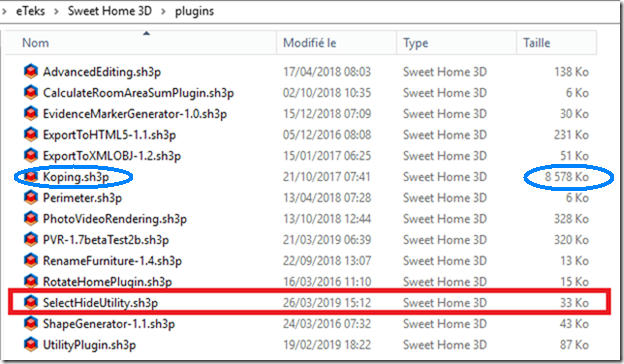
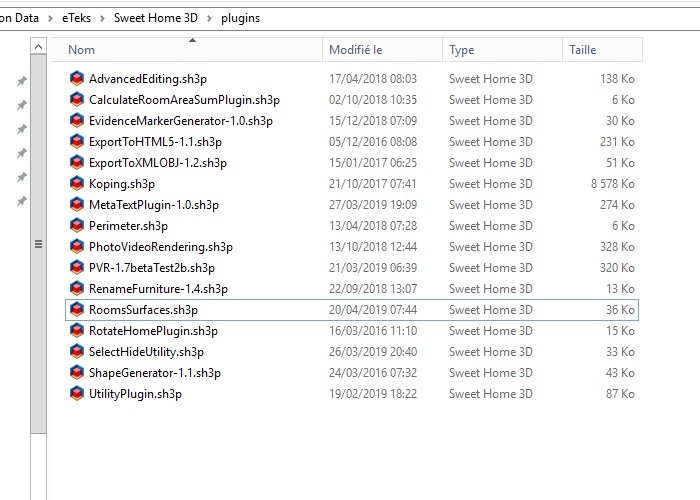
1. I see an very huge plug-in Koping (8.5M). I try to find it on google without success.
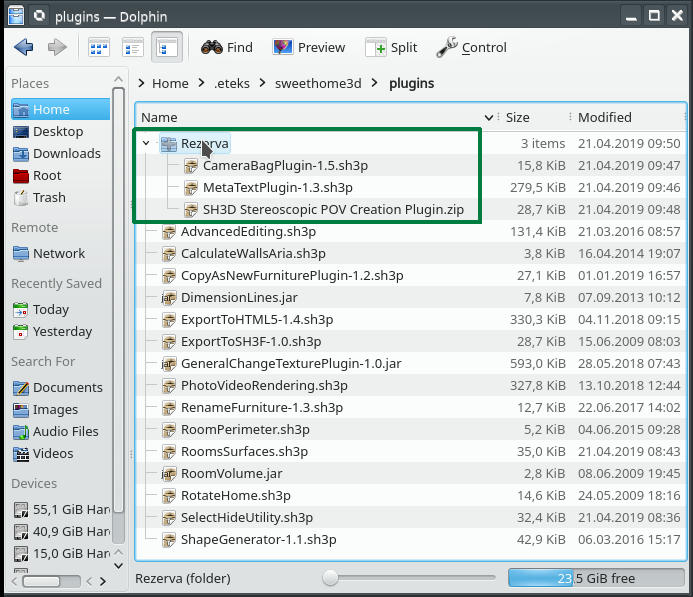
2. In second image I share my plug-ins folder and the way I use when I test something.
I create an folder under plugins (mine are "Rezeva" which mean "backup" ) where I put the files I don't use everyday and I don't want to delete.
Usually I drag-and-drop from an location to another.
SH3D will see and load only those from plugins nothing else.
If You can, please send me the link of Koping.sh3p and the source cod if it's free.
Happy Easter!
Dorin
----------------------------------------
A computer program does what you tell it to do, not what you want it to do. Murphy's Law
When all else fails, read the instructions. Murphy's Law
If you don't like "AS IS", DIY. Dorin's law

Posted by bdfd at Apr 21, 2019, 9:15:28 AM
Re: Rooms Surfaces plug-in
TY Dorin.

Here are my installing plugins.


My last try : I moved all plugins in a backup directory except your.
I launched sh3d.
Result : no change ! crying
.
----------------------------------------
Evil progresses when good people do nothing!
---
SH3D 7.1 and nothing else - W11 64b in 4K

Posted by dorin at Jun 22, 2019, 11:05:50 PM
Re: Rooms Surfaces plug-in
New version 1.2 and also on Source Forge
-add localization (only French);
-add icon;
-now work including on new file after room creation;

@bdfd
You've right, on some localization don't work.
I've try to fix it in this version.

@UbuntuBirdy
I intend to add perimeter and walls surface surround rooms
with and without hols (doors and windows) to have more useful information.
But all under the same check box.
----------------------------------------
A computer program does what you tell it to do, not what you want it to do. Murphy's Law
When all else fails, read the instructions. Murphy's Law
If you don't like "AS IS", DIY. Dorin's law

Posted by Bubblobill at Dec 5, 2019, 7:10:49 AM
Feature Request - Re: Rooms Surfaces plug-in
I want more.
Why? Because what you have almost does what I want and I don't want to write it myself.

What do I want?

  • A breakdown of area values,
  • The ability to create a list of key/value pairs,
  • The capacity to multiply any given area by one of those values, and
  • The resulting subtotals.


Why should you do it? Because it would be awesome useful.

Follow me here;

Key value list
Ceiling paint 0.1 l/m^2
Ceiling paint (wet area) 0.13 l/m^2
Render 0.8 kg/m^2
Paint Primer 0.011 l/m^2
Red paint 0.019 l/m^2
Red paint + primer 0.03 l/m^2
Carpet 59 $/m^2


Area Material Result
Room Name Ceiling 32m^2 Ceiling paint 3.2 litres
Floor 32m^2 Lineolem $940
Wall 1 12m^2 Red paint + primer 0.36 litres
Wall 2 12m^2 Red paint + primer 0.36 litres
Wall 3 12m^2 Red paint + primer 0.36 litres
Wall 3 12m^2 Wood Panel $390


Material Total
Ceiling paint 3.2 litres
Lineolem $940
Red paint + primer 1.1 litres
Wood Panel $390


There are obviously a multitude of ways to summarise and present the results, but I'm hoping you can see the value to people who use SH3D to plan renovations and decorating.

Cheers,

Jay

Posted by dorin at Dec 5, 2019, 5:33:14 PM
Re: Feature Request - Re: Rooms Surfaces plug-in
Dear Jay,
I don't want to write it myself

Well, why not? You are bather than me! (I've study Your code for stairs).
Other wise You will have to wait until I manage to learn how to do this.

At that moment I still working to add walls surfaces which surround each room without holes.
The perimeter I've implemented but I'am not fully satisfied.
According to this I what to change the plugin name in "Rooms Info".
Follow me here;

I've follow Your demands and I've see:
The next step is to have some walls surfaces as accurate as possible.
I want more.

Me too but I don't know when.
I weren't good enough to convince Santa to make me such gift crying
----------------------------------------
A computer program does what you tell it to do, not what you want it to do. Murphy's Law
When all else fails, read the instructions. Murphy's Law
If you don't like "AS IS", DIY. Dorin's law

Posted by Bubblobill at Dec 6, 2019, 9:40:24 AM
Re: Feature Request - Re: Rooms Surfaces plug-in
Dear Dorin,

Well, why not? You are bather than me! (I've study Your code for stairs).


My stairs code might be pretty but your abilities have one important difference. Your plugin works.

I weren't good enough to convince Santa to make me such gift crying


I shall write him a letter to tell him how much you deserve it.

Posted by dorin at Dec 27, 2019, 7:55:21 AM
Re: Feature Request - Re: Rooms Surfaces plug-in
@Bubblobill
Thanks for the letter You've write to Santa.
A little late an not quite what I wish but...

clown Santa bring me this Rooms Info plugin .
It's only an attempt so use it with care.
I've add to room surface perimeter and walls surface around room.
It's far to be accurate and in some circumstances give strange results.
----------------------------------------
A computer program does what you tell it to do, not what you want it to do. Murphy's Law
When all else fails, read the instructions. Murphy's Law
If you don't like "AS IS", DIY. Dorin's law

Posted by dorin at Dec 31, 2019, 7:11:22 PM
Re: Feature Request - Re: Rooms Surfaces plug-in
I'm sorry for this but this version it's a real mess.
I hope I break the link to this.
Those who already downloaded the plugin please go to Rooms Information thread.
Sorry for the inconvenience.
----------------------------------------
A computer program does what you tell it to do, not what you want it to do. Murphy's Law
When all else fails, read the instructions. Murphy's Law
If you don't like "AS IS", DIY. Dorin's law