|
Sweet Home 3D Forum » List all forums » » Forum: Developers » » » Thread: Multiple paste & Distribute elevation plug-in |
|
| Print at Dec 18, 2025, 2:51:39 PM | |
| Posted by dorin at Jun 9, 2019, 10:18:37 AM |
|
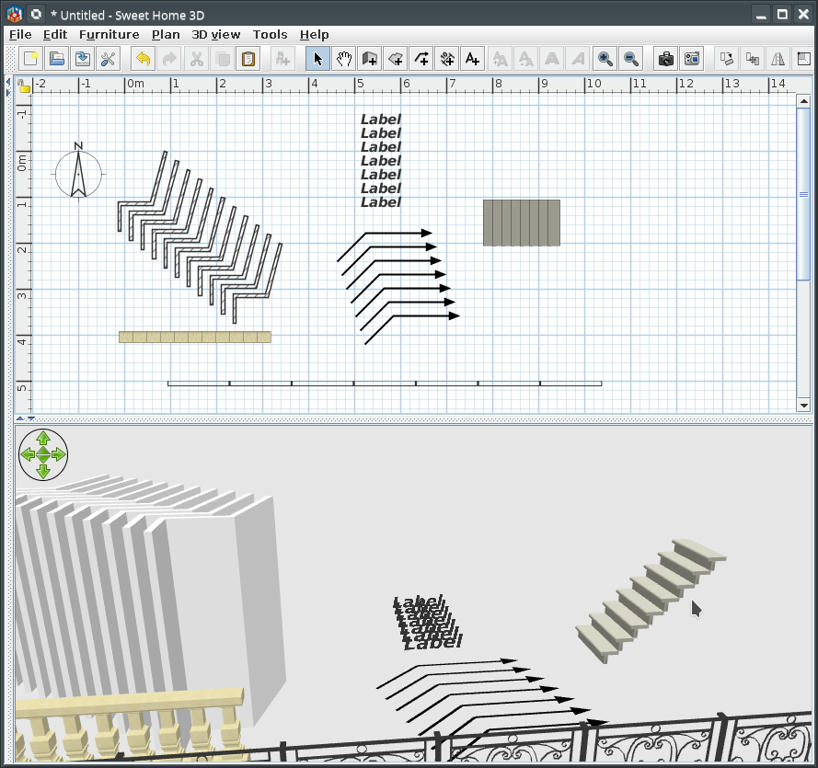
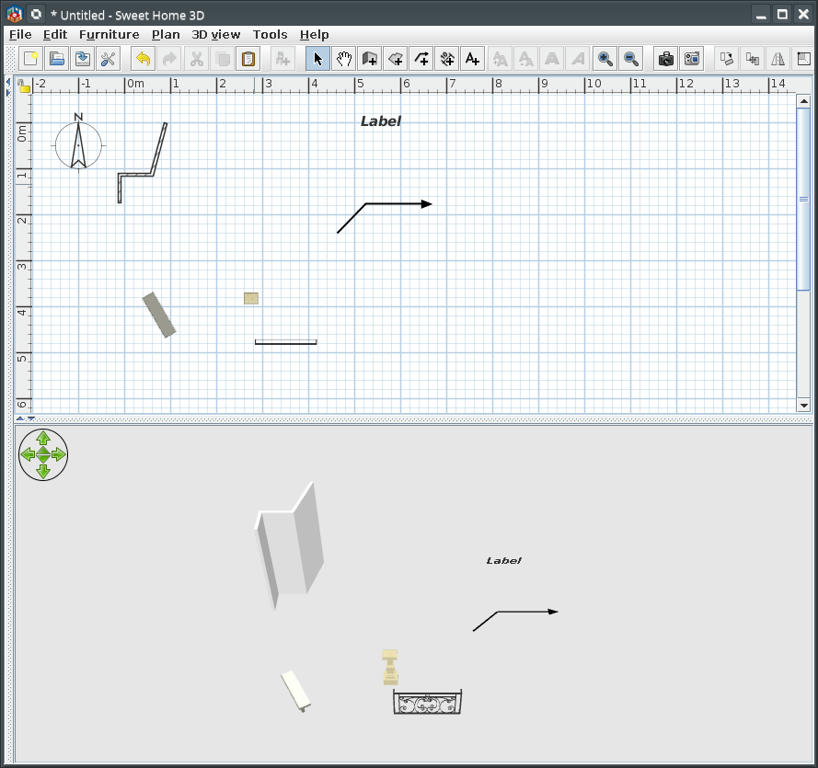
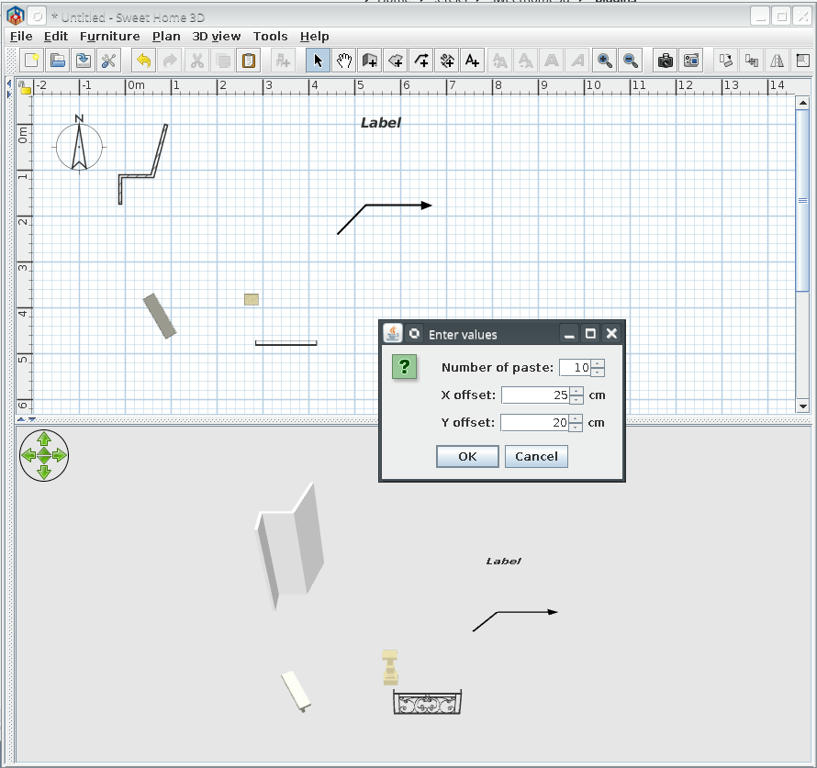
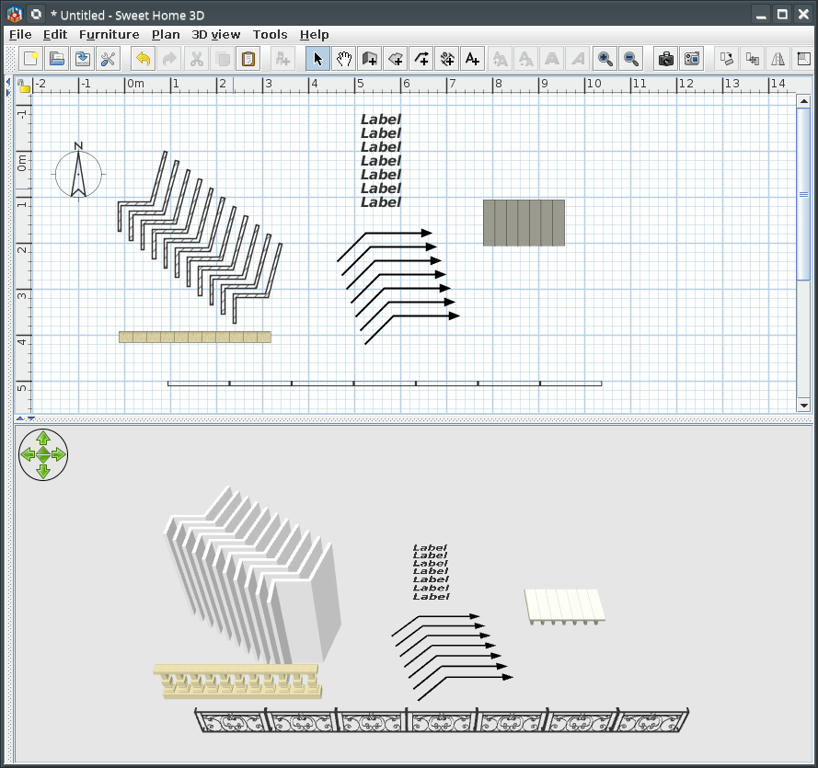
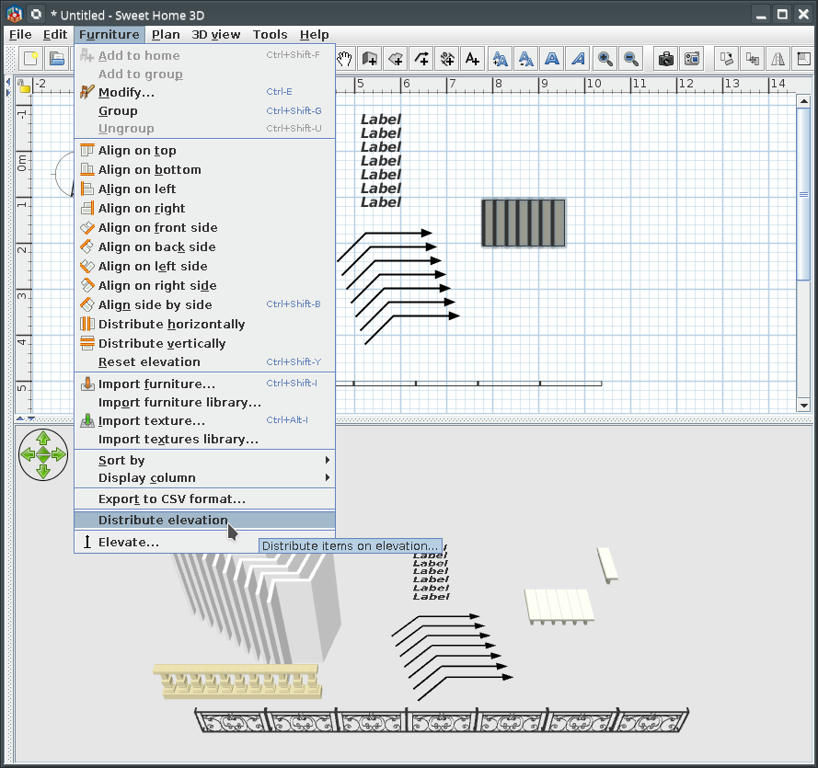
Multiple paste & Distribute elevation plug-in Finally I reach the target for what I've start learning java. Maybe is time to start to forget, to make room for other knowledge. This plug-in add two necessary (IMHO) tools: 1. Multiple paste (under Edit->Paste special...) 2. Distribute elevation (under Furniture->Distribute elevation) While SH3D is a 3D software I think is must to have a complete set of tools including for manipulation in 3D. Anyway I don't intend to spend time to write an user manual for this; Nobody read it! So: risk, try, fail, observe & learn and try again. You could find the plug-in here Paste special & Distribute elevation or on Source Forge. Few screen shoot: Insert objects in plan then select and copy (Ctrl+C) the desired object(s) then deselect them ![]() Edit->Paste special... and insert values ![]() This could be the results for different values and objects ![]() Example of use distribute elevation to make stairs Elevate one step to maximum necessary; select all steps and... ![]() This could be the result ![]() Of course I know someone for who will don't work but I can't help him ![]() PS: This plug-in is a little late for VeroniQ but could be useful for future tutorials. ---------------------------------------- A computer program does what you tell it to do, not what you want it to do. Murphy's Law When all else fails, read the instructions. Murphy's Law If you don't like "AS IS", DIY. Dorin's law |
| Posted by VeroniQ at Jun 9, 2019, 1:00:26 PM |
|
Re: Multiple paste & Distribute elevation plug-in Many thanks, Dorin. Very useful. I'll try it! |
| Posted by hansmex at Jun 9, 2019, 1:12:33 PM |
|
Re: Multiple paste & Distribute elevation plug-in Dorin, Thanks for this useful plug-in. I tested it and found the following problems: 1 - I open a new instance of SH3D without any furniture. 2 - I insert one (1) model and select that model. I then look at Edit -> Paste Special, but that option is still gray and cannot be used. I have to select that model and copy-paste it, before I can use Paste Special. When the copy of that model is selected and I use Paste Special, the plug-in copies the first instance of the model, not the second one that is selected. 3 - When (after step #2 above) I insert a second model and I try to copy that model, the plug-in copies the first model, not the second. As an extra feature, it would be very nice if you could add Rotate to your plug-in. That would make it possible to make a spiral staircase (and many other things). I'm using Windows 10 64 bit and SH3D v6.1.2 I hope this helps you. Hans ---------------------------------------- Hans new website - under constuction hansdirkse.info |
| Posted by dorin at Jun 9, 2019, 1:23:13 PM |
|
Re: Multiple paste & Distribute elevation plug-in @VeroniQ I'm happy You find it useful. I forget to mention: is localized in french (google help). Use with caution!! You could insert hundred pieces at once but then, if something You don't like it, You will have to make hundred undo (Ctrl+Z). Don't forget this is a controlled paste (Ctrl+V) so will have all the original paste characteristics with good & bad. Keep in mind two things: 1. After You select and copy (Ctrl+C)- deselect it or select other object to activate the plugin (at least on first use). 2. The number of paste NOT include the original object(s). ---------------------------------------- A computer program does what you tell it to do, not what you want it to do. Murphy's Law When all else fails, read the instructions. Murphy's Law If you don't like "AS IS", DIY. Dorin's law |
| Posted by dorin at Jun 9, 2019, 1:57:27 PM |
|
Re: Multiple paste & Distribute elevation plug-in @hansmex I'm glad You find it useful too. @2-When You drag&drop a furniture on the plan and immediately right click to modify it You will don't find the Modify furniture menu; is the way how SH3D work; the furniture are registered when You deselect it by clicking somewhere in plan. This plug-in work with clipboard NOT with selected items. You have to copy (Ctrl+C)+deselect and than You could use Paste(Ctrl+V) or Paste special... @Rotate -I have this in my mind but I don't verify if it could be applied to ALL kinds of items (especially for walls). Maybe another tool something like Distribute angle ????? ---------------------------------------- A computer program does what you tell it to do, not what you want it to do. Murphy's Law When all else fails, read the instructions. Murphy's Law If you don't like "AS IS", DIY. Dorin's law |
| Posted by Mike53 at Jun 9, 2019, 10:19:23 PM |
|
Re: Multiple paste & Distribute elevation plug-in Great idea Dorin. I look forward to trying it. |
| Posted by Bubblobill at Jun 14, 2019, 6:26:05 AM |
|
Re: Multiple paste & Distribute elevation plug-in We are one step closer to being able to build staircases. |
| Posted by Ceciliabr at Jun 14, 2019, 6:56:12 PM |
|
Re: Multiple paste & Distribute elevation plug-in Beautiful, Dorin! Thank you! Cecilia |
| Posted by dorin at Jun 22, 2019, 10:43:57 PM |
|
Re: Multiple paste & Distribute elevation plug-in New version 1.1 and also on Source Forge -add icons -improve localization files For other tools like rotation I need more advises about how You expect to act'it. Thanks to all who appreciate and need this tool. ---------------------------------------- A computer program does what you tell it to do, not what you want it to do. Murphy's Law When all else fails, read the instructions. Murphy's Law If you don't like "AS IS", DIY. Dorin's law |
| Posted by dorin at Jul 2, 2019, 10:58:39 AM |
|
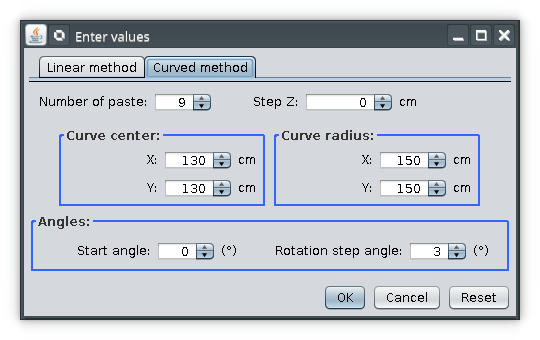
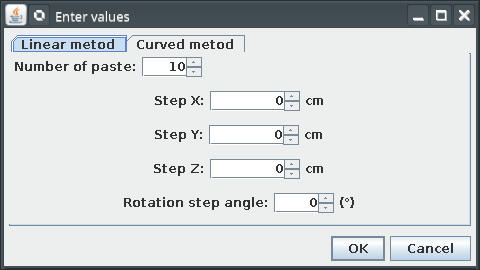
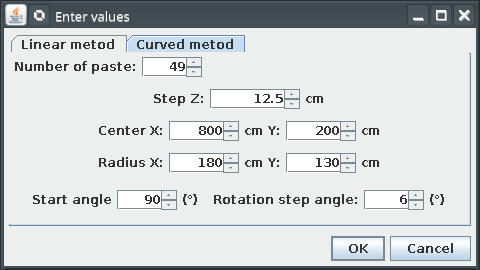
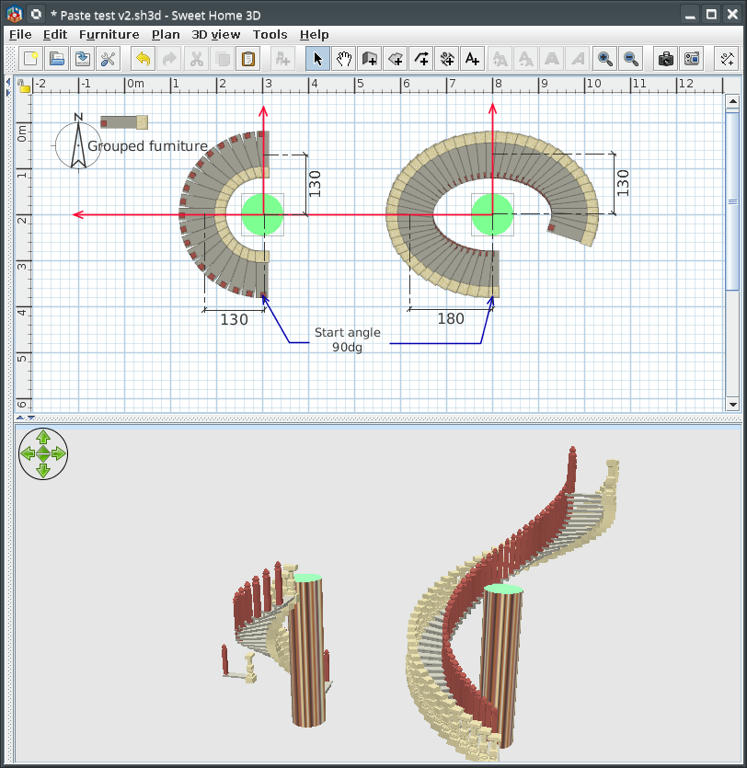
Re: Multiple paste & Distribute elevation plug-in New version 2.0 and also on Source Forge -change interface -add a curve method -add elevation and rotation in both method The operations remain the same: 1. Select->Copy->Deselect 2. Menu->Edit->Paste Special... .....and than You are on own risk! I don't try to write an user manual while nobody read it. RECOMMENDATION: exercise on a new file until You handle how it work. Few hints: ![]() The second image have the input used for ellipse ![]() You can use undo for delete one-by-one latest objects. ---------------------------------------- A computer program does what you tell it to do, not what you want it to do. Murphy's Law When all else fails, read the instructions. Murphy's Law If you don't like "AS IS", DIY. Dorin's law |
| Posted by Mike53 at Jul 19, 2019, 5:35:52 PM |
|
Re: Multiple paste & Distribute elevation plug-in Hi Dorin Gave this plug-in a try today, very nice work mate, here i a link to an image , Not posted to keep your topic clean. pool tile Took me a few attempts to orientate the object and figure out that "centre x/y" referred to the object's position once it is pasted in, other than that all good, except , i recall reading that the shape generator plug-in was used for some of your background work, could you use another of its attributes and have your plug-in remember the last settings used, very handy when tweaking a previous attempt. Thx and well done MIke |
| Posted by hansmex at Jul 20, 2019, 10:14:49 AM |
|
Re: Multiple paste & Distribute elevation plug-in Finally I managed to install and try v2 of your plugin. Nice work!! Thank you very much! @Emmanuel - I hope this one gets a place on the plugin page of the website... ![]() ---------------------------------------- Hans new website - under constuction hansdirkse.info |
| Posted by dorin at Jul 22, 2019, 6:39:04 PM |
|
Re: Multiple paste & Distribute elevation plug-in It appear You don't let me left this game. I'm glad if someone find this plugin useful for something. @Mike53 remember the last settings used I encountered the same problem and You don'n want to know how many times I cursed my self for this when I've make tests.I can't promise nothing but I'll try to learn more. Please remember I'm not a programmer, I've start learning java 6 months ago. Took me a few attempts to orientate the object While You are willing to test I suggest to try negative value for start angle.@hansmex Finally I managed to install You encountered some problems at this point? If so how You solve it?I hope this one gets a place on the plugin page of the website... It's a honor but I think is not yet good enough to be in that position.Maybe after a deep polishing could be a part of AdvancedEditing if Tobias accept this. ---------------------------------------- A computer program does what you tell it to do, not what you want it to do. Murphy's Law When all else fails, read the instructions. Murphy's Law If you don't like "AS IS", DIY. Dorin's law |
| Posted by Mike53 at Jul 24, 2019, 9:07:44 PM |
|
Re: Multiple paste & Distribute elevation plug-in Hi Dorin. Guess what..... i am doing something wrong...trying to create 30 objects in a straight line, no Y change, no Z change. copied object - deselected it > edit > paste special... Number of paste 30 step X 11.8 step Y 0 step Z 0 OK nothing happens PLease advise mate Thx Mike P.S. The Enter values window remains on top of SH3D..... and firefox and winamp and solitaire ![]() |
| Posted by Mike53 at Jul 24, 2019, 11:13:39 PM |
|
Re: Multiple paste & Distribute elevation plug-in That was strange, i had 2 instances of SH3D open, copied object in one....it pasted in to the other mmmm i had tried in 6 x, lots to delete , but sorted. |
| Posted by bdfd at Jul 25, 2019, 9:13:42 AM |
|
Re: Multiple paste & Distribute elevation plug-in @dorin, no changes for me, always the same old windows frame… and no solution ! . ---------------------------------------- Evil progresses when good people do nothing! --- SH3D 7.1 and nothing else - W11 64b in 4K |
| Posted by dorin at Jul 26, 2019, 6:46:42 AM |
|
Re: Multiple paste & Distribute elevation plug-in @bdfd Sorry to hear that. I've try to reproduce Your conditions: -Win10 fully updated,SH3D-32b=>work; -SH3D, French localization=>work; -Win10-French+SH3D-64b+French=>work. I don't know howto reproduce Your issue. If You say some frame remain on screen, try to launch from command prompt and maybe You receive some error messages. On previously versions of my plugins I've discover errors when other locale than English are set but I've fix it on last versions. @Mike53 I never test it in such conditions; multiple instances of SH3D, copy from one and Paste special to another. ---------------------------------------- A computer program does what you tell it to do, not what you want it to do. Murphy's Law When all else fails, read the instructions. Murphy's Law If you don't like "AS IS", DIY. Dorin's law |
| Posted by bdfd at Jul 27, 2019, 5:55:09 AM |
Re: Multiple paste & Distribute elevation plug-in@dorin Without any change on my new pc (see my signature :)) after installing new win10fam OS and sh3d => no change ! I Don't see that's the problem… . ---------------------------------------- Evil progresses when good people do nothing! --- SH3D 7.1 and nothing else - W11 64b in 4K |
| Posted by Mike53 at Aug 5, 2019, 3:41:43 PM |
|
Re: Multiple paste & Distribute elevation plug-in If it is not possible to remember previous settings, can it be set up so the window remains open after clicking ok |
| Posted by dorin at Aug 13, 2019, 7:48:11 PM |
|
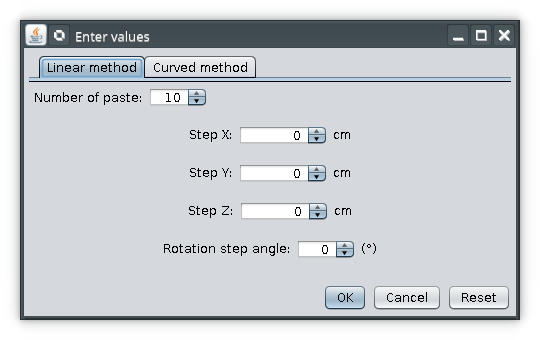
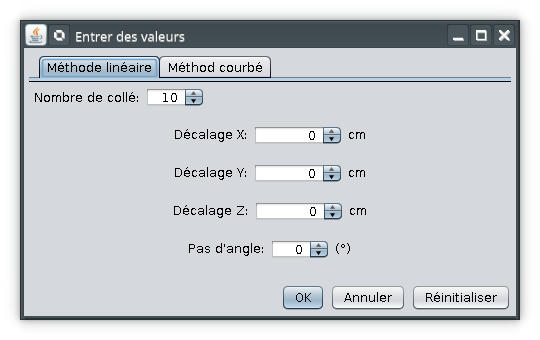
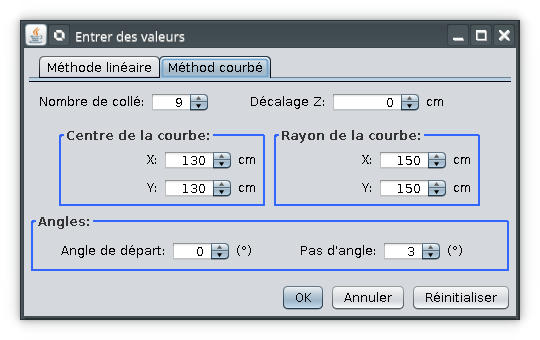
Re: Multiple paste & Distribute elevation plug-in New version 2.1 code name "Mike53" and on Source Forge . The news: -implement ability to remember last inserted values; -add an Reset button (to default values); -minor change on interface; -some possible bug fixed and create other new. Some screenshot: English ![]() French ![]() Possible problems: I've try to paste 10000 objects and my PC has give-up. With 1000 it took 3min 30sec. So be carefully OR be patient. Opinion pool: need someone an random generator? Maybe for grass field or forest. ---------------------------------------- A computer program does what you tell it to do, not what you want it to do. Murphy's Law When all else fails, read the instructions. Murphy's Law If you don't like "AS IS", DIY. Dorin's law |
| Posted by Mike53 at Aug 14, 2019, 9:21:55 AM |
|
Re: Multiple paste & Distribute elevation plug-in Hi Dorin Downloading now and will try later, i think the codename is an excellent choice Hopefully with this one i will be able to copy/paste in 1 project, at the moment i have to open a 2nd project for the Paste to appear. As always, thank you for your time and effort. Mike |
| Posted by dorin at Aug 14, 2019, 10:56:45 AM |
|
Re: Multiple paste & Distribute elevation plug-in i will be able to copy/paste in 1 project, at the moment i have to open a 2nd project for the Paste to appear. IT NOT I've just verify this and it appear in the second plan BUT the pasted items has gone in the plan from where are copy. So, the current solutions: 1.Copy ...->...Paste special... in the same work file than Copy->Paste in desire file. 2. Copy->Paste items in desire file and work from there. 3. Take some needed information from second file (dimensions, angles etc.), put it in first file and then test it hire until You're satisfied. Finally grouped and copy->paste in second file. Sorry, I'm not meet You expectancy ![]() ---------------------------------------- A computer program does what you tell it to do, not what you want it to do. Murphy's Law When all else fails, read the instructions. Murphy's Law If you don't like "AS IS", DIY. Dorin's law |
| Posted by dorin at Dec 27, 2019, 8:37:52 AM |
|
Re: Multiple paste & Distribute elevation plug-in Now It's work as You want New version 1.3
Also on Souce Forge ---------------------------------------- A computer program does what you tell it to do, not what you want it to do. Murphy's Law When all else fails, read the instructions. Murphy's Law If you don't like "AS IS", DIY. Dorin's law |
| Posted by SeppoV12 at Dec 28, 2019, 6:55:44 PM |
|
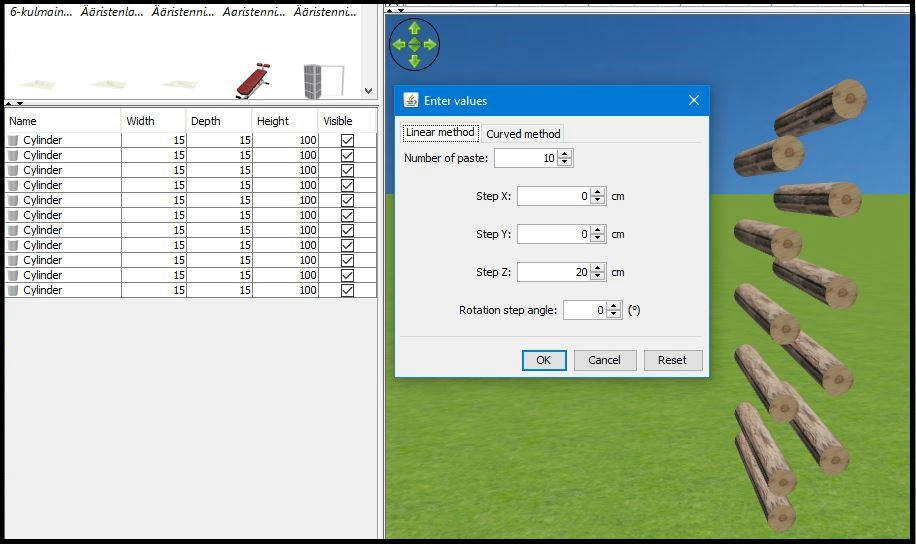
Re: Multiple paste & Distribute elevation plug-in Hi Dorin, I am using plugin version 1.3. I noticed that when Step X and Step Y are zero, multiple paste uses SH3D:s default offset values (?) for x and y instead of Step X and Step Y after first paste. Any other values than 0 (or 0.0) works as should. In screen capture each cylinder should be 20 cm higher than previous and straight above it. I hope the picture explain things better than me.. ![]() Thanks for excellent tool, I have a lot of use for it! Seppo |
| Posted by dorin at Dec 29, 2019, 11:40:36 AM |
|
Re: Multiple paste & Distribute elevation plug-in 1.Errata: I messed up the version numbers in previous post. Have to be 2.2 in place of 1.3(well, age...) 2. Thanks Seppo! I've have this problem from the beginning and only now, thanks to You, I think I've found a solution. So, New version 2.3 -solve (somehow) to trick default offset of SH3D which don't let to paste items on the same place Also on Source Forge PS In some circumstances, when the steps are not respected, the plugin don't do anything. In in such cases hit Cancel or X and start again. ---------------------------------------- A computer program does what you tell it to do, not what you want it to do. Murphy's Law When all else fails, read the instructions. Murphy's Law If you don't like "AS IS", DIY. Dorin's law |
| Posted by dorin at Oct 1, 2020, 7:19:16 AM |
|
Re: Multiple paste & Distribute elevation plug-in This plugin was splinted in two separate plugin: Multiplier plugin and Distribute elevation plugin . For those who try to use it I recommend to remove Multiple paste plugin to avoid some possible issue. ---------------------------------------- A computer program does what you tell it to do, not what you want it to do. Murphy's Law When all else fails, read the instructions. Murphy's Law If you don't like "AS IS", DIY. Dorin's law |
| Posted by Nauthiz at Oct 5, 2020, 8:52:24 AM |
|
Re: Multiple paste & Distribute elevation plug-in I'm crazy enough to put my bathroom tiles as separate 3d objects, so these plugins are really, really useful. The automatic grouping is a very nice idea, but I keep forgetting to turn the polyline off before use... Thank you so much for the update! |
|
|
Current timezone is GMT Dec 18, 2025, 2:51:39 PM |