Print at Dec 21, 2025, 6:29:02 AM
Posted by KitchM at Jul 31, 2019, 6:57:48 PM
Streets and Roads
I am attempting to create my plot or site plan. I need a street or road to go along the side of the property in 2D view. How can I do that?

Posted by Mike53 at Jul 31, 2019, 9:43:28 PM
Re: Streets and Roads
Just draw a room the size and shape you need your road to be, modify it to not show a ceiling and texture the floor with 1 of the "pavement" textures, in the recently released library 1.7 there are some road markings too

Posted by KitchM at Aug 1, 2019, 12:43:37 AM
Re: Streets and Roads
Thanks. And what can a person do for a curved driveway?

Posted by Bubblobill at Aug 1, 2019, 6:53:13 AM
Re: Streets and Roads
You use the same trick using curved walls.
Draw the shape with walls so that the area is enclosed.
Change to the room tool thing, double click in the enclosed area to create the room.
Change the wall height to something along the lines of a kerb or delete them altogether.
Modify the room as for the road.

Posted by KitchM at Aug 2, 2019, 8:08:30 PM
Re: Streets and Roads
I must be doing something wrong. I created a room, but there is no way to curve it that I can find.

For my street, I can create the room, which is okay for the straight street, but the option to add the payment is not available.

Posted by Mike53 at Aug 2, 2019, 9:05:39 PM
Re: Streets and Roads
Not sure what you refer to as "add payment", are you using google translate?
Look at this image
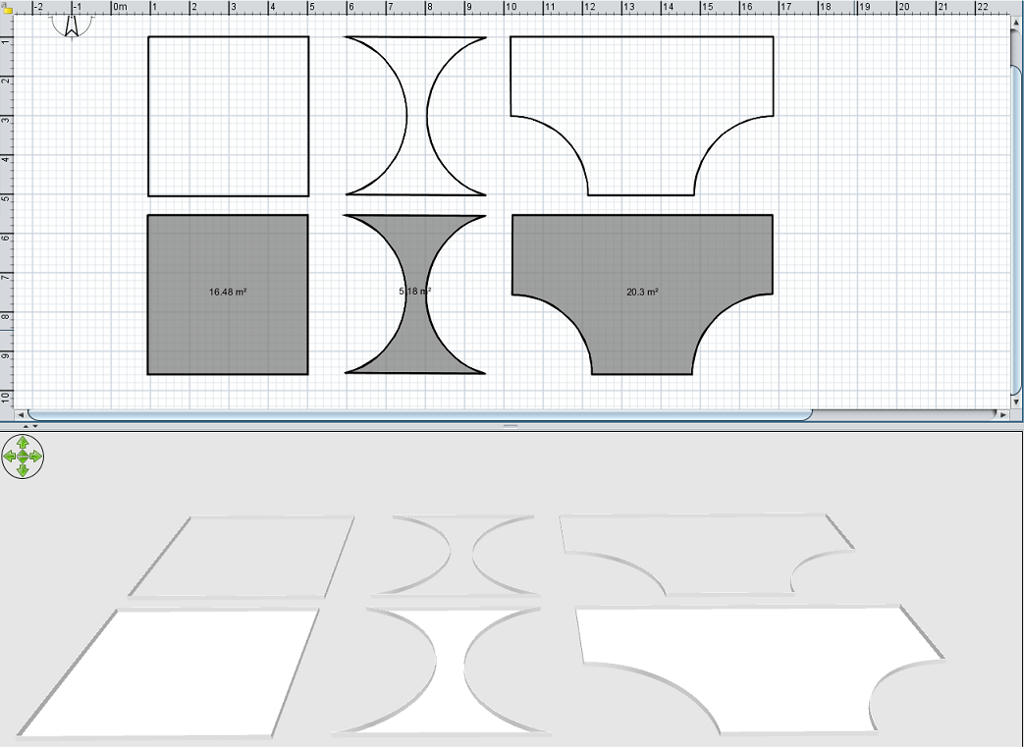


The top row is 3 shapes created with walls, the 2nd has an arc added to the 2 side walls, the 3rd was made with 6 walls, this also has an arc on 2 of its walls.
Arcs can be added either in the walls modification window, you will see Arc in the bottom right corner
or
move your mouse pointer to the centre of a wall, where the wall has an arrow on one side, your pointer will change to a double arrow, you can then left click your mouse and drag the wall to form your arc. Once you have achieved the shape you need select the room tool and double click within the borders formed by the walls, remember, for this to work all the walls MUST be joined.

This method, when used on a level with an elevation of 0 will give you a shape that has no depth.
If you use the same method, but at an elevated level where the floor has a depth, the shape you create will have that depth, very handy for creating custom kitchen worktops, steps, lintels, copings etc. For these you can export your room and import it as an object.
And don't forget you can use the room tool to create a shape without the use of walls, just select the tool and draw in your 2d window by randomly clicking the mouse

Posted by Mike53 at Aug 2, 2019, 9:13:37 PM
Re: Streets and Roads
The 3rd shape shown is a representation of a turn-around point for a car.......it is NOT a pair of pants...as my mrs has just commented

Posted by VeroniQ at Aug 2, 2019, 11:15:38 PM
Re: Streets and Roads
laughing Mike53 (and Mrs)! KitchM, this tutorial and this tip might help you too.

Posted by KitchM at Aug 2, 2019, 11:18:59 PM
Re: Streets and Roads
Thanks all.

@Mike53, that should be pavement. Sometimes I am just too sloppy. Sorry.

Posted by bdfd at Aug 3, 2019, 6:03:04 AM
Re: Streets and Roads
Hi,

Just look at the exteriors of my projects.
I created few different streets with plenty of details…
wink
.
----------------------------------------
Evil progresses when good people do nothing!
---
SH3D 7.1 and nothing else - W11 64b in 4K

Posted by Bubblobill at Aug 3, 2019, 4:08:55 PM
Re: Streets and Roads
Check out the mini-golf holes . The same principle applies.

Posted by KitchM at Aug 4, 2019, 8:15:55 PM
Re: Streets and Roads
@bdfd, please supply a link to your projects. I don't know where your examples are.

Also, everyone, I cannot see the pavement texture with the dotted line anywhere but on my button bar. However, when I select it, nothing happens and I cannot add it to the item I'm editing.

Posted by VeroniQ at Aug 4, 2019, 8:41:08 PM
Re: Streets and Roads
KitchM, draw a line before with Create Polylines tool.

Posted by Mike53 at Aug 4, 2019, 8:49:11 PM
Re: Streets and Roads
You could download the latest library files, version 1.7 i think. it contains road lines
or
apply the gray pavement texture then draw walls where you want lines, 100 mm wide 2mm high color both sides white

Posted by KitchM at Aug 4, 2019, 9:20:01 PM
Re: Streets and Roads
Okay, please help me clarify this. If I am creating a road or a driveway, is it a room, a series of walls or a set of polylines?

Posted by Mike53 at Aug 4, 2019, 10:04:35 PM
Re: Streets and Roads
The room you create will actually end up being your road or driveway. poly lines do not show up in the 3d view and i am not sure if they print, all you need is a room, walls may help you to create the room, but then they can be deleted

Posted by KitchM at Aug 4, 2019, 10:37:48 PM
Re: Streets and Roads
Okay. So I create a room. Let's say it is a rectangle. I therefore see a rectangle shaded with grey inside.

Next I would add arcs to create a curve to my "room". Where and how is it exactly that I create an arc?

Posted by VeroniQ at Aug 5, 2019, 1:03:54 AM
Re: Streets and Roads
Polyline is only for the dotted lines. They can be visible in 3D if you choose the option.
If you want a curved street, you have to draw walls before, curve them, then create a room into the joined walls and remove walls. Then apply a texture to the room.
If you need rectangular street, use only Create rooms tool the apply a texture.

Posted by KitchM at Aug 5, 2019, 2:24:00 AM
Re: Streets and Roads
Good so far. Now how do I turn the walls into a room?

Posted by UbuntuBirdy at Aug 5, 2019, 4:53:46 AM
Re: Streets and Roads
You can not turn the walls inti rooms.
You should use the walls to define the perimeter of the room you want to create, to "draw" the shape of the room.
Once you have done that, you can choose the room tool and double click into that shape and your room will automaticly be created.
----------------------------------------
Pascal

SH3D 6.6 / Ubuntu 22.04 (Mainline-Kernel) / Radeon RX580 / Ryzen 7 5800x

Posted by KitchM at Aug 5, 2019, 3:09:35 PM
Re: Streets and Roads
But how does the room take on the curves of the walls outside it?

Posted by Mike53 at Aug 5, 2019, 3:44:03 PM
Re: Streets and Roads
Going to need an image or the file mate to see what it is you are trying to achieve

Posted by KitchM at Aug 5, 2019, 4:11:02 PM
Re: Streets and Roads
File mate?

Just trying to make a curved driveway.

https://www.mediafire.com/file/nmou57kx71de99i/Plot_Plan.sh3d/file

Posted by Mike53 at Aug 5, 2019, 4:31:44 PM
Re: Streets and Roads
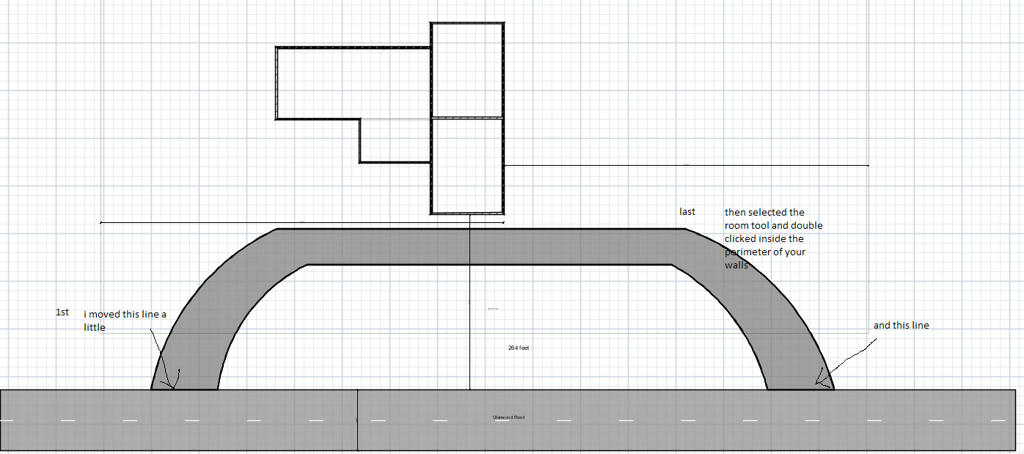
is this what you wanted?

if it is then all you need do i follow what i wrote, then delete the perimeter walls

Posted by Mike53 at Aug 5, 2019, 4:36:16 PM
Re: Streets and Roads
or keep and resize them to represent kerbing

Posted by KitchM at Aug 5, 2019, 5:02:10 PM
Re: Streets and Roads
Yup, that's it. Thanks.

So the simple answer is to select the room mode and double-click inside the curved shape to automatically create the room. Piece of cake!

(Somebody aught to write this in the instructions. wink )

Posted by UbuntuBirdy at Aug 5, 2019, 6:09:09 PM
Re: Streets and Roads
(Somebody aught to write this in the instructions. wink )


Do you know the video tutorials?

Listen carefully to the instructions in the second video... wink
----------------------------------------
Pascal

SH3D 6.6 / Ubuntu 22.04 (Mainline-Kernel) / Radeon RX580 / Ryzen 7 5800x

Posted by KitchM at Aug 9, 2019, 9:20:07 PM
Re: Streets and Roads
You mean the one for the older version that is hard to understand and has poor resolution?

Posted by UbuntuBirdy at Aug 9, 2019, 9:30:56 PM
Re: Streets and Roads
Do you want to learn how to use SH3D or are you looking for someone who stands right behind you and tells you how to move your mouse pointer?
----------------------------------------
Pascal

SH3D 6.6 / Ubuntu 22.04 (Mainline-Kernel) / Radeon RX580 / Ryzen 7 5800x

Posted by KitchM at Aug 12, 2019, 7:51:01 PM
Re: Streets and Roads
I'm looking for useful information. Know anyone who can give it?

Posted by UbuntuBirdy at Aug 12, 2019, 8:03:25 PM
Re: Streets and Roads
The User's guides and the Video tutorials contains lots of useful information, even it's for an older version or has poor resolution.
And the Tips and tricks page can answer a lot of questions with helpful examples.

... sometimes a little try is not wrong... wink

And if all that fails, then we will try to find someone here in the forum who can solve complex problems.
----------------------------------------
Pascal

SH3D 6.6 / Ubuntu 22.04 (Mainline-Kernel) / Radeon RX580 / Ryzen 7 5800x

Posted by KitchM at Aug 13, 2019, 7:21:39 PM
Re: Streets and Roads
Are all of those references cross-referenced for quick subject search?

Posted by Puybaret at Aug 13, 2019, 8:50:26 PM
Re: Streets and Roads
KitchM, what about simply reading them and make some suggestions about possible missing cross-references? That would be a nice contribution...
----------------------------------------
Emmanuel Puybaret, Sweet Home 3D creator