Print at Dec 19, 2025, 4:15:22 PM
Posts: 14   Pages: 2   [ Previous Page | 1 2 ]
View all posts in this thread on one page
Posted by hen3bosch at Aug 23, 2020, 8:05:30 PM
Re: Cavity walls without a redesign...
This doesn't work.

When you put a door in the outer wall and you open it then you are looking at the inner wall.


hen3

Posted by gregoryx at Nov 3, 2020, 11:58:19 PM
Re: Cavity walls without a redesign...
Not an ideal solution, but I've had to do this a few times to deal with such a wall: install the door, then change the width of the door (10-inches instead of 3-inch, for example), then use the arrow keys to move the door to cover both walls. PITA, but works. 🤷‍♀️

Posted by AlbertKakiay at Feb 25, 2021, 3:58:33 PM
Re: Cavity walls without a redesign...
No need redesign, add new wall as skin with cavity space. Adjust door and window.

I call it Skin, the same structure with different facade.

Posted by Mike53 at Feb 25, 2021, 7:28:10 PM
Re: Cavity walls without a redesign...
I have a feeling my point has been misunderstood.

Draw a wall as per normal, open the modify walls dialogue box, select the NEW Cavity wall hatching.
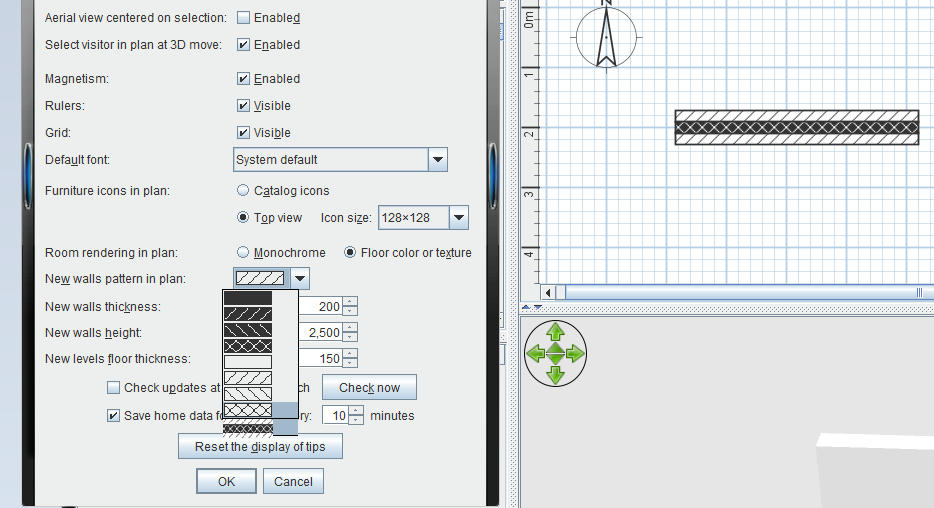


Windows and doors then act as normal, without the need for extra walls or positioning issues.

Any printed docs would then appear to have cavity walls

Very small programme change compared to to creating actual cavity walls

Posts: 14   Pages: 2   [ Previous Page | 1 2 ]