Print at Dec 20, 2025, 10:20:49 AM
Posted by MichaelN at Oct 26, 2019, 2:25:38 PM
Graphic issue - any hints?
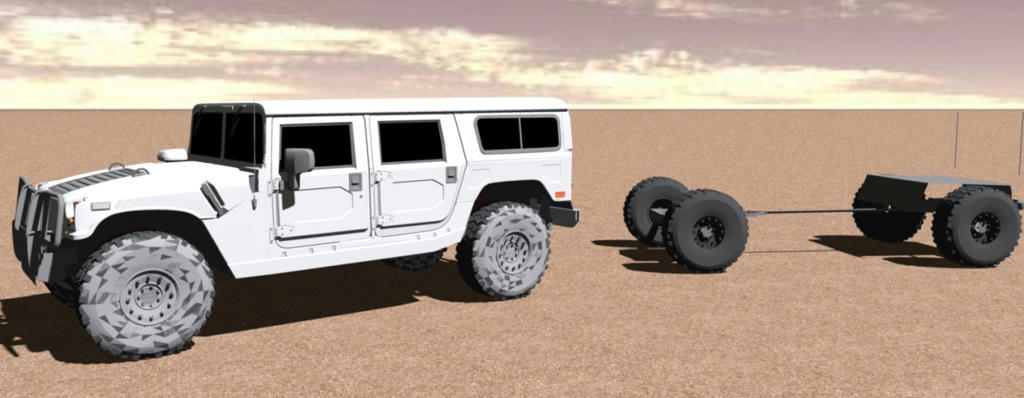
I see this graphic issue (rendering with best quality). What can I do to avoid this? Or it's an issue with the model?

Picture

Posted by Ceciliabr at Oct 27, 2019, 4:44:49 PM
Re: Graphic issue - any hints?
Had the same problem some years ago.


My solution:
Import to Verto Studio 3d ( free program) and export obj. file.

Problem solved.

You can probably do the same with Blender, also free.


cec

_________________________________________________________________

EDIT:
If you are working on a Mac or iPad, Verto Studio is still free.
The Windows version is no longer free. Sorry.
Thank you Hans :)

CEC
Posted by alaX at Oct 28, 2019, 9:55:02 AM
Re: Graphic issue - any hints?
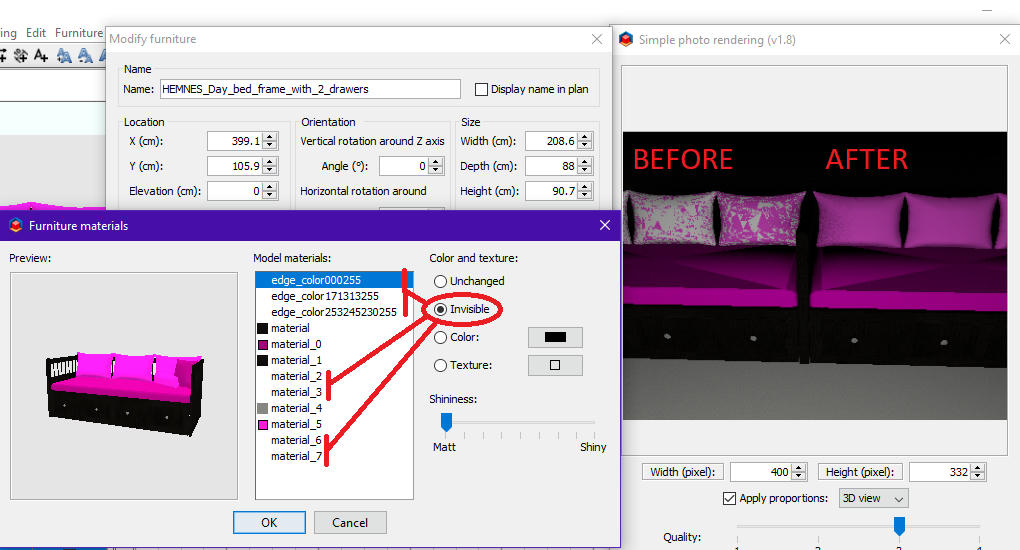
Make material on back faces of your model invisible.


Posted by hansmex at Oct 28, 2019, 11:46:17 AM
Re: Graphic issue - any hints?
Verto Studio 3D now costs €16.79
----------------------------------------
Hans

new website - under constuction
hansdirkse.info

Posted by Ceciliabr at Oct 28, 2019, 7:31:27 PM
Re: Graphic issue - any hints?
Verto Studio 3D now costs €16.79

That is the VR-version ( which is incredible!).
The standard version is still free.


Make material on back faces of your model invisible.

Works sometimes.
See if you can make it work on this: Hummer-no-black.zip


cec

Posted by hansmex at Oct 28, 2019, 8:32:51 PM
Re: Graphic issue - any hints?
Dear Cecilia,

Believe me, I don't doubt what you say or write. Before writing my answer I searched for "free version" but without result. I would be very interested if you could provide a link to the free version. If you search my posts, this same issue has caused me problems for many years.

Thanks in advance.

H
----------------------------------------
Hans

new website - under constuction
hansdirkse.info

Posted by Ceciliabr at Oct 28, 2019, 9:38:48 PM
Re: Graphic issue - any hints?
https://vertostudio.com/desktop.php

This link takes you to the download page. For Mac it points to Appstore, where the app is free, for Windows( Linux/others, I don't know, since the website obviously sees what platform is making the request, and leads me to Appstore.


Cec

Posted by hansmex at Oct 29, 2019, 7:28:21 AM
Re: Graphic issue - any hints?
Hi Cecilia,

I found that page as well. Unfortunately Apple-only.
Thanks anyhow.

H
----------------------------------------
Hans

new website - under constuction
hansdirkse.info

Posted by Ceciliabr at Oct 29, 2019, 7:58:49 AM
Re: Graphic issue - any hints?
Hm...
It seems you're right. The standard version is no longer available for Windows.


Cec

Posted by MichaelN at Oct 29, 2019, 6:52:25 PM
Re: Graphic issue - any hints?
The tip with making surface invisble doesn't worked.
Blender is an idea, I will test it in the next few days. Thanks.

Posted by SeppoV12 at Nov 23, 2019, 5:00:35 PM
Re: Graphic issue - any hints?
With me this issue exist with models downloaded from 3DWarehouse to SketcUp and then exported SH3D.
Usually method alaX suggsted works fine and removes those typically gray patches from renderings.
Bit more still..

Original picture was not available, so I used Hummer-no-black.zip
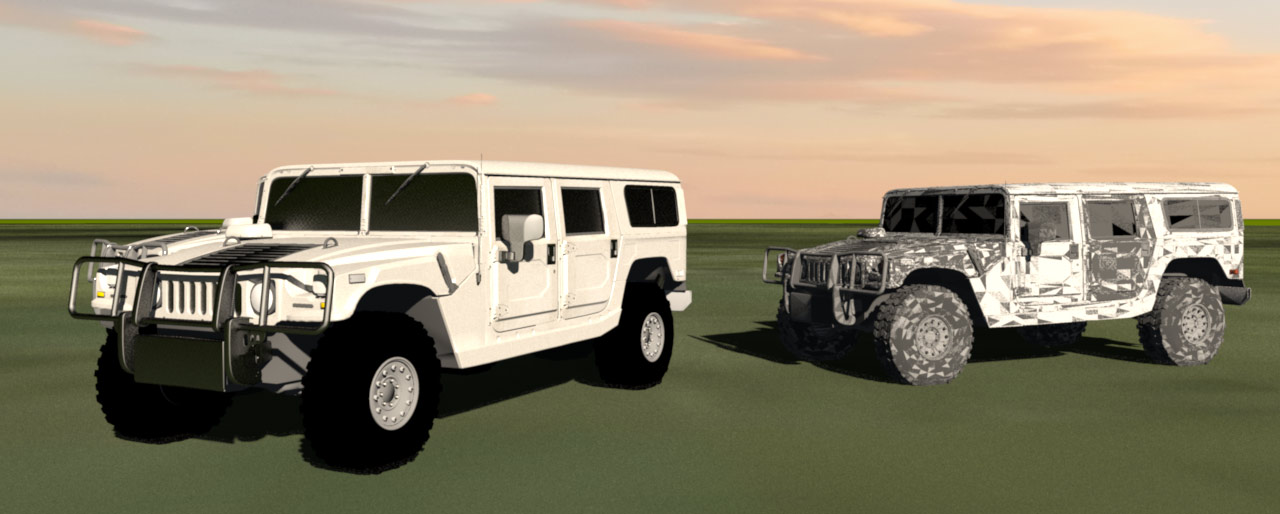
Rendering show gray patches in tires and they disappear when 'material_5' is marked invisible.
Left Hummer intact, right one stripped to show that tires are OK and some other thing.
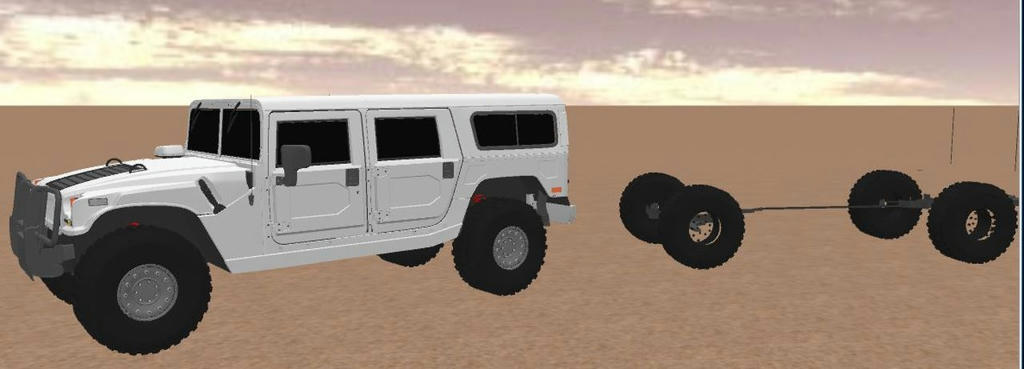
Interesting detail is seen in 3D-view..

Rendered image below


3D-view screen capture below


That detail: marking material_5 inivisible make wheel hubs transparent in 3D-view but just when looked 'outside'. And rendering above show hubs black/dark gray as designer intended. Interesting.

A bit long story to notice that imported things can contain object that is transparent from other side and completely opaque when looked from other side.

Anyway: now is Saturday evening, time for sauna and beer after that.
Everything begin to feel much better!