France
Joined: Nov 7, 2005
Post Count: 9440
Status:
Offline
Shape Generator plug-in
Hello,
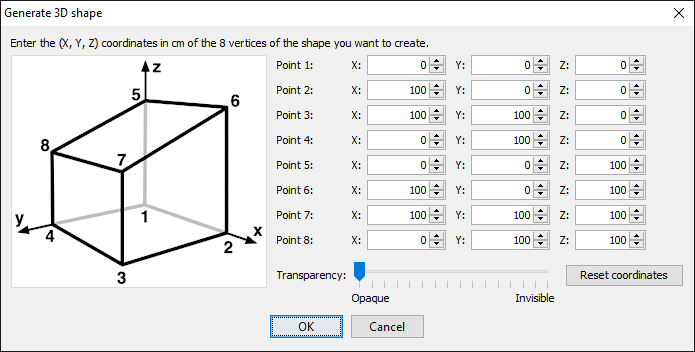
I'm pleased to propose the new Shape Generator plug-in that will allow you to create a white 3D shape with 8 vertices which coordinates can be directly entered by the user. Once this plug-in is installed, the following dialog box is shown by the additional Tools > Generate 3D shape menu item (en français, le menu Outils > Générer forme 3D):
For those among you who are not against thinking in a 3D coordinates space, this plug-in should allow to create all kind of simple objects from Sweet Home 3D: triangles, pyramids, beams, terrain parts, roof parts... The coordinates are stored from a call of the plug-in to the next, to let you adjust a shape you would have wrongly designed or if you want to create a new shape from the previous one. The Reset coordinates button will reset the values of the 8 vertices to the ones of a 100 cm or 3 ft cube. Note that it provides also a Transparency slider to create half transparent shapes and that the generated shape comes with texture coordinates.
Hope you'll like it. Make your imagination work and feel free to show various arrangements you'll succeed to design with this plugin!
Thanks to Yann for providing the base idea of this plug-in and Dorin for programming a 3D preview in version 1.2.
Download links for Shape Generator plug-in: Shape Generator plug-in 1.2.1 was released on 08/21/2024 Shape Generator plug-in 1.2 was released on 11/21/2020 to add a 3D preview Shape Generator plug-in 1.1 was released on 03/06/2016 Shape Generator plug-in 1.0 was released on 03/05/2016
----------------------------------------
Emmanuel Puybaret, Sweet Home 3D creator
----------------------------------------
[Edit 5 times,
last edit by Puybaret at Aug 22, 2024, 7:36:07 AM]
Netherlands
Joined: Sep 26, 2009
Post Count: 4027
Status:
Offline
Re: Shape Generator plug-in
I was thinking of the six sided box when I wrote that. My guess was that if transparency can be set for each side, we can later set colour or texture for each side.
----------------------------------------
Hans
France
Joined: Nov 7, 2005
Post Count: 9440
Status:
Offline
Re: Shape Generator plug-in
Thanks for your feedback I managed the 6 sides with different materials in the updated version 1.1 of the plug-in. Once the shape is created, you can modify the visibility / color / texture of each of these materials with the existing furniture materials modification dialog box.
----------------------------------------
Emmanuel Puybaret, Sweet Home 3D creator
Joined: May 12, 2013
Post Count: 1545
Status:
Offline
Re: Shape Generator plug-in
Very useful. I really like this approach. Great potential for lots of different simple geometry objects: sloping walls, roofs, terrains - just to mention a couple.
For some reason, double-clicking ShapeGenerator-1.1.sh3p (5.2a, win 8.1) launched the info in SH3D saying the plug-in had been installed, but just put an empty file with correct name in ...\eTeks\Sweet Home 3D\plugins. And the plug-in did not show in the Help-Libraries list. Putting the file there manually worked, though.
I suppose the target group primarily is users who do not resort to other software to create objects. In which case, it might be interesting to see how it works with different users after a while. I suspect the user interface may be a bit daunting to the numerically challenged. But I also have no immediate ideas as to how to improve the interface:
Ideally, the points could be moved along xyz in the left window (but I guess that may not be that easy to implement).
Maybe a couple of pre-sets? Roof and sloping terrain being the most obvious judging by forum requests.
If so, maybe a proportional scaling of all points (at least if I am right about the texture scaling):
Trying to figure out how textures are mapped on to the surface, it seems to me that textures are mapped to 100×100 cm (of the initial size of the generated shape and will scale up)?
Maybe, maybe, a generate shape as Door/window (i.e. with cutout) could be useful as it would save the user the job of exporting/importing?
Certainly a must-have plug-in, shall be looking forward to see what becomes of it and how it is used. ok
USA
Joined: Oct 6, 2015
Post Count: 199
Status:
Offline
Re: Shape Generator plug-in
I just installed this plugin on SH3D 5.2a and it looks promising. I haven't done much with it yet but did create a small test roof.
Thanks for this.
Just a reminder: I'm running SH3D on an XP machine.
---------------------------------------- Hawk
----------------------------------------
[Edit 2 times,
last edit by HawkDawg at Mar 6, 2016, 5:29:51 PM]
France
Joined: Mar 9, 2016
Post Count: 1
Status:
Offline
Re: Shape Generator plug-in
Hi, Although it requires that you prepare your shape coordinates in advance, this new plug-in is terrific! It makes my terrain look much more like a real terrain than the sloped walls I used previously as a workaround.
I noticed that if you do not follow the corners orders indicated but enter the basis corner coordinates iso the top corner once, the created shape is an empty (open) box. Might be worth for some specific furnitures.
Because dealing with coordinates quite boresome and not very handy in SH3D (whose philosophy is simplicity based), for easier use of this plug-in, is it possible (in order of usefulness, I think) to: - have the mouse pointer coordinates displayed (on the rule axes for instance) to avoid creating gaps with nearby walls or other shapes, - have a properties info box to display already created coordinates (useful when coming back on project after you have sent your previous mapping notes to trash, to be able to create adjacent shapes to the existing ones) - have a dialog box to change the coordinates after the shape is created (iso being able to make length/width/height changes only, not shape adjustments) - have a "duplicate X and Y coordinates" button to press once you entered the 4 first corner coordinates, to only have to enter the Z coordinates of the basis in most cases.
Many thanks again to Emmanuel and long live this plug-in and its future updates.