I just added this feature in version 3.4 Beta 32.I have a question about putting stairs in: When you put them in, shouldn't they punch a "hole" in the floor above, or below them like windows and doors do?
This required a new property in the description file of the furniture of the catalog. I called it staircaseCutOutShape and it describes the shape used to cut out the ceiling and the floor of the upper levels when they intersect a staircase. This shape should be written with the syntax of the SVG path element described at http://www.w3.org/TR/SVG/paths.html (for example, M0,0 v1 h1 v-1 z describes a 1 unit wide square). This will allow to have complicated shapes like a pie shape for spiral staircases, as show in the following image and the attached document:
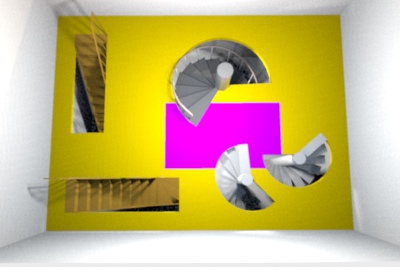
To let you import 3D models as staircases too, I added a new Staircase checkbox at the third step of the import furniture wizard and in the upcoming update of the Furniture Library Editor. In that case, the cut out shape of the staircase will be a rectangle with the same width and depth as the object itself.
To avoid presenting too much features to beginners, the button and the level tabs are displayed only once you added a first level with... the Plan > Add level menu item.I thought you had an icon for adding levels. Where did that go? I hope you won't be taking that out for the final version.
This behavior happens because you didn't create a ceiling at the lower level matching the bottom of the balcony, and OpenGL faces are visible only from one side. As I'm afraid of a flow of FAQs about this, I'm probably going to improve this behavior before releasing version 3.4. The idea would be to always create the opposite (ceiling) part of upper level floors, except at the places where the user drew a ceiling at the lower level. This is not so easy because it requires to compute some intersections between the user ceilings and these opposite parts, otherwise the superimposed surfaces won't be rendered correctly.I made a balcony with a floor but when you "walk" under it, you can see right through the floor like it isn't even there.