- if you change the texture of the whole object using the button beside the Texture radio button in the furniture modification dialog box, the texture is mapped on top, front, back and bottom sides of the object respecting the width and height of the texture. On the left and right sides, the result is most of the time not so nice because of the way automatic texture mapping works (like in the cube of the image below).
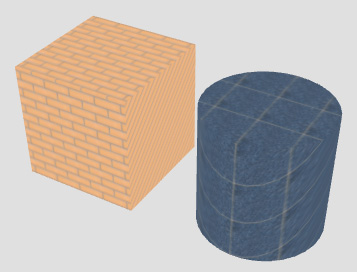
- if you change a texture of an object using the Modify button beside the Materials radio button in the furniture modification dialog box, it depends on whether the part of the object you change defines some texture coordinates or not. If the part you change defines some texture coordinates in its 3D model, then those coordinates will be used. If that part don't define any texture coordinates, default texture coordinates will be used according to the previous rule.
Why keeping those coordinates if they exist since, in a way, it obliges to understand what texture coordinates are and how they are defined on the object you want to modify? At the moment, I prefer to keep them unchanged because users wouldn't be able to nicely change the texture of a cylinder and other not boxy shapes. Maybe, I could add an Ignore model texture coordinates check box in the Furniture materials dialog box, but fear it would confuse many users without always solving the problem as they wish...
See also this tip.