A couple of options:
1) Place the door window in the wall. Then increase the depth of the window.
2) Disable magnetism (ALT) when placing the door/window.
3) Putting the door/window in a hole/opening - what I think you tried - should work too. First insert the hole, and then import the model (but without Door/Window checked). Then place the door carefully in the opening. Use the settings manually to get the hole and door to match.
The 1)-3) options have the disadvantage that moving the door becomes a bit cumbersome later.
4) Look for a SH3D furniture library that has a suitable model where the values for how far the door/window should protrude are already set.
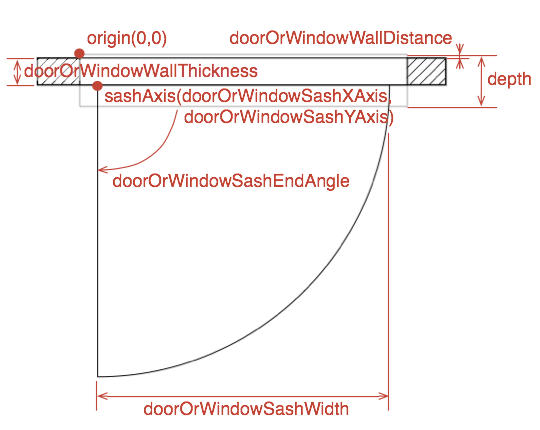
5) If you feel comfortable editing advanced properties in library text files: Import your door/window to a library and find out how you can edit the advanced properties of library items (DefaultFurnitureCatealog.properties in the library - see thread 2006 and some additional info in the SVG guide on p 9-10). The values you are looking for are:
[font=courier new]doorOrWindowWallThickness#n=x[/font] (compare to depth#)
[font=courier new]doorOrWindowWallDistance#n=y[/font] (protrusion one side).
ok