A first Beta version of Sweet Home 3D 7.2 was released and its ability to view dimensions in the 3D view as well as to handle elevation dimensions was reused in a Beta version of Side view plug-in that I would like you to test before releasing it.
If you made dimension lines viewable in the 3D view, the plug-in will let you create directly images like the following one.
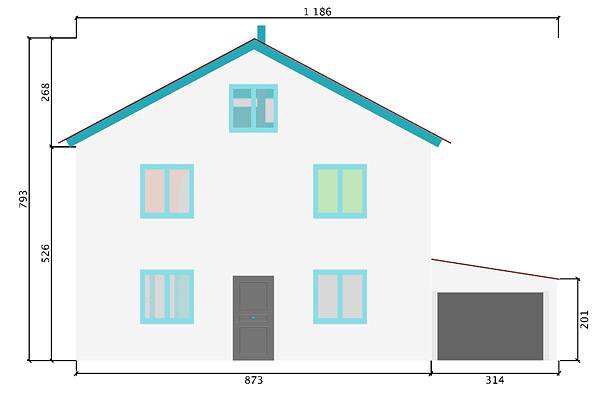
This version is also able to replace the side view of furniture with some cutomized images if you feel it necessary, for example to represent a shelf unit with a back panel using the same material as the shelves, or windows with limits that can't be distinguished well enough.

These images come from the properties named [font=courier new]sideViewFrontImage[/font], [font=courier new]sideViewBackImage[/font], [font=courier new]sideViewLeftImage[/font] and [font=courier new]sideViewRightImage[/font] which value is an image. You don't have to define the 4 images to make it work and will probably need only [font=courier new]sideViewFrontImage[/font] or [font=courier new] sideViewBackImage[/font] property most of the time.
To help you define these images, you can use Furniture Library Editor 2.0 where you'll add in preferences the properties you need with an Image type.
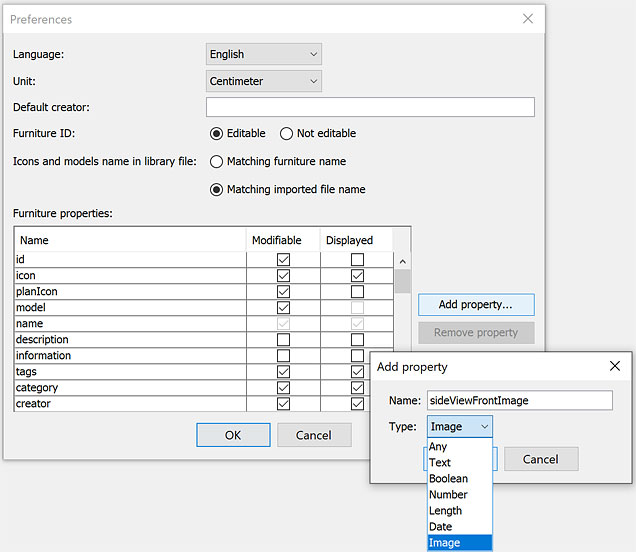
Once the properties are added, select the side view image(s) in the furniture modification dialog of each model you want to update.
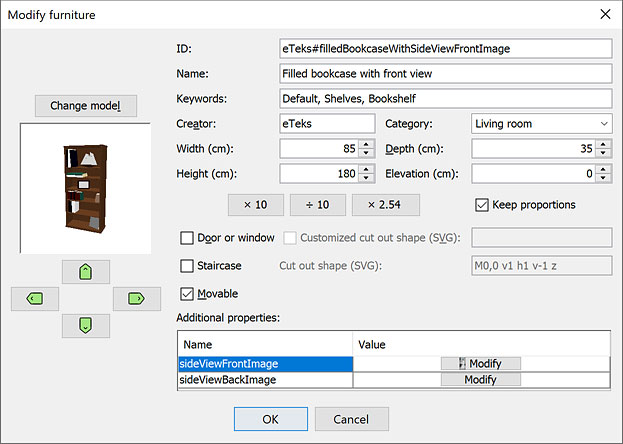
Images can use transparency if necessary and will be scaled to fit the furniture side where they will be applied. As this feature works thanks to textures, their width and height should be ideally a power of two (64, 128, 256, 512...).
If you want to try this feature directly, the furniture library FilledBookcaseWithSideViewFrontImage.sh3f attached to this post defines the front image of the model named Filled bookcase with front view.
Note that this new version of the plug-in requires Sweet Home 3D 7.2 (Beta versions included) to work and it fixes also some issues with textures that could happen when you change them in Sweet Home 3D while the plug-in window is opened.
The selection contour of selected objects appear at screen in the plug-in window but are not saved in the final image.
[Note: the final verson of Side view plug-in 1.1 was released on 09/22/2023]