First of all, as I'm writing this tutorial I want to thoroughly understand how each plug-in and each function works. I'm pretty sure other users may have similar questions. Or am I the only stupid guy here? So I'm not trying to annoy you, just wanting to understand the details.
Also, I edited my last post: I corrected the picture and added some text.
After reading your last post, I followed your instructions and reversed wall direction. Now I can join two walls, more or less in the way I want. Wow!
Nevertheless, it's a bit of a hassle. Would it be possible to change the plug-in in such a way that we can point at the end points of the lines we want to connect? Like: the first end point clicked connects to the second end point clicked. That way the plug-in would work much more intuitively.
One further request: in the current behaviour the walls are connected by moving one wall. Ideally it would also be possible to connect walls by stretching or extending them, as shown in the image below. Each option has its advantages, so I think (f you agree) that the current behaviour should be kept, and the "new" behaviour should be added, maybe with a dialogue box asking "Move or stretch?"
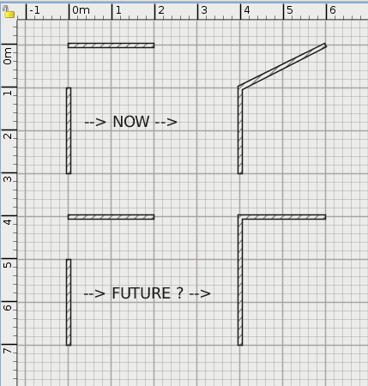
EDIT
This is a more complete "visual description" of the current behaviour of this plug-in.
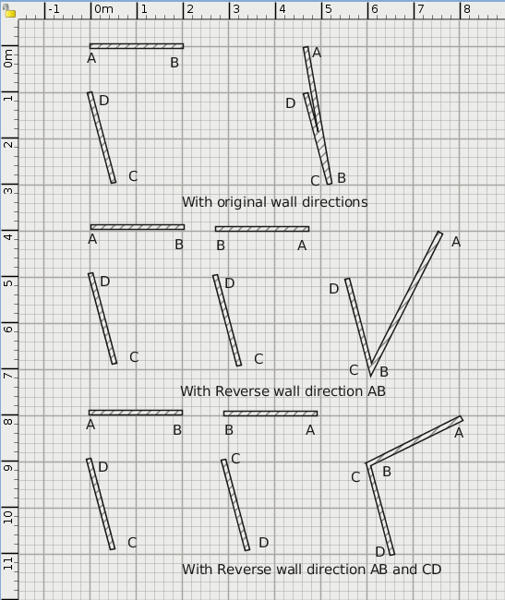
END EDIT
Hans