
Rob:
Can you share your design file? The original that you use to make your renders? That way we can see what you are doing. You can use www.mediafire.com (or a similar service) to park your file and then copy the link here.
Hans
Color of walls: problem
This topic has been viewed 7697 times and has 14 replies
Re: Color of walls: problem
Hello Hans,
Please have a look at:
http://www.mediafire.com/?yzi4fv0pun693sl
Thank you in advance for your help.
Robert
Please have a look at:
http://www.mediafire.com/?yzi4fv0pun693sl
Thank you in advance for your help.
Robert
Re: Color of walls: problem
Rob:
1 - When I open your file, I see that in your room you only have two small lamps of which I'm not sure if they give any light.
2 - The only light that is active, is the ceiling light. One problem is that 1 ceiling light cannot give sufficient light for a 30 m2 room.
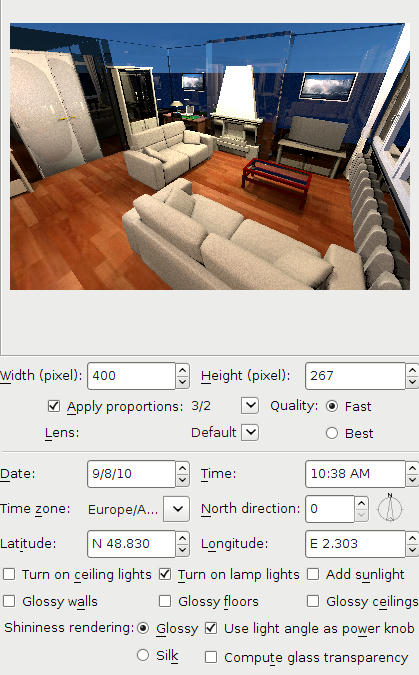
3 - I added five 50x50x50 cm halogen lights (elevation 200 cms, set a 50 degree angles) and I checked Turn on lamp lights in the Advance Render plug-in. The result you can see below.
4 - The walls are all very blue. I checked the ceiling, saw that it was blue, and changed it to white. The walls still remained blue. I then deleted the floor and ceiling and saw that you used a blue sky as texture for the floor. I changed the floor texture and the sky texture, and made a new render. Still the wall remained blue. Investigating further I discovered that the chimney walls are transparent. Strange?! I deleted both walls and drew them again, giving them approx. the same colour. And? Even stranger: they're still transparent. The two colours blue that you see are the ground and sky. Somewhere in between I changed all wall heights, so that now they are 250 cm high, and after that I put new floor and ceiling.
5 - Because I don't like riddles, I decided to deleted almost everything and see what happens when I have an empty room. Here it is.
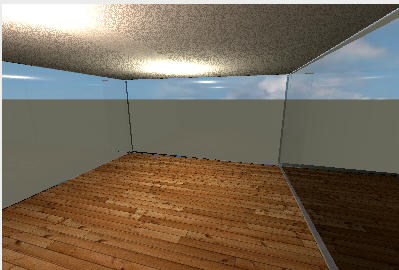
To make a long story short: it is a riddle, it remains a riddle. I can't solve the transparency of the walls. I suspect <?> that the file is somehow corrupted, but I'm not sure.
Maybe db4tech has any ideas? He programmed the advanced render plug-in.
1 - When I open your file, I see that in your room you only have two small lamps of which I'm not sure if they give any light.
2 - The only light that is active, is the ceiling light. One problem is that 1 ceiling light cannot give sufficient light for a 30 m2 room.
3 - I added five 50x50x50 cm halogen lights (elevation 200 cms, set a 50 degree angles) and I checked Turn on lamp lights in the Advance Render plug-in. The result you can see below.
4 - The walls are all very blue. I checked the ceiling, saw that it was blue, and changed it to white. The walls still remained blue. I then deleted the floor and ceiling and saw that you used a blue sky as texture for the floor. I changed the floor texture and the sky texture, and made a new render. Still the wall remained blue. Investigating further I discovered that the chimney walls are transparent. Strange?! I deleted both walls and drew them again, giving them approx. the same colour. And? Even stranger: they're still transparent. The two colours blue that you see are the ground and sky. Somewhere in between I changed all wall heights, so that now they are 250 cm high, and after that I put new floor and ceiling.
5 - Because I don't like riddles, I decided to deleted almost everything and see what happens when I have an empty room. Here it is.
To make a long story short: it is a riddle, it remains a riddle. I can't solve the transparency of the walls. I suspect <?> that the file is somehow corrupted, but I'm not sure.
Maybe db4tech has any ideas? He programmed the advanced render plug-in.
-
whippetsleek

- Posts: 121
- Joined: Sat Jul 31, 2010 11:54 pm
Re: Color of walls: problem
Like Hansmex, I don't like a mystery either, so I downloaded your file Rob123, and noticed your wall transparency is slightly moved. If you move the wall transparency slider all the way to the left, You will get a good solid wall. You are getting the glass look because the renderer thinks of the walls as transparent. Here is the render I got...

I see your file is in what I believe is french, so if I haven't explained clearly enough, maybe someone can translate this into french for you...
BTW, Very nicely done home, it looks excellent.
I see your file is in what I believe is french, so if I haven't explained clearly enough, maybe someone can translate this into french for you...
BTW, Very nicely done home, it looks excellent.
Re: Color of walls: problem
Aw Hans, as much as I wish that was true, Emmanuel is the programmer! [:)]Maybe db4tech has any ideas? He programmed the advanced render plug-in.
Thank you though!
I wonder why the doors (on the left) are rendering with an unusual shiny patch in the middle?
Good work trying to find the walls solution, very thorough!
db4tech
***
Good catch whippet on finding the solution, not sure I would have noticed the slider since it was only slightly moved! [:)]
I never realised the walls rendered as transparent, if the transparency slider was changed, I thought that feature was purely for OpenGL 3D, to assist in positioning difficult items close to walls.
db4tech
Who is online
Users browsing this forum: No registered users and 1 guest