
The version 2.0 of Furniture Library Editor is on its way, and I would like you to test a Beta version before releasing it.
Its preferences pane was updated to let you add your own typed properties, and set whether each property should be modifiable and displayed in the furniture list of the editor. The list of furniture properties contain also the ones known in Sweet Home 3D like light properties and door/window properties, to let you choose whether you want to modify them or not in the modification dialog box of each piece of furniture.

Modifiable properties then appear in the furniture modification dialog box to let you set their values. Some known properties like [font=courier new]price[/font] or [font=courier new]resizable[/font] will appear as additional fields or check boxes, and other properties will appear in the new Additional properties table:
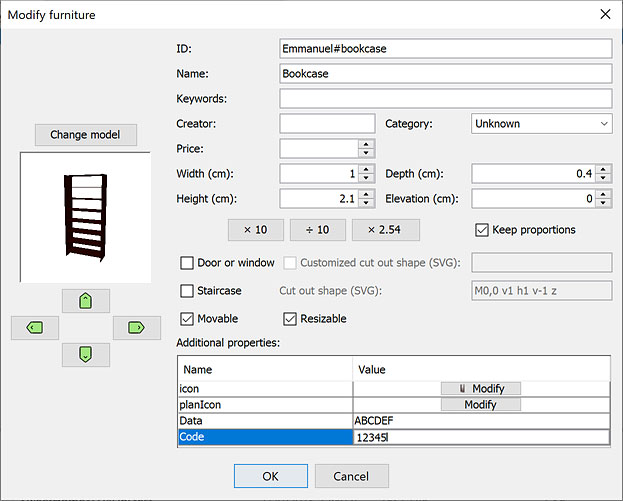
The properties with an Image type, like [font=courier new]icon[/font] and [font=courier new]planIcon[/font] in the previous screenshot, will be displayed as a button in their Value column to let you choose the image file of your choice.
When the [font=courier new]icon[/font] property is made modifiable in the preferences panel, you'll be able to choose an image with this button instead of a screenshot of the 3D preview.
The Editor will check whether values entered in the table for Sweet Home 3D known properties are valid, for example if the value of door sashes properties [font=courier new]doorOrWindowSashXAxis[/font], [font=courier new]doorOrWindowSashYAxis[/font], [font=courier new]doorOrWindowSashWidth[/font], [font=courier new]doorOrWindowSashStartAngle[/font] and [font=courier new]doorOrWindowSashEndAngle[/font] each contain 2 numbers if you want to define 2 sashes.
Finally, the value of the following properties must contains lengths expressed in the current unit that the Editor will convert in centimeter in the SH3F file:
[font=courier new]doorOrWindowWallThickness[/font]
[font=courier new]doorOrWindowWallDistance[/font]
[font=courier new]doorOrWindowSashXAxis[/font]
[font=courier new]doorOrWindowSashYAxis[/font]
[font=courier new]doorOrWindowSashWidth[/font]
[font=courier new]lightSourceX[/font]
[font=courier new]lightSourceY[/font]
[font=courier new]lightSourceZ[/font]
[font=courier new]lightSourceDiameter[/font]
[font=courier new]dropOnTopElevation[/font]
[font=courier new]shelfElevations[/font]
[font=courier new]shelfBoxes[/font]
Hope you'll like it [:)]
[Note: Final version of Furniture Library Editor 2.0 was released on 09/22/2023]


