Great, exe installation is OK !
first tries are good... [:)]
Pitch and roll on 'modify furniture' window are amazing !!! [=D>]
Sweet Home 3D 5.5
This topic has been viewed 312185 times and has 97 replies
-
bdfd

- Posts: 2614
- Joined: Sat Mar 29, 2014 7:17 am
- Country: LILLE, Les Hauts de France, Western Europa
Re: Sweet Home 3D 5.5
Evil progresses when good people do nothing!
---
SH3D 7.1 and nothing else - W11 64b in 4K
---
SH3D 7.1 and nothing else - W11 64b in 4K

Re: Sweet Home 3D 5.5
The version 5.5 Beta 5 fixes a regression that appeared in the previous version on doors which are supposed to cut the both faces of walls.
I also tried to improve the new image shown in the Furniture modification dialog box, showing a chest:

instead of a cube:

I also renamed the new Virtual visitor selected at change preference as Select visitor in plan at 3D move, in the hope it will be easier to understand.
I also tried to improve the new image shown in the Furniture modification dialog box, showing a chest:
instead of a cube:
I also renamed the new Virtual visitor selected at change preference as Select visitor in plan at 3D move, in the hope it will be easier to understand.
Emmanuel Puybaret, Sweet Home 3D creator
Re: Sweet Home 3D 5.5
Great work, great program. Sadly the new 5.5 beta 4 does not solve the crashing when using the open/save dialog popup in W10. The java webstart 5.5 you provided at the top of this threat does work however.
-
bdfd
- Posts: 2614
- Joined: Sat Mar 29, 2014 7:17 am
- Country: LILLE, Les Hauts de France, Western Europa
Re: Sweet Home 3D 5.5
First anomaly for me ! [:D]
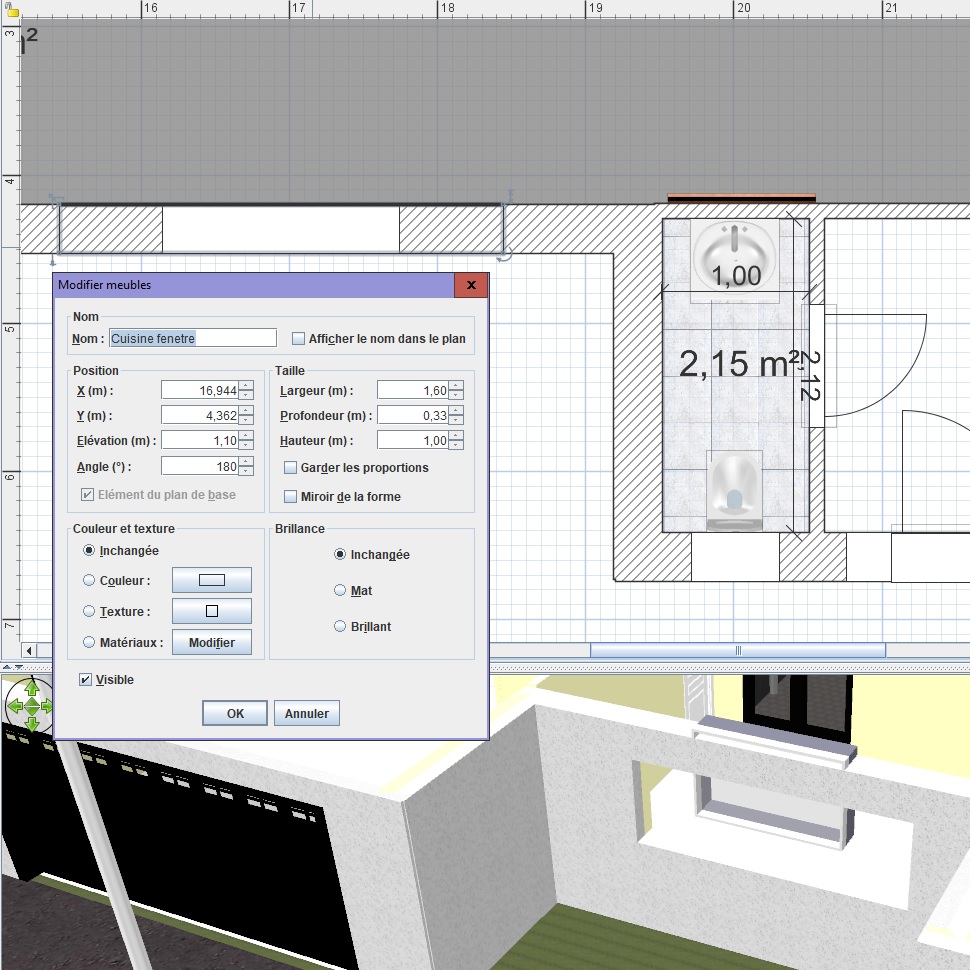
An existing project made with 5.4 and copy/paste and updated with 5.5 beta4 !!!
See the window and the wall (standard height 2.5 m) ???
=> All updated objects are wrong !
[:((]
An existing project made with 5.4 and copy/paste and updated with 5.5 beta4 !!!
See the window and the wall (standard height 2.5 m) ???
=> All updated objects are wrong !
[:((]
Evil progresses when good people do nothing!
---
SH3D 7.1 and nothing else - W11 64b in 4K
---
SH3D 7.1 and nothing else - W11 64b in 4K
Re: Sweet Home 3D 5.5
Thanks for your feedback.
harhouse, can you confirm that you tried the Java Web Start version 5.5 of Sweet Home 3D with Java 1.8.0_141 or higher (see About dialog)?
bdfd, can you describe step by step how to reproduce this bug with an example as simple as possible?
harhouse, can you confirm that you tried the Java Web Start version 5.5 of Sweet Home 3D with Java 1.8.0_141 or higher (see About dialog)?
bdfd, can you describe step by step how to reproduce this bug with an example as simple as possible?
Emmanuel Puybaret, Sweet Home 3D creator
-
bdfd
- Posts: 2614
- Joined: Sat Mar 29, 2014 7:17 am
- Country: LILLE, Les Hauts de France, Western Europa
Re: Sweet Home 3D 5.5
Well,bdfd, can you describe step by step how to reproduce this bug with an example as simple as possible?
I began with a new project. [:D]
4 Walls (h = 2.5 m, width = 0.33 m)
One door for entry
A standard fixed window (vitrine in french) updated with dimensions :
elevation = 1.1 m
height = 1 m
lenght = 1.6 m
Boom, look at the screenshot... [:((]
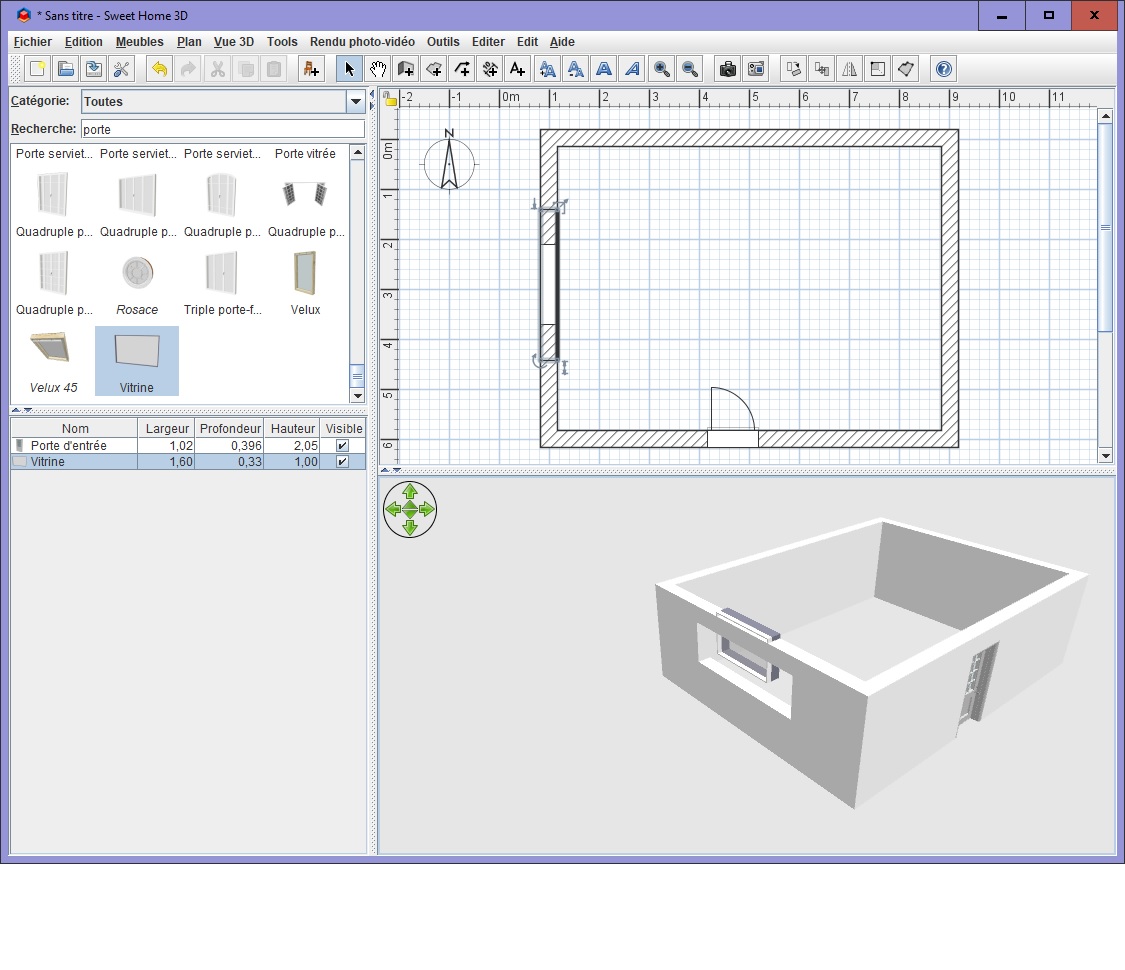
The wall keeps the old dimensions and the 'new' window has new location... [:(]
Evil progresses when good people do nothing!
---
SH3D 7.1 and nothing else - W11 64b in 4K
---
SH3D 7.1 and nothing else - W11 64b in 4K
Re: Sweet Home 3D 5.5
As I suspect your issue is due to a regression in the Beta 4, please try the Windows installer version 5.5 Beta 5 [link removed, see this message to test version 5.5 Beta 6].
Did you remove the SweetHome3D.l4j.ini file from your installation directory to check if the bug that prevents to show file dialogs in Windows 10 Creator update is fixed? I have an other idea to fix it, but would like to know how the first attempt worked for you, after harhouse's bad report.
Did you remove the SweetHome3D.l4j.ini file from your installation directory to check if the bug that prevents to show file dialogs in Windows 10 Creator update is fixed? I have an other idea to fix it, but would like to know how the first attempt worked for you, after harhouse's bad report.
Emmanuel Puybaret, Sweet Home 3D creator
-
bdfd
- Posts: 2614
- Joined: Sat Mar 29, 2014 7:17 am
- Country: LILLE, Les Hauts de France, Western Europa
Re: Sweet Home 3D 5.5
Great, it works fine ! [:)]
ini file has been renamed.
ini file has been renamed.
Evil progresses when good people do nothing!
---
SH3D 7.1 and nothing else - W11 64b in 4K
---
SH3D 7.1 and nothing else - W11 64b in 4K
Re: Sweet Home 3D 5.5
Thanks for your test bdfd.
Actually, I discovered an other small issue about the position of 3D models with an irregular shape, when they are rotated around horizontal and vertical axes. So please, test rather version 5.5 Beta 6 [link removed, see this message to test version 5.5 Beta 7].
Actually, I discovered an other small issue about the position of 3D models with an irregular shape, when they are rotated around horizontal and vertical axes. So please, test rather version 5.5 Beta 6 [link removed, see this message to test version 5.5 Beta 7].
Emmanuel Puybaret, Sweet Home 3D creator
-
bdfd
- Posts: 2614
- Joined: Sat Mar 29, 2014 7:17 am
- Country: LILLE, Les Hauts de France, Western Europa
Re: Sweet Home 3D 5.5
De nada Manu.Thanks for your test bdfd...
1. I saw a strange thing when I ask 'Save & compress'.
The progress bar into the box window didn't move.
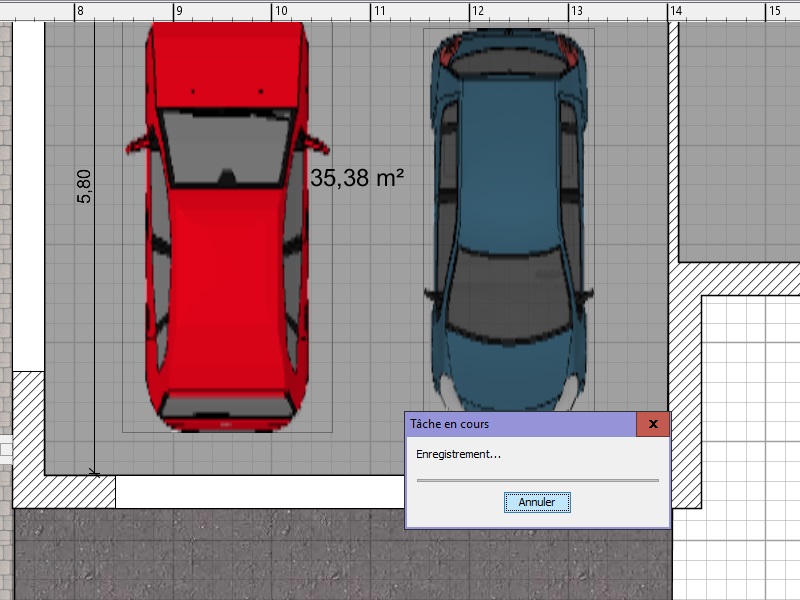
Is it malfunction ?
Not sure that beta6 is the cause...
2. Regressions
a.The function 'Save as' breaks down sh3d.
b. Save a rendering photo breaks down too...
Perhaps by giving a beta6.jar would be OK ?
[:((]
Evil progresses when good people do nothing!
---
SH3D 7.1 and nothing else - W11 64b in 4K
---
SH3D 7.1 and nothing else - W11 64b in 4K
Who is online
Users browsing this forum: No registered users and 1 guest