Photo rendering test
This topic has been viewed 1802801 times and has 68 replies

Re: Photo rendering test
I prefer the darker background.
-
ndorigatti
- Posts: 66
- Joined: Fri May 12, 2017 9:54 am
- Country: Italia
Re: Photo rendering test
Dark One!
-
UbuntuBirdy

- Posts: 421
- Joined: Thu Aug 31, 2017 10:31 pm
- Country: Switzerland
- Contact:
Re: Photo rendering test
For me the dark one is the one to go with.
Pascal
SH3D 6.6 / Ubuntu 22.04 (Mainline-Kernel) / Radeon RX580 / Ryzen 7 5800x
SH3D 6.6 / Ubuntu 22.04 (Mainline-Kernel) / Radeon RX580 / Ryzen 7 5800x
Re: Photo rendering test
Thank you all, the dark background will be chosen. [;)]
Here is the preview of the png file in an image editor.

Enko
Here is the preview of the png file in an image editor.
Enko
EnkoNyito
-
maureenowaters
- Posts: 15
- Joined: Mon Sep 30, 2019 3:06 pm
- Country: USA
Re: Photo rendering test
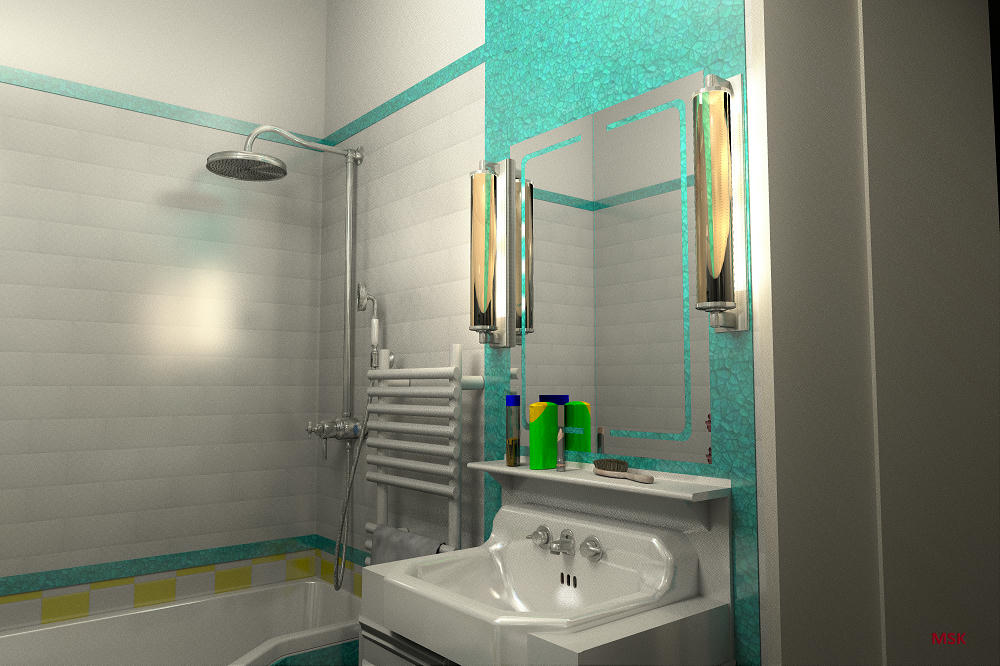
So beautiful design guys. Thanks for sharing.Here is another image I made of my friend's new bathroom I create in style of 50's. There is no trick here. It's a combination of IPR and indirect light... I am happy that it is really possible to create very photorealistic pictures here with 1.3.1 renderer...
settings here...
GI path
DB 1
algorythm IPR
picture size 6000x4000px then resized to 1000x667px
time rendering 13 hours 30 minutes
-
maureenowaters
- Posts: 15
- Joined: Mon Sep 30, 2019 3:06 pm
- Country: USA
Re: Photo rendering test
I think first one is better than the others.
Re: Photo rendering test
I like the first image. It clearly shows the different effects of light near the bottle and the glass. It looks pretty much realistic. However, the colour of the door looks much better in the 3rd image.
Re: Photo rendering test
This test concerns YafaRay transparent materials and shadow depth.


With a shadow depth of 16, the shadow of transparent objects appears less dark in places. (good)
For the [font=courier new]rough_glass[/font] material, the shadow remains transparent instead of being translucent and the rendering is longer. (not good)
Enko
With a shadow depth of 16, the shadow of transparent objects appears less dark in places. (good)
For the [font=courier new]rough_glass[/font] material, the shadow remains transparent instead of being translucent and the rendering is longer. (not good)
Enko
EnkoNyito
Re: Photo rendering test
There is a link between anti-aliasing and sampling.
In SunFlow, the anti-aliasing values range from 0 to 5, which corresponds to sampling values from 1 to 1024.
In YafaRay, the sampling values corresponding to anti-aliasing are also a multiplication factor.
Examples of YafaRay renderings with their anti-aliasing samples mulitplied to those of the sun, ambient occlusion, path tracing, ibl or skylight.
AAminSamples 16, sunSamples 8, AOsamples 1, pathSamples 8


AAminSamples 16, iblSamples 16, pathSamples 2


AAminSamples 16, skylightSamples 32, pathSamples 2


In SunFlow, the anti-aliasing values range from 0 to 5, which corresponds to sampling values from 1 to 1024.
In YafaRay, the sampling values corresponding to anti-aliasing are also a multiplication factor.
Examples of YafaRay renderings with their anti-aliasing samples mulitplied to those of the sun, ambient occlusion, path tracing, ibl or skylight.
AAminSamples 16, sunSamples 8, AOsamples 1, pathSamples 8
AAminSamples 16, iblSamples 16, pathSamples 2
AAminSamples 16, skylightSamples 32, pathSamples 2
EnkoNyito
Who is online
Users browsing this forum: No registered users and 0 guests