Therefore I guess there must be something in how AoI exports. I have practically no experience with AoI, but can the settings be changed to include the texture file in the export - or something?
I just saw your reply after I had posted saying, never mind.
I might try to edit the mtl file as you said. But one thing with Windows 8, which is very annoying: Once you edit a file in an app, Windows 8 automatically assigns that app to open as the default for that file. Then to correct the problem, you have to take quite a few steps, which is the annoying part.
In AOI, this is in the exported .obj:
#Produced by Art of Illusion 3.0, Mon May 26 12:54:18 EDT 2014
mtllib Chanlight.mtl
g sweethome3d_window_pane
usemtl test
and this is in the .mtl file:
#Produced by Art of Illusion 3.0, Mon May 26 12:54:18 EDT 2014
newmtl test
Kd 0.15 0.12042 0.063
Ks 0 0 0
Ka 0.92 0.76286 0.3588
illum 1
Anyway, here is the chandelier after I finally remembered that I have to rename all things transparent to (without the quote marks of course) "sweethome3d_window_pane"
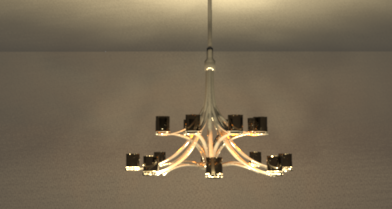
And this is the chandelier as rendered by Art Of Illusion:
http://www.storm-artists.net/view/136785
(I know that sh3d's renderer won't give the same results)
P.S. I tried to edit the .mtl but that did not make a difference...That's ok.
