Print at Dec 20, 2025, 7:43:37 PM
Posts: 33   Pages: 4   [ Previous Page | 1 2 3 4 | Next Page ]
View all posts in this thread on one page
Posted by Puybaret at Jul 31, 2022, 7:13:27 PM
Re: Sweet Home 3D 7.0
I just released the version 7.0.2 which makes room ceilings more transparent and fixes some issues in transparency handling in SVG exported files.
Thanks sjb007 for your help!
----------------------------------------
Emmanuel Puybaret, Sweet Home 3D creator

Posted by bdfd at Aug 13, 2022, 12:45:55 PM
Re: Sweet Home 3D 7.0
Hi,

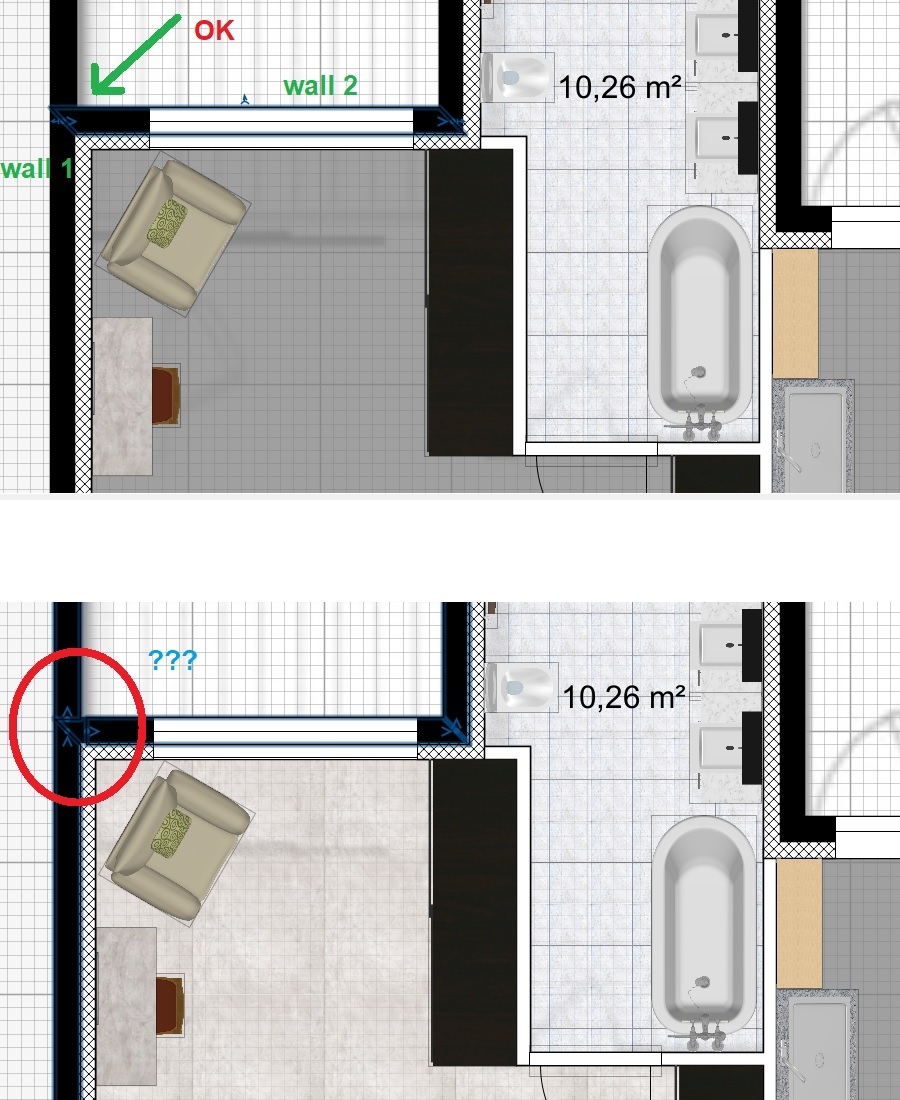
bug appeared (at 90%) on 7.0 (after the 6.x versions):
Walls 1 and 2 are joined.
I modify the room and after validation, a piece of triangular wall appears between walls 1 and 2!
The vertical wall does not change the bug.
Why ?


Up of the picture : before update

Down of the picture : after update

----------------

bug apparu (à 90%) sur les post 7.0 (après les versions 6.x) :
Les murs 1 et 2 sont joints.
Je modifie la pièce et après validation, un bout de mur triangulaire apparait entre les murs 1 et 2 !
Le mur vertical ne change rien au bug.
Pourquoi ?

wink
.
----------------------------------------
Evil progresses when good people do nothing!
---
SH3D 7.1 and nothing else - W11 64b in 4K

Posted by MOURET at Dec 23, 2022, 5:28:18 PM
Re: Sweet Home 3D 7.0
I am a beginner, someone would be available to help me understand how to put light on an object?

Posted by Puybaret at Jan 2, 2023, 5:43:50 PM
Re: Sweet Home 3D 7.0
What didn’t you understand in the description and the examples given in the first post of this thread?
----------------------------------------
Emmanuel Puybaret, Sweet Home 3D creator

Posted by enkonyito at Jan 13, 2023, 12:50:22 AM
Re: Sweet Home 3D 7.0
I had updated these light libraries to be compatible with the new version of Sweet Home 3D based on the provided library LightShapes.sh3f.

While doing some tests recently, I discovered an intriguing operation.

When I create a new file and save it with my new lights, the model material is light and the object emits light in the default photo panel.
When I close this file and open it again, the model material is default and the object does not emit any light in the default photo panel although its power is > 0.

Here is the information contained in the Home.xml file after saving the project:
<light id='light-1422e91d-a799-41fe-ad90-dc46b39de09e' catalogId='EnkoNyito#opaquePanel' name='Opaque panel' creator='Enko Nyito' model='1' icon='0' x=' 25.0' y='0.05' elevation='10.0' width='50.0' depth='0.1' height='100.0' modelSize='342' description='permanent_TriangleMeshLight type' dropOnTopElevation='-0.01' power='0.05'>
<lightSourceMaterial name='light'/>
</light>


With lights from the LightShapes.sh3f library, the model material is light and the object emits light in the default photo panel after reopening a project.
Its Home.xml file contains this information:
<light id='light-35ed9266-e2f8-4413-b267-4e2b292bf9bc' catalogId='Puybaret#lightPanel' name='Light panel' creator='Emmanuel Puybaret' model='1/lightPanel.obj' icon='0 ' x='25.0' y='0.0' elevation='10.0' pitch='1.5707964' width='50.0' depth='100.0' depthInPlan='0.0010043712' height='0.001' heightInPlan='100.0' modelSize='1096 'dropOnTopElevation='-999.99994' power='0.05'>
<lightSourceMaterial name='light'/>
</light>

----------------------------------------
EnkoNyito

Posted by enkonyito at Jan 14, 2023, 3:50:01 PM
Re: Sweet Home 3D 7.0
When a project is opened, the program calls the OBJLoader.java file to load the 3D scene.

With my new lights, the material of the first geometry is 'light' but the appearance of it is null so the function getAppearance(String material) returns 'default'.
----------------------------------------
EnkoNyito

Posted by Puybaret at Jan 16, 2023, 3:40:18 PM
Re: Sweet Home 3D 7.0
You forgot to add the property multiPartModel# set to true in PluginFurnitureCatalog.properties. By default, this property is false, meaning that all the files depending on the main 3D model file won't be saved (here, MTL files won't be saved, and only the OBJ file will be saved at root of the SH3D file).
----------------------------------------
Emmanuel Puybaret, Sweet Home 3D creator

Posted by enkonyito at Jan 17, 2023, 8:37:38 PM
Re: Sweet Home 3D 7.0
Indeed, for the material to be properly taken into account when reopening SH3D-7.0, the multiPartModel# property must be true and the OBJ and MTL files of the light must be in a separate folder from the PluginFurnitureCatalog.properties file.
----------------------------------------
EnkoNyito

Posted by YGYL at Feb 23, 2023, 7:28:48 AM
Re: Sweet Home 3D 7.0
The lightSourceMaterialName# property was added to PluginFurnitureCatalog.properties of SH3F furniture libraries to define the material(s) of shapes which should be used in a 3D model as light sources at the two best quality rendering levels, for example to define a light panel or a ceiling mini spot with a thin light surface.

Can you add a function to specify the brightness of this light-emitting material (recommended brightness). It can also be turned on or off by default. Avoid a light fixture made with this method, too bright or rendering too slow (crystal lights can be turned off directly)

Posted by Tutmozis at Nov 24, 2023, 11:31:39 PM
Re: Sweet Home 3D 7.0
What didn’t you understand in the description and the examples given in the first post of this thread?


Well, we are confused as newbies where to put that... at objects .mtl ? I would like my simple box what I use as ceiling to shine if possible... where to put that light command ?

#
# Generated by Sweet Home 3D - Sat Nov 25 00:26:22 CET 2023
# http://www.sweethome3d.com/
#

newmtl bottom
illum 2
Ka 0.4 0.4 0.4
Kd 1.0 1.0 1.0
Ks 1.0 1.0 1.0
Ns 128.0

newmtl top
illum 2
Ka 0.4 0.4 0.4
Kd 1.0 1.0 1.0
Ks 0.3 0.3 0.3
Ns 60.0

newmtl left
illum 2
Ka 0.4 0.4 0.4
Kd 1.0 1.0 1.0
Ks 0.3 0.3 0.3
Ns 60.0

newmtl right
illum 2
Ka 0.4 0.4 0.4
Kd 1.0 1.0 1.0
Ks 0.3 0.3 0.3
Ns 60.0

newmtl back
illum 2
Ka 0.85882354 0.85882354 0.85882354
Kd 0.85882354 0.85882354 0.85882354
Ks 0.46875 0.46875 0.46875
Ns 60.0

newmtl front
illum 2
Ka 0.4 0.4 0.4
Kd 1.0 1.0 1.0
Ks 0.3 0.3 0.3
Ns 60.0


Posts: 33   Pages: 4   [ Previous Page | 1 2 3 4 | Next Page ]