good morning
i'm trying to find how to insert a ROOF WINDOW
i can find the velux object but I cannot get to change the angle
to make if fit the roof angle
any idea ?
thanks
 ROOF WINDOW / VELUX WINDOWS
This topic has been viewed 53601 times and has 31 replies

Re: ROOF WINDOW / VELUX WINDOWS
Welcome on board!
1. You can't!
Well, not really simple BUT it's possible like in this picture:

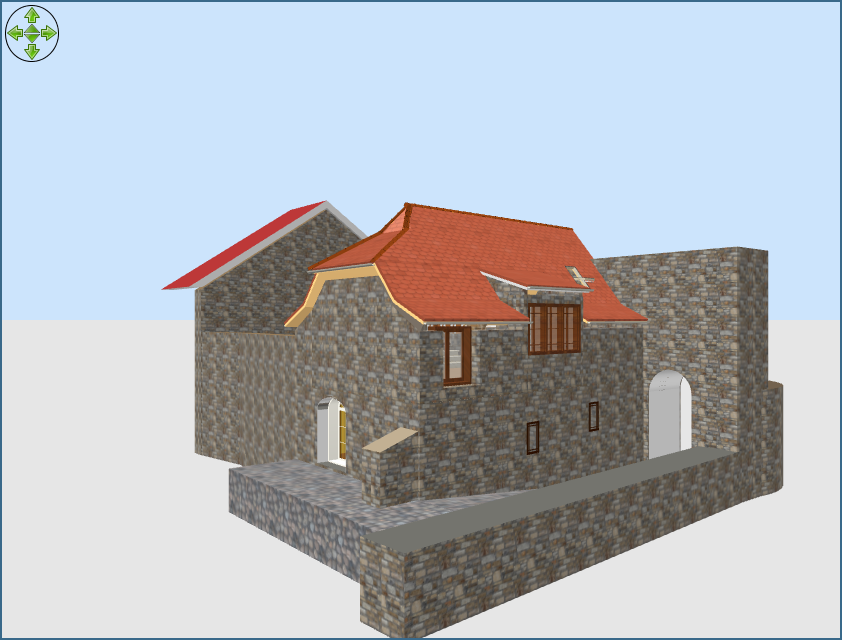

Export the window as object;
Import it as furniture( NOT as doors&windows);
Elevate it at 1m than rotate it how you like;
IMPORTANT!
Don't expect to act as a window in the wall.
Will don't cut the necessarily hole in your roof.
At this moment it can't even on my roof.
1. You can't!
Well, not really simple BUT it's possible like in this picture:
i can find the velux object but I cannot get to change the angle to make if fit the roof angle
Export the window as object;
Import it as furniture( NOT as doors&windows);
Elevate it at 1m than rotate it how you like;
IMPORTANT!
Don't expect to act as a window in the wall.
Will don't cut the necessarily hole in your roof.
At this moment it can't even on my roof.
A computer program does what you tell it to do, not what you want it to do. Murphy's Law
When all else fails, read the instructions. Murphy's Law
If you don't like "AS IS", DIY. Dorin's law
When all else fails, read the instructions. Murphy's Law
If you don't like "AS IS", DIY. Dorin's law
Re: ROOF WINDOW / VELUX WINDOWS
An alternative is to draw your roof on it's side as a tall wall assuming the shape is fairly simple like a 45 degree pitched roof. Then you can insert window objects and have them snap in. I just used simple fixed windows as "velux". You then export the whole lot as an object, and reimport it as a new furniture object rotated into the correct orientation. If your windows are not symmetrical they will end up the wrong way round. You could fix this by doing an export, import as normal object, rotate object to correct orientation, export, import as a window before inserting into the walls.
It is a bit long winded, and you have zero flexibility with the new furniture object. i.e. you couldn't move the "window" as it is now just geometry in the larger roof object in SH3D.
It is a bit long winded, and you have zero flexibility with the new furniture object. i.e. you couldn't move the "window" as it is now just geometry in the larger roof object in SH3D.
Re: ROOF WINDOW / VELUX WINDOWS
Holy cow! I just exported and reimported a side rotated velux, and the opening mechanism still worked. I tested adding it to a sideways on wall, and the snapping all worked. I did not expect that.
But... Exporting the whole roof and reimporting it back in the velux windows didn't quite preserve their capabilities. The initial closed look is fine. The rotation is a strange twisting motion, not the tilt of a velux. I suspect the window export of a snapped and rotated at import object is messing up that openable mechanism. Also, trying to open one window opens both windows. (I added two to test this.)
Still, the windows look good if you don't want to open and close them!
But... Exporting the whole roof and reimporting it back in the velux windows didn't quite preserve their capabilities. The initial closed look is fine. The rotation is a strange twisting motion, not the tilt of a velux. I suspect the window export of a snapped and rotated at import object is messing up that openable mechanism. Also, trying to open one window opens both windows. (I added two to test this.)
Still, the windows look good if you don't want to open and close them!
Re: ROOF WINDOW / VELUX WINDOWS
Well that is interesting. A single velux in the imported roof object works perfectly. So it the clash of having more than one opener mechanism in a single object that causes the problems. I've no idea how that could be fixed, but it is an interesting observation.

Re: ROOF WINDOW / VELUX WINDOWS
That's probably because both windows have the "sweethome3d_hinge_1_..." in it's object source. You could edit the OBJ file and change one of the window hinges to "sweethome3d_hinge_2_..." and change the movable parts of that window to "sweethome3d_opening_on_hinge_2_...".Also, trying to open one window opens both windows. (I added two to test this.)them!
Dodecagon.nl
1300+ 3D models, manuals, and projects
1300+ 3D models, manuals, and projects
Re: ROOF WINDOW / VELUX WINDOWS
Most likely the export/import changed the direction of the hinge movement. It will take some experimenting but moving the "sweethome3d_hinge_1" string to a different side of the hinge part would solve that. I have encountered the same with hinges and changing the hinge side solved it.The rotation is a strange twisting motion, not the tilt of a velux. I suspect the window export of a snapped and rotated at import object is messing up that openable mechanism.
Dodecagon.nl
1300+ 3D models, manuals, and projects
1300+ 3D models, manuals, and projects
Re: ROOF WINDOW / VELUX WINDOWS
As I said in my last post, a single window in the roof object behaves correctly, i.e. no twisting, opening in the correct manner. It is specifically adding multiple opening windows to the roof object that causes them to twist once they are exported and imported in the new orientation.
Maybe my scatter of posts caused confusion about that.
Very interesting info there Keet about the naming of the hinge objects. I should take a look at the obj file, because even if I can't move the location of the window after importing, being able to add and open multiple windows would still be a cool effect.
Maybe my scatter of posts caused confusion about that.
Very interesting info there Keet about the naming of the hinge objects. I should take a look at the obj file, because even if I can't move the location of the window after importing, being able to add and open multiple windows would still be a cool effect.
Re: ROOF WINDOW / VELUX WINDOWS
Object deformations are explained in this thread: http://www.sweethome3d.com/support/forum/viewthread_thread,8704_offset,8As I said in my last post, a single window in the roof object behaves correctly, i.e. no twisting, opening in the correct manner. It is specifically adding multiple opening windows to the roof object that causes them to twist once they are exported and imported in the new orientation.
Maybe my scatter of posts caused confusion about that.
Very interesting info there Keet about the naming of the hinge objects. I should take a look at the obj file, because even if I can't move the location of the window after importing, being able to add and open multiple windows would still be a cool effect.
It also explains how to use multiple deformations in the same piece of furniture.
Dodecagon.nl
1300+ 3D models, manuals, and projects
1300+ 3D models, manuals, and projects
Re: ROOF WINDOW / VELUX WINDOWS
Didn't even look at that thread [;)]
I just followed your simplified instructions, and now both windows hinge properly. Top man, Keet!
I just followed your simplified instructions, and now both windows hinge properly. Top man, Keet!
Who is online
Users browsing this forum: No registered users and 1 guest