Thanks for the nice comment!

___________
Another render for my another friend. Big photo print on the wall.

I wish the quality of shadows and textures would be better but the floor is perfect!!
 Thank you advanced photo render.
|
Sweet Home 3D Forum » List all forums » » Forum: Gallery » » » Thread: My photos on the wall.. |
||
| Print at Sep 14, 2026, 10:46:01 PM |
|
|
| Posted by kumax at Oct 5, 2010, 8:59:52 AM |
|
Re: My photos on the wall.. Thanks for the nice comment! ___________ Another render for my another friend. Big photo print on the wall. I wish the quality of shadows and textures would be better but the floor is perfect!! Thank you advanced photo render. |
| Posted by Puybaret at Oct 5, 2010, 9:22:36 AM |
|
Re: My photos on the wall.. Very nice.  I'm looking forward discovering the picture you'll submit to Sweet Home 3D contest. 6 days left before the end! ---------------------------------------- Emmanuel Puybaret, Sweet Home 3D creator |
| Posted by db4tech at Oct 6, 2010, 8:13:48 PM |
|
Re: My photos on the wall.. Another great looking render! What is it about the shadows that you'd like to change, the hardness? Also the textures? db4tech |
| Posted by sanjoyp at Oct 6, 2010, 11:13:44 PM |
|
Re: My photos on the wall.. Hi sorry for the thread hijack. I am running in to problems with my photos I have made into paintings on the wall ? I have found that those taken from gifs are okay but when the jpg resolution is high 2000+ * 2000+ pixels I am unable to render. I get the dreaded red x, memory issue ? This image has two boxes with customer textures which are iphone photos of paintings. 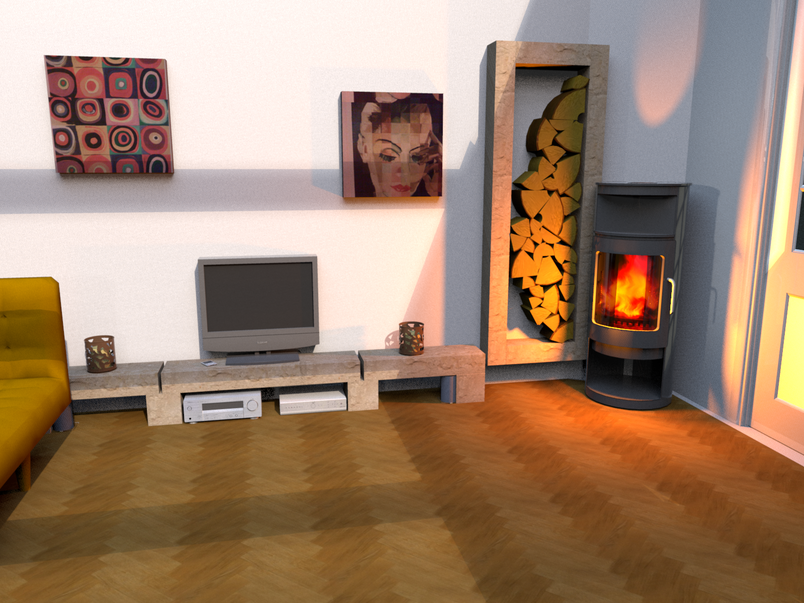 Is it just lack of RAM ? |
| Posted by sanjoyp at Oct 6, 2010, 11:15:23 PM |
|
Re: My photos on the wall.. Which floor texture did you use in this photos it is exactly what I am after!  |
| Posted by hansmex at Oct 6, 2010, 11:34:28 PM |
|
Re: My photos on the wall.. Sanjoy, There's some kind of an upper limit to the size of texture you can use.This problem has been reported before (see this thread). The solution is to make your texture smaller. A remark about texture size: If you make a render of 4000x3000 pixels and there's a picture on the wall (see the two pictures in your last post) then the size of the pictures on the wall is maybe 800x600 pixels. Why would you apply a texture of 2400x1800 pixels (or something similar) only to have it reduced in the final result to 800x600? It takes up a lot of processor time to calculate every pixel, but none of it shows as a better quality in the final result. Hans ---------------------------------------- Hans new website - under constuction hansdirkse.info |
| Posted by sanjoyp at Oct 6, 2010, 11:40:20 PM |
|
Re: My photos on the wall.. Good point Hans, I was using the train of thought of not removing any detail I had and using the high res imaged. Will retry. Cheers Sanjoy |
| Posted by kumax at Oct 31, 2010, 11:46:29 AM |
|
Re: My photos on the wall.. Another great looking render! What is it about the shadows that you'd like to change, the hardness? Also the textures? db4tech Not the hardness but the smoothness? I don't know how to say it, but I see some dots in the shadow and I would rather like to have it in one smooth surface. I think the thing which would solve my problem it's to render it in bigger resolution and than resize it to smaller picture. But the bigger resolution would kill my computer.. :-)) And the thing about textures.. I meant it would be nice to see some fabric texture of the sofa... for example. :) |
| Posted by whippetsleek at Nov 1, 2010, 6:26:39 PM |
|
Re: My photos on the wall.. Hi kumax... not sure about the shadows.. that would be puybarets or db4tech's area.. but when I want to get a fabric type texture, I used a smaller texture of between 256 x256 or 512x512, and make it the shades very distinct. Then I make the texture very small in the texture editor, like 1 inch sq. Here is an example.. It used this texture at 4x4 inches  This one is a little lighter  and used this at 1x1  And this is dark...  and used this at 6x6 inches  And those were great looking renders! ----------------------------------------  |
|

|
Current timezone is GMT Sep 14, 2026, 10:46:01 PM |