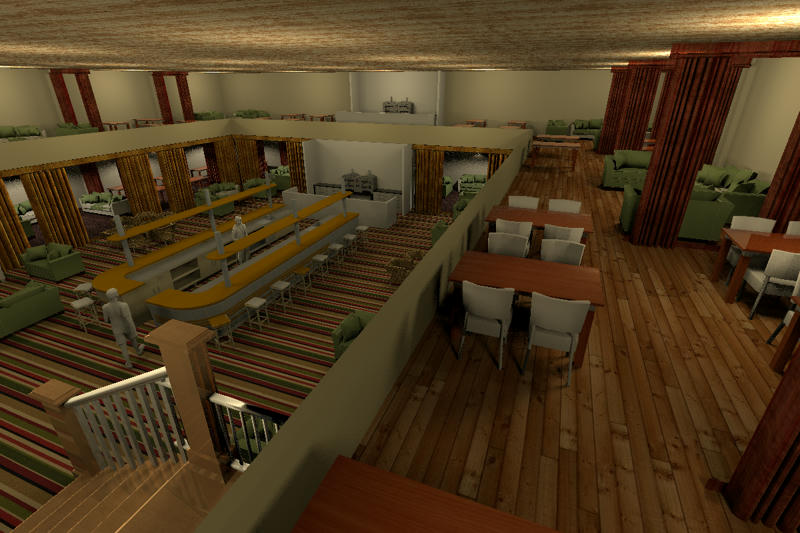
Another picture of the restaurant with gallery. It's about time to hire a chef!
Hans
Click here for a larger picture.
----------------------------------------
Hans
new website - under constuction
hansdirkse.info
|
Sweet Home 3D Forum » List all forums » » Forum: Sweet Home 3D bar » » » Thread: 2 floor restaurant. |
||
| Print at Sep 24, 2026, 9:49:08 PM |
|
|
| Posted by hansmex at Dec 29, 2010, 3:57:43 PM |
|
Re: 2 floor restaurant. Another picture of the restaurant with gallery. It's about time to hire a chef! Hans Click here for a larger picture. ---------------------------------------- Hans new website - under constuction hansdirkse.info |
| Posted by wrosun at Dec 29, 2010, 4:11:50 PM |
|
Re: 2 floor restaurant. Nice work there hans....really nice floor texture for the gallery...but i dont like the roof texture... |
| Posted by hansmex at Dec 29, 2010, 4:53:23 PM |
|
Re: 2 floor restaurant. wrosun, Thank you! The nice thing about SH3D is, that you can design your own restaurant, with all your favourite textures!  I sent you a link to the texture. Hans ---------------------------------------- Hans new website - under constuction hansdirkse.info |
| Posted by wrosun at Dec 29, 2010, 5:23:18 PM |
|
Re: 2 floor restaurant. ya! i meant that that was carefullt designed ..i guess you know what i actually mean Anyway i dont see the link where is it...??? |
| Posted by Fintan at Dec 29, 2010, 5:39:53 PM |
|
Re: 2 floor restaurant. Hans: here is the share: http://www.sweethome3d.com/support/forum/view...ad,2002_lastpage,yes#8901 I will have a look at the rest tonight :) |
| Posted by hansmex at Dec 29, 2010, 8:14:43 PM |
|
Re: 2 floor restaurant. Fred, Here is part 1 Here is part 2 I have taken the liberty to adapt your files a bit in order to explain a few things. When you draw a multi-level building it is very important that you work with exact X,Y coordinates. Hand-drawn walls will never stack properly and result in ragged walls, corners, etc. The most important change I made is change all coordinates in such a way that the ground floor and first floor have the exact same X,Y coordinates for walls, floors, etc. This also makes it much easier to place furniture in a correct manner; in this case, e.g., with logical distances between two rows of restaurant tables. Just have a look and compare what I did with your own design. Hans ---------------------------------------- Hans new website - under constuction hansdirkse.info |
| Posted by Fintan at Dec 30, 2010, 8:55:39 AM |
|
Re: 2 floor restaurant. Thank you Hans, I had a look and see your point. I made a few changes to the gallery and tried to "copy as new furniture" again but still cannot paste into "restaurant".  This should be straight forward enough but I just cannot see what I am doing wrong. I have SH3d 2.6 (?) on a friends windows computer and will play with that later. I have uploaded the changed designs to the same link as before. If you want to have a look. I really appreciate your help and efforts  Best Greetings Fred |
| Posted by hansmex at Dec 30, 2010, 9:19:03 AM |
|
Re: 2 floor restaurant. Fred, I have forgotten all about v2.6. That was ages ago, in another life. Please update to v3.0 (not v3.1) and make sure you have the latest updates of the plug-ins. Follow exactly the description in this post: I wrote it while doing a step-by-step myself to make sure I didn't omit the tiniest detail. I now notice one other thing. You wrote Since I didn't have: a plugins dir in .eteks/sweethome3d/plugins I created one and then moved the plugins over to that dir Maybe here we have the problem?- Which operating system do you have? Am I correct that it's Linux/Ubuntu? The dot in ".eteks" makes me think so. - In the menu, can you see the new command Tools --> Copy as new furniture ? - Do you have other plug-ins installed? Do they work correctly? - Do you open BOTH files before you make your selection, and before you give the command Tools --> Copy as new furniture ? I don't want to seem overbearing, but this method really works. If there is an English word you don't understand, send me an email or PM in German, and we'll try and sort it out in German if that's easier for you. The language problem then lies with me, as my English is better than my German, but at least you will understand all nuances and can ask the right questions. Hans ---------------------------------------- Hans new website - under constuction hansdirkse.info |
| Posted by Fintan at Dec 31, 2010, 7:34:44 AM |
|
Re: 2 floor restaurant. Hello Hans and thank you for your input. - Which operating system do you have? Am I correct that it's Linux/Ubuntu? The dot in ".eteks" makes me think so. - In the menu, can you see the new command Tools --> Copy as new furniture ? - Do you have other plug-ins installed? Do they work correctly? - Do you open BOTH files before you make your selection, and before you give the command Tools --> Copy as new furniture ? Yes, to all of the above. I was trying out my designs on my friends windows laptop with vers. 2.6. Made no real difference. As a Californian, English should not be a problem  All plugins are latest. The version on my machine is 3.0. I'll go through your step-by-step again. and report back. Cheers Fred |
| Posted by Fintan at Dec 31, 2010, 8:40:42 AM |
|
Re: 2 floor restaurant. Well, I went through the step-by step again.Nada. I don't know if the plugin "copy as new furniture" is working correctly. I can see it under tools when I select something. With nothing selected it is greyed out. When applying copy as new furniture it shows a progress bar and then nothing. Pasting into another (ALREADY OPEN) design simply does not work here. Where does it copy to? Maybe I could import to furniture from there? I have all the pieces finished but cannot seem to combine them.  |
|

|
Current timezone is GMT Sep 24, 2026, 9:49:08 PM |