|
Sweet Home 3D Forum » List all forums » » Forum: Developers » » » Thread: Rename furniture |
||
| Print at Dec 20, 2025, 2:46:26 PM |
|
|
| Posted by hansmex at Sep 22, 2018, 8:11:56 AM |
|
Re: Rename furniture Thanks, Enko, works perfectly! ---------------------------------------- Hans new website - under constuction hansdirkse.info |
| Posted by bdfd at Sep 22, 2018, 12:14:24 PM |
|
Re: Rename furniture Version 1.4 Excellent into a house but just a remark : Improved treatment. Why does the tool include objects outside buildings ? Garden, trees, sidewalks,... It's not necessary. ![]() . ---------------------------------------- Evil progresses when good people do nothing! --- SH3D 7.1 and nothing else - W11 64b in 4K |
| Posted by bdfd at Sep 22, 2018, 12:23:10 PM |
|
Re: Rename furniture Update : it was only on exterior Walls (gutters, windows, doors,...). . ---------------------------------------- Evil progresses when good people do nothing! --- SH3D 7.1 and nothing else - W11 64b in 4K |
| Posted by enkonyito at Sep 23, 2018, 5:05:46 PM |
|
Re: Rename furniture @bdfd Why does the tool include objects outside buildings ? Garden, trees, sidewalks,... Update : it was only on exterior Walls (gutters, windows, doors,...). The plug-in adds to the name of a piece of furniture only the name of a room in which the center of the furniture is located and one of its corners with a margin of 1cm. This therefore depends on the position of the furniture in relation to a room, regardless of its type of environment (indoor or outdoor). ---------------------------------------- EnkoNyito |
| Posted by bdfd at Sep 25, 2018, 7:08:24 AM |
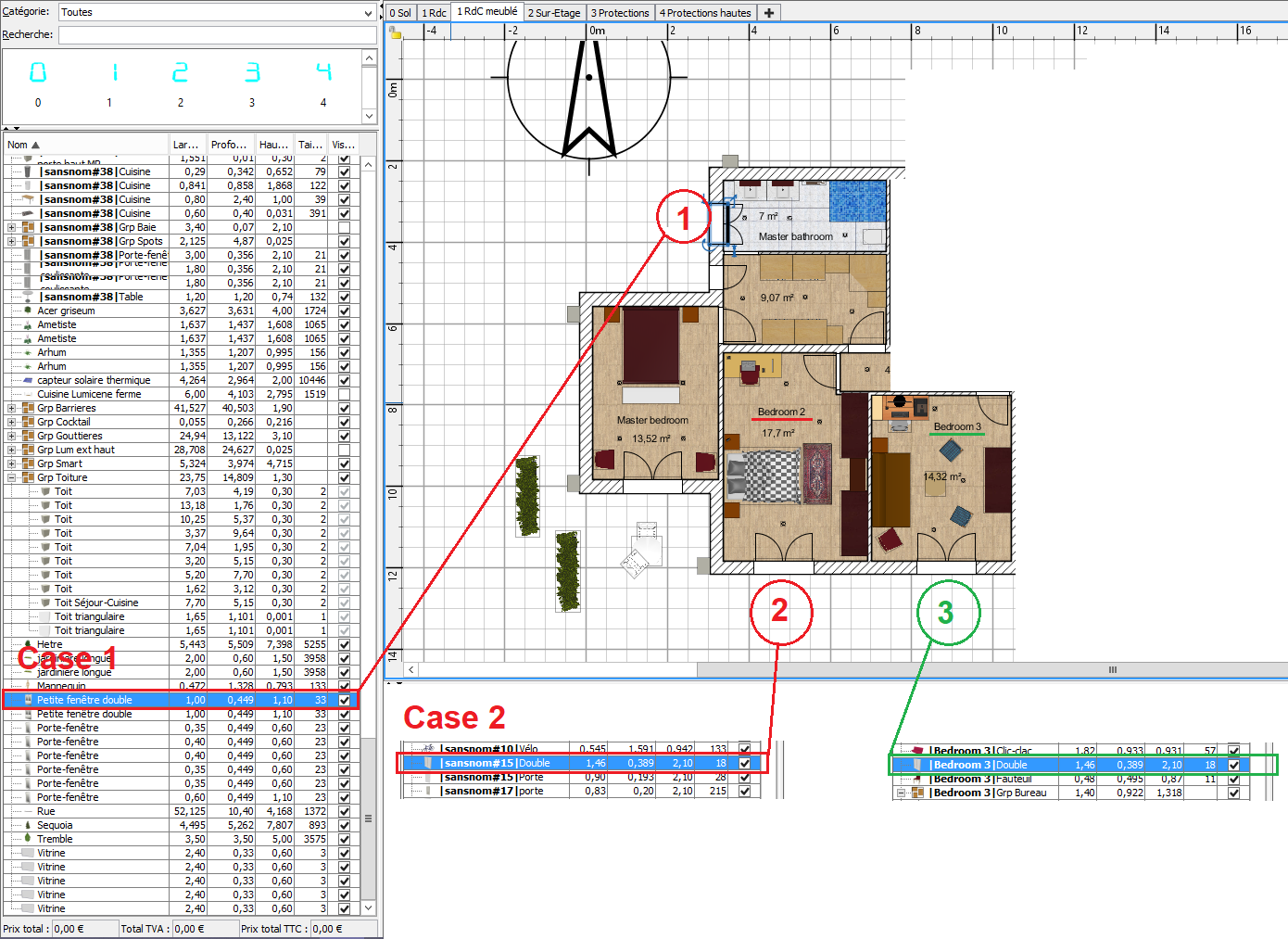
Re: Rename furniture@bdfd Ok for these explanations. Why does the tool include objects outside buildings ? Garden, trees, sidewalks,... Update : it was only on exterior Walls (gutters, windows, doors,...). The plug-in adds to the name of a piece of furniture only the name of a room in which the center of the furniture is located and one of its corners with a margin of 1cm. This therefore depends on the position of the furniture in relation to a room, regardless of its type of environment (indoor or outdoor). But I didn't understand for these... I used plugin v1.4 Case 1 The room has a name : 'Master bathroom' But the window has no name and NO named group ??? => all furniture below in the list are in same case… Case 2 The room has a name : 'Bedroom 2' But the window has no name and without named group ??? Case 3 The next room, nearest of previous anomaly has a name : 'Bedroom 3' It equipped of the same window. The window has a name like the room ! Can you explain us which is different ? Regards, bdfd. ![]() ---------------------------------------- Evil progresses when good people do nothing! --- SH3D 7.1 and nothing else - W11 64b in 4K |
| Posted by enkonyito at Sep 26, 2018, 2:02:10 AM |
|
Re: Rename furniture Illustration with the Studio demo file. before after As you can see, the 4 doors or windows in bold do not have their centers inside a room so they have not been renamed. ---------------------------------------- EnkoNyito |
| Posted by enkonyito at Sep 28, 2018, 5:17:31 PM |
|
Re: Rename furniture As shown in the user's guide , a selected piece of furniture has a rectangular outline (1 center and 4 corners). Which translates into coding: getXSo just change the outline of the room to take into account the renaming of the piece of furniture (in bold). ---------------------------------------- EnkoNyito |
| Posted by bdfd at Sep 28, 2018, 5:28:49 PM |
Re: Rename furniture...So just change the outline of the room to take into account the renaming of the piece of furniture (in bold). Yes, good tip !. ---------------------------------------- Evil progresses when good people do nothing! --- SH3D 7.1 and nothing else - W11 64b in 4K |
|
|
|
Current timezone is GMT Dec 20, 2025, 2:46:26 PM |