Print at Dec 18, 2025, 3:07:20 PM
Posts: 42   Pages: 5   [ Previous Page | 1 2 3 4 5 | Next Page ]
View all posts in this thread on one page
Posted by enkonyito at Jan 13, 2016, 2:20:40 AM
Re: Other rendering quality levels
Version 1.3 of the plug-in incorporates 2 new rendering properties (filter and samplerAlgorithm) from SH3D-5.2 .


----------------------------------------
Attachment configureSunflowRenderingEngine.pdf (227128 bytes) (Download count: 3240) (Configure the SunFlow rendering engine with Sweet Home 3D version 4.0 and higher.)

----------------------------------------
EnkoNyito
Posted by mazoola at Jan 13, 2016, 8:47:21 AM
Re: Other rendering quality levels
FYI, for anyone looking for detailed information on the SunFlow rendering engine, a PDF copy of the old SunFlow Wiki can be found here.

Posted by okh at Jan 26, 2016, 8:15:48 AM
Re: Other rendering quality levels
A couple of interesting examples of use in thread 6462. ok

Posted by anhmax at Jan 26, 2016, 5:25:58 PM
Re: Other rendering quality levels
Thank Enkonyito a lot,
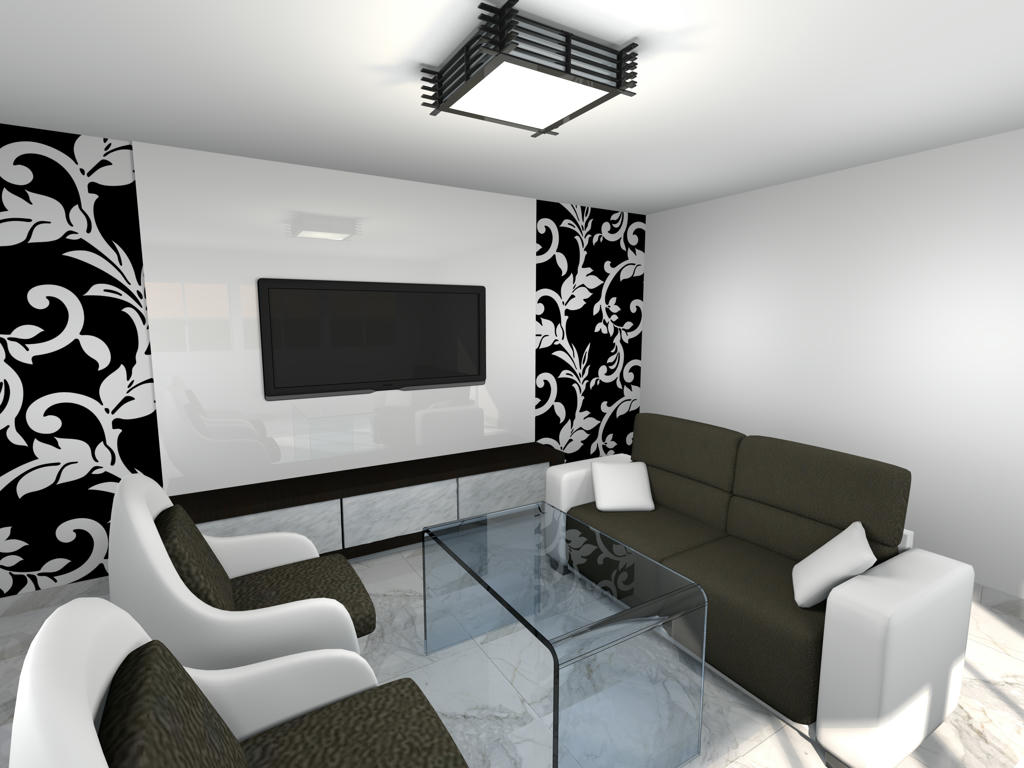
this plug-in helped me solve my question: "how to put shininess on furniture without reflecting the lights". Now I can set "shiny" on object such as TV screen without lights on it. We can look at the TV screen and the wall behind to see the effect.
Here is my image:

----------------------------------------
My channel:
https://www.youtube.com/channel/UCM1mqUjGRtD4uCXX5qzgG3w

Posted by enkonyito at Jan 27, 2016, 4:21:48 AM
Re: Other rendering quality levels
Glad to know this plug-in is also useful to others. wink
----------------------------------------
EnkoNyito

Posted by enkonyito at Jul 7, 2016, 6:25:36 PM
Re: Other rendering quality levels
Version 1.3.1
- Settings backup when saving the project

Option also available for the photo plug-in .
----------------------------------------
EnkoNyito

Posted by enkonyito at Jul 13, 2016, 4:44:30 PM
Re: Other rendering quality levels
In case of problems with previous links (unavailability of sourceforge), use the one attached.
----------------------------------------
Attachment AdvancedSettings_PhotoRendering-1.3.1.sh3p (23044 bytes) (Download count: 1046)

----------------------------------------
EnkoNyito

Posted by enkonyito at Nov 5, 2016, 11:41:06 PM
Re: Other rendering quality levels (Advanced settings of photo rendering plug-in)
Here is additional information on the interactions between parameters:

- For globalIllumination = default, no difference in rendering for diffusedBounces > 1
- For antiAliasing.max = 0 and samplerAlgorithm = multipass, anti-aliasing
- For antiAliasing.max >= 1 and samplerAlgorithm = multipass, identical anti-aliasing regardless of the value of antiAliasing.max
- For antiAliasing.max >= 1 and samplerAlgorithm = ipr or fast, no anti-aliasing
- For filter = box, no anti-aliasing regardless of the value of antiAliasing.max
- For samplerAlgorithm = fast, ipr or multipass, same filter effect regardless of the chosen type

To avoid confusion, safeguards will be put.

According to the BucketRenderer.java file, antiAliasing.max is limited to 5.
----------------------------------------
EnkoNyito

Posted by harbinger at Sep 24, 2018, 5:22:48 PM
Re: Other rendering quality levels (Advanced settings of photo rendering plug-in)
Disinterring this thread because i'm not finding the answers to a simple question: what do all the parameters mean both in definition and in application?

Can you provide the ranges for the values in each field and some examples of their effects?

I've done some reading in wikipedia (there are some dead-end links in this and other threads here), and gotten an idea of the theory, but i'm still not grasping how values used by this plugin will affect a rendering.

For example, i know what anti-aliasing is and i learned what photon mapping is and the definition of caustics, but what values do i put in the fields of this plugin? Is the 'caustics' value a Boolean, does it need a range between 0 and 1, are the effects linear or exponential (or something else)?

More examples and correct ranges would be very helpful. I would also like to know these parameters' effects on rendering times.

Posted by enkonyito at Sep 25, 2018, 3:22:30 AM
Re: Other rendering quality levels (Advanced settings of photo rendering plug-in)
@harbinger
Disinterring this thread because i'm not finding the answers to a simple question: what do all the parameters mean both in definition and in application?

This old plug-in, although functional is no longer maintained, allows to modify the parameters of the Sunflow rendering engine directly in Sweet Home 3D from the PhotoRenderer.properties file.
For more information, you will find here the document "Configure the SunFlow rendering engine" detailing the definitions of each parameter.
(String or numeric values are editable from the arrows)
----------------------------------------
EnkoNyito

Posts: 42   Pages: 5   [ Previous Page | 1 2 3 4 5 | Next Page ]