Hello everyone,
Search for my new project (lounge) luminous neon objects from American bars. I couldn't find anything in 3D Warehouse!
Is there a website that has something like this?
Thank you very much!
Merry Christmas & Happy New Year
Engelbert

|
Sweet Home 3D Forum » List all forums » » Forum: 3D models and textures » » » Thread: Search luminous neon objects! |
||
| Print at Sep 23, 2026, 9:08:16 PM |
|
|
| Posted by oldies2000 at Dec 20, 2017, 2:56:02 PM |
|
Search luminous neon objects! Hello everyone, Search for my new project (lounge) luminous neon objects from American bars. I couldn't find anything in 3D Warehouse! Is there a website that has something like this? Thank you very much! Merry Christmas & Happy New Year Engelbert |
| Posted by hansmex at Dec 20, 2017, 4:17:37 PM |
|
Re: Search luminous neon objects! https://www.turbosquid.com/3d-model/neon-light https://3dwarehouse.sketchup.com/search.html?...=entity&q=neon%20sign mit die suche: "free 3d model neon sign" gibt's u.v.a.: https://www.yobi3d.com/fr/q/Mod%C3%A8les-3D/Neon.obj https://www.cgtrader.com/3d-models/neon Achte darauf das du selbst <!!!> das Licht an das Model hinzufuegen sollst! OKH hat eine Anleitung geschrieben wie man das macht. Hans ---------------------------------------- Hans new website - under constuction hansdirkse.info |
| Posted by okh at Dec 20, 2017, 5:02:26 PM |
|
Re: Search luminous neon objects! OKH hat eine Anleitung geschrieben wie man das macht. Well, rather an appendix to the SVG mini guide. But with little detail, it does not describe how to add multiple light-sources one model. However, in the Forum there is good advice in several places - also how you can place lights manually in the SH3D plan. That said, for a neon light, my off the cuff advice to avoid too many complications, would be to use a model with a box and transparent lettering so you can place the lights behind the transparent parts in the box. But much better, look to the rendering-experts, e.g. posts by enkonyito and Ceciliabr, such as the Chinese ghost city. |
| Posted by spocky at Dec 21, 2017, 5:58:12 AM |
|
Re: Search luminous neon objects! Hello, One solution is to do everything yourself with transparent shapes and adding light sources. But it's going to be long ... |
| Posted by okh at Dec 21, 2017, 4:49:58 PM |
|
Re: Search luminous neon objects! But it's going to be long ... Yes, you may have a hard time both finding old bar neon lights and adding lightsources to make it look real. A lot of time and lots of try and fail. I know I would.But it all depends on your ambition level and need for quality renderings. If you are willing to live with lower quality, there is a possible compromise. Make a box with a front texture and inside boxes with different colours. Add a couple of lightsources inside the coloured boxes. Now the front texture is a canvas where you can use raster software (like the Gimp) to write or draw transparent patterns in a .png or .gif file. Put the different textures on the boxes. That way the light will shine through and look like light signs, if not exactly proper neon signs. If the texture is mapped to 100% of the front surface, you can also scale the sign to different ratios (but beware the scaling of the lightsource that tends to end up beyond the box borders). Yes, yes, I know. Nowhere as elegant as other projects, such as the ghost city, but it is quick (and dirty) and takes up very little file space. The rendering, however, can still be pretty sluggish depening on how many lightsources you wish to play with. NOTE that the below examples are quick illustrations not intended to produce high quality results. With some editing the look could improve, if not to the standards some here would require. In case some of the pros want to contribute proper models, I created a ticket in SF 3D models 453. ok Demo file: bar_neon.sh3d 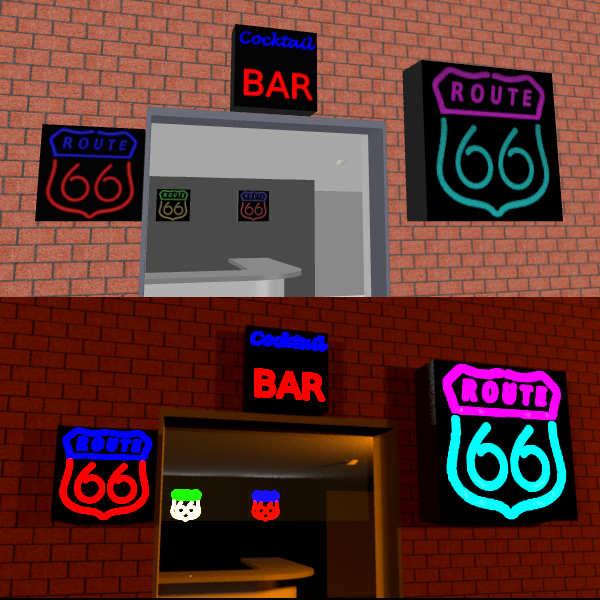 Texture files (low res) - transparency written on a black canvas.   |
| Posted by alaX at Dec 21, 2017, 6:07:22 PM |
|
Re: Search luminous neon objects! GLOW You need your model in .obj format with corresponding .mtl file. If you have .dae or .3ds model import it to SH3D and export as .obj (3D view > Export to OBJ format...). Open .mtl and set "illum 0" for material you want to "glow". Save, reimport model and render with global illumination=path (if you dont have plugin it will be Q4 - best quality i think) 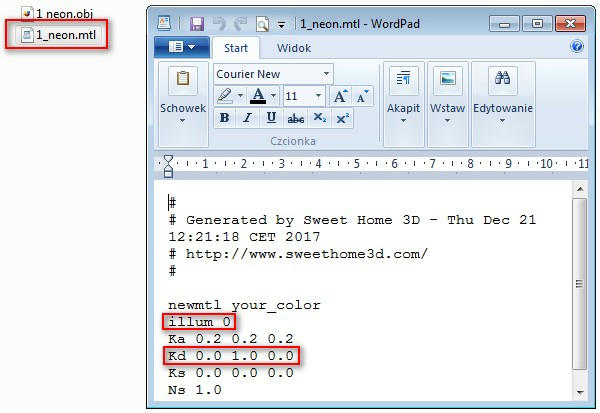 1) Global illumination default - your object is always bright, even if there's no light source in your scene, but it doesn't emit its own light (no glow). Global illumination path - your object glows - gives light to the scene. 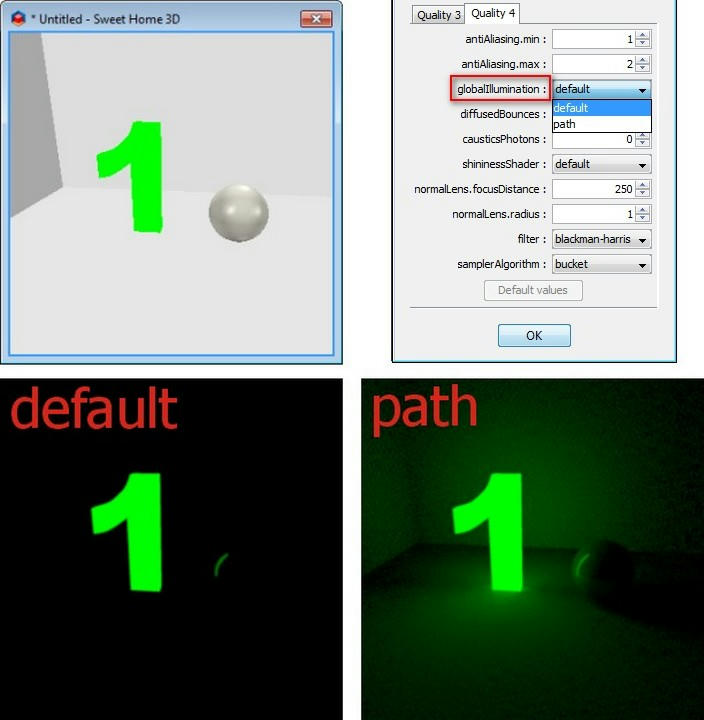 2) The bigger is model (face) the more light it emits (range). Single face emits light from both sides. 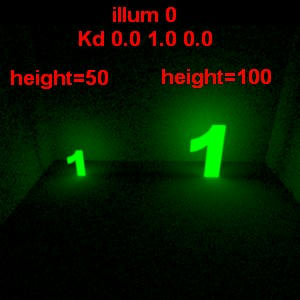 3) You can increase strength of light by multiplying Kd values in .mtl file. Example: White color is Kd 1.0 1.0 1.0 (RGB) - if you want more bright white change it to Kd 2.0 2.0 2.0. Green is Kd 0.0 1.0 0.0 - more glowing green Kd 0.0 5.0 0.0 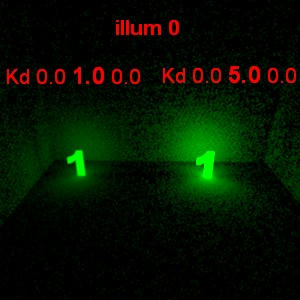 4) Emitted light doesn't pass thru transparent objects. 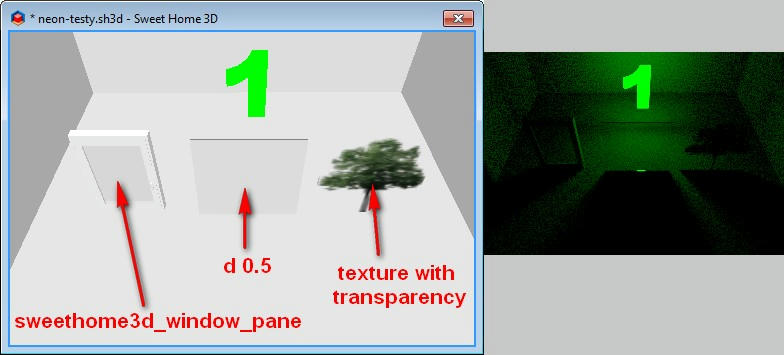 5) Changing color in "Modify furniture" removes glow effect. 6) It increases rendering time (in comparison to normal light sources). |
| Posted by okh at Dec 21, 2017, 7:27:07 PM |
|
Re: Search luminous neon objects! This is interesting. Never quite figured the full meaning of the illum settings, but then, there you go with amateurs at play. Thanks for sharing this. More to play with: and before I elaborate on my lack of understanding I am looking forward to do some testing - if I can get my head around all the variables. You would not, by any chance, have a corresponding .sh3d file to explore? ok |
| Posted by alaX at Dec 21, 2017, 8:38:51 PM |
|
Re: Search luminous neon objects! This is really very simple. More useful example (i hope): Create your own sign using walls, floors and other objects (furniture). (If you want your floor to have thickness create next level with elevation>0) Apply different colors to parts of your sign (for walls - top and both sides). 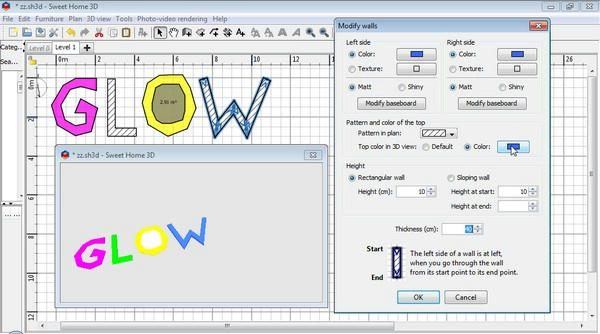 Select all parts* and Export to OBJ. 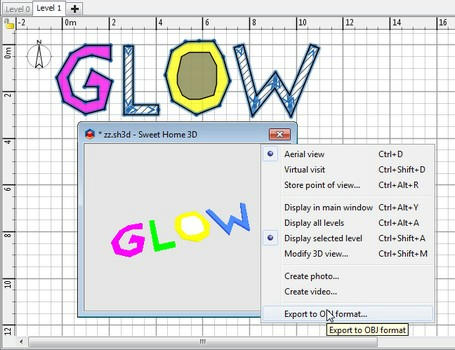 Modify .mtl - illum to "0" (You can remove some parameters - i think you can leave only newmtl, illum and Kd). 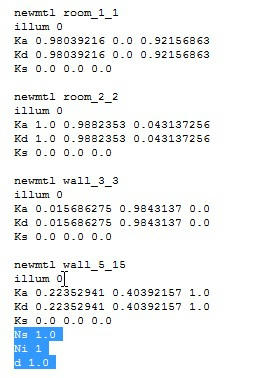 Import .obj - rotate, change size if needed, etc. 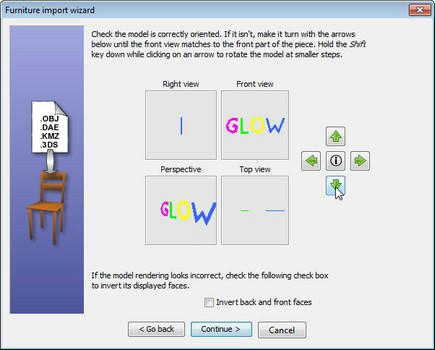 Place in your home and render Q4 (or with plugin - set gI to "path")** 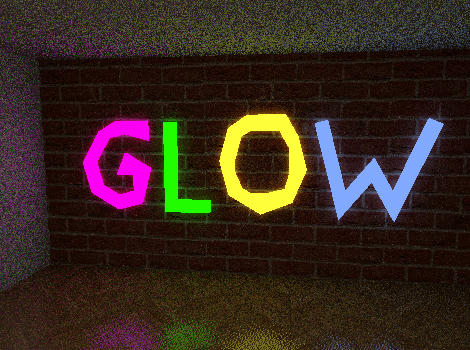 *If you want to cut hole in floor draw smaller floor shape inside(on it) and don't select it for exporting (see "O" in "GLOW") ** No glowing when sky has texture Download glow.sh3d |
| Posted by okh at Dec 21, 2017, 10:15:45 PM |
|
Re: Search luminous neon objects! Thanks - looking forward to explore. This is really very simple... Yes, well, for you, I suppose... Not sure about me. But then, everything is simple when you know how  . Anyway, thanks again, most useful. New possibilities for learning... And Merry Hols. ok . Anyway, thanks again, most useful. New possibilities for learning... And Merry Hols. ok |
| Posted by bdfd at Dec 22, 2017, 6:00:21 AM |
|
Re: Search luminous neon objects! This is really very simple. Amazing. More useful example (i hope): Create your own sign using walls, floors and other objects (furniture). (If you want your floor to have thickness create next level with elevation>0) Apply different colors to parts of your sign (for walls - top and both sides). Select all parts* and Export to OBJ. Modify .mtl - illum to "0" (You can remove some parameters - i think you can leave only newmtl, illum and Kd). Import .obj - rotate, change size if needed, etc. Place in your home and render Q4 (or with plugin - set gI to "path")** *If you want to cut hole in floor draw smaller floor shape inside(on it) and don't select it for exporting (see "O" in "GLOW") ** No glowing when sky has texture Download glow.sh3d  Bravo Alax !  ---------------------------------------- Evil progresses when good people do nothing! --- SH3D 7.1 and nothing else - W11 64b in 4K |
|

|
Current timezone is GMT Sep 23, 2026, 9:08:16 PM |