|
Sweet Home 3D Forum » List all forums » » Forum: 3D models and textures » » » Thread: Tin Can Alley |
||
| Print at Dec 16, 2025, 9:20:22 AM |
|
|
| Posted by okh at Jan 19, 2018, 9:00:41 PM |
|
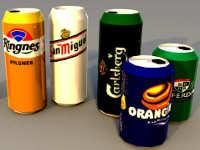
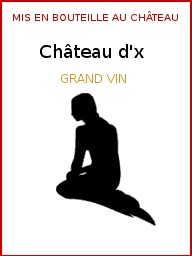
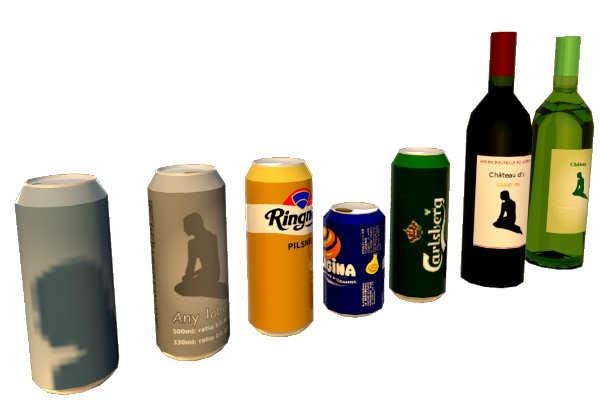
Tin Can Alley For reasons now forgotten, I needed a beverage can. As a result of an exchange with Cec on lights and small models a beer can was called for to illustrate a rougher approach. But after Simplifying .obj in SF261 the can seemed ridiculously large without even texturing well. So nothing for it but starting over, size matters and one can to rule them all: texture mapping so any brand label can be added, as few vertices as possible, open/close by setting opening to invisible, scalable for any size/volume. Point is to have a mix-and-match model: Import one can to home, copy paste around, add different labels, open and close: lots of different drinking containers with one only obj model in the .sh3d file. Of course, for super renderers discussing reflections in Perrier bottles, there are better models to be found or made. Still, the beverage container is just to show options for a model if the goal is versatility and small size. To get a local brand, create/copy a label to an image, edit and use texture for Material 'Label' in SH3D (image can be scaled to 512×512, 128×128, etc. it stretches to entire surface on model). Change other colours, set Alu_top_closed to invisible to 'open' the can. To resize to 333ml can, set height to 11,5 cm. Applied same to wine bottle. Possibly less elegant than the existing ones, but a fraction of the size and easier to change label. So for my own use, I plan to revisit some essential models and compile similar microversions in a library, to be shared if anyone is interested. Will it make a difference? Maybe not for everyone, but it will let me do basic home design faster and with smaller files. TINY Model details: Alucan - 6KB, 2,87KB compressed with holding label: - 500ml: 6,62×16,8 - label surface: 20,8×14,5 (1:1,434) - original - 330ml: 6,62×11,5 - label surface: 20,8×9,2 (1:2.256) - same model resized Wine bottle - 10KB, 5,74KB compressed with holding label: - 750ml: 7,8×30 - label surface 7,7×10,9 (0,75:1) Everything in SF 3D models 461 Models: alucan_wine_simpler.sh3d ![]() ![]() Label examples |
| Posted by okh at Jan 22, 2018, 9:22:46 PM |
|
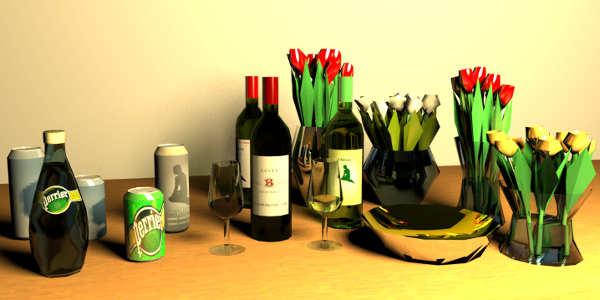
Re: Tin Can Alley Getting lost in transparency and reflections. Just in case anyone thought Scandinavians drink wine from the bottle, I added a glass. ISO standard wine tasting glass no less. Intended for a 50ml fill, but, well... What eats me, is that I do not really understand the .mtl settings; when what works how. But it seems, by accident, there is a distortion of the transparency in the liquid. Added a saucepan with mirror effect. Still a lot of room for improvement. If anyone can help with my primitive attempts (screwups, please comment. Please test if so inclined. But no matter, the models are small and still work reasonably well for their size. It is also appropriate to pay a tribute to the late Paul Bocuse. Nouvelle cuisine or not, "Il n'y a qu'une seule cuisine... La Bonne" One of the greatest has passed away. ok All in SF 3D models 461. Link to models: alucan_wine_glass_simpler.sh3d ![]() ![]() |
| Posted by VeroniQ at Jan 22, 2018, 11:15:10 PM |
|
Re: Tin Can Alley Thank you, Okh! This time, these bottles are full!! |
| Posted by okh at Jan 22, 2018, 11:24:20 PM |
|
Re: Tin Can Alley ..these bottles are full!! Well, you could set the material 'Wine' to invisible, but then, that probably would not be my preferred way... Thanks. ok |
| Posted by Ceciliabr at Jan 31, 2018, 7:54:03 PM |
|
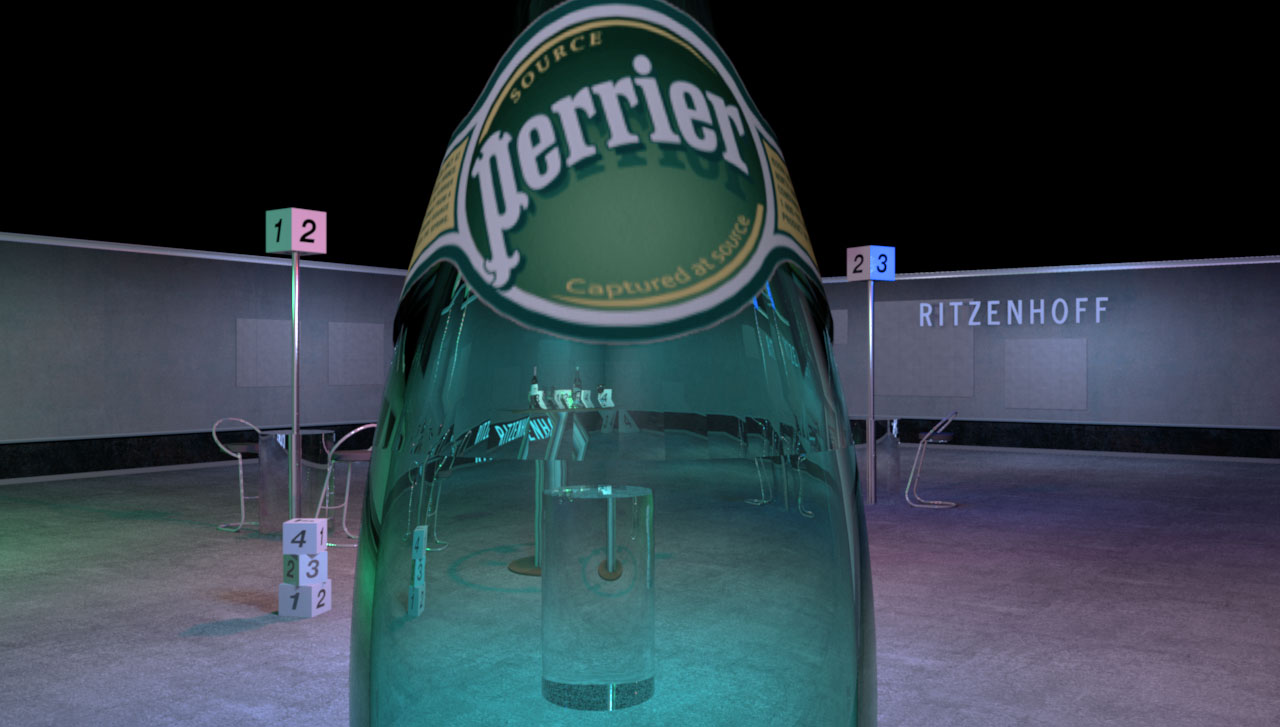
Re: Tin Can Alley Interesting thread. Of course, for super renderers discussing reflections in Perrier bottles, there are better models to be found or made Just like in real life, sometimes you feel compelled to view the world thru a bottle of Perrier just to find out how it looks – and then you just might let your curiosity get the better of you... Anything that has a weight comes at a cost. This Perrier bottle weighs 6.252kb, and the rendering time for this image ( 1280 X 727) was 1 h 0 min 43 s. The Perrier mtl (in case anyone is interested): Here is the image that was wrongly posted earlier ( sorry) : (2048 X 1163) rendering time: 6 h 07 min 32 s. What eats me, is that I do not really understand the .mtl settings; when what works how That's a mystery for me too. You can find a quite in-depth explanation here, but I think Sunflow only supports some of these settings. Cec |
| Posted by okh at Jan 31, 2018, 8:59:33 PM |
|
Re: Tin Can Alley ..view the world thru a bottle of Perrier... Now, there is novel a thought But the effect is very nice though. Now I know...Perrier bottle weighs 6.252kb... Surely that must be overkill? Of course, you would not get your good rendering at proposed < 10kb models, but it should be interesting to see the .obj file. How many sides does the polygon have to simulate the circle? Gut feeling tells me that it could come down to <500kb or a whole lot less without noticeable quality loss - even in your rendering. ok |
| Posted by Puybaret at Jan 31, 2018, 9:39:42 PM |
|
Re: Tin Can Alley Very nice attempts from both of you to obtain either small 3D models or very nice renderings with a row of bottles For your information, you should know that the Ni factor in MTL files is used as the optical density (see MTL specs here). If glass has an optical density of 1.5 like Cec used it, other materials have often a different value like water which optical density is 1.333. It would be interesting to test that if some of you have the patience. ---------------------------------------- Emmanuel Puybaret, Sweet Home 3D creator |
| Posted by Ceciliabr at Feb 1, 2018, 10:42:24 AM |
|
Re: Tin Can Alley Surely that must be overkill? Probably. Here is the original file @ archive3D.net: https://archive3d.net/?a=download&id=284ad5c5 And here is my modified version: ceciliabr.com/sh3d/Perrier.zip I don't think I'm allowed to re-distribute these files, but I guess it's OK for "educational purposes"...? Cec |
| Posted by Ceciliabr at Feb 1, 2018, 10:48:41 AM |
|
Re: Tin Can Alley Very nice attempts from both of you... Thank you I will make an attempt to perform a new test after lunch. Cec |
| Posted by okh at Feb 1, 2018, 9:34:08 PM |
|
Re: Tin Can Alley ..guess it's OK for "educational purposes"... ..guess it is educational for ok ... So, thanks.Looked at your bottles which render beautifully, especially after your touches, but it is - quite literally - quite a mesh. A look at the mesh in Blender was a bit confusing, but then, I am used to simpler stuff. Also put your bottle through EP simplification procedure (removing normals, adding smoothing), but for some reason that did not work as nicely as expected. So just to compare (and save rendering time), I mocked-up a model with very few surfaces to compare. There the simplification worked. Never mind the lousy texturing and obvious shortcomings, but for the size 21kb compared to the original at 6243kb, at least it makes testing .mtl very much faster. But again, not your quality level. Will send comparison file by e-mail. It is a bit strange that the smoothing does not work even nicer on your bottle, but maybe the upper and lower part should be split and regrouped as there appear to be an intended row of flat-ish surfaces on top. Cannot remember, did not drink Perrier in a while. ..Ni factor in MTL files is used as the optical density (see MTL specs here),,, Once I think I have understood something about Wavefront, new ideas are turning up. I really should be doing more homework. Most interesting. Will do more testing, but initial test with my primitive models look very cool. Optical density... Of course, there must be such a thing. Looking through a bottle will never be the same again. ok Updated SIMPLE file (not the nice Cec' stuff ): low_poly_drinking.sh3d Test bottle model: bottle_perrier.zip ![]() |
|
|
|
Current timezone is GMT Dec 16, 2025, 9:20:22 AM |