Hmm, maybe not very useful 
On the contrary! This is exactly why I asked for a custom definable pivot when posting my wish-list.
This is extremely useful everytime the wind is changing

Cec
|
Sweet Home 3D Forum » List all forums » » Forum: 3D models and textures » » » Thread: New prefixes |
||
| Print at Sep 24, 2026, 3:28:38 AM |
|
|
| Posted by Ceciliabr at Oct 23, 2018, 6:09:16 PM |
|
Re: New prefixes Hmm, maybe not very useful On the contrary! This is exactly why I asked for a custom definable pivot when posting my wish-list. This is extremely useful everytime the wind is changing Cec |
| Posted by VeroniQ at Oct 23, 2018, 11:48:11 PM |
|
Re: New prefixes This is extremely useful everytime the wind is changing And alas, it will change soon  |
| Posted by okh at Oct 24, 2018, 1:30:37 PM |
|
Re: New prefixes The hinges and rails are certainly useful and a great addition to SH3D! At least if it were not for all the custom models that needs updating. ..extremely useful everytime the wind is changing... As for a flagpole, well, I use it mostly to visualise wind, and not least shadows around a building. What is tricky, though, is to get the smooth proportions nicely textured and make the flag look fairly realistic. In real life, unless there is a gale, flags tend to flap helplessly around the flagpole - but then, maybe not as good for seeing wind. Anyway, here is the model with a more realistic flag, still hinged and texture mapped. SF 3D models 506: flag_hinged_pole.zip  |
| Posted by alaX at Oct 24, 2018, 10:00:58 PM |
|
Re: New prefixes Great lamp in SF 3d models 505, alaX! Thanks. I'm not happy with transparent part - looks quite good with light on and off when rendered Q3 and Q4 but I have to work on Q1/Q2 appearance. Another clock (507) - it needs some light sources built in.  clock-test.sh3d |
| Posted by bdfd at Oct 25, 2018, 7:08:08 AM |
|
Re: New prefixes I'm not happy with transparent part - looks quite good with light on and off when rendered Q3 and Q4 but I have to work on Q1/Q2 appearance. Great ! Another clock - it needs some light sources built in. clock-test.sh3d  Could you make this clock with an automatic mode (like a real clock) ? With an help of a plug-in ? . ---------------------------------------- Evil progresses when good people do nothing! --- SH3D 7.1 and nothing else - W11 64b in 4K |
| Posted by ndorigatti at Oct 25, 2018, 7:56:30 AM |
|
Re: New prefixes What does it do using the prefixes? |
| Posted by alaX at Oct 25, 2018, 8:20:19 AM |
|
Re: New prefixes You can change the time. |
| Posted by alaX at Oct 25, 2018, 9:23:19 AM |
|
Re: New prefixes @bdfd Automatic? As if it displays the time you heve set in CreatePhoto/PVR? Yeah, just give me a sec...  |
| Posted by okh at Oct 26, 2018, 7:56:03 AM |
|
Re: New prefixes Hi AlaX, the clock model is clever. I am impressed at all the ideas you can come up with for using the prefixes. It would be interesting to see whether Modify 'openings' could with light sources too, at least as a stationary light inside the non-rotating part. Maybe you could try it with the panel light sources? ok |
| Posted by alaX at Oct 26, 2018, 11:19:09 AM |
|
Re: New prefixes The problem with lights in my clock model is that they rotate after modification of openings. I forgot the rule: (...) if a light source intersects with a rotated part, it sounds logical to make it rotate too. (#39691 )Pity - I created new model and it looks good with lights on but only if openings are in their initial position (time 00:00). 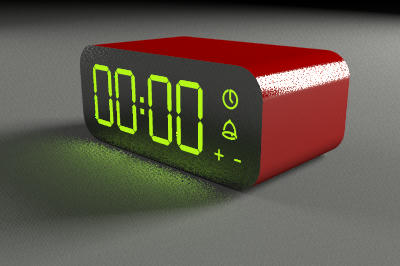 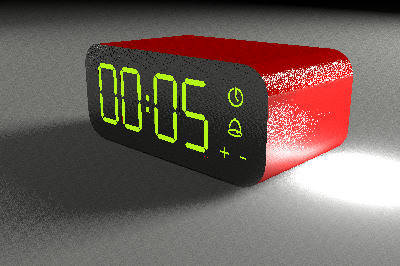 There's no space inside where I could place light not intersecting with openings. I don't know how to define part of model as a triangle mesh light (opaque panel). I haven't found any clever utilization of "arm_on_ball" yet |
|

|
Current timezone is GMT Sep 24, 2026, 3:28:38 AM |