|
Sweet Home 3D Forum » List all forums » » Forum: Developers » » » Thread: Rooms Surfaces plug-in |
||
| Print at Dec 22, 2025, 2:08:33 PM |
|
|
| Posted by enkonyito at Apr 20, 2019, 2:54:00 AM |
|
Re: Rooms Surfaces plug-in Hi Dorin, I tested your plug-in on Windows 10 64bit and it works as it should. Nice work! ---------------------------------------- EnkoNyito |
| Posted by hansmex at Apr 20, 2019, 3:48:03 AM |
|
Re: Rooms Surfaces plug-in Same for me, also Windows 10 64 bits. Hans ---------------------------------------- Hans new website - under constuction hansdirkse.info |
| Posted by bdfd at Apr 20, 2019, 7:28:18 AM |
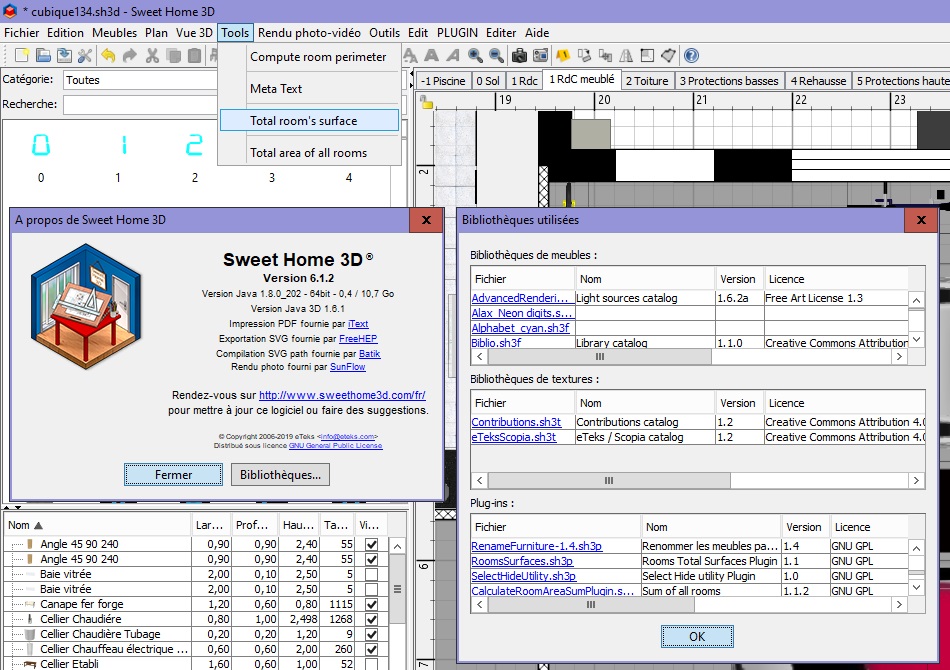
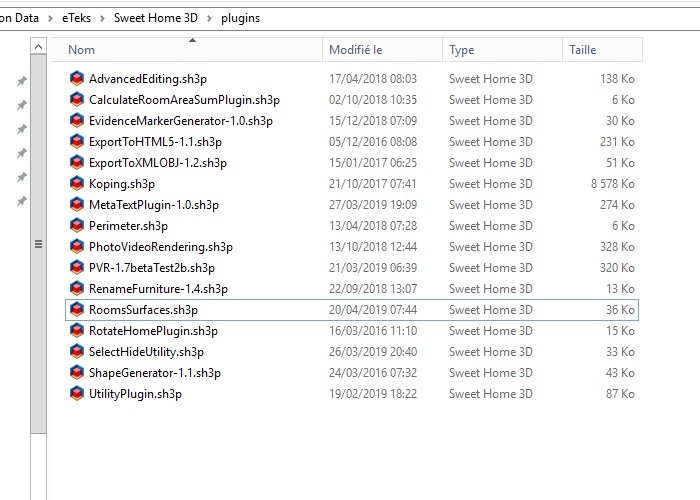
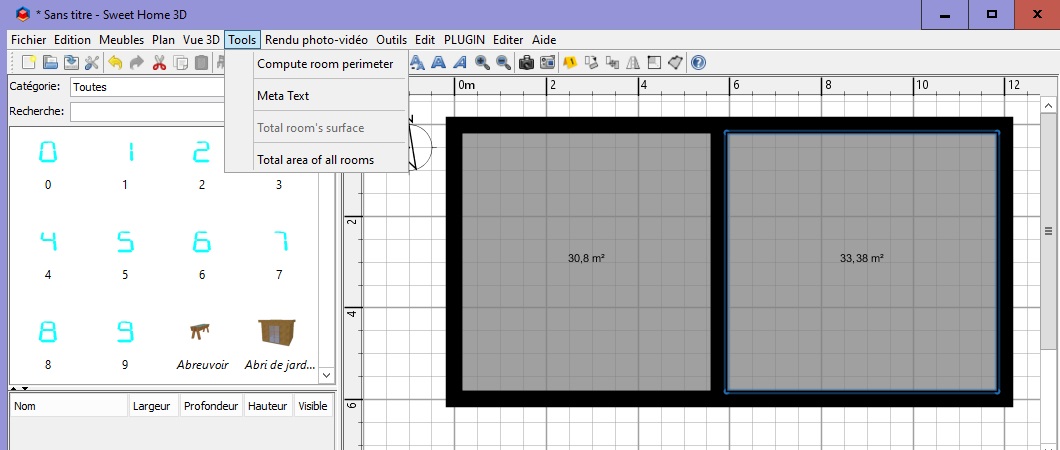
Re: Rooms Surfaces plug-in@dorin : TY for your return. I'd installed your plugin with double-click, no problem, it appears in options. I did 2 tries : 1. with a new project, I built 5 Walls for 2 rooms, after I choose the option… Watch the result (?) : The plugin is 'grey', Why ? 2. with an existing project, The option is NOT 'grey' but by clicking on it there is no result ! ![]() Watch the options of my PC for SH3D. @Manu : I try to create a log file but the file is empty ! NB : I say that I use many other plugins (see the list) which are OK, why not these two ? . ---------------------------------------- Evil progresses when good people do nothing! --- SH3D 7.1 and nothing else - W11 64b in 4K |
| Posted by dorin at Apr 20, 2019, 8:30:50 PM |
|
Re: Rooms Surfaces plug-in @bdfd From what I see You've right but... I don't know what to say. Only think that cross my mind is the 1-st suggestion I've propose. In this way You could test everything on a clean medium. At least for me is the best way I use when I test new furniture, texture or plug-ins. It's possible to interfere with other plug-in but I have almost the same as You installed (except Meta text) and I don't see any problem. Sorry man, I reach my skill's limits. ---------------------------------------- A computer program does what you tell it to do, not what you want it to do. Murphy's Law When all else fails, read the instructions. Murphy's Law If you don't like "AS IS", DIY. Dorin's law |
| Posted by dorin at Apr 21, 2019, 8:28:31 AM |
|
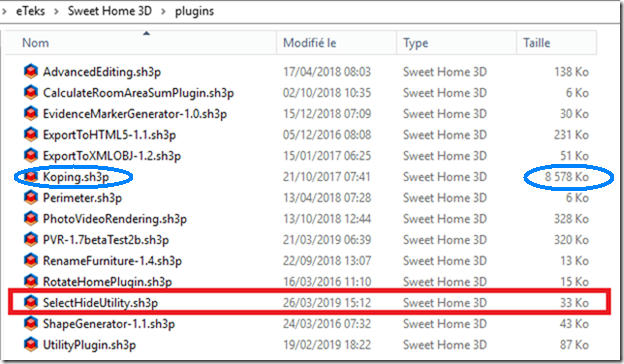
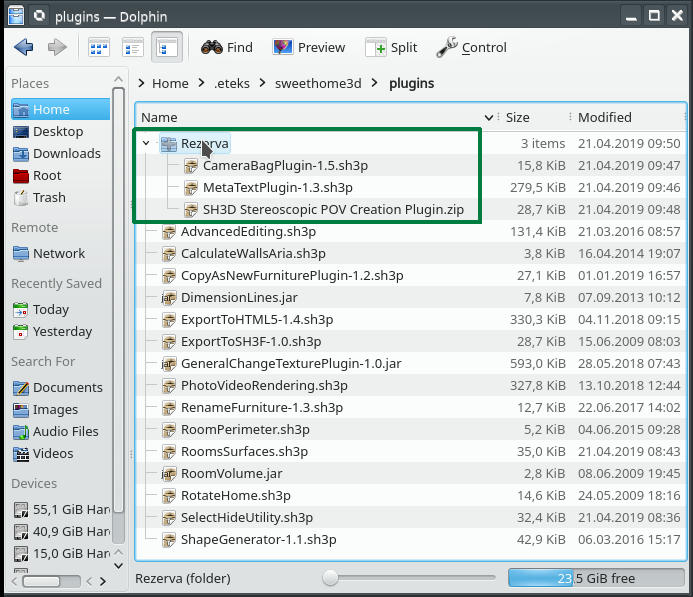
Re: Rooms Surfaces plug-in @bdfd Sorry if I boring You but I can't sleep. I've compare what You have with mine: ![]() 1. I see an very huge plug-in Koping (8.5M). I try to find it on google without success. 2. In second image I share my plug-ins folder and the way I use when I test something. I create an folder under plugins (mine are "Rezeva" which mean "backup" ) where I put the files I don't use everyday and I don't want to delete. Usually I drag-and-drop from an location to another. SH3D will see and load only those from plugins nothing else. If You can, please send me the link of Koping.sh3p and the source cod if it's free. Happy Easter! Dorin ---------------------------------------- A computer program does what you tell it to do, not what you want it to do. Murphy's Law When all else fails, read the instructions. Murphy's Law If you don't like "AS IS", DIY. Dorin's law |
| Posted by bdfd at Apr 21, 2019, 9:15:28 AM |
|
Re: Rooms Surfaces plug-in TY Dorin. Here are my installing plugins. My last try : I moved all plugins in a backup directory except your. I launched sh3d. Result : no change ! . ---------------------------------------- Evil progresses when good people do nothing! --- SH3D 7.1 and nothing else - W11 64b in 4K |
| Posted by dorin at Jun 22, 2019, 11:05:50 PM |
|
Re: Rooms Surfaces plug-in New version 1.2 and also on Source Forge -add localization (only French); -add icon; -now work including on new file after room creation; @bdfd You've right, on some localization don't work. I've try to fix it in this version. @UbuntuBirdy I intend to add perimeter and walls surface surround rooms with and without hols (doors and windows) to have more useful information. But all under the same check box. ---------------------------------------- A computer program does what you tell it to do, not what you want it to do. Murphy's Law When all else fails, read the instructions. Murphy's Law If you don't like "AS IS", DIY. Dorin's law |
| Posted by Bubblobill at Dec 5, 2019, 7:10:49 AM |
|
Feature Request - Re: Rooms Surfaces plug-in I want more. Why? Because what you have almost does what I want and I don't want to write it myself. What do I want?
Why should you do it? Because it would be awesome useful. Follow me here; Key value list Area Material ResultMaterial TotalThere are obviously a multitude of ways to summarise and present the results, but I'm hoping you can see the value to people who use SH3D to plan renovations and decorating. Cheers, Jay |
| Posted by dorin at Dec 5, 2019, 5:33:14 PM |
|
Re: Feature Request - Re: Rooms Surfaces plug-in Dear Jay, I don't want to write it myself Well, why not? You are bather than me! (I've study Your code for stairs). Other wise You will have to wait until I manage to learn how to do this. At that moment I still working to add walls surfaces which surround each room without holes. The perimeter I've implemented but I'am not fully satisfied. According to this I what to change the plugin name in "Rooms Info". Follow me here; I've follow Your demands and I've see: The next step is to have some walls surfaces as accurate as possible. I want more. Me too but I don't know when. I weren't good enough to convince Santa to make me such gift ![]() ---------------------------------------- A computer program does what you tell it to do, not what you want it to do. Murphy's Law When all else fails, read the instructions. Murphy's Law If you don't like "AS IS", DIY. Dorin's law |
| Posted by Bubblobill at Dec 6, 2019, 9:40:24 AM |
|
Re: Feature Request - Re: Rooms Surfaces plug-in Dear Dorin, Well, why not? You are bather than me! (I've study Your code for stairs). My stairs code might be pretty but your abilities have one important difference. Your plugin works. I weren't good enough to convince Santa to make me such gift ![]() I shall write him a letter to tell him how much you deserve it. |
|
|
|
Current timezone is GMT Dec 22, 2025, 2:08:33 PM |