|
Sweet Home 3D Forum » List all forums » » Forum: Developers » » » Thread: Multiple paste & Distribute elevation plug-in |
||
| Print at Dec 18, 2025, 6:47:56 AM |
|
|
| Posted by Mike53 at Aug 14, 2019, 9:21:55 AM |
|
Re: Multiple paste & Distribute elevation plug-in Hi Dorin Downloading now and will try later, i think the codename is an excellent choice Hopefully with this one i will be able to copy/paste in 1 project, at the moment i have to open a 2nd project for the Paste to appear. As always, thank you for your time and effort. Mike |
| Posted by dorin at Aug 14, 2019, 10:56:45 AM |
|
Re: Multiple paste & Distribute elevation plug-in i will be able to copy/paste in 1 project, at the moment i have to open a 2nd project for the Paste to appear. IT NOT I've just verify this and it appear in the second plan BUT the pasted items has gone in the plan from where are copy. So, the current solutions: 1.Copy ...->...Paste special... in the same work file than Copy->Paste in desire file. 2. Copy->Paste items in desire file and work from there. 3. Take some needed information from second file (dimensions, angles etc.), put it in first file and then test it hire until You're satisfied. Finally grouped and copy->paste in second file. Sorry, I'm not meet You expectancy ![]() ---------------------------------------- A computer program does what you tell it to do, not what you want it to do. Murphy's Law When all else fails, read the instructions. Murphy's Law If you don't like "AS IS", DIY. Dorin's law |
| Posted by dorin at Dec 27, 2019, 8:37:52 AM |
|
Re: Multiple paste & Distribute elevation plug-in Now It's work as You want New version 1.3
Also on Souce Forge ---------------------------------------- A computer program does what you tell it to do, not what you want it to do. Murphy's Law When all else fails, read the instructions. Murphy's Law If you don't like "AS IS", DIY. Dorin's law |
| Posted by SeppoV12 at Dec 28, 2019, 6:55:44 PM |
|
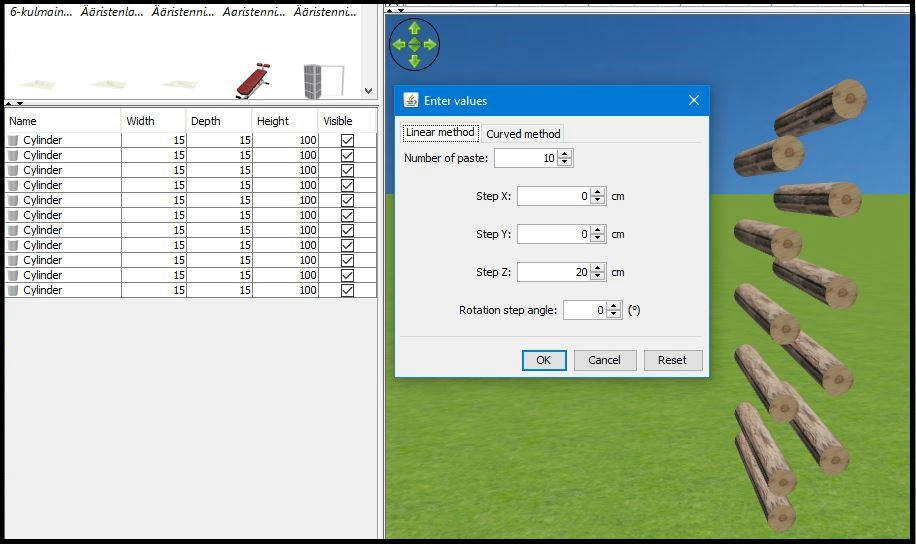
Re: Multiple paste & Distribute elevation plug-in Hi Dorin, I am using plugin version 1.3. I noticed that when Step X and Step Y are zero, multiple paste uses SH3D:s default offset values (?) for x and y instead of Step X and Step Y after first paste. Any other values than 0 (or 0.0) works as should. In screen capture each cylinder should be 20 cm higher than previous and straight above it. I hope the picture explain things better than me.. ![]() Thanks for excellent tool, I have a lot of use for it! Seppo |
| Posted by dorin at Dec 29, 2019, 11:40:36 AM |
|
Re: Multiple paste & Distribute elevation plug-in 1.Errata: I messed up the version numbers in previous post. Have to be 2.2 in place of 1.3(well, age...) 2. Thanks Seppo! I've have this problem from the beginning and only now, thanks to You, I think I've found a solution. So, New version 2.3 -solve (somehow) to trick default offset of SH3D which don't let to paste items on the same place Also on Source Forge PS In some circumstances, when the steps are not respected, the plugin don't do anything. In in such cases hit Cancel or X and start again. ---------------------------------------- A computer program does what you tell it to do, not what you want it to do. Murphy's Law When all else fails, read the instructions. Murphy's Law If you don't like "AS IS", DIY. Dorin's law |
| Posted by dorin at Oct 1, 2020, 7:19:16 AM |
|
Re: Multiple paste & Distribute elevation plug-in This plugin was splinted in two separate plugin: Multiplier plugin and Distribute elevation plugin . For those who try to use it I recommend to remove Multiple paste plugin to avoid some possible issue. ---------------------------------------- A computer program does what you tell it to do, not what you want it to do. Murphy's Law When all else fails, read the instructions. Murphy's Law If you don't like "AS IS", DIY. Dorin's law |
| Posted by Nauthiz at Oct 5, 2020, 8:52:24 AM |
|
Re: Multiple paste & Distribute elevation plug-in I'm crazy enough to put my bathroom tiles as separate 3d objects, so these plugins are really, really useful. The automatic grouping is a very nice idea, but I keep forgetting to turn the polyline off before use... Thank you so much for the update! |
|
|
|
Current timezone is GMT Dec 18, 2025, 6:47:56 AM |