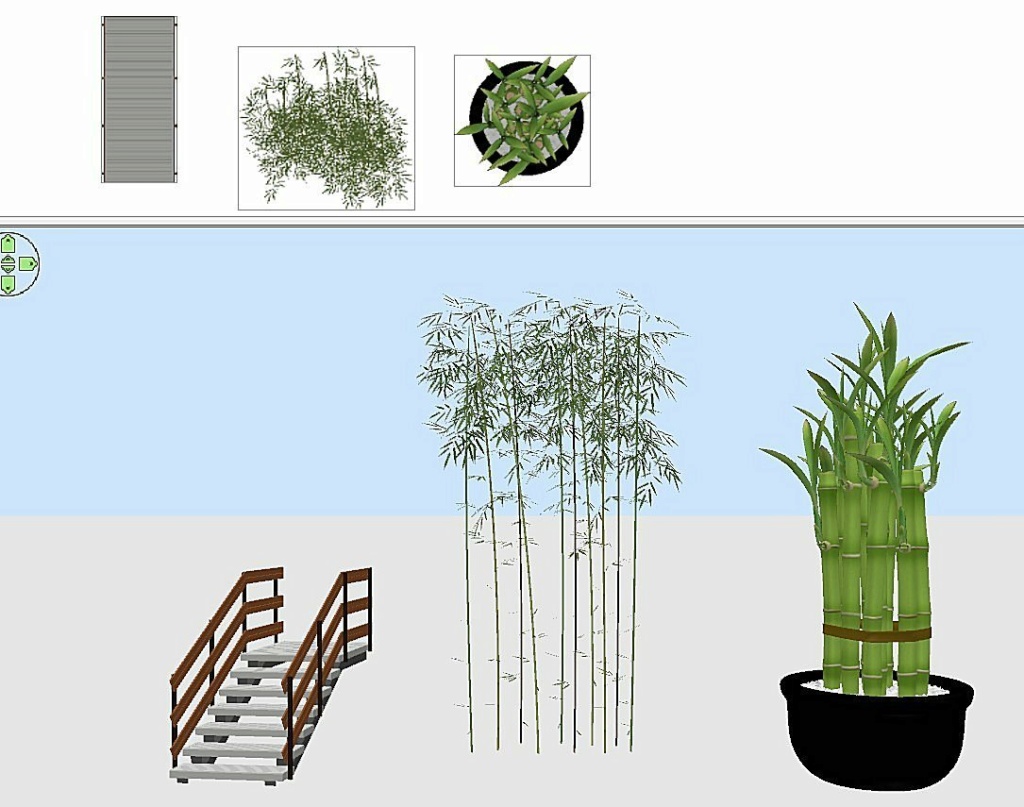
Bonjour, Je suis sur SH3D 7.5 Je remarque avoir que très peu de modèles 3D dans la version 7.5 installée! Aussi je voulais importer des modèles de :https://sweethome3d.com/freeModels.jsp et les classer dans des catégories définies par moi. Je télécharge le fichier zip (ex: bamboo.zip ) Je vais dans /meubles/importer meubles ... choisir meuble ... ok ok Dans la catégorie je change "utilisateur" par Végétation et je valide. La catégorie est bien ajoutée mais le meuble apparait sous forme d'un gros carré pixelisé de différentes couleurs. Parfois il est m^me impossible de créer une nouvelle catégorie pour certains objets comme "outdoor_staircase.zip" qui s'enregistre seulement dans le plan actif du projet sous forme d'un carré pixélisé en plus grand. Pourquoi ai je ce petit souci ?
Hello, I'm on SH3D 7.5 I'm surprised to see very few 3D models! So I wanted to import models from :https://sweethome3d.com/freeModels.jsp and sort them into categories defined by me. I download the zip file (ex: bamboo.zip ) I go to /furniture/import furniture ... choose furniture ... ok ok In the category, I change “user” to “Vegetation” and validate. The category is added, but the furniture appears as a large pixelated square in different colors. Sometimes it's even impossible to create a new category for certain objects, such as “outdoor_staircase.zip”, which only registers in the project's active plane in the same larger pixelated square.
Netherlands
Joined: Apr 8, 2022
Post Count: 1807
Status:
Offline
Re: Importation modèle incorrecte
Peu de modèles 3D ? Le monde est votre magasin de modèles 3D. La page que vous avez utilisée présente déjà de nombreux modèles, mais vous pouvez télécharger des modèles à partir de nombreux autres sites et dans différents formats de fichiers. Sur mon site dodecagon.nl, j'offre des bibliothèques de meubles avec un total de plus de 1000 modèles, et ce n'est que mon petit site. Sur la page 3D models, vous pouvez télécharger et installer quelques-unes des bibliothèques proposées. Une bibliothèque de meubles est une collection de modèles dans un seul fichier de bibliothèque (.sh3f). (Importez-la avec Menu > Furniture > Import furniture library, et non avec la fonction d'importation de modèles individuels).
L'image que vous voyez dans le plan 2D est une vue de dessus générée du modèle 3D. Ce que vous voyez est ce que vous êtes censé voir dans le plan 2D. Ces images 2D peuvent être modifiées, mais il faut pour cela ajouter le modèle à une bibliothèque de meubles, où il est possible d'ajouter une icône de plan personnalisée.
Vous pouvez modifier une catégorie comme vous le souhaitez, mais veillez à ne pas créer trop de catégories avec seulement quelques modèles. Cela va à l'encontre de l'objectif d'une catégorie. Je n'ai eu aucun problème à changer la catégorie du modèle outdoor_staircase.zip. Vous avez probablement oublié quelque chose dans le processus d'importation.
Traduit avec DeepL.com (version gratuite)
[English] Very few 3D models? The world is your 3D model shop. The page you used already shows many models but you can download models from many more sites and in different file formats. On my site dodecagon.nl I offer Furniture Libraries with a total of 1000+ models, and that is just my small site. On the 3D models page you should download and install a few of the offered libraries. A Furniture Library is a collection of models in a single library file (.sh3f). (Import it with Menu > Furniture > Import furniture library, not the import function for single models.)
The image you see in the 2Dview is a generated top view image of the 3D model. What you see is what you are supposed to see in the 2D plan. These 2D images can be changed but that requires that you add the model to a Furniture Library where you get the option to add a custom plan-icon.
You can change a category to whatever you want but make sure you don't create too many categories with only a few models. It defeats the purpose of a category. I had no problem with changing the category for the outdoor_staircase.zip model. You probably missed something in the import process.
---------------------------------------- Dodecagon.nl 1300+ 3D models, manuals, and projects
France
Joined: Oct 20, 2017
Post Count: 403
Status:
Offline
Re: Importation modèle incorrecte
Je suis étonné par le problème que vous rencontrez. Je suis aussi sous Sweet Home avec la version 7.5 installée et j'ai téléchargé les modèles dont vous parlez sans rencontrer de problème.
J'ai placé l'escalier dans la bibliothèque "Escaliers" et les bamboo dans la bibliothèque "Végétaux".